Hi, and thanks in advance for anyone who can help.
I'm not that savvy regarding the inner workings, so if anyone can help, please dumb it down for me in your explanations.
I tried searching for this problem, but can only find solution for external devices. This is my internal hard drives.
Yesterday I used my pc as normal. Everything was fine. I could access the hard drives, use the pc, surf the internet, etc... last night I turned off my pc and went to bed.
Today, I turned it on and I have problems. It took about 30 minutes for it to boot up. It stuck on the Windows starting screen for about 5 minutes, then went completely black for another 20 or so minutes, before showing me my desktop. There was a signal there the whole time as my monitor did not give me a No signal message or power down.
Using the pc is no problem. I can play games, and obviously, go online as I'm doing right now.
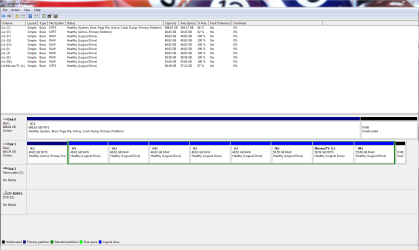
The problem is I cannot access my internal hard drives. I cannot save anything or go into my folders to open anything. If it's not on my desktop already, I can't access it.
When I try, I get the little spinning wheel that it's thinking about it, as well as the green status bar at the top of the window. Then I get an I/O error. (input / output)
I tried scanning a full scan with Kaspersky. It says everything is fine. Then I tried a detailed scan of one of my drives. (they're partitioned) It starts the scan, but freezes at 1%
I of course have restarted etc... but it's the same every time.
Any suggestions?
I'm not that savvy regarding the inner workings, so if anyone can help, please dumb it down for me in your explanations.
I tried searching for this problem, but can only find solution for external devices. This is my internal hard drives.
Yesterday I used my pc as normal. Everything was fine. I could access the hard drives, use the pc, surf the internet, etc... last night I turned off my pc and went to bed.
Today, I turned it on and I have problems. It took about 30 minutes for it to boot up. It stuck on the Windows starting screen for about 5 minutes, then went completely black for another 20 or so minutes, before showing me my desktop. There was a signal there the whole time as my monitor did not give me a No signal message or power down.
Using the pc is no problem. I can play games, and obviously, go online as I'm doing right now.
The problem is I cannot access my internal hard drives. I cannot save anything or go into my folders to open anything. If it's not on my desktop already, I can't access it.
When I try, I get the little spinning wheel that it's thinking about it, as well as the green status bar at the top of the window. Then I get an I/O error. (input / output)
I tried scanning a full scan with Kaspersky. It says everything is fine. Then I tried a detailed scan of one of my drives. (they're partitioned) It starts the scan, but freezes at 1%
I of course have restarted etc... but it's the same every time.
Any suggestions?
My Computer
- OS
- Windows 7 Home Premium 32 bit
- CPU
- Intel(R) Core(TM)2 Duo CPU E6750 @ 2.66GHz
- Motherboard
- ASUSTeK Computer INC. P5E
- Memory
- 4.00 GB with 3.25 GB available
- Graphics Card(s)
- (1) Radeon X1950 Series (Microsoft Corporation - WDDM) (
- Sound Card
- High Definition Audio Device
- Hard Drives
- (1) WDC WD7501AALS-00J7B0 ATA Device