SSD boot drive cannot access internet where HDD has no problem

loninappleton

New member
Member
VIP
Local time
10:17 PM
Messages
892
I have two similar MSI PCs. Made an SSD boot drive for one and moved it to the other MSI.
Most everything works on the newer install, network places on the homenet etc.


But it cannot access the internet.


Can this be fixed in Win7 options? I simply don't know how to do it. I recall something in the TCP/IP
screens but please give a complete instruction to do this.


If it's necessary to reinstall from scratch I can do it but would rather retain the new build on the SSD boot drive I started.
 

My Computer My Computer

Computer type
PC/Desktop
Computer Manufacturer/Model Number
custom
OS
Windows 7 x64 Ultimate
CPU
AMD Athlon II x3 450
Motherboard
MSI 880GM
Memory
2 GB
Hard Drives
various
Browser
Firefox, Opera
Open a CMD prompt type


Ipconfig /all


Post results
 

My Computer My Computer

Computer type
PC/Desktop
OS
win 8 32 bit

My Computer My Computer

Computer type
PC/Desktop
Computer Manufacturer/Model Number
custom
OS
Windows 7 x64 Ultimate
CPU
AMD Athlon II x3 450
Motherboard
MSI 880GM
Memory
2 GB
Hard Drives
various
Browser
Firefox, Opera
If you post the requested info we can tell you
 

My Computer My Computer

Computer type
PC/Desktop
OS
win 8 32 bit
my ipconfig attached....


thanks for answering
 

Attachments

My Computer My Computer

Computer type
PC/Desktop
Computer Manufacturer/Model Number
custom
OS
Windows 7 x64 Ultimate
CPU
AMD Athlon II x3 450
Motherboard
MSI 880GM
Memory
2 GB
Hard Drives
various
Browser
Firefox, Opera
From cmd again type


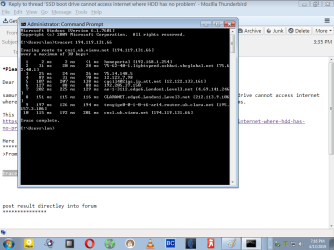
tracert 194.119.131.66


post result directley into forum
 

My Computer My Computer

Computer type
PC/Desktop
OS
win 8 32 bit
Here is the result in a print screen. I have no consistency as to how to select all at cmd.


I must admit some strange stuff shows up on this.
 

Attachments

  • traceroute.png
    traceroute.png
    32.3 KB · Views: 1

My Computer My Computer

Computer type
PC/Desktop
Computer Manufacturer/Model Number
custom
OS
Windows 7 x64 Ultimate
CPU
AMD Athlon II x3 450
Motherboard
MSI 880GM
Memory
2 GB
Hard Drives
various
Browser
Firefox, Opera
That shows your connected to the internet so what is the problems
 

My Computer My Computer

Computer type
PC/Desktop
OS
win 8 32 bit
Erf. It was not clear that I should do this on the SSD. I ran the trace on the working HDD.
Will follow up with another trace shortly.

Will also try the procedure given above which, as I recall, is just like that given by an
earlier ISP and under Windows XP many years ago.
 

My Computer My Computer

Computer type
PC/Desktop
Computer Manufacturer/Model Number
custom
OS
Windows 7 x64 Ultimate
CPU
AMD Athlon II x3 450
Motherboard
MSI 880GM
Memory
2 GB
Hard Drives
various
Browser
Firefox, Opera
This is a seeming no go problem without a scratch install.

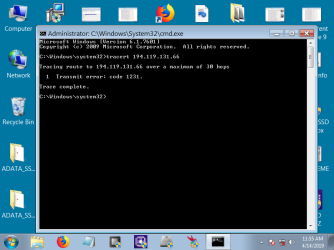
But here is the tracert run from the SSD you requested. A closer examination shows
that my little three station homenet is also not finding the other connections.

Trying the TCP IP in properties to reconnect where it asks to get a DNS automatically was not working either.

The command ncpa.cle gives a Broadband icon checked green then 'disconnected' greyed out and WAN MINIPort PPPOE also inactive greyed out.

The other oddity is these prompts will ask for my ISP login then countdown like it's using dial up.
All this is more confusing than getting a fresh SSD.

This is a wholly strange problem for me. The SSD works fine on the original PC where it was
installed.

Could a naming convention need to be changed? CMOS cleared. Something like that?
Just advise if this is some Microsoft lockout between PCs and I'll start over.
 

Attachments

  • tracert.png
    tracert.png
    29.1 KB · Views: 0

My Computer My Computer

Computer type
PC/Desktop
Computer Manufacturer/Model Number
custom
OS
Windows 7 x64 Ultimate
CPU
AMD Athlon II x3 450
Motherboard
MSI 880GM
Memory
2 GB
Hard Drives
various
Browser
Firefox, Opera
Just as a followup test, I ran the tracert command you gave on the original ssd and install PC and it gives
the same result as the successful trace from HDD on the target or second PC.


I will look at some things in device manager for clues when installed on the problem PC.
 

My Computer My Computer

Computer type
PC/Desktop
Computer Manufacturer/Model Number
custom
OS
Windows 7 x64 Ultimate
CPU
AMD Athlon II x3 450
Motherboard
MSI 880GM
Memory
2 GB
Hard Drives
various
Browser
Firefox, Opera
Marked solved.
I re-ran the MSI ethernet installer to refresh the drivers on the SSD for this MSI PC.
Everything then fell into place. This is something I had not thought to do but Device Manager

showed a yellow lock error icon and I then started to think of a reinstall from the mfg
disk.


Currently writing from the target MSI with SSD boot drive.


Thanks for assistance. Please explain how trace route works for diagnostic.
 

My Computer My Computer

Computer type
PC/Desktop
Computer Manufacturer/Model Number
custom
OS
Windows 7 x64 Ultimate
CPU
AMD Athlon II x3 450
Motherboard
MSI 880GM
Memory
2 GB
Hard Drives
various
Browser
Firefox, Opera
Trace shows were the signal is going and every router to the final destination it shows if there is a bad router on the network if it goes nowhere then there is a local fault
 

My Computer My Computer

Computer type
PC/Desktop
OS
win 8 32 bit
Back
Top