Cannot Access my former HDD

Rizzit

New member
Local time
8:24 PM
Messages
4
Hello,

I installed Win7 Ultimate on a new HDD
my old HDD with Windows XP is now used to store files.
I can't acces any User related files (Desktop, My documents etc..) to copy or move
them to my new new OS. I always get a permission denied error, how do i tell Windows
that i am the supremer master of super admin root of death... I can't lose those files
on my former HDD
 

My Computer

Computer Manufacturer/Model Number
Made by Rizzit
OS
Windows 7 Ultimate 64Bit
CPU
Intel Q9550 @3,82 Ghz
Motherboard
XFX 790i Ultra SLi
Memory
4GB DDR3 @1333Mhz
Graphics Card(s)
XFX GTX285
Sound Card
X-Fi Creative Professional Gamer by Fatal1ty
Monitor(s) Displays
2x Samsung SyncMaster 2333
Hard Drives
3x 750 GB Samsung 7400RPM
Case
Thermaltake - Shark
Cooling
Zalman CPU Fan

My Computer

Computer Manufacturer/Model Number
Sony Vaio FZ21Z
OS
Windows 7 Ultimate x64 ®™
CPU
Intel Core 2 Duo (2.2 GHz)
Motherboard
Sony (Intel Chipset)
Memory
2x 2GB Corsair (667 MHz)
Graphics Card(s)
NVIDIA 8600M GS (256MB)
Sound Card
Sigmatel
Monitor(s) Displays
15.4" TFT X-Black
Screen Resolution
1280x800
Hard Drives
Western Digital 300GB Scorpio Black (7200rpm)
Mouse
Logitech Anywhere MX
Internet Speed
Sky 5MB

My Computer

Computer Manufacturer/Model Number
Made by Rizzit
OS
Windows 7 Ultimate 64Bit
CPU
Intel Q9550 @3,82 Ghz
Motherboard
XFX 790i Ultra SLi
Memory
4GB DDR3 @1333Mhz
Graphics Card(s)
XFX GTX285
Sound Card
X-Fi Creative Professional Gamer by Fatal1ty
Monitor(s) Displays
2x Samsung SyncMaster 2333
Hard Drives
3x 750 GB Samsung 7400RPM
Case
Thermaltake - Shark
Cooling
Zalman CPU Fan
Are you right clicking the top level folder?
 

My Computer

Computer Manufacturer/Model Number
Sony Vaio FZ21Z
OS
Windows 7 Ultimate x64 ®™
CPU
Intel Core 2 Duo (2.2 GHz)
Motherboard
Sony (Intel Chipset)
Memory
2x 2GB Corsair (667 MHz)
Graphics Card(s)
NVIDIA 8600M GS (256MB)
Sound Card
Sigmatel
Monitor(s) Displays
15.4" TFT X-Black
Screen Resolution
1280x800
Hard Drives
Western Digital 300GB Scorpio Black (7200rpm)
Mouse
Logitech Anywhere MX
Internet Speed
Sky 5MB
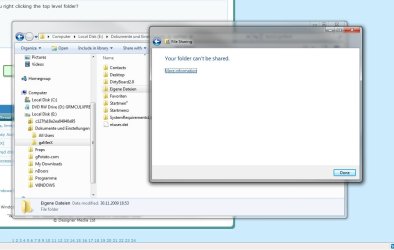
I am not dumb m8 it doesnt work i made some screenshots to show where i stuck at
I extra installed english language pack for this:
 

Attachments

  • omg.jpg
    omg.jpg
    84 KB · Views: 32
  • omg2.jpg
    omg2.jpg
    63.1 KB · Views: 25

My Computer

Computer Manufacturer/Model Number
Made by Rizzit
OS
Windows 7 Ultimate 64Bit
CPU
Intel Q9550 @3,82 Ghz
Motherboard
XFX 790i Ultra SLi
Memory
4GB DDR3 @1333Mhz
Graphics Card(s)
XFX GTX285
Sound Card
X-Fi Creative Professional Gamer by Fatal1ty
Monitor(s) Displays
2x Samsung SyncMaster 2333
Hard Drives
3x 750 GB Samsung 7400RPM
Case
Thermaltake - Shark
Cooling
Zalman CPU Fan
I am not dumb m8 it doesnt work i made some screenshots to show where i stuck at
I extra installed english language pack for this:
Theres no need to get aggressive,he had to make sure you had tried it correctly before moving on.
I dont see the take ownership short cut on your right click menu anyway,have you downloaded it?
If you havent ,you can get it here
http://www.sevenforums.com/tutorials/1911-take-ownership-shortcut.html

If that does not work ,try it manually,tutorial here
Take Ownership of file - Vista Forums

Have you tried right clicking the folder>properties>security>click your user group>edit>click all the tabs to give the privalleges.
 

My Computer

Computer Manufacturer/Model Number
Blue Shards 1.0
OS
Windows 7 Ultimate 64bit
CPU
AMD Phenom II 555 Black Edition Quad Core OC'd to 4.0GHz
Motherboard
ASUS M4A88T-M
Memory
G Skill RipJaw 1333MHz 4GB
Graphics Card(s)
ATI raideon 4250 HD/XFX ATI Radeon 1GB HD4650
Sound Card
Realteck HD Audio
Monitor(s) Displays
2x 22" Widescreen HD Monitors
Hard Drives
500GB Sata 7500RPM
80GB IDE
PSU
850W OCUK Modular
Case
Antec Dark Fleet DF-30
Cooling
Titan Fenrir Pro (CPU)
Keyboard
Logitech Wireless
Mouse
Logitech Wireless
Internet Speed
24Meg
Other Info
Getting soon-
2TB 7200RPM HDD
+8GB RAM
30GB SSD
HD6950/70
I am not dumb m8 it doesnt work i made some screenshots to show where i stuck at
Which is why I asked if you were clicking the "top level" folder...
 

My Computer

Computer Manufacturer/Model Number
Sony Vaio FZ21Z
OS
Windows 7 Ultimate x64 ®™
CPU
Intel Core 2 Duo (2.2 GHz)
Motherboard
Sony (Intel Chipset)
Memory
2x 2GB Corsair (667 MHz)
Graphics Card(s)
NVIDIA 8600M GS (256MB)
Sound Card
Sigmatel
Monitor(s) Displays
15.4" TFT X-Black
Screen Resolution
1280x800
Hard Drives
Western Digital 300GB Scorpio Black (7200rpm)
Mouse
Logitech Anywhere MX
Internet Speed
Sky 5MB
If logged in as a ADmin: You can also try,

right click the folder you want to access

Choose properties

Choose SECURITY tab

select your user name choose EDIT

In next pop up, choose user name and check FULL CONTROLL at bottom.

Click apply and you should now have access
 

My Computer

Computer Manufacturer/Model Number
Custom (Self Build)
OS
Windows 7 Home Premium 64bit
CPU
Intel Core i7 2700k
Motherboard
eVGA P67 SLI
Memory
8GB Mushkin Redline Ridgebacks @1866
Graphics Card(s)
EVGA GTX570 SC
Sound Card
XiFi Titanium HD
Monitor(s) Displays
LG W2453V
Screen Resolution
1920x1080
Hard Drives
Intel 320 80GB -- Intel X25-V 40GB --WD Black 1TB x2 -- WD Blue 640GB
PSU
Seasonic x750
Case
Corsair 600T SE White
Cooling
eVGA Superclocked CPU Cooler
Keyboard
Saitek Cyborg
Antivirus
Kaspersky
Browser
IE
Other Info
LG BD/DVD
If logged in as a ADmin: You can also try,

right click the folder you want to access

Choose properties

Choose SECURITY tab

select your user name choose EDIT

In next pop up, choose user name and check FULL CONTROLL at bottom.

Click apply and you should now have access

This works m8 but i have to do this all over again for each sub folder
anyways thanks
 

My Computer

Computer Manufacturer/Model Number
Made by Rizzit
OS
Windows 7 Ultimate 64Bit
CPU
Intel Q9550 @3,82 Ghz
Motherboard
XFX 790i Ultra SLi
Memory
4GB DDR3 @1333Mhz
Graphics Card(s)
XFX GTX285
Sound Card
X-Fi Creative Professional Gamer by Fatal1ty
Monitor(s) Displays
2x Samsung SyncMaster 2333
Hard Drives
3x 750 GB Samsung 7400RPM
Case
Thermaltake - Shark
Cooling
Zalman CPU Fan
This works m8 but i have to do this all over again for each sub folder
anyways thanks
Open computer via the start menu,right click on the hard drive you wish to have access to and do the same process from there,it will give you full access to the entire hard drive and all its subfolders.
 

My Computer

Computer Manufacturer/Model Number
Blue Shards 1.0
OS
Windows 7 Ultimate 64bit
CPU
AMD Phenom II 555 Black Edition Quad Core OC'd to 4.0GHz
Motherboard
ASUS M4A88T-M
Memory
G Skill RipJaw 1333MHz 4GB
Graphics Card(s)
ATI raideon 4250 HD/XFX ATI Radeon 1GB HD4650
Sound Card
Realteck HD Audio
Monitor(s) Displays
2x 22" Widescreen HD Monitors
Hard Drives
500GB Sata 7500RPM
80GB IDE
PSU
850W OCUK Modular
Case
Antec Dark Fleet DF-30
Cooling
Titan Fenrir Pro (CPU)
Keyboard
Logitech Wireless
Mouse
Logitech Wireless
Internet Speed
24Meg
Other Info
Getting soon-
2TB 7200RPM HDD
+8GB RAM
30GB SSD
HD6950/70
it will give you full access to the entire hard drive and all its subfolders.
"Top level folder" would you call that?
 

My Computer

Computer Manufacturer/Model Number
Sony Vaio FZ21Z
OS
Windows 7 Ultimate x64 ®™
CPU
Intel Core 2 Duo (2.2 GHz)
Motherboard
Sony (Intel Chipset)
Memory
2x 2GB Corsair (667 MHz)
Graphics Card(s)
NVIDIA 8600M GS (256MB)
Sound Card
Sigmatel
Monitor(s) Displays
15.4" TFT X-Black
Screen Resolution
1280x800
Hard Drives
Western Digital 300GB Scorpio Black (7200rpm)
Mouse
Logitech Anywhere MX
Internet Speed
Sky 5MB

My Computer

Computer Manufacturer/Model Number
Blue Shards 1.0
OS
Windows 7 Ultimate 64bit
CPU
AMD Phenom II 555 Black Edition Quad Core OC'd to 4.0GHz
Motherboard
ASUS M4A88T-M
Memory
G Skill RipJaw 1333MHz 4GB
Graphics Card(s)
ATI raideon 4250 HD/XFX ATI Radeon 1GB HD4650
Sound Card
Realteck HD Audio
Monitor(s) Displays
2x 22" Widescreen HD Monitors
Hard Drives
500GB Sata 7500RPM
80GB IDE
PSU
850W OCUK Modular
Case
Antec Dark Fleet DF-30
Cooling
Titan Fenrir Pro (CPU)
Keyboard
Logitech Wireless
Mouse
Logitech Wireless
Internet Speed
24Meg
Other Info
Getting soon-
2TB 7200RPM HDD
+8GB RAM
30GB SSD
HD6950/70
I have the same issue. I cannot access music or picture files. I have taken ownership and permissioned myself on the old Hdd and several sub folders down but when i get to my music and my pictures permissioning creates an access denied error for the files below. If I hold down c for continue, the error cycles through all contents and takes me back to security tab.

At this stage, if I select the user I am trying to permission it looks like I have full control but of course I don't. Its obvious since i see only icons in the thumbnails when I open the my pictures folder. And if I go back to security then remove the user the error cycle starts again when I try to repermission.

There is some config in these folders which simply wont let me permission access to the files. Most peculiar because I seem to have ownership on the folder and can permission the files individually. Can anyone help
 

My Computer

Computer Manufacturer/Model Number
Dell
OS
windows 7
Back
Top