Solved Cannot access router. Ping: "General failure" (but internet is fine)

millene

New member
Local time
10:43 PM
Messages
11
Cannot access router. Ping: "General failure" (but internet is fine)

Basic requirements:

1) Wireless
2) CenturyLink
3) DSL
4) CenturyLink C1100T
5) Malwarebytes Premium
6) Attached
7) Attached

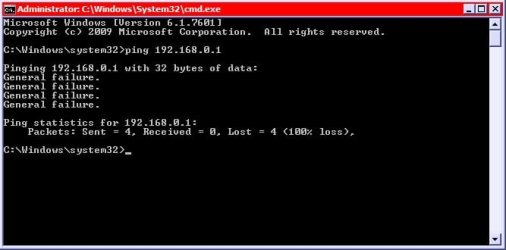
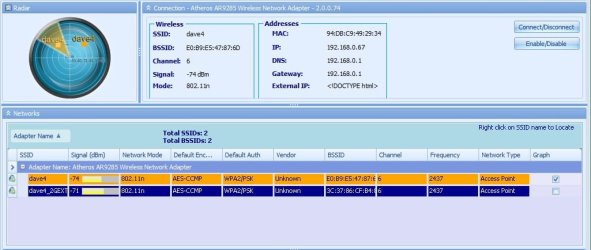
I have two computers on my network, but only one of them cannot connect to the router, getting "Unable to connect" error (Firefox) or "Your internet access is blocked" error (Chrome). Attempting to ping it from that computer gets "General failure" error (attached). The internet functions otherwise completely fine. Both computers have the same network settings.
 

Attachments
  • xirrus.jpg
    xirrus.jpg
    57.9 KB · Views: 1
  • general failure.jpg
    general failure.jpg
    24.3 KB · Views: 8
  • ipconfig.txt
    ipconfig.txt
    4 KB · Views: 1

My Computer My Computer

At a glance

Windows 7 Professional 64-bitIntel Core i3-2310M 2.10GHz4GB
Computer type
Laptop
Computer Manufacturer/Model Number
Panasonic CF-53
OS
Windows 7 Professional 64-bit
CPU
Intel Core i3-2310M 2.10GHz
Memory
4GB
Screen Resolution
1366x768
Internet Speed
65mbps
Antivirus
Malwarebytes Premium
Browser
Mozilla FireFox 90.0.2
Does the router use javascript that is the most common reason for this as it gets stopped by AV
 

My Computer My Computer

At a glance

win 8 32 bit
Computer type
PC/Desktop
OS
win 8 32 bit
I.. doubt it? I don't know how a router uses javascript. Also I turned off my antivirus AND windows firewall while troubleshooting any interference, and the other computer is running both while connecting so it shouldn't be that.
 

My Computer My Computer

At a glance

Windows 7 Professional 64-bitIntel Core i3-2310M 2.10GHz4GB
Computer type
Laptop
Computer Manufacturer/Model Number
Panasonic CF-53
OS
Windows 7 Professional 64-bit
CPU
Intel Core i3-2310M 2.10GHz
Memory
4GB
Screen Resolution
1366x768
Internet Speed
65mbps
Antivirus
Malwarebytes Premium
Browser
Mozilla FireFox 90.0.2
Does the router use javascript that is the most common reason for this as it gets stopped by AV

Javascript is almost never blocked by antiviruses. Pretty much the whole web now relies on it and it would break virtually every website out there. Except for some particularly malicious fragments and for the occasional false positives, Javascript just survives antiviruses.

Besides, I would find it very rare that a router uses Javascript at all, and most important, it simply doesn't matters, as long as it relays packets as it should.
 

My Computer My Computer

At a glance

Windows 7 Ultimate x64Intel Core i7-740QM8 GB DDR3NVIDIA GeForce 330GT
Computer type
Laptop
Computer Manufacturer/Model Number
Toshiba Sattelite A665-S6092
OS
Windows 7 Ultimate x64
CPU
Intel Core i7-740QM
Memory
8 GB DDR3
Graphics Card(s)
NVIDIA GeForce 330GT
Screen Resolution
1366x768
Hard Drives
Samsung 840 SSD 500GB
1TB USB3 external HD
Cooling
Coolermaster Notepal U3 notebook cooling pad
Internet Speed
3mbps ASDL
Antivirus
ClamWin 0.98.7
Browser
Opera 12.17 x86 (main), Firefox 38 (sec), IE11 (last resort)
After several days of this, suddenly the computer now accesses it fine. I changed zero settings while waiting for help. I don't understand what the problem was.
 

My Computer My Computer

At a glance

Windows 7 Professional 64-bitIntel Core i3-2310M 2.10GHz4GB
Computer type
Laptop
Computer Manufacturer/Model Number
Panasonic CF-53
OS
Windows 7 Professional 64-bit
CPU
Intel Core i3-2310M 2.10GHz
Memory
4GB
Screen Resolution
1366x768
Internet Speed
65mbps
Antivirus
Malwarebytes Premium
Browser
Mozilla FireFox 90.0.2
Back
Top