Cannot access some websites

xxxdannyxxx

Do You Believe
Guru
Gold Member
VIP
Local time
4:44 PM
Messages
2,615
Location
England
Hi Guys hope you're all well

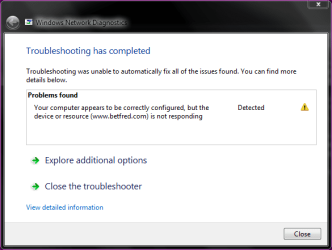
I have an issue with a certain website. As some of you know I play a lot of poker online, its almost like a second job for me but for the last week or so I have been unable to access Online Poker | Play Texas Hold'Em at Betfred.com | Up to £250 Bonus! The page will not load nor will any webpage associated with Betfred.

I have spoken to them via email the site is not or hasn't been down for any time at all in the past week and I'm not banned or blocked in any way.

I can access it if I use my phones internet connection with the laptop.

I can access my account using my friends internet with a different ISP.

I can also access it if I use an online web proxy although very slow - Hide My Ass! Free Proxy and Privacy Tools - Surf The Web Anonymously

I have spoken to my ISP and they say they to cannot access any site associated with them and have emailed but as of yet have not had a reply so were not overly helpful.

Can anyone shed a light on what the issue may be as I'm not getting a clear answer from my ISP and up to a week ago it was working fine. Why would the whole network (even my friend who is with the same ISP) be unable to access the site

Danny
 

My Computer

Computer Manufacturer/Model Number
acer aspire 5935g
OS
Windows 7 Home Premium x64 SP1
CPU
intel(R)core(TM)2 duo CPU T6600 @ 2.20GHz
Motherboard
intel gm45/gm47 revision 07
Memory
3 gb ddr3
Graphics Card(s)
ati radeon hd4570/512mb
Monitor(s) Displays
lop156wh2-tle1 15.3 flat
Screen Resolution
1366x768
Hard Drives
OCZ-Agility3 60gig ssd
320gig external hdd
500gig external hdd
Mouse
Optical
Internet Speed
30Mbps Down/30Mbps Up

My Computer

Computer type
PC/Desktop
Computer Manufacturer/Model Number
Me
OS
Win 7 Ultimate x64
CPU
FX-8350 @ 4.6 GHz so far
Motherboard
Asus M5A97 EVO
Memory
ADATA XPG V1 Series Black 8GB DDR3 1600
Graphics Card(s)
Sapphire R9 270x Dual-X
Sound Card
Xonar DGX w/ Corsair Vengence 1300
Monitor(s) Displays
Acer S232HL Abid
Screen Resolution
1920x1080
Hard Drives
120 GB OCZ Vertex 3
500 GB Seagate 7200.12
PSU
Antec Earthwatts 650W Green
Case
Antec Three Hundred
Cooling
Cooler Master 212 EVO
Keyboard
Logitech G510
Mouse
Logitech G500s
Internet Speed
35000/3000
Hello Danny. Are you using Internet Explorer? When you try to access / log in to Betfred are they using a secure website (https)? If yes to both questions, no guarantees but you could try these steps:

First, try logging in and then run the Network and Internet Troubleshooter by right-clicking the network icon in the notification area > click Troubleshoot problems > click Internet Connections. The Troubleshooter might ask you some questions or reset common settings as it tries to fix any issues.

Another possibility is when you connect to a secure website, Internet Explorer uses an encrypted channel that uses Secure Sockets Layer (SSL) technology to encrypt transactions. Corrupted information in the SSL can cause websites not to load correctly. Clearing the SLL state may resolve this issue. To do this:

Open Control Panel > Internet Options > Content tab > click Clear SSL state button.
 

My Computer

Computer type
Laptop
Computer Manufacturer/Model Number
Sony Vaio VPCEB47GM Laptop
OS
Win 7 Pro 64-bit
CPU
Intel i5 2.4 Ghz
Memory
8GB DDR3
Graphics Card(s)
Intel HD 3000
Sound Card
IDT High Definition
Monitor(s) Displays
15.6 WGXA Anti-Glare LED
Screen Resolution
1280x800
Hard Drives
640Gb 7200rpm
Antivirus
MSE
Browser
Opera (primary) with IE9 backup
Thanks Richard no I hadn't thought of that and my ISP has been very unhelpful

I changed the dns servers to googles 8-8-8-8 and 8-8-4-4 on the router and in windows and still the same no access. I should mention I also cannot access from my tablet or the browser on my smart tv either.
I've had a good couple of hours at it tonight and can't sus it out.
I have ruled out the router itself as I get the same result plugged in direct.
Same result on a clean install on a spare HDD
I'm sure its an issue with the ISP but find it very odd its just the one site and its associates.I'm vot very experienced in this area so any suggestions at all would be much appreciated

Danny
 

My Computer

Computer Manufacturer/Model Number
acer aspire 5935g
OS
Windows 7 Home Premium x64 SP1
CPU
intel(R)core(TM)2 duo CPU T6600 @ 2.20GHz
Motherboard
intel gm45/gm47 revision 07
Memory
3 gb ddr3
Graphics Card(s)
ati radeon hd4570/512mb
Monitor(s) Displays
lop156wh2-tle1 15.3 flat
Screen Resolution
1366x768
Hard Drives
OCZ-Agility3 60gig ssd
320gig external hdd
500gig external hdd
Mouse
Optical
Internet Speed
30Mbps Down/30Mbps Up
Hello Danny. Are you using Internet Explorer? When you try to access / log in to Betfred are they using a secure website (https)? If yes to both questions, no guarantees but you could try these steps:

First, try logging in and then run the Network and Internet Troubleshooter by right-clicking the network icon in the notification area > click Troubleshoot problems > click Internet Connections. The Troubleshooter might ask you some questions or reset common settings as it tries to fix any issues.

Another possibility is when you connect to a secure website, Internet Explorer uses an encrypted channel that uses Secure Sockets Layer (SSL) technology to encrypt transactions. Corrupted information in the SSL can cause websites not to load correctly. Clearing the SLL state may resolve this issue. To do this:

Open Control Panel > Internet Options > Content tab > click Clear SSL state button.

Hi Lee hope you are well

I tried your suggestion but no change, the site itself isn't https until you enter the financial options once logged in.In all honesty I have tried all the browsers I can find just to make sure it wasn't just one.

Capture.PNG

Danny
 

My Computer

Computer Manufacturer/Model Number
acer aspire 5935g
OS
Windows 7 Home Premium x64 SP1
CPU
intel(R)core(TM)2 duo CPU T6600 @ 2.20GHz
Motherboard
intel gm45/gm47 revision 07
Memory
3 gb ddr3
Graphics Card(s)
ati radeon hd4570/512mb
Monitor(s) Displays
lop156wh2-tle1 15.3 flat
Screen Resolution
1366x768
Hard Drives
OCZ-Agility3 60gig ssd
320gig external hdd
500gig external hdd
Mouse
Optical
Internet Speed
30Mbps Down/30Mbps Up
Just some random thoughts, Danny. Is it possible that the Betfred servers automatically locked out your IP address after "x" failed attempts to log in? (Different from having your user name & PW blocked.) Have you checked your firewall settings? Did Betfred somehow wind up being a restricted site on the different browsers? (In IE: internet options > security tab)

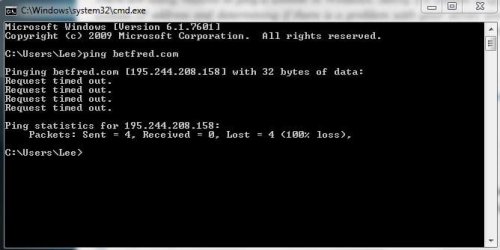
FWIW, I tried pinging betfred.com and 4 packets were sent, 0 packets were received, all due to a "request timed out" status.

ping.JPG

Don't know if any of this will help. But Happy Holidays to you and yours.
 

My Computer

Computer type
Laptop
Computer Manufacturer/Model Number
Sony Vaio VPCEB47GM Laptop
OS
Win 7 Pro 64-bit
CPU
Intel i5 2.4 Ghz
Memory
8GB DDR3
Graphics Card(s)
Intel HD 3000
Sound Card
IDT High Definition
Monitor(s) Displays
15.6 WGXA Anti-Glare LED
Screen Resolution
1280x800
Hard Drives
640Gb 7200rpm
Antivirus
MSE
Browser
Opera (primary) with IE9 backup
Just some random thoughts, Danny. Is it possible that the Betfred servers automatically locked out your IP address after "x" failed attempts to log in? (Different from having your user name & PW blocked.) Have you checked your firewall settings? Did Betfred somehow wind up being a restricted site on the different browsers? (In IE: internet options > security tab)

FWIW, I tried pinging betfred.com and 4 packets were sent, 0 packets were received, all due to a "request timed out" status.

View attachment 246321

Don't know if any of this will help. But Happy Holidays to you and yours.

Thanks mate you also

I've just had an extensive conversation with my ISP and they cannot access the site using there own network either:sarc: however one of the guys fired up his ipad on the orange network and got straight on so for some reason they are having issues themselves. Not sure what would cause a provider to be blocked off but fingers crossed they will sort it soon.

Many thanks to all and Happy Christmas
 

My Computer

Computer Manufacturer/Model Number
acer aspire 5935g
OS
Windows 7 Home Premium x64 SP1
CPU
intel(R)core(TM)2 duo CPU T6600 @ 2.20GHz
Motherboard
intel gm45/gm47 revision 07
Memory
3 gb ddr3
Graphics Card(s)
ati radeon hd4570/512mb
Monitor(s) Displays
lop156wh2-tle1 15.3 flat
Screen Resolution
1366x768
Hard Drives
OCZ-Agility3 60gig ssd
320gig external hdd
500gig external hdd
Mouse
Optical
Internet Speed
30Mbps Down/30Mbps Up
Back
Top