Cannot access the internet

jimmandyuk

New member
Local time
6:41 AM
Messages
6
Good morning everyone I have just joined with a problem I need help with, I have two computers both running 7 ulitmate 32 bit, Mandy is the gateway which was connected to the internet modem via the ethernet cable mine Jim was connected to Mandy via a crossover cable to a pci ethernet card in Mandy's. Mandy could get the internet but Jim could not see Mandy it said unidentified network I tried to follow suggestions off the internet but no joy, so I thought of a solution myself and bought 10/100m desktop switch. Connected the internet modem to the switch, connected Mandy by network cable to switch via the mobo connection having removed pci ethernet card now not in use, connected Jim to the switch via network cable hoping for the best but alas no. Mandy has the internet no problems, Jim has in network sharing centre a picture of my jim pc a line to a network icon but then a line to the internet icon with a cross on it and nothing I have done or can think to do has got me access to the internet. On Mandy I have got ipv 4 and ipv 6 to get the ipv address automatically tried unticking but all I get is Mandy losing the internet and the other one causes Jim to lose the connection to the network icon which goes to unidentified. I have only tried home network. In one word please help. Thank you Jim
 

My Computer

OS
windows 7 ultimate 32bit
Follow on from first post

I have thought if adding the switch into the system has put people off helping me so I have reverted to the original set up.
Mandy, modem connected to mobo, ethernet pci card back in and crossover cable to Jim mobo.
Mandy network sharing centre reads
Mandy - multiple networks - internet
Network 2 home network-------internet, ready to create,Local area connection
Unidentified network, public network-------------no internet access, local area connection 2
Jim network sharing centre reads
Jim- unidentified network -x- internet
unidentified network, public----------------no internet access, local area connection.
Please help :cry:
 

My Computer

OS
windows 7 ultimate 32bit

My Computer

Computer Manufacturer/Model Number
Apple Macbook Pro (April 2009)
OS
W7 Ult. x64 | OS X
CPU
Intel Mobile Core 2 Duo 2.93Ghz [T9800 Penryn]
Motherboard
NVIDIA nForce 730i Rev. B1 [Mac-F2268EC8 (U2E1)]
Memory
4096MB Samsung DDR3 Dual Channel [PC3-8500F 1066Mhz]
Graphics Card(s)
NVIDIA GeForce 9600M GT 512MB [G96M Rev. C1]
Sound Card
SB X-Fi Surround 5.1 USB | Onboard Realtek (Disabled)
Monitor(s) Displays
Acer x223wbd 22" | Apple Anti-Glare 17" (Disabled)
Screen Resolution
{Current} 1440x900 {Acer} 1680x1050 {Apple} 1920x1200
Hard Drives
{Internal}
Seagate Momentus 320GB 2.5" 7200RPM [ST9320421AS]

{Externals}
LaCie 320GB USB 2.0 HDD [301284UR]
LaCie 750GB USB 2.0 FW400 eSATA HDD [301314U]
LaCie 1TB USB 2.0 HDD [301304UR]
PSU
Magsafe
Case
Aluminum/Unibody (MBP52)
Cooling
2 x 6000 RPM Fans
Keyboard
Logitech G-15v2 [PN 920-000379]
Mouse
Logitech G-9 [PN 910-000338]
Internet Speed
12Mbps/2.5Mbps w/ 24Mbps Speed Boost [Comcast]
Other Info
Logitech X-540 Speakers [PN 970223-0122]
Sennheiser PC-151 Headset
If you hooked a standard modem into a switch that's your problem.
A standard modem passes along the IP assigned by your provider to your PC. A standard modem does not have DCHP capabilities.
You must connect a router to a modem, and PCs to the router. Most routers will get the IP automatically from a modem, and pass IPs dynamically via DHCP to the PCs connected.

With today's technology and pricing, I can't see one good reason to run a crossover from PC to PC.
 

My Computer

Computer Manufacturer/Model Number
Sytemax
OS
7 Pro 64 Bit
CPU
8300 Quad 2.53Ghz
Motherboard
Asus
Memory
4GB DDR Crucial
Graphics Card(s)
Intel
But using a router would be way to easy....:sarc:
 

My Computer

Computer type
PC/Desktop
Computer Manufacturer/Model Number
Home built
OS
Windows 7 Ult, Windows 8.1 Pro,
CPU
Q9650-4.275GHz, E8600 4.5GHz, E6750-3.8GHz
Motherboard
Evga 780i FTW
Memory
G.Skill PC2 9600 1200Mhz 5 5 5 15 2T
Graphics Card(s)
GTX480
Sound Card
Asus Xonar D2
Monitor(s) Displays
HannsG
Screen Resolution
1680X1050
Hard Drives
GSkill Phoenix Pro 120GB SSD
PSU
ThermalTake Toughpower 1000Watt modular
Case
ThermalTake XaserV
Cooling
Xigmatek S1283
Keyboard
Logitech G15
Mouse
Logitech G9
Internet Speed
T1
If you hooked a standard modem into a switch that's your problem.
A standard modem passes along the IP assigned by your provider to your PC. A standard modem does not have DCHP capabilities.
You must connect a router to a modem, and PCs to the router. Most routers will get the IP automatically from a modem, and pass IPs dynamically via DHCP to the PCs connected.

With today's technology and pricing, I can't see one good reason to run a crossover from PC to PC.

I agree and as a bonus, you have much better security with the router's hardware firewall.
 

My Computer

Computer Manufacturer/Model Number
Home built
OS
Windows 7 Ultimate 32 bit
CPU
Intel(R) Pentium(R) 4 CPU 3.00GHz
Motherboard
ASUS P4P800-VM Motherboard Chipset: Intel 865G + ICH5
Memory
2.50 GB RAM
Graphics Card(s)
NVIDIA GeForce 7600 GS
Sound Card
SoundMax Integrated Digital Audio (Chip)
Monitor(s) Displays
ViewSonic VX 1962 wm
Screen Resolution
1680 X 1050
Hard Drives
Seagate Barracuda 7200.10 80 GB
ST380215A ATA Device 18.6 GB
Western Digital "My Book" external hard drive 750 GB
Cooling
Fan based
Keyboard
Microsoft Comfort Curve Keyboard 2000 v10 USB
Mouse
Logitec optic USB
Internet Speed
3.01 Mb/s download 0.64 Mb/s upload
Tried bridge

Thank you Notsograymatter, I followed bridging instructions and achieved the bridge but all that did was lose the internet connection for Mandy and in network and sharing centre all that was visible was the unidentified network showing no internet
 

My Computer

OS
windows 7 ultimate 32bit

My Computer

Computer type
PC/Desktop
Computer Manufacturer/Model Number
Home built
OS
Windows 7 Ult, Windows 8.1 Pro,
CPU
Q9650-4.275GHz, E8600 4.5GHz, E6750-3.8GHz
Motherboard
Evga 780i FTW
Memory
G.Skill PC2 9600 1200Mhz 5 5 5 15 2T
Graphics Card(s)
GTX480
Sound Card
Asus Xonar D2
Monitor(s) Displays
HannsG
Screen Resolution
1680X1050
Hard Drives
GSkill Phoenix Pro 120GB SSD
PSU
ThermalTake Toughpower 1000Watt modular
Case
ThermalTake XaserV
Cooling
Xigmatek S1283
Keyboard
Logitech G15
Mouse
Logitech G9
Internet Speed
T1
Hi there, a switch cant multicast but it can broadcast. You need a layer 3 device, that is, a router to get this fixed. Can you ping Mandy's IP address?
 

My Computer

Computer Manufacturer/Model Number
Samsung NP530U4B-S02IN
OS
Windows® 8 Pro (64-bit)
CPU
Intel® Core™ i5 Processor 2467M (1.60GHz, 3MB L3 Cache)
Motherboard
Samsung Electronics
Memory
6GB DDR3 System Memory at 1,333MHz (on BD 4GB + 2GB x 1)
Graphics Card(s)
AMD Radeon™ HD7550M 1GB DDR3 (Ext. Graphic)
Sound Card
Realtek High Definition Audio
Monitor(s) Displays
35.56cm (14.0) SuperBright 300nit HD LED Display
Screen Resolution
1366x768
Hard Drives
1TB S-ATA II Hard Drive (5400RPM) with ExpressCache 16GB SSD
Internet Speed
sucks
Antivirus
Microsoft Security Essentials
Browser
Google Chrome (Sync enabled)
ipconfig

Thank you gor guides to solve my question, I have typed ipconfig into search and it comes up and gone in a milli second, I just cannot work out how you must be able to read it, please some one tell me how to keep the details on the screen to be able to read it.
 

My Computer

OS
windows 7 ultimate 32bit
Thank you gor guides to solve my question, I have typed ipconfig into search and it comes up and gone in a milli second, I just cannot work out how you must be able to read it, please some one tell me how to keep the details on the screen to be able to read it.

Type cmd to Start Menu's search field, and press Enter. This opens the command prompt window. Type then ipconfig in command prompt window.

Kari
 

My Computer

Computer type
Laptop
Computer Manufacturer/Model Number
HP ENVY 17-1150eg
OS
Windows 10 Pro x64 EN-GB
CPU
1.6 GHz Intel Core i7-720QM Processor
Memory
6 GB
Graphics Card(s)
ATI Mobility Radeon HD 5850 Graphics
Sound Card
Beats sound system with integrated subwoofer
Monitor(s) Displays
17" laptop display, 22" LED and 32" Full HD TV through HDMI
Screen Resolution
1600*900 (1), 1920*1080 (2&3)
Hard Drives
Internal: 2 x 500 GB SATA Hard Disk Drive 7200 rpm
External: 2TB for backups, 3TB USB3 network drive for media
Cooling
As Envy runs a bit warm, I have it on a Cooler Master pad
Keyboard
Logitech diNovo Media Desktop Laser (bluetooth)
Mouse
Logitech Performance Mouse MX
Internet Speed
50/10 Mbps VDSL
Antivirus
Windows Defender 4.3.9431.0
Browser
Maxthon 3.5.2., IE11
Got on internet

I followed Chev65's instructions and got myself on the internet, many many thanks to Chev65. Both Mandy and Jim can see the other computers icon in network but when I double click on the other computer icon on both mine and Mandys pc a window pops up enter network password, to my knowledge I havent set any up yet either on last os install or when I was trying to get on internet. I googled problem and got a multitude of reasons not sure which one applies to me I wonder if anyone who reads this thread can see the way forward to sharing files and printer for me please. Thank you...............Jim
 

My Computer

OS
windows 7 ultimate 32bit
Ok one problem down, on to the next one.

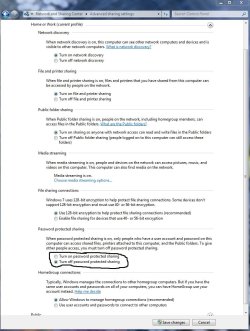
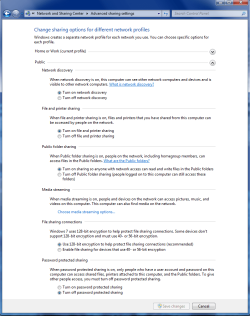
Under Advanced Sharing Settings it may help to turn off password protected sharing. You may need to do this for both the Public file sharing and the Home or Work sharing windows, I'm not even sure which one you are using. You may need to reboot both machines after changing the setting.

Is there an XP machine in this ICS network? If so there is another step to turning off the password prompts.
Goto... Control Panel > Administrative Tools > Local Security Policy > Local Policies > Security Options

Scroll down to... Network Access: Sharing and security model for local accounts

Select... Guest only and not Classic.

You should also make sure that the time/date settings are the same "in sync" on all machines.
 

Attachments

  • PASSWORD PROTECTED SHARING ON OR OFF.jpg
    PASSWORD PROTECTED SHARING ON OR OFF.jpg
    99.5 KB · Views: 10
  • public sharing enabled all.PNG
    public sharing enabled all.PNG
    39.7 KB · Views: 7
Last edited:

My Computer

Computer type
PC/Desktop
Computer Manufacturer/Model Number
Home built
OS
Windows 7 Ult, Windows 8.1 Pro,
CPU
Q9650-4.275GHz, E8600 4.5GHz, E6750-3.8GHz
Motherboard
Evga 780i FTW
Memory
G.Skill PC2 9600 1200Mhz 5 5 5 15 2T
Graphics Card(s)
GTX480
Sound Card
Asus Xonar D2
Monitor(s) Displays
HannsG
Screen Resolution
1680X1050
Hard Drives
GSkill Phoenix Pro 120GB SSD
PSU
ThermalTake Toughpower 1000Watt modular
Case
ThermalTake XaserV
Cooling
Xigmatek S1283
Keyboard
Logitech G15
Mouse
Logitech G9
Internet Speed
T1
All Sorted

All goals achieved, looking back I never thought in such a short space of time I would be sorted out, last night seemed a mountain to climb, this morning got on line and tonight shared files and printer it dont get much better then that. To all the members who helped guide me on my journey a heart felt thank you, with out a doubt times that by ten for Chev65.................Jim
 

My Computer

OS
windows 7 ultimate 32bit
Jim, thanks for letting us know. Congratulations on getting it solved.
 

My Computer

Computer Manufacturer/Model Number
Home built
OS
Windows 7 Ultimate 32 bit
CPU
Intel(R) Pentium(R) 4 CPU 3.00GHz
Motherboard
ASUS P4P800-VM Motherboard Chipset: Intel 865G + ICH5
Memory
2.50 GB RAM
Graphics Card(s)
NVIDIA GeForce 7600 GS
Sound Card
SoundMax Integrated Digital Audio (Chip)
Monitor(s) Displays
ViewSonic VX 1962 wm
Screen Resolution
1680 X 1050
Hard Drives
Seagate Barracuda 7200.10 80 GB
ST380215A ATA Device 18.6 GB
Western Digital "My Book" external hard drive 750 GB
Cooling
Fan based
Keyboard
Microsoft Comfort Curve Keyboard 2000 v10 USB
Mouse
Logitec optic USB
Internet Speed
3.01 Mb/s download 0.64 Mb/s upload
All goals achieved, looking back I never thought in such a short space of time I would be sorted out, last night seemed a mountain to climb, this morning got on line and tonight shared files and printer it dont get much better then that. To all the members who helped guide me on my journey a heart felt thank you, with out a doubt times that by ten for Chev65.................Jim

Nice work following the advice jimmyandyuk, these networks can get confusing at times but usually if you take it one step out a time it works out pretty well. ;)
 

My Computer

Computer type
PC/Desktop
Computer Manufacturer/Model Number
Home built
OS
Windows 7 Ult, Windows 8.1 Pro,
CPU
Q9650-4.275GHz, E8600 4.5GHz, E6750-3.8GHz
Motherboard
Evga 780i FTW
Memory
G.Skill PC2 9600 1200Mhz 5 5 5 15 2T
Graphics Card(s)
GTX480
Sound Card
Asus Xonar D2
Monitor(s) Displays
HannsG
Screen Resolution
1680X1050
Hard Drives
GSkill Phoenix Pro 120GB SSD
PSU
ThermalTake Toughpower 1000Watt modular
Case
ThermalTake XaserV
Cooling
Xigmatek S1283
Keyboard
Logitech G15
Mouse
Logitech G9
Internet Speed
T1
Back
Top