
Hi all,
I have 1 HD, Windows 7 Ultimate edition
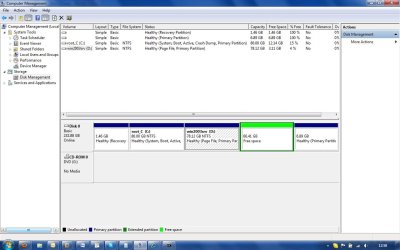
With Disk Mngmnt I was not able to use a partition (see attachment)
Disk ### Status Size Free Dyn Gpt
-------- ------------- ------- ------- --- ---
* Disk 0 Online 232 GB 66 GB
==========================================
These are the partitions I have:
DISKPART> list partition
Partition ### Type Size Offset
------------- ---------------- ------- -------
Partition 1 Recovery 1500 MB 1024 KB
Partition 2 Primary 80 GB 1501 MB
Partition 3 Primary 78 GB 81 GB
* Partition 0 Extended 73 GB 159 GB
Partition 4 Logical 7051 MB 225 GB
==========================================
DISKPART> list volume
Volume ### Ltr Label Fs Type Size Status Info
---------- --- ----------- ----- ---------- ------- --------- --------
Volume 0 G DVD-ROM 0 B No Media
Volume 1 C root_C NTFS Partition 80 GB Healthy System
Volume 2 D win2003srv NTFS Partition 78 GB Healthy Pagefile
Volume 3 TOSHIBA SYS NTFS Partition 1500 MB Healthy Hidden
==========================================
Now, when I check details of partition 0:
DISKPART> detail partition
Partition 0
Type : 0F
Hidden: No
Active: No
Offset in Bytes: 171360386560
There is no volume associated with this partition.
================================
If I try to activate the partition
DISKPART> active
Virtual Disk Service error:
The specified partition is a not a primary or logical volume.
================================
Even if I try to delete the partition, I get the following message:
DISKPART> delete partition
Virtual Disk Service error:
The extended partition is not empty.
================================
Now the question is:
1. How can I use that space from that partition?
See attachment to get a better picture.
Regards,
Leo
I have 1 HD, Windows 7 Ultimate edition
With Disk Mngmnt I was not able to use a partition (see attachment)
Disk ### Status Size Free Dyn Gpt
-------- ------------- ------- ------- --- ---
* Disk 0 Online 232 GB 66 GB
==========================================
These are the partitions I have:
DISKPART> list partition
Partition ### Type Size Offset
------------- ---------------- ------- -------
Partition 1 Recovery 1500 MB 1024 KB
Partition 2 Primary 80 GB 1501 MB
Partition 3 Primary 78 GB 81 GB
* Partition 0 Extended 73 GB 159 GB
Partition 4 Logical 7051 MB 225 GB
==========================================
DISKPART> list volume
Volume ### Ltr Label Fs Type Size Status Info
---------- --- ----------- ----- ---------- ------- --------- --------
Volume 0 G DVD-ROM 0 B No Media
Volume 1 C root_C NTFS Partition 80 GB Healthy System
Volume 2 D win2003srv NTFS Partition 78 GB Healthy Pagefile
Volume 3 TOSHIBA SYS NTFS Partition 1500 MB Healthy Hidden
==========================================
Now, when I check details of partition 0:
DISKPART> detail partition
Partition 0
Type : 0F
Hidden: No
Active: No
Offset in Bytes: 171360386560
There is no volume associated with this partition.
================================
If I try to activate the partition
DISKPART> active
Virtual Disk Service error:
The specified partition is a not a primary or logical volume.
================================
Even if I try to delete the partition, I get the following message:
DISKPART> delete partition
Virtual Disk Service error:
The extended partition is not empty.
================================
Now the question is:
1. How can I use that space from that partition?
See attachment to get a better picture.
Regards,
Leo
Attachments
My Computer
- Computer Manufacturer/Model Number
- toshiba satellite
- OS
- windows 7
- CPU
- AMD turionx2 64
- Memory
- 4 GB


