Cannot Apply Themes

Emarlier

New member
Local time
4:13 PM
Messages
2
I've downloaded a new theme from DeviantArt.com and Installed Universal Theme Patcher. I've followed the rules (patching, restarting the computer, placing extracted theme in C:/Windows/Resources/Themes.) Yet, every time I press "Apply" my computer does absolutely nothing. No "Please Wait.." or anything and the theme does not change.

Someone please help?
 

My Computer

OS
32
Welcome to the Seven Forums
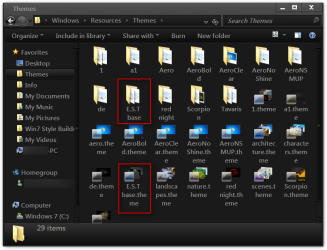
Did you put both (1 theme folder and 1 .theme file) like in screenshot in C:/Windows/Resources/Themes?
Themes.png

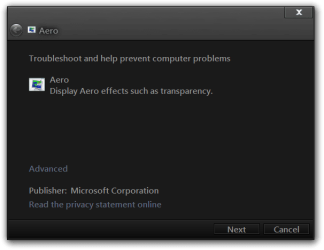
Click on :orb: start button in the search box type Aero and look for Find and fix problems with transparency and check for problems
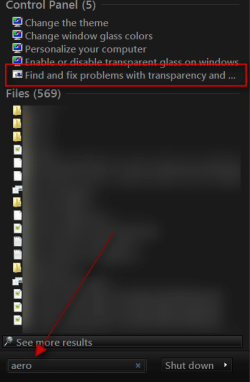
s.pngAero.png


Let me know if this helps
Jerry
 

My Computer

Computer type
Laptop
Computer Manufacturer/Model Number
Sager NP9170
OS
Win 7 Pro x64 / Win 10 Pro
CPU
Intel(R) Core(TM) i7-3630QM CPU @ 2.40GHz
Motherboard
CLEVO P170EM
Memory
12 GB
Graphics Card(s)
(1) Intel(R) HD Graphics 4000 (2) NVIDIA GeForce GTX 675M
Sound Card
(1) Realtek High Definition Audio (2) Intel(R) Display Aud
Monitor(s) Displays
17.3
Screen Resolution
1920x1080
Hard Drives
(1) Samsung 860 EVO 500GB(OS) (1) Samsung 860 EVO 500GB(Data)
Keyboard
Backlite
Antivirus
MSE, Malwarebytes Pro
Browser
Firefox
Other Info
DESKTOP: Custom-built.
OS: Win 10 Pro x64.
CASE: Rosewill R5.
CPU: Intel I5 4670K CPU @ 3.40GHz.
CPU COOLER: Cool Master Hyper 212 EVO.
MOTHERBOARD: Asus Z87-A.
MEMORY: Kingston HyperX 2x4 GB.
GPU: Nvidia Geforce 650 TI.
PSU: Corsair TX750.
DRIVES: (1) Samsung 840 120 GB SSD (2) Western Digital blue 500 GB 7200 RPM.
I am having the same problem! I did the find and fix thing, and it says that the "current theme doesn't support aero."
 

My Computer

Computer Manufacturer/Model Number
HP Slimline s3120n
OS
Microsoft Windows Vista Home Premium
CPU
Athlon64 X2 dual core processer
Motherboard
Asus M2NC51-AR
Memory
2048MB
Graphics Card(s)
Integrated graphics using nVidia GeForce 6150LE
Hard Drives
320GB
I just gave up, I tried to use a theme that required you to replace the "shell32.dll" and it messed up my computer. I used the recovery cd.
 

My Computer

Computer Manufacturer/Model Number
HP Slimline s3120n
OS
Microsoft Windows Vista Home Premium
CPU
Athlon64 X2 dual core processer
Motherboard
Asus M2NC51-AR
Memory
2048MB
Graphics Card(s)
Integrated graphics using nVidia GeForce 6150LE
Hard Drives
320GB
I am having the same problem! I did the find and fix thing, and it says that the "current theme doesn't support aero."

I just gave up, I tried to use a theme that required you to replace the "shell32.dll" and it messed up my computer. I used the recovery cd.
You do not need to replace "shell32.dll" if you don't want to it's a option. post a link to the theme and I will look at it.
You will need to do 1 of these 2 ways of Enabling custom themes for it to work.
http://www.sevenforums.com/tutorials/34579-enabling-custom-themes-windows-7-a.html
Or
http://www.sevenforums.com/tutorials/28377-theme-how-apply-custom-themes.html?filter

Will be back in about 8 to 10 hours time for bed.
Jerry
 

My Computer

Computer type
Laptop
Computer Manufacturer/Model Number
Sager NP9170
OS
Win 7 Pro x64 / Win 10 Pro
CPU
Intel(R) Core(TM) i7-3630QM CPU @ 2.40GHz
Motherboard
CLEVO P170EM
Memory
12 GB
Graphics Card(s)
(1) Intel(R) HD Graphics 4000 (2) NVIDIA GeForce GTX 675M
Sound Card
(1) Realtek High Definition Audio (2) Intel(R) Display Aud
Monitor(s) Displays
17.3
Screen Resolution
1920x1080
Hard Drives
(1) Samsung 860 EVO 500GB(OS) (1) Samsung 860 EVO 500GB(Data)
Keyboard
Backlite
Antivirus
MSE, Malwarebytes Pro
Browser
Firefox
Other Info
DESKTOP: Custom-built.
OS: Win 10 Pro x64.
CASE: Rosewill R5.
CPU: Intel I5 4670K CPU @ 3.40GHz.
CPU COOLER: Cool Master Hyper 212 EVO.
MOTHERBOARD: Asus Z87-A.
MEMORY: Kingston HyperX 2x4 GB.
GPU: Nvidia Geforce 650 TI.
PSU: Corsair TX750.
DRIVES: (1) Samsung 840 120 GB SSD (2) Western Digital blue 500 GB 7200 RPM.
Hey Jerry, I attempted Find and fix problems with transparency but I opened it, and then it quickly shut down for some reason. Also, if I type in Aero in the search, it doesn't even give me the option Find and fix problems with transparency, I have to type it in manually.
 

My Computer

OS
32
Hey Jerry, I attempted Find and fix problems with transparency but I opened it, and then it quickly shut down for some reason. Also, if I type in Aero in the search, it doesn't even give me the option Find and fix problems with transparency, I have to type it in manually.
Can you fill out your system specs look at post 2, 4 will tell you how to fill it out http://www.sevenforums.com/general-discussion/8-forum-rules-info-please-read.html#post23230

Have you used Aero theme before on this computer?

Try this http://www.sevenforums.com/tutorials/1538-sfc-scannow-command-system-file-checker.html if you use the Universal Theme Patcher this will remove the patch and you'll have to do it again.
In post 5 there are two links the first one is a service that allows you to run custom themes you do not need to patch files and then if you need to run the file Checker it does not remove it I thought I would just mention that.
Jerry
 

My Computer

Computer type
Laptop
Computer Manufacturer/Model Number
Sager NP9170
OS
Win 7 Pro x64 / Win 10 Pro
CPU
Intel(R) Core(TM) i7-3630QM CPU @ 2.40GHz
Motherboard
CLEVO P170EM
Memory
12 GB
Graphics Card(s)
(1) Intel(R) HD Graphics 4000 (2) NVIDIA GeForce GTX 675M
Sound Card
(1) Realtek High Definition Audio (2) Intel(R) Display Aud
Monitor(s) Displays
17.3
Screen Resolution
1920x1080
Hard Drives
(1) Samsung 860 EVO 500GB(OS) (1) Samsung 860 EVO 500GB(Data)
Keyboard
Backlite
Antivirus
MSE, Malwarebytes Pro
Browser
Firefox
Other Info
DESKTOP: Custom-built.
OS: Win 10 Pro x64.
CASE: Rosewill R5.
CPU: Intel I5 4670K CPU @ 3.40GHz.
CPU COOLER: Cool Master Hyper 212 EVO.
MOTHERBOARD: Asus Z87-A.
MEMORY: Kingston HyperX 2x4 GB.
GPU: Nvidia Geforce 650 TI.
PSU: Corsair TX750.
DRIVES: (1) Samsung 840 120 GB SSD (2) Western Digital blue 500 GB 7200 RPM.
Hello Jerry,

Sorry I just got notice that you replied to this thread.

Here is one of the many themes I was trying to use. Not sure if this was one with the shell32.dll thing, but this wouldn't work at all for me.
Snow Leopard for Win7 FINAL by =sagorpirbd on deviantART

I will review the links you've provided. Thank you for responding!
 

My Computer

Computer Manufacturer/Model Number
HP Slimline s3120n
OS
Microsoft Windows Vista Home Premium
CPU
Athlon64 X2 dual core processer
Motherboard
Asus M2NC51-AR
Memory
2048MB
Graphics Card(s)
Integrated graphics using nVidia GeForce 6150LE
Hard Drives
320GB
Hello Jerry,

Sorry I just got notice that you replied to this thread.

Here is one of the many themes I was trying to use. Not sure if this was one with the shell32.dll thing, but this wouldn't work at all for me.
Snow Leopard for Win7 FINAL by =sagorpirbd on deviantART

I will review the links you've provided. Thank you for responding!
First next time would you please start a new thread it gets confusing trying to work on two things in one thread thank you.
I downloaded the theme you posted a link to and installed it and it works fine.
I noticed under your username and your system specs say Vista that is confusing to please let us know which operating system you are using.
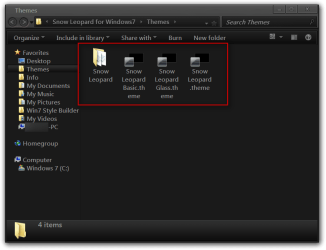
Did you put 4 (1 theme folder and 3 .theme files) highlighted in red?
Themes.png

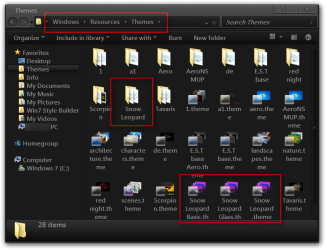
In C/Windows/Resources/Themes as shown in the screenshot highlighted in red?
Themes2.png

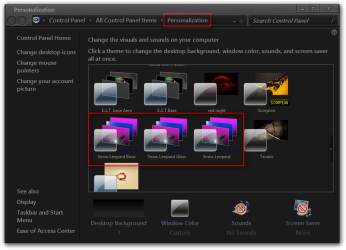
Do they show up in the Personalization as shown in the screenshot highlighted in red?
Personalization.png

Jerry
 

My Computer

Computer type
Laptop
Computer Manufacturer/Model Number
Sager NP9170
OS
Win 7 Pro x64 / Win 10 Pro
CPU
Intel(R) Core(TM) i7-3630QM CPU @ 2.40GHz
Motherboard
CLEVO P170EM
Memory
12 GB
Graphics Card(s)
(1) Intel(R) HD Graphics 4000 (2) NVIDIA GeForce GTX 675M
Sound Card
(1) Realtek High Definition Audio (2) Intel(R) Display Aud
Monitor(s) Displays
17.3
Screen Resolution
1920x1080
Hard Drives
(1) Samsung 860 EVO 500GB(OS) (1) Samsung 860 EVO 500GB(Data)
Keyboard
Backlite
Antivirus
MSE, Malwarebytes Pro
Browser
Firefox
Other Info
DESKTOP: Custom-built.
OS: Win 10 Pro x64.
CASE: Rosewill R5.
CPU: Intel I5 4670K CPU @ 3.40GHz.
CPU COOLER: Cool Master Hyper 212 EVO.
MOTHERBOARD: Asus Z87-A.
MEMORY: Kingston HyperX 2x4 GB.
GPU: Nvidia Geforce 650 TI.
PSU: Corsair TX750.
DRIVES: (1) Samsung 840 120 GB SSD (2) Western Digital blue 500 GB 7200 RPM.
Back
Top