cannot boot from original windows 7 home premium CD

tsuresh

New member
Local time
7:08 AM
Messages
6
Hi,
I have booted my PC from the original windows 7 home cd today.But its not booting properly.
I am not getting this message "press any key to boot from the DVD.."
Instead a black screen is there for long time only with the cursor visible and going to normal windows logging option.
I could load the DVD from within windows 7 and browse the files on the DVD.
I have set the DVD drive to be the first boot device in BIOS.
But still not working.
Few hints why this issue occured:
My laptop comes with the window 7 home premium version.
My friend had taken my laptop and installed profession version a year ago.
After one year I have installed home premium version which is now there with me.(At this time there was no problem installing it)
Today I have two windows versions.
I want to do a clean format and install only windows 7 home which comes with the laptop.
But as I stated earlier its not loading the files properly.
Could someone please help me out here ?

Thanks
Suresh
 

My Computer My Computer

Computer Manufacturer/Model Number
Dell studio
OS
Windows 7 Home Premium 32bit
Hello tsuresh, welcome to Seven Forums!


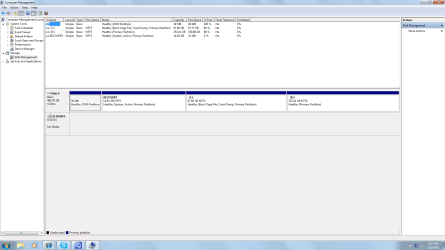
Before we make any specific recommendations will you please post a snip/screen-shot of the entire disk management drive map with a full description as to which drive/partition is which, so we can see what you have going on as there may be a fairly simple way to resolve the situation.

In the Windows start menu right click computer and click manage, in the left pane of the "Computer Management" window that opens click disk management and post a maximized snip of that.


How to Upload and Post a Screenshot and File in Seven Forums
 

My Computer My Computer

Computer Manufacturer/Model Number
* BFK Customs *
OS
W 7 64-bit Ultimate
CPU
Intel Q9550 Yorkfield
Motherboard
ASUS P5Q Pro
Memory
8GB Dominator 8500C5D
Graphics Card(s)
ATI : XFX 5870
Sound Card
Realtek HD Audio 7-1
Monitor(s) Displays
1x 47" LCD HDMI & 3x 26" LCD HDMI
Screen Resolution
1920x1080P & 1920x1200
Hard Drives
1x 80GB Intel X25-M G2 SSD : 1x 500GB & 1x 640GB WD Caviar Black(s)
PSU
Corsair 620HX
Case
Cooler Master RC-690
Cooling
Tuniq Tower 120, 2x 140mm and 3x 120mm case fans
Keyboard
Microsoft 500
Mouse
Razer Diamondback 3G
Internet Speed
14 Mb/s
Other Info
1x Koutech 3Gb/s SATA HDD Hot Swap Rack
Hi,
Thanks for your reply.
I have attached as the screen shot as you said.
C:New win 7 home premium
D:just for data storage
RECOVERY: I think the old os in my description(probably windows enterprise)

Regards,
Suresh
 

Attachments

  • disc_management.png
    disc_management.png
    46.9 KB · Views: 146

My Computer My Computer

Computer Manufacturer/Model Number
Dell studio
OS
Windows 7 Home Premium 32bit
Hi,
I have booted my PC from the original windows 7 home cd today.But its not booting properly.
I am not getting this message "press any key to boot from the DVD.."
Instead a black screen is there for long time only with the cursor visible and going to normal windows logging option.

Thanks
Suresh


This tells me your Windows 7 DVD is probably not bootable, where did you get it?
 

My Computer My Computer

Computer Manufacturer/Model Number
* BFK Customs *
OS
W 7 64-bit Ultimate
CPU
Intel Q9550 Yorkfield
Motherboard
ASUS P5Q Pro
Memory
8GB Dominator 8500C5D
Graphics Card(s)
ATI : XFX 5870
Sound Card
Realtek HD Audio 7-1
Monitor(s) Displays
1x 47" LCD HDMI & 3x 26" LCD HDMI
Screen Resolution
1920x1080P & 1920x1200
Hard Drives
1x 80GB Intel X25-M G2 SSD : 1x 500GB & 1x 640GB WD Caviar Black(s)
PSU
Corsair 620HX
Case
Cooler Master RC-690
Cooling
Tuniq Tower 120, 2x 140mm and 3x 120mm case fans
Keyboard
Microsoft 500
Mouse
Razer Diamondback 3G
Internet Speed
14 Mb/s
Other Info
1x Koutech 3Gb/s SATA HDD Hot Swap Rack
If your computer came with home premium preinstalled, where did you get this disk from? Is it factory-made or home-made? If home-made I would suspect a bad burn or a bad iso.

Second, did you make recovery disks when you had home premium installed?
 

My Computer My Computer

Computer Manufacturer/Model Number
Too many to describe...
OS
Windows 7 x64 pro/ Windows 7 x86 Pro/ XP SP3 x86
hi,
Two months back using home premium CD I have succesfully installed home.
I have dual boot now which I dont want.
But now the same CD is not booting properly.
Computer came with home preimum installed and it was working properly.My friend had an enterprise version.
He took my laptop and did a complete installation of enterprise version.
But its license got over within a year I think.I am not able to activate enterprise edition now.
But I dont need it either.
Since I have the original home CD which comes with my computer, I want to do a clean install of home again without dual boot which I have now.
Hope this info helps.

Regards,
Suresh
 

My Computer My Computer

Computer Manufacturer/Model Number
Dell studio
OS
Windows 7 Home Premium 32bit

My Computer My Computer

Computer Manufacturer/Model Number
* BFK Customs *
OS
W 7 64-bit Ultimate
CPU
Intel Q9550 Yorkfield
Motherboard
ASUS P5Q Pro
Memory
8GB Dominator 8500C5D
Graphics Card(s)
ATI : XFX 5870
Sound Card
Realtek HD Audio 7-1
Monitor(s) Displays
1x 47" LCD HDMI & 3x 26" LCD HDMI
Screen Resolution
1920x1080P & 1920x1200
Hard Drives
1x 80GB Intel X25-M G2 SSD : 1x 500GB & 1x 640GB WD Caviar Black(s)
PSU
Corsair 620HX
Case
Cooler Master RC-690
Cooling
Tuniq Tower 120, 2x 140mm and 3x 120mm case fans
Keyboard
Microsoft 500
Mouse
Razer Diamondback 3G
Internet Speed
14 Mb/s
Other Info
1x Koutech 3Gb/s SATA HDD Hot Swap Rack
There are contradictions with what you said earlier- did your friend install pro or enterprise or pro activated with kms? Dell no longer gives out OS disks bit I guess you have an older computer.

What you can try is to tap F12 repeatedly at boot to invoke the one time boot menu, then click the optical drive there, hit Enter. If the disk is indeed bootable that should do the trick.

Otherwise, you can make a win7 install usb key, set the computer to boot from usb first then boot from usb and install.

http://www.sevenforums.com/tutorials/2432-usb-windows-7-installation-key-drive-create.html
 

My Computer My Computer

Computer Manufacturer/Model Number
Too many to describe...
OS
Windows 7 x64 pro/ Windows 7 x86 Pro/ XP SP3 x86
hi,
my laptop is 2 yr old.
the order of installation is:
1)laptop comes with preinstalled windows 7 home premium.
2)my friend had installed win 7 enterprise within a week
3)around 2 weeks back I have installed home premium again.I didnt do clean install that time.
So now its dual boot.
I want the clean install with win 7 home for which I have the CD now.
If I insert the disc and try to reboot it doesnt show "press any key to load files.."
I think the problem might be:
something might have changed in boot settings file which is stopping this.
Is there any way to format/delete to do a clean install ?
I doubt USB boot helps for this issue.

Regards,
Suresh
 

My Computer My Computer

Computer Manufacturer/Model Number
Dell studio
OS
Windows 7 Home Premium 32bit
None of these circumstances would make the Windows 7 DVD not-bootable, only a bad installation file or a bad burn to the DVD would do that, we're trying to tell you that there's a good chance the disk you're trying to boot is not bootable for one reason or another.


Again, where did you get the installation disk?
 

My Computer My Computer

Computer Manufacturer/Model Number
* BFK Customs *
OS
W 7 64-bit Ultimate
CPU
Intel Q9550 Yorkfield
Motherboard
ASUS P5Q Pro
Memory
8GB Dominator 8500C5D
Graphics Card(s)
ATI : XFX 5870
Sound Card
Realtek HD Audio 7-1
Monitor(s) Displays
1x 47" LCD HDMI & 3x 26" LCD HDMI
Screen Resolution
1920x1080P & 1920x1200
Hard Drives
1x 80GB Intel X25-M G2 SSD : 1x 500GB & 1x 640GB WD Caviar Black(s)
PSU
Corsair 620HX
Case
Cooler Master RC-690
Cooling
Tuniq Tower 120, 2x 140mm and 3x 120mm case fans
Keyboard
Microsoft 500
Mouse
Razer Diamondback 3G
Internet Speed
14 Mb/s
Other Info
1x Koutech 3Gb/s SATA HDD Hot Swap Rack
Are you following these exact steps: How to Boot your Computer from a Bootable CD or DVD?

What happens when you tap the F12 key repeatedly at boot? Do you get the BIOS Boot Menu and can you select DVD drive to boot? If so are you prompted to Press any key...?

Try running Factory Recovery partiition to restore the computer to factory condition Home Premium: Dell Restoring Your Computer´s Software to the Factory Settings

If Factory Recovery will not run, then find another Win7 installation DVD for your licensed version, wipe the HD since the Recovery won't run anyway, then reinstall Win7 following these steps: Reinstalling Windows 7
 
Did you make your Dell Recovery Disk?

How to use Dell Recovery, & how to order Recovery Disks.
Dell - Support
 

My Computer My Computer

OS
ME/XP/Vista/Win7
hi,
I dont see the option Dell factory Image restore.
Does this recovery disk costs me ?
 

My Computer My Computer

Computer Manufacturer/Model Number
Dell studio
OS
Windows 7 Home Premium 32bit
I suspect the OP's friend has wiped the Dell recovery partition.
 

My Computer My Computer

Computer type
PC/Desktop
Computer Manufacturer/Model Number
Home Built Desktop By DataTech
OS
Windows 7 Ultimate X64 SP1
CPU
Intel i5-2550K, Differing ~4.4-4.8GHz No built in GPU
Motherboard
ASUS P8Z68-V PRO/GEN3
Memory
16GB G.Skill Sniper 1866MHz @ 2133MHz 2x8GB
Graphics Card(s)
ASUS GTX650TIB-DC2OC-2GD5, (650TI Boost)
Sound Card
Onboard Realtek 5-1
Monitor(s) Displays
Samsung P2570HD
Screen Resolution
1920x1080
Hard Drives
Samsung 840 Pro 256GB SSD for OS, 500GB Seagate Constellation (Enterprise drive) for Data
PSU
Corsair HX650W
Case
Inwin Dragon Rider
Cooling
Hyper 212 EVO w/two Noctua fans, push-pull, @1300 RPM
Keyboard
E-Z Eyes, bright yellow keys with large characters
Mouse
steelseries SENSEI Laser Pro Gaming
Internet Speed
48-51Mbs Mbs down, 11 Mbs up Xfinity Cable
Antivirus
Norton Internet Security 2013
Browser
IE 10, Opera, Pale Moon if needed
Other Info
4 case fans, LG BluRay-RE, ASUS DVD-RW, Mr. Fusion power supply, 1.21 gigawatts.
I suspect the OP's friend has wiped the Dell recovery partition.
No, if you see the disk management snip, the recovery partition is still there. But its impossible to follow what exactly OP and friend did and exactly what disks they used.

OP, if you're still around, your factory recovery options are:

1) If dell datasafe is installed and lets you create recovery disks, do so asap and restore from them. If its not installed you might try downloading from the dell site, then try. See Theog's post above.

2) If 1) does not work, go back to disk management and mark the recovery partition active, then reboot and it should launch recovery. Backup user data before doing this.

If disk management doesnt let you, diskpart can also be used to mark the recovery partition active. Theres a tut on SF, check it out.

3) Tap F8 repeatedly at boot then click Repair my computer in the advanced boot options. See if theres a dell restore option there, if yes click it and follow onscreen prompts.

4) If nothing works, borrow a disk from a friend or download a clean iso off the web, install the same edition that came preloaded and activate with the sticker key. As Gregrocker advised.
 

My Computer My Computer

Computer Manufacturer/Model Number
Too many to describe...
OS
Windows 7 x64 pro/ Windows 7 x86 Pro/ XP SP3 x86
You are correct Bill, I missed that.:o
 

My Computer My Computer

Computer type
PC/Desktop
Computer Manufacturer/Model Number
Home Built Desktop By DataTech
OS
Windows 7 Ultimate X64 SP1
CPU
Intel i5-2550K, Differing ~4.4-4.8GHz No built in GPU
Motherboard
ASUS P8Z68-V PRO/GEN3
Memory
16GB G.Skill Sniper 1866MHz @ 2133MHz 2x8GB
Graphics Card(s)
ASUS GTX650TIB-DC2OC-2GD5, (650TI Boost)
Sound Card
Onboard Realtek 5-1
Monitor(s) Displays
Samsung P2570HD
Screen Resolution
1920x1080
Hard Drives
Samsung 840 Pro 256GB SSD for OS, 500GB Seagate Constellation (Enterprise drive) for Data
PSU
Corsair HX650W
Case
Inwin Dragon Rider
Cooling
Hyper 212 EVO w/two Noctua fans, push-pull, @1300 RPM
Keyboard
E-Z Eyes, bright yellow keys with large characters
Mouse
steelseries SENSEI Laser Pro Gaming
Internet Speed
48-51Mbs Mbs down, 11 Mbs up Xfinity Cable
Antivirus
Norton Internet Security 2013
Browser
IE 10, Opera, Pale Moon if needed
Other Info
4 case fans, LG BluRay-RE, ASUS DVD-RW, Mr. Fusion power supply, 1.21 gigawatts.
Hi all,

Thanks for you all your support.The issue is solved but still looks strange to me.
Probably it could be a known issue .
Till yesterday evening the scenario is,
I have dual boot (win 7 enterprise,win 7 home.But home is recently installed OS)
The bootable win 7 home CD is not booting properly.
Yesterday night I have tried with the XP bootable CD.
That time it shows "Press any key...."(But I didnt installed)
After this,I haved just tried win 7 home CD,to my surprise it shows "Press any key.."
I have successfully installed home now.
But still I dont know how it worked.
Is it like once you enter the lower version of OS the BIOS settings will change (or) something like that ?

Thanks for all your support again.
Regards,
Suresh
 

My Computer My Computer

Computer Manufacturer/Model Number
Dell studio
OS
Windows 7 Home Premium 32bit
That is good news, glad you got it sorted.:)
 

My Computer My Computer

Computer type
PC/Desktop
Computer Manufacturer/Model Number
Home Built Desktop By DataTech
OS
Windows 7 Ultimate X64 SP1
CPU
Intel i5-2550K, Differing ~4.4-4.8GHz No built in GPU
Motherboard
ASUS P8Z68-V PRO/GEN3
Memory
16GB G.Skill Sniper 1866MHz @ 2133MHz 2x8GB
Graphics Card(s)
ASUS GTX650TIB-DC2OC-2GD5, (650TI Boost)
Sound Card
Onboard Realtek 5-1
Monitor(s) Displays
Samsung P2570HD
Screen Resolution
1920x1080
Hard Drives
Samsung 840 Pro 256GB SSD for OS, 500GB Seagate Constellation (Enterprise drive) for Data
PSU
Corsair HX650W
Case
Inwin Dragon Rider
Cooling
Hyper 212 EVO w/two Noctua fans, push-pull, @1300 RPM
Keyboard
E-Z Eyes, bright yellow keys with large characters
Mouse
steelseries SENSEI Laser Pro Gaming
Internet Speed
48-51Mbs Mbs down, 11 Mbs up Xfinity Cable
Antivirus
Norton Internet Security 2013
Browser
IE 10, Opera, Pale Moon if needed
Other Info
4 case fans, LG BluRay-RE, ASUS DVD-RW, Mr. Fusion power supply, 1.21 gigawatts.
Sounds like dust on DVD or in CD/DVD Drive.
 

My Computer My Computer

OS
ME/XP/Vista/Win7
Back
Top