Cannot boot Win7 RC from Vista boot manager.

DarthLinux

New member
Local time
4:37 AM
Messages
2
Hello All,
I'm having a heck of a time trying to figure this one out so I came here for help.
Background:
I had a dual boot system with XP Pro and Vista Ultimate 32bit everything was great.
I decided to try the Win7 RC but I needed a new drive due to lack of space.
My original drive is IDE, I bought a SATA drive and moved the OS's to the new drive.
I wanted to keep the old drive in system for storage so I formatted it and changed BIOS boot priority.
After fixing some minor issues with drive letter assignments due to the fact the bios reads the first and second IDE channels first then SATA.
I was all ready to install Win7 RC on an unallocated 100gb section of my new drive.
Note: that the old drive has a single partition formatted NTFS but is currently blank.
And I did follow the "Golden Rule" of installing the oldest OS first when I set up the computer in the first place.
The Install went fine.

Now for the problem.
Win7 did not add an entry into Vista's boot manager so no option to boot into Win7 without the install disk in the drive.
I used EasyBCD 1.7.2 from within Vista to add an entry for Win7. But when initially added easyBCD assigns the drive partition a drive letter that I don't have.
Therefore the entry does not show up on reboot. I changed the path to the correct drive and then the entry does show up on reboot.
But when I select Win7 the boot manager refuses to load Win7 saying that "cannot verify the digital signature of the file winload.exe"
I have tried wiping and re-installing the Win7 partition 3 times I've tried using the Win7 install disk to repair startup problems.
None of these has worked I'm at a loss as to what is happening.
If Win7 created a hidden partition for recovery and boot files I'm unable to find it, I thought of trying and Linux Live CD to look for the hidden partition but have not done it yet. My thought was to delete this hidden partition and wipe the Win7 partition and format it before re-installing either from within Vista or during the Win7 install process via a command prompt in an attempt to keep Win7 from creating this hidden partition. The problem is that I don't believe this will solve the problem due to the digital signature error reported by Vista's boot manager.

Can anybody help me with this or at least bring a perspective that I may be over-looking?
Thanks in advance,
DarthLinux
 

My Computer

Computer Manufacturer/Model Number
Hand built
OS
XP/Vista
CPU
AMD X2 4600+ socket 939
Motherboard
MSI K8 neo4
Memory
2 gb
Graphics Card(s)
Nvidia 8800 GTX
Sound Card
Realtek (onboard)
Monitor(s) Displays
2 dell 21" CRT
Hard Drives
320gb SATA
160gb IDE
PSU
750 watt
Case
modded generic
Cooling
air
cannot boot from win 7

Hello All,
I'm having a heck of a time trying to figure this one out so I came here for help.
Background:
I had a dual boot system with XP Pro and Vista Ultimate 32bit everything was great.
I decided to try the Win7 RC but I needed a new drive due to lack of space.
My original drive is IDE, I bought a SATA drive and moved the OS's to the new drive.
I wanted to keep the old drive in system for storage so I formatted it and changed BIOS boot priority.
After fixing some minor issues with drive letter assignments due to the fact the bios reads the first and second IDE channels first then SATA.
I was all ready to install Win7 RC on an unallocated 100gb section of my new drive.
Note: that the old drive has a single partition formatted NTFS but is currently blank.
And I did follow the "Golden Rule" of installing the oldest OS first when I set up the computer in the first place.
The Install went fine.

Now for the problem.
Win7 did not add an entry into Vista's boot manager so no option to boot into Win7 without the install disk in the drive.
I used EasyBCD 1.7.2 from within Vista to add an entry for Win7. But when initially added easyBCD assigns the drive partition a drive letter that I don't have.
Therefore the entry does not show up on reboot. I changed the path to the correct drive and then the entry does show up on reboot.
But when I select Win7 the boot manager refuses to load Win7 saying that "cannot verify the digital signature of the file winload.exe"
I have tried wiping and re-installing the Win7 partition 3 times I've tried using the Win7 install disk to repair startup problems.
None of these has worked I'm at a loss as to what is happening.
If Win7 created a hidden partition for recovery and boot files I'm unable to find it, I thought of trying and Linux Live CD to look for the hidden partition but have not done it yet. My thought was to delete this hidden partition and wipe the Win7 partition and format it before re-installing either from within Vista or during the Win7 install process via a command prompt in an attempt to keep Win7 from creating this hidden partition. The problem is that I don't believe this will solve the problem due to the digital signature error reported by Vista's boot manager.

Can anybody help me with this or at least bring a perspective that I may be over-looking?
Thanks in advance,
DarthLinux

Hello DL
Welcome to SF. For a first post it is a good one. well written and thorough. You problem may not be that difficult. I have a thought that is just to easy but here goes. Where did you get the win 7 image from? The thing I thougt of was in what you said abt not being able to verify the winload.exe.
Also thanks so much for filling in your system specs. Its an ongoing battle and it makes things so much easier when someone does.

Hope this helps a little

Ken
 

My Computer

Computer Manufacturer/Model Number
HP Pavillion dv-7 1005 Tx
OS
Win 8 Release candidate 8400
CPU
[email protected]
Memory
4 gigs
Graphics Card(s)
Nvidia 9600M
Sound Card
HD built-in
Monitor(s) Displays
17" Wxga
Screen Resolution
1440x900
Cooling
none
Internet Speed
45Mb down 5Mb up
Hello DarthLinux (nice name), welcome to Seven Forums.

I have a suggestion;

Fix your BIOS
Format your hard drives (wipe out everything, back up what you want)
Reinstall XP/Vista (whichever you want)
Reinstall Windows 7
Then install any hardware/programs after that
 

My Computer

Computer Manufacturer/Model Number
Custom | Whitebox
OS
Windows 7 Ultimate, OS X 10.7, Ubuntu 11.04
CPU
Intel E6750 @ 3.80GHz
Motherboard
Gigabyte GA-EP45-UD3L (Revision 1.1)
Memory
2x2GB & 2x1GB (6GB) OCZ Reaper 1066MHz @ 1080MHz
Graphics Card(s)
EVGA nVidia GTX 260 896mb (216 Core) FTW Edition
Sound Card
Realtek ALC888
Monitor(s) Displays
21" VIZIO TV
Screen Resolution
1680x1050 @ 60Hz
Hard Drives
Western Digital WD6401AALS - 640GB
Hitachi HDP725016GLA380 - 160GB
PSU
Corsair 750W
Case
NZXT Nemesis Elite
Cooling
Thermaltake SpinQ
Keyboard
Logitech Wireless S520
Mouse
Logitech Wireless S520 - Microsoft Wireless Arc Mouse
Internet Speed
Download: 20mbps, Upload: 3mbps
Hello,
Zigzag: I got the image directly from Microsoft. That fact keeps boggling my mind, why I'm having this much problem is crazy.

DNG: Fix my BIOS? what's wrong with it?:rolleyes:
Wiping everything is a last resort and one I'm not too keen on.
You see I have games that I bought that have DRM and a limited number of times I can re-install.

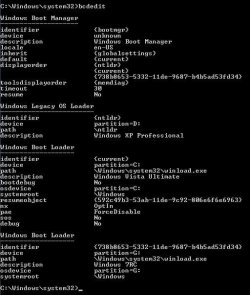
If anyone would like additional info about my system status or screen shots of the output of BCDEDIT or anything else that might help to resolve this issue I'd be more than happy to provide them.
 

Attachments

  • bcdedit-screen1.jpg
    bcdedit-screen1.jpg
    40.1 KB · Views: 198

My Computer

Computer Manufacturer/Model Number
Hand built
OS
XP/Vista
CPU
AMD X2 4600+ socket 939
Motherboard
MSI K8 neo4
Memory
2 gb
Graphics Card(s)
Nvidia 8800 GTX
Sound Card
Realtek (onboard)
Monitor(s) Displays
2 dell 21" CRT
Hard Drives
320gb SATA
160gb IDE
PSU
750 watt
Case
modded generic
Cooling
air
I wondering if you were able to resolve the boot issue. I am having a very similar problem. I am installing win 7 to a second partition on my raid array. The Vista is on this drive as well and is the system we boot into. When I install win 7 it does not overwrite or update the vista boot record on this drive. If I run the win 7 iso and try and repair the vista boot record it alerts me that it is not compatable with the vista boot reocrd and make no changes. If I try and repair the win 7 boot record the log shows`me all is fine and it is bootable. Not sure where to go next but I will likely play around with the vista boot record using the vista disk and atempt to add win 7 as an option.

I did add win 7 to the vista boot using EasyBCD. But, i get an error mesage (not recognized id or somethng like that) when I select win 7.

like you I do not want to wipe my vista install. I am really suprised that this is not an easy fix. So I must be missing something obvious.
 

My Computer

Computer Manufacturer/Model Number
Home Built
OS
XP, Win_7 64 7100
CPU
Intel Q6600
Motherboard
ASUS P5E3 Deluxe X38 chipset
Memory
1033 4x1 GB
Graphics Card(s)
ATI 4850x2
Sound Card
SoundMax Intergrated
Monitor(s) Displays
SyncMaster 2493HM, SyncMaster 204t
Screen Resolution
1920x1200. 1600x120,
Hard Drives
VelociRaprtor Raid 0 300 GB array, Raid 1 750 GB array
PSU
PC P&C Silencer 750W Quad
Case
Cosmos
Cooling
Zallman 110 mm and more fans
Keyboard
Tarantula Razor
Mouse
LogitecMx518
Internet Speed
9.5 down .750 up
Resolved - Well not really read on

Perhaps this was an obvious screw up. It appears that the original problem stemmed from installing Win 7 into an existing formatted non active partition. I was installing Win 7 into this previously formatted partition. I made it active and that was a bit of mistake because I could no longer boot Vista either. I tried to get the active partition to boot using BootRec at the command line with no luck.

So:

Deleted the Win 7 partition and installed Win 7 into the free non-formatted space.

Repaired Vista boot using my 32 bit Vista disk. I guess I had messed up my Vista boot record on that partition with all of the repair attempts I had made. Not sure why I was getting "no system..." message ( I also did a system restore on my Vista partition to earlier in the day hoping to make the VISTA partition active)

Restarted and Win 7 setup completed

I can now start up Win 7 64 or Vista x86 on my raid drive.

BUT Wait - Only if if have the Vista 32 cd in the drive and I let the it time out to not start from the CD. If the CD is not in the drive it will not start... No system

I am tired I am taking a break :rolleyes:
 

My Computer

Computer Manufacturer/Model Number
Home Built
OS
XP, Win_7 64 7100
CPU
Intel Q6600
Motherboard
ASUS P5E3 Deluxe X38 chipset
Memory
1033 4x1 GB
Graphics Card(s)
ATI 4850x2
Sound Card
SoundMax Intergrated
Monitor(s) Displays
SyncMaster 2493HM, SyncMaster 204t
Screen Resolution
1920x1200. 1600x120,
Hard Drives
VelociRaprtor Raid 0 300 GB array, Raid 1 750 GB array
PSU
PC P&C Silencer 750W Quad
Case
Cosmos
Cooling
Zallman 110 mm and more fans
Keyboard
Tarantula Razor
Mouse
LogitecMx518
Internet Speed
9.5 down .750 up
Hi,

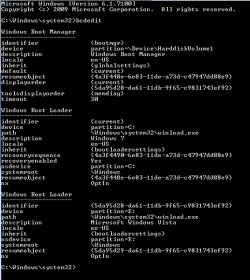
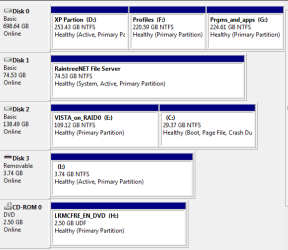
Could you post a screenshot of bcdedit and Disk Management?
 

My Computers

System One System Two

  • Computer type
    PC/Desktop
    OS
    7 X64
    CPU
    i5 8400
    Motherboard
    gigabyte b365m ds3h
    Memory
    2x8gb 3200mhz
    Hard Drives
    various
    PSU
    pure power 11 400w cm
    Case
    Coolermaster
    Cooling
    cryorig m9i
  • Computer type
    PC/Desktop
    OS
    7x64
    CPU
    g5400
    Motherboard
    ga b365m ds3h
    Memory
    8gb ddr4 2400
    PSU
    xfx pro 450w
Thank you, Here is the information. I am not very proficient with the boot system. For example is devicevolume1 equal to drive 0 or 1.

It looks like vol 2 (Disk 2) has no active partition and should have one. The install is pointing to vol 0 for the boot manager. Volume 1 (Drive 1) is a drive I plan to remove from this system. My BIOS is set to boot from vol 2 and this is where the VISTA and Win 7 partitions are installed.

I suppose I should make C partition active. But I need to point to vol 2 as the MBR as well and make sure vol 2 has a Win 7 compatible boot manager on it. Since I get no system installed when I boot now, I think this indicates I have no MBR on vol 2.


Thanks again for any help. And I plan to read through this link, http://www.sevenforums.com/tutorials/2676-bcdedit-how-use.html
 

Attachments

  • BCDEDIT.PNG
    BCDEDIT.PNG
    8.2 KB · Views: 214
  • Disk Managment.PNG
    Disk Managment.PNG
    12.4 KB · Views: 88

My Computer

Computer Manufacturer/Model Number
Home Built
OS
XP, Win_7 64 7100
CPU
Intel Q6600
Motherboard
ASUS P5E3 Deluxe X38 chipset
Memory
1033 4x1 GB
Graphics Card(s)
ATI 4850x2
Sound Card
SoundMax Intergrated
Monitor(s) Displays
SyncMaster 2493HM, SyncMaster 204t
Screen Resolution
1920x1200. 1600x120,
Hard Drives
VelociRaprtor Raid 0 300 GB array, Raid 1 750 GB array
PSU
PC P&C Silencer 750W Quad
Case
Cosmos
Cooling
Zallman 110 mm and more fans
Keyboard
Tarantula Razor
Mouse
LogitecMx518
Internet Speed
9.5 down .750 up
Hi ,

Bootmgr and the Boot folder ( containing bcd) are on Disk 1 - that is why it says "system".

You might be better to mark E active.

Make sure Disk2 is first hd in bios boot order.

Boot the 7 dvd to system recovery options ( click "Repair my Computer" - underneath where it says Install now).

Startup repair should run automatically - it will take a few runs.

That should make E the system partition.
 

My Computers

System One System Two

  • Computer type
    PC/Desktop
    OS
    7 X64
    CPU
    i5 8400
    Motherboard
    gigabyte b365m ds3h
    Memory
    2x8gb 3200mhz
    Hard Drives
    various
    PSU
    pure power 11 400w cm
    Case
    Coolermaster
    Cooling
    cryorig m9i
  • Computer type
    PC/Desktop
    OS
    7x64
    CPU
    g5400
    Motherboard
    ga b365m ds3h
    Memory
    8gb ddr4 2400
    PSU
    xfx pro 450w
I will give that a try and clean this up.

I have it booting now since making disk1 the first in the order. It gives me a choice to boot my vista or win 7 partition. But as I said that drive is going away. If I Disk0 first in the boot order it gives me the choice to start vista or my xp partition.

Thanks for the advice and help
 

My Computer

Computer Manufacturer/Model Number
Home Built
OS
XP, Win_7 64 7100
CPU
Intel Q6600
Motherboard
ASUS P5E3 Deluxe X38 chipset
Memory
1033 4x1 GB
Graphics Card(s)
ATI 4850x2
Sound Card
SoundMax Intergrated
Monitor(s) Displays
SyncMaster 2493HM, SyncMaster 204t
Screen Resolution
1920x1200. 1600x120,
Hard Drives
VelociRaprtor Raid 0 300 GB array, Raid 1 750 GB array
PSU
PC P&C Silencer 750W Quad
Case
Cosmos
Cooling
Zallman 110 mm and more fans
Keyboard
Tarantula Razor
Mouse
LogitecMx518
Internet Speed
9.5 down .750 up
You have Vista bootmgr and boot folder and the XP bootfiles , ntldr and boot.ini on Disk 0.

If you make E ( Disk2 ) system partition as I posted earlier - you can then remove Disk1 when you like.

You can add XP to 7 boot menu afterwards.
 

My Computers

System One System Two

  • Computer type
    PC/Desktop
    OS
    7 X64
    CPU
    i5 8400
    Motherboard
    gigabyte b365m ds3h
    Memory
    2x8gb 3200mhz
    Hard Drives
    various
    PSU
    pure power 11 400w cm
    Case
    Coolermaster
    Cooling
    cryorig m9i
  • Computer type
    PC/Desktop
    OS
    7x64
    CPU
    g5400
    Motherboard
    ga b365m ds3h
    Memory
    8gb ddr4 2400
    PSU
    xfx pro 450w
Back
Top