Cannot boot Windows 7 Professional without DVD!

sushi714

New member
Local time
10:52 PM
Messages
9
Hello,

I posted this problem on Microsoft answers yesterday, but have yet to find a working solution, so I am posting it here, in hopes that someone has had the same problem and has found a fix for it...

I purchased Windows 7 Professional 64-bit (as a student) and created an ISO, then burned it onto a DVD. I installed Windows 7 Pro on a system previously running Windows Vista Home Premium 32-bit.

I had no problems until this past Sunday. At first, I had a "BOOTMGR is missing" error. Since I had "custom" installed Windows 7 on the same hard drive I had Vista on without formatting the drive, I thought that formatting the drive and reinstalling Windows 7 would solve the problem, but it has not.

My current boot error provides the following information:

File: Boot\BCD
Status: 0xc0000034
Info: The Windows Boot Configuration Data file is missing required information.


I've read several posts with solutions for problems similar to this and most have suggested first trying to have the Windows 7 install disc try to identfy boot problems. I have done this and experienced an interesting problem. When it scans the drive for boot errors, none are found, but I noticed it says my Windows installation is on the D: drive, but when I am actually logged into Windows 7, the installation is on the C: drive. In addition, I have also tried a suggestion to use command prompt and fix the BCD (bootrec /RebuildBCD), but it still has not changed anything.

I am really clueless where to proceed from here. I have held off from reinstalling anything onto my system in case any solutions presented require me to reformat or lose any of my applications/settings.

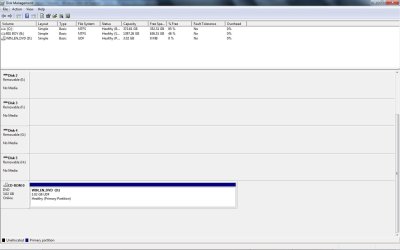
The only other thing I can think of that is potentially causing this error is that my secondary hard drive (B:) is listed as Disk 0 under Disk Management, while the drive with my Windows 7 installation (C:) is listed as Disk 1.

Thanks in advance for any help and please let me know if any additional information would be helpful to anyone willing to find me a solution for this problem!
 

My Computer

Computer Manufacturer/Model Number
HP Pavilian a6230n
OS
Windows 7 Professional
CPU
AMD Athlon 64 X2 5600+
Have you tried running Startup Repair?
 

My Computer

Computer Manufacturer/Model Number
Custom
OS
Windows 7 Professional x64
CPU
Intel i7 2600K OC'd @ 4620 MHz
Motherboard
Asus P8Z68-V Pro
Memory
16GB GSkill Sniper 2133 Mhz (4x4GB)
Graphics Card(s)
EVGA GeForce GTX 480 SuperClocked+
Sound Card
Realtek High Definition Audio
Monitor(s) Displays
2x Acer S273HLbmii 27"
Screen Resolution
2 x 1920x1080
Hard Drives
64GB Crucial M4 SSD

Storage: Hitachi 1TB 5400RPM, Samsung 1.5TB 5400RPM
PSU
Corsair HW Series 750w (modular)
Case
Cooler Master HAF 932 Advanced Blue Edition
Cooling
CM Hyper 212+ CPU cooler, 3x 230mm + 1x 140mm case fans
Keyboard
Logitech MK320 (wireless)
Mouse
Logitech MK320 (wireless)
Internet Speed
30 Mb/s : 2 Mb/s
Yes, I've run startup repair before and it says there are no boot errors. As I said in my initial post, I also found it strange that repair says my Windows installation is on my D: because when I actually log in to Windows 7, my installation is on my C: drive.
 

My Computer

Computer Manufacturer/Model Number
HP Pavilian a6230n
OS
Windows 7 Professional
CPU
AMD Athlon 64 X2 5600+

My Computers

System One System Two

  • Computer type
    PC/Desktop
    OS
    7 X64
    CPU
    i5 8400
    Motherboard
    gigabyte b365m ds3h
    Memory
    2x8gb 3200mhz
    Hard Drives
    various
    PSU
    pure power 11 400w cm
    Case
    Coolermaster
    Cooling
    cryorig m9i
  • Computer type
    PC/Desktop
    OS
    7x64
    CPU
    g5400
    Motherboard
    ga b365m ds3h
    Memory
    8gb ddr4 2400
    PSU
    xfx pro 450w
(Posted 2 screenshots, since my DVD writer was all the way on the bottom of the list.)

My Windows installation is on C: in this case (rather than D:, where Windows 7 startup repair finds my installation).

Also, I just realized this after searching around the web about "System" partitions, when I first installed Windows 7, my secondary drive (B:, as shown in the screenshot) was not active, so I went into Disk Management and made it active. Not sure if this in any way cause the problem, but I figured I'd provide this information in case it may have.
 

Attachments

  • Untitled.jpg
    Untitled.jpg
    99 KB · Views: 876
  • Untitled2.jpg
    Untitled2.jpg
    63.5 KB · Views: 511

My Computer

Computer Manufacturer/Model Number
HP Pavilian a6230n
OS
Windows 7 Professional
CPU
AMD Athlon 64 X2 5600+
Go into Bios, make sure DISK 1 is the first HD in bios boot order. After cdrom is ok - but it must be the first HD .

Boot the dvd . Run Startup repair 3 times.
 

My Computers

System One System Two

  • Computer type
    PC/Desktop
    OS
    7 X64
    CPU
    i5 8400
    Motherboard
    gigabyte b365m ds3h
    Memory
    2x8gb 3200mhz
    Hard Drives
    various
    PSU
    pure power 11 400w cm
    Case
    Coolermaster
    Cooling
    cryorig m9i
  • Computer type
    PC/Desktop
    OS
    7x64
    CPU
    g5400
    Motherboard
    ga b365m ds3h
    Memory
    8gb ddr4 2400
    PSU
    xfx pro 450w
Go into Bios, make sure DISK 1 is the first HD in bios boot order.

Boot the dvd . Run Startup repair 3 times.
Will do...be back in a few...
 

My Computer

Computer Manufacturer/Model Number
HP Pavilian a6230n
OS
Windows 7 Professional
CPU
AMD Athlon 64 X2 5600+
Okay, so I changed the boot order to boot the HDD Group first with the hard drive that has my Windows installation on it, but all 3 times I restarted it took me directly to the error I mentioned in my first post.

Could B: drive being labeled as a "System" partition be causing a problem during the boot? Or is there some other explanation for all this?
 

My Computer

Computer Manufacturer/Model Number
HP Pavilian a6230n
OS
Windows 7 Professional
CPU
AMD Athlon 64 X2 5600+
Yes, that's exactly it.

Type cmd in start search - when it pops up, rt click and run as Admin , then type: ( Press enter after each command.)

Diskpart

sel vol b

inact

exi

( to leave diskpart)

bcdboot c:\windows /s c:

d:\boot\bootsect.exe /nt60 ALL /force /mbr


Close cmd prompt.

Restart - without the dvd in the drive.
 

My Computers

System One System Two

  • Computer type
    PC/Desktop
    OS
    7 X64
    CPU
    i5 8400
    Motherboard
    gigabyte b365m ds3h
    Memory
    2x8gb 3200mhz
    Hard Drives
    various
    PSU
    pure power 11 400w cm
    Case
    Coolermaster
    Cooling
    cryorig m9i
  • Computer type
    PC/Desktop
    OS
    7x64
    CPU
    g5400
    Motherboard
    ga b365m ds3h
    Memory
    8gb ddr4 2400
    PSU
    xfx pro 450w
Thanks again...going to test it out, brb.
 

My Computer

Computer Manufacturer/Model Number
HP Pavilian a6230n
OS
Windows 7 Professional
CPU
AMD Athlon 64 X2 5600+
Yes, that's exactly it.

Type cmd in start search - when it pops up, rt click and run as Admin , then type: ( Press enter after each command.)

Diskpart

sel vol b

inact

exi

( to leave diskpart)

bcdboot c:\windows /s c:

d:\boot\bootsect.exe /nt60 ALL /force /mbr


Close cmd prompt.

Restart - without the dvd in the drive.
Okay, so I followed all of these instructions, but still ran into the following error:

File: Boot\BCD
Status: 0xc0000034
Info: The Windows Boot Configuration Data file is missing required information.

I then restarted with the DVD in the drive again and it immediatly booted and took me to Windows 7 install. I went to repair and noticed there were no Windows installations listed, so I did a Startup Repair.

Took the DVD out after the startup repair and got the same error above during the boot again, so I restarted again with the DVD in the drive. I didn't boot from the DVD, but just left it in and let it start up on its own and it brought me back into Windows 7 again. Checked Disk Management to see if anything changed, but still looks like it did when I posted the screen shots.

So basically, I'm back at where I started...
 

My Computer

Computer Manufacturer/Model Number
HP Pavilian a6230n
OS
Windows 7 Professional
CPU
AMD Athlon 64 X2 5600+
Did all the commands report as successful?

Open an elevated command and type:

bcdedit /enum /v

Post the contents it displays
 

My Computers

System One System Two

  • Computer type
    PC/Desktop
    OS
    7 X64
    CPU
    i5 8400
    Motherboard
    gigabyte b365m ds3h
    Memory
    2x8gb 3200mhz
    Hard Drives
    various
    PSU
    pure power 11 400w cm
    Case
    Coolermaster
    Cooling
    cryorig m9i
  • Computer type
    PC/Desktop
    OS
    7x64
    CPU
    g5400
    Motherboard
    ga b365m ds3h
    Memory
    8gb ddr4 2400
    PSU
    xfx pro 450w
I am unsure. I'm pasting everything in the cmd window below so you can see the results when I entered in the commands you suggested. (Basically, I'm trying this again, so I'll see if it fixes it the second time.)


Microsoft Windows [Version 6.1.7600]
Copyright (c) 2009 Microsoft Corporation. All rights reserved.
C:\Windows\system32>Diskpart
Microsoft DiskPart version 6.1.7600
Copyright (C) 1999-2008 Microsoft Corporation.
On computer: PLATINUM
DISKPART> sel vol b
Volume 1 is the selected volume.
DISKPART> inact
DiskPart marked the current partition as inactive.
DISKPART> exi
Leaving DiskPart...
C:\Windows\system32>bcdboot c:\windows /s c:
Boot files successfully created.
C:\Windows\system32>d:\boot\bootsect.exe /nt60 ALL /force /mbr
Target volumes will be updated with BOOTMGR compatible bootcode.
B: (\\?\Volume{a41593c4-c731-11de-b8eb-806e6f6e6963})
Forced dismount complete, open handles to this volume are now invalid.
Successfully updated NTFS filesystem bootcode.
C: (\\?\Volume{a41593c5-c731-11de-b8eb-806e6f6e6963})
Updated NTFS filesystem bootcode. The update may be unreliable since the
volume could not be dismounted during the update:
Access is denied.
E: (\\?\Volume{a41593d8-c731-11de-b8eb-806e6f6e6963})
Could not open the volume root directory:
The parameter is incorrect.
F: (\\?\Volume{a41593d9-c731-11de-b8eb-806e6f6e6963})
Could not open the volume root directory:
The parameter is incorrect.
G: (\\?\Volume{a41593da-c731-11de-b8eb-806e6f6e6963})
Could not open the volume root directory:
The parameter is incorrect.
H: (\\?\Volume{a41593db-c731-11de-b8eb-806e6f6e6963})
Could not open the volume root directory:
The parameter is incorrect.
\??\PhysicalDrive0
Successfully updated disk bootcode.
\??\PhysicalDrive1
Successfully updated disk bootcode.
\??\PhysicalDrive2
Could not prepare disk(s) for update:
The device is not ready.
\??\PhysicalDrive3
Could not prepare disk(s) for update:
The device is not ready.
\??\PhysicalDrive4
Could not prepare disk(s) for update:
The device is not ready.
\??\PhysicalDrive5
Could not prepare disk(s) for update:
The device is not ready.
Bootcode was successfully updated on at least one volume.
C:\Windows\system32>
 

My Computer

Computer Manufacturer/Model Number
HP Pavilian a6230n
OS
Windows 7 Professional
CPU
AMD Athlon 64 X2 5600+
That looks right.
 

My Computers

System One System Two

  • Computer type
    PC/Desktop
    OS
    7 X64
    CPU
    i5 8400
    Motherboard
    gigabyte b365m ds3h
    Memory
    2x8gb 3200mhz
    Hard Drives
    various
    PSU
    pure power 11 400w cm
    Case
    Coolermaster
    Cooling
    cryorig m9i
  • Computer type
    PC/Desktop
    OS
    7x64
    CPU
    g5400
    Motherboard
    ga b365m ds3h
    Memory
    8gb ddr4 2400
    PSU
    xfx pro 450w
SIW2, you're a life saver!

Not sure what happened the first time I entered the commands, but seemed like the 2nd time did the trick.

Thanks so much -- now I can get back to my life! :)
 

My Computer

Computer Manufacturer/Model Number
HP Pavilian a6230n
OS
Windows 7 Professional
CPU
AMD Athlon 64 X2 5600+
I think you may have made a typo the first time.

Glad it worked for you.

Have fun.:D
 

My Computers

System One System Two

  • Computer type
    PC/Desktop
    OS
    7 X64
    CPU
    i5 8400
    Motherboard
    gigabyte b365m ds3h
    Memory
    2x8gb 3200mhz
    Hard Drives
    various
    PSU
    pure power 11 400w cm
    Case
    Coolermaster
    Cooling
    cryorig m9i
  • Computer type
    PC/Desktop
    OS
    7x64
    CPU
    g5400
    Motherboard
    ga b365m ds3h
    Memory
    8gb ddr4 2400
    PSU
    xfx pro 450w
I think you may have made a typo the first time.

Glad it worked for you.

Have fun.:D

AWESOME! I just had the same problem... thank you for this! :D
 

My Computer

Computer Manufacturer/Model Number
Built by Me
OS
Windows 7 Premium 32 bit
CPU
Intel Core 2 Extreme QX6850 Kentsfield 3.0GHz LGA 775 130W Q
Motherboard
EVGA 132-CK-NF79-A1 LGA 775 NVIDIA nForce 790i Ultra SLI ATX
Memory
Kingston 4GB (4 x 1GB) 240-Pin DDR3 SDRAM DDR3 1333 (PC3 106
Graphics Card(s)
SAPPHIRE 100281SR Radeon HD 5870 (Cypress XT) 1GB 256-bit GD
Sound Card
Creative Sound Blaster X-Fi Titanium Fatal1ty Professional P
Monitor(s) Displays
SAMSUNG ToC T260 Rose-Black 25.5" 5ms HDMI Widescreen LCD Mo
Screen Resolution
1920 x 1200
Hard Drives
3 x Western Digital Raptor X WD1500AHFD 150GB 10000 RPM SATA 1.5Gb/s 3.5" Hard Drive -Bare Drive
PSU
Thermaltake Toughpower W0133RU 1200W ATX12V / EPS12V SLI Cer
Case
COOLER MASTER Stacker 830 Evolution RC-830-KKR3-GP Black Alu
Cooling
ZALMAN CNPS 9700 NT 110mm 2 Ball Ultra Quiet CPU Cooler
Keyboard
Logitech G15 Gaming Keyboard
Mouse
Razer Mamba Mouse
Internet Speed
High Speed Cable
Other Info
9 x XIGMATEK XLF-F1253 120mm 4 white LED LED Case Fan
Glad to see it worked for you - have fun running 7.:D
 

My Computers

System One System Two

  • Computer type
    PC/Desktop
    OS
    7 X64
    CPU
    i5 8400
    Motherboard
    gigabyte b365m ds3h
    Memory
    2x8gb 3200mhz
    Hard Drives
    various
    PSU
    pure power 11 400w cm
    Case
    Coolermaster
    Cooling
    cryorig m9i
  • Computer type
    PC/Desktop
    OS
    7x64
    CPU
    g5400
    Motherboard
    ga b365m ds3h
    Memory
    8gb ddr4 2400
    PSU
    xfx pro 450w
Thank you.

Resolved my issue as well. Greatly appreciated.
 

My Computer

Computer Manufacturer/Model Number
HP
OS
Windows 7 Professional
CPU
AMD Athlon 64 X2 Dual Core Processor 5000+ 2.60 GHz
Memory
4 Gb
Graphics Card(s)
nVidia GeForce 9500 GT
Hi … I have a same problem with some differences … I format and install windows 7 Ultimate on my pc in my new raid array of 2 Intel ssd’s … I have made 10 format and installs the os because I cant boot directly from the array and I need to boot first from dvd and after from boot manager the windows 7 … I have make bootable the array from nvidia raid creator, the order in bios boot sequence is correct with array first in boot line but all the time I need the dvd support to run the os … if the dvd not present "disk boot failure" … with 10 formats and reformat and delete array and recreate array all from the beginning I can’t think were may be the problem … anyone can help me … sorry for my English …:o
 

My Computer

Computer Manufacturer/Model Number
Custom
OS
windows 7 32bit
CPU
Q8200 intel quad core
Motherboard
asus striker II extreme
Memory
patriot 2gb kit @ 1600
Graphics Card(s)
2 x 260 gtx
Sound Card
HD audio supremesx II
Monitor(s) Displays
42" HD TV
Hard Drives
2 x 40 GB SSD intel for the OS and 1 western digital 1,5 TB for rest
PSU
Corsair 950 tx series
Case
Coller master haf 945
Cooling
Air cooling
Back
Top