
Solved Cannot change 640x480 screen resolution with TeamViewer

HaziqNR

New member
Local time
4:47 PM
Messages
7
Hi,

My laptop screen is broken so I decided to remote control the laptop through my other laptop using TeamViewer. Since there is no screen for the laptop, I only got 640x480 screen resolution option. If I plug in the laptop with TV or other monitor it should be fine. If you guys know how to fix it, let me know.

Thanks
 

Attachments
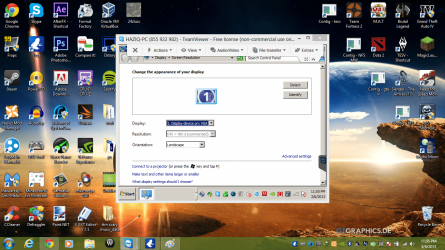
  • 640x480.png
    640x480.png
    294.8 KB · Views: 9

My Computer My Computer

Computer type
Laptop
Computer Manufacturer/Model Number
HP
OS
Windows 7 Home Premium x64
CPU
Core 2 Duo T6600
Memory
4 GB
Graphics Card(s)
Nvidia 105M
Antivirus
Microsoft Security Essentials
Browser
Google Chrome
I take it this issue was resolved once you connected it to an external monitor?

I ask because a client of mine contacted me about the same problem. Her family removed the monitor from the computer, and I'm guessing the resolution will be normal once another monitor is connected.
 

My Computer My Computer

Computer type
PC/Desktop
Computer Manufacturer/Model Number
Toshiba Qosmio X505-Q894
OS
Win 8.1 Pro
CPU
Intel® Core™ i7-740QM processor
Memory
8 GB
Graphics Card(s)
NVIDIA® GeForce® GTX 460M
Monitor(s) Displays
2
Screen Resolution
1680x945 & 1920x1080
Internet Speed
Cable
Other Info
Excellent desktop replacement for work & gaming.
I think it resolve by itself but not in widescreen (the laptop screen resolution). I restarted the laptop without any monitor and connected it to my other laptop and then I can change the screen resolution. I got around 1600x1200 screen resolution. Thanks anyway for your reply :)
 

My Computer My Computer

Computer type
Laptop
Computer Manufacturer/Model Number
HP
OS
Windows 7 Home Premium x64
CPU
Core 2 Duo T6600
Memory
4 GB
Graphics Card(s)
Nvidia 105M
Antivirus
Microsoft Security Essentials
Browser
Google Chrome
Back
Top