Solved Cannot change main display--dual monitors

Dave3141942

New member
Local time
1:26 PM
Messages
3
I have two monitors. The graphics card has VGA and DVI ports. The VGA monitor has much larger screen & I want that to be the main display. Currently the smaller (DVI) display is main display, i.e, Number 1. I want the larger VGA display to be the main display, i.e., to be Number 1. Both monitors are displaying my wallpaper and the smaller screen (DVI) shows my icons, etc. In Windows 7, I go to DISPLAY, SCREEN RESOLUTION window. On that page I have made the following selections:
Display: the VGA display
Resolution: 1280 x 768
Multiple Displays: Extend Desktop to this Display (only alternative is to Disconnect this Display)
Make This My Main Display: Checked, i.e., √

When I click APPLY , I get "Unable to save display settings" --thus I cannot change main displays.
Some insightful comments would be be welcome.

P.S. Swapping display icons by dragging only changes the direction the cursor slides off the display.
I do not have any utility software for the graphics card, and I do not know how to get it, if it exists-(I have looked for it)--I have only the driver. There is no on board graphics on the motherboard.
 

My Computer My Computer

Computer type
PC/Desktop
Computer Manufacturer/Model Number
Sony Pcv-RS320G
OS
Windows 7 Professionsl 32-bit
CPU
Pentium 4 3.2 GHz
Memory
2.8 GB
Graphics Card(s)
ATI Radeon 9200
Antivirus
MS Essentials
Browser
IE
Please update your system specs, or provide details on your graphics card.

There is no Windows 7 support for the Radeon 9200, if that's what you still have (which I somehow doubt).

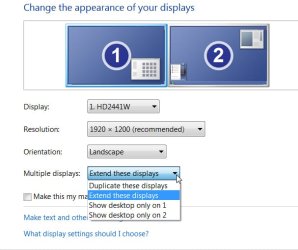
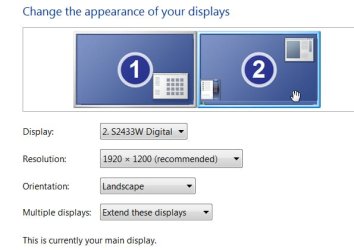
On a working dual-monitor system (e.g. using my HD5870) the setup for the two monitors looks as follows. Note that my "primary main display" is the one on the right, shown as #2. So my desktop extends to the left from the left edge of #2 onto the right edge of #1.
 

Attachments

  • Monitor-1.jpg
    Monitor-1.jpg
    35.1 KB · Views: 9
  • Monitor-2.jpg
    Monitor-2.jpg
    26.1 KB · Views: 9

My Computer My Computer

Computer type
PC/Desktop
Computer Manufacturer/Model Number
Home-built, two systems (1) and (2)
OS
Windows 7 Pro x64 (1), Win7 Pro X64 (2)
CPU
i5-3350p 3.1Ghz/6MB-cache (1); E8400 3.0Ghz/6MB-cache (2)
Motherboard
ASUS P8Z77-V Pro (1); ASUS P5Q3 (2)
Memory
8GB PC3-12800 DDR3 (1); 4GB PC3-10600 DDR3 (2)
Graphics Card(s)
ATI HD7750 (1), (see TV cards); ATI R7 250 (2)
Sound Card
Realtek ALC892 HD Audio (1); Realtek ALC1200 HD Audio (2)
Monitor(s) Displays
Eizo HD2441W LCD, Eizo S2433W (1); Eizo 24" S2433W (2)
Screen Resolution
1920x1200, 1920x1200 (1); 1920x1200 (2)
Hard Drives
(1) 1TB SATA-II (7200RPM), 2x2TB SATA-III (7200RPM), 250GB SATA-III (10000RPM) for OS; 2x2TB external USB 3.0

(2) 320GB SATA-II (7200RPM), 750GB SATA-II (7200RPM), 150GB SATA-II (10000RPM) for OS; 2TB external USB 3.0
PSU
Nesteq ECS-6001 600W (1); Nesteq ECS-5001 500W (2)
Case
Acousti-Case 360 (1) and (2)
Cooling
Noctua NH-U12P SE2 for CPU, 2x120mm case fans (1) and (2)
Keyboard
IBM PS/2 (1) and (2)
Mouse
Logitech MX Revolution wireless (1); Microsoft wired (2)
Internet Speed
100mbps down / 10mbps up
Antivirus
Microsoft Security Essentials; Malwarebyte Anti-Malware Pro
Browser
Firefox
Other Info
Ceton InfiniTV 4-tuner cablecard-enabled TV card as well as Hauppauge HVR-2250 OTA/ATSC 2-tuner TV card in (1), running under Win7 WMC
More on dual display

It is indeed a Ati Radeon 9200. I was able to get it to work (recently updated from XP to Windows 7) on Windows 7 by applying a hack to the XP driver. It has occurred to me (now) that perhaps Windows 7 is trying to talk to the graphics card subsequent to when I click APPLY. If that is the case, then the solution is to just buy a larger monitor because as you say "Windows 7 does not support the Radeon 9200." My initial assumption was that we were strictly dealing with an internal Windows 7 issue or I was doing something out of sequence. What do you think?

P.S. This graphics card is probably 10-14 years old but it certainly is sufficient for my purposes. ( I am an old guy and I love to get the old stuff to run). :D
 

My Computer My Computer

Computer type
PC/Desktop
Computer Manufacturer/Model Number
Sony Pcv-RS320G
OS
Windows 7 Professionsl 32-bit
CPU
Pentium 4 3.2 GHz
Memory
2.8 GB
Graphics Card(s)
ATI Radeon 9200
Antivirus
MS Essentials
Browser
IE
If you have a Sony PCV-RS320 and you want to keep it then you don't have any options. Its AGP video and the Radeon 9200 in it is unsupported in Win7.

If you feel like spending money on a larger monitor and keeping this machine, that's your choice.

But it really might be a much more prudent use of your money to maybe look for an inexpensive new modern machine, e.g. a "refurb" Thinkcentre desktop from Lenovo from their Outlet which is a much less costly alternative than buying one new. You'd really get MUCH MORE VALUE for any dollars spent going this route than hanging on to your 14-year old Sony and trying to make it live a few months longer.

That's just my opinion, of course.
 

My Computer My Computer

Computer type
PC/Desktop
Computer Manufacturer/Model Number
Home-built, two systems (1) and (2)
OS
Windows 7 Pro x64 (1), Win7 Pro X64 (2)
CPU
i5-3350p 3.1Ghz/6MB-cache (1); E8400 3.0Ghz/6MB-cache (2)
Motherboard
ASUS P8Z77-V Pro (1); ASUS P5Q3 (2)
Memory
8GB PC3-12800 DDR3 (1); 4GB PC3-10600 DDR3 (2)
Graphics Card(s)
ATI HD7750 (1), (see TV cards); ATI R7 250 (2)
Sound Card
Realtek ALC892 HD Audio (1); Realtek ALC1200 HD Audio (2)
Monitor(s) Displays
Eizo HD2441W LCD, Eizo S2433W (1); Eizo 24" S2433W (2)
Screen Resolution
1920x1200, 1920x1200 (1); 1920x1200 (2)
Hard Drives
(1) 1TB SATA-II (7200RPM), 2x2TB SATA-III (7200RPM), 250GB SATA-III (10000RPM) for OS; 2x2TB external USB 3.0

(2) 320GB SATA-II (7200RPM), 750GB SATA-II (7200RPM), 150GB SATA-II (10000RPM) for OS; 2TB external USB 3.0
PSU
Nesteq ECS-6001 600W (1); Nesteq ECS-5001 500W (2)
Case
Acousti-Case 360 (1) and (2)
Cooling
Noctua NH-U12P SE2 for CPU, 2x120mm case fans (1) and (2)
Keyboard
IBM PS/2 (1) and (2)
Mouse
Logitech MX Revolution wireless (1); Microsoft wired (2)
Internet Speed
100mbps down / 10mbps up
Antivirus
Microsoft Security Essentials; Malwarebyte Anti-Malware Pro
Browser
Firefox
Other Info
Ceton InfiniTV 4-tuner cablecard-enabled TV card as well as Hauppauge HVR-2250 OTA/ATSC 2-tuner TV card in (1), running under Win7 WMC
end of thread

Thanks for the comments-appreciate what you do.
 

My Computer My Computer

Computer type
PC/Desktop
Computer Manufacturer/Model Number
Sony Pcv-RS320G
OS
Windows 7 Professionsl 32-bit
CPU
Pentium 4 3.2 GHz
Memory
2.8 GB
Graphics Card(s)
ATI Radeon 9200
Antivirus
MS Essentials
Browser
IE
Back
Top