Solved Cannot change Status in System configuration

markaz

New member
Power User
VIP
Local time
6:17 PM
Messages
168
Location
Peoria, AZ
I attempted to run sfc /scannow and received a message that "Windows Resource Protection Could Not Start the Repair Service." I find that service is dependent on the Windows Modules Installer and that it must be running. In checking MSConfig > Service I find Windows Modules Installer is Stopped.
AF1QipM6owob6bHTm3q5pipRB3OWrxALQeog2gQyIuY

When I double click the service to change its status, absolutely nothing happens. None of the Services respond to double-clicking. The last time I manually changed the status of a Service was on August 9th. Any help would be greatly appreciated.
 

My Computer

Computer type
PC/Desktop
Computer Manufacturer/Model Number
Custom
OS
Windows 7 Home Premium x64
CPU
AMD A6-6400K APU
Motherboard
Gigabyte F2A88XM-D3H
Memory
8.0GB DDR3-1600
Graphics Card(s)
Radeon Onboard Graphics
Sound Card
Realtek High Def
Monitor(s) Displays
Acer K242HQL
Screen Resolution
1920x1080
Hard Drives
Samsung 850 EVO SSD 250GB
PSU
Corsair 430W
Case
Silverstone PS-08
Cooling
Enermax fans (120mm-intake, 80mm-exhaust)
Keyboard
Logitech K360
Mouse
Logitech M305 Cordless Optical
Internet Speed
Download 60.19Mbps Upload 6.71Mbps
Antivirus
AVG
Browser
Iron Version 51.0.2700.0 (64-bit)
Hi markaz,

I attempted to run sfc /scannow and received a message that "Windows Resource Protection Could Not Start the Repair Service." I find that service is dependent on the Windows Modules Installer and that it must be running. In checking MSConfig > Service I find Windows Modules Installer is Stopped.

When I double click the service to change its status, absolutely nothing happens. None of the Services respond to double-clicking. The last time I manually changed the status of a Service was on August 9th.

Surely you just need to click the tick box!
 

My Computer

Computer type
Laptop
Computer Manufacturer/Model Number
Fujitsu LIFEBOOK
OS
Win 7 HP SP1 64-bit Vista HB SP2 32-bit Linux Mint 18.3
CPU
Intel(R) Pentium(R) CPU P6200 @ 2.13GHz
Motherboard
FUJITSU FJNBB06
Memory
4.00 GB
Graphics Card(s)
Intel(R) Graphics Media Accelerator HD
Sound Card
[1] Realtek High Definition Audio [2] Intel(R) Display Audio
Screen Resolution
1366 x 768 x 32 bits (4294967296 colors) @ 59 Hz
Hard Drives
TOSHIBA MK5076GSX
Antivirus
AVG FREE
Hi All,
Greets,

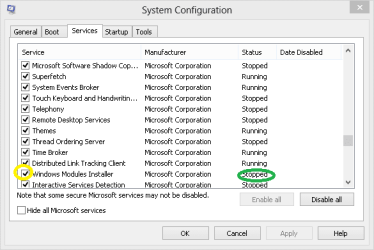
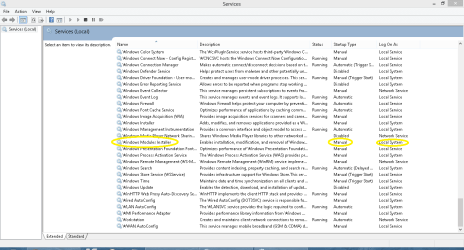
markaz : You are right 'Windows Modules Installer' needs to be started for running sfc /scannow but the service showing status stopped in msconfig is normal because its a Manual service & is started only when needed by the system or activity.
Look below in the images, its normal in this way :

In the msconfig : make sure that the box next to the service is checked as said by Sir.

Capture.PNG

In the Services Mangement Console : make sure the Startup Type is set as Manual & log on as set to Local System

Services.PNG

If you are getting the prompt :

"Windows Resource Protection Could Not Start the Repair Service."

Then you have to go in the Service Management Console & start it manually. Once the service is started, you should be able to run sfc /scannow.
You can't change the service running status from msconfig, there you can only make sure that the box next to it is checked as said above.

The Tip section in the below link has it all you need to know.

Repair Windows 7 System Files with System File Checker

Notes:
1.Startup Type is good as Manual. You need not change that. You have to just Start the service.

2.You need not restart the computer here for the changes to take affect. If the service is started, run the sfc /scannow.

Thanks & Regards. ...
 
Last edited:

My Computer

Computer type
Laptop
Computer Manufacturer/Model Number
hp compaq presario c795VU notebook pc
OS
Windows 7 Ultimate x32 With Sp1 + Vista Ultimate x32 with Sp1 & Sp2 !!
CPU
Intel Mobile Core 2 Duo T5750 @ 2.00GHz Merom 65nm Technolog
Motherboard
Hewlett-Packard 30D9 (CPU)
Memory
2.00GB Dual-Channel DDR2 @ 332MHz (5-5-5-15)
Graphics Card(s)
Mobile Intel(R) 965 Express Chipset Family
Sound Card
High Definition Audio Device
Monitor(s) Displays
LP154WX4-TLCB on Mobile Intel 965 Express Chipset Family
Screen Resolution
1280x800 @ 60Hz
Hard Drives
149GB Western Digital WDC WD1600BEVS-60VAT0 ATA Device (SATA)
Keyboard
Standard 101/102-Key or Microsoft Natural PS/2 Key + HP QLB
Mouse
ALPS pointing device
Antivirus
Kaspersky AV 2017(Win 7) & AVG AntiVirus Free 2016 (VISTA)
Browser
google chrome
Back
Top