Cannot change theme after uninstalled DreamScene

vavalent

New member
Local time
5:24 PM
Messages
3
Hi everyone,

My desktop (Windows 7 32-bit) has been experienced the problem for a week. The problem is that i cannot change the wallpaper and the theme. This problem starts right after I've uninstalled DreamScene.

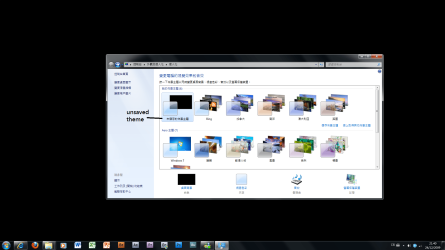
The attachment is below this post. I cannot delete the 'unsaved theme', everytime I press the other themes, it jumps back to the 'unsaved theme'.

Yesterday, I discovered that I can change the solid color settings, but still, I cannot select any picture file to be the wallpaper.

Is there any solution? Please help me because I really want to get back my wallpaper slideshow feature :(

Thank you so much
 

Attachments

  • theme.png
    theme.png
    117.3 KB · Views: 65

My Computer

OS
Windows 7
Two things come to mind, first open the Aero Troublshooter from Help and Support and run it. If that doesn't solve the problem, the only other thing that I can think of is to do a System Restore prior to the uninstallation. Obviously, that would mean needing to uninstall Dreamscape again, which could lead to the same problem again, but maybe not, if you used some other way to do the uninstall. Take note of any changes that are listed in the System Restore so that you can anticipate any other actions that you may need to perform.
 

My Computer

Computer Manufacturer/Model Number
DIY
OS
W7x64 Pro, SuSe 12.1/** W7 x64 Pro, XP MCE
CPU
Phenom II 1090T w/Noctua NH-D14 /**4400+ X2 w/CM Hyper TX 3
Motherboard
ASRock 890FX Deluxe 4/**A8N-SLI
Memory
2 x 2GB Patriot PGS34g1600LLKA/**4x1GB Corsair VS
Graphics Card(s)
EVGA GTX460 SC/**EVGA 8800GTS
Sound Card
Asus Xonar D2X/**Xonar D1
Monitor(s) Displays
Acer X233H, Dell E152FPc /**LG M237-WD
Screen Resolution
1920x1080 & 1024x768/**1980x1080
Hard Drives
WDC 2TB, 1.5TB, 1TB, 500GB,Seagate 500GB , Maxtor 80GB /**500GB Seagate & WDC 1TB Black
PSU
CM RS600 w/ APC BX1000G/**Antec 500 TP w/ APC BX1000
Case
HAF922/**Antec 1040IIB
Cooling
3x200mm, 1x140 and 1x120mm/**5x80mm fans
Keyboard
Logitech Media USB/**Saitek Eclipse
Mouse
Cordless Trackman Wheel/**Ditto
Internet Speed
3.3Mbps
Other Info
SB 560 5.1 w/ Sennheiser RS140/**Creative T20 speakers, Dvico FusionHDTV7 Gold RT, Cisco E3000, HP 5510V AIO, Linksys E3000, Belkin F5U237 hub and **F5D8055 adapter
(** = 2nd rig)

My Computer

Computer Manufacturer/Model Number
Dell Inspiron N5010
OS
Windows 7 Ultimate x64 SP1
CPU
Intel Core i3
Memory
4 GB DDR3
Screen Resolution
1366 X 768
Hard Drives
Seagate 500 GB
Internet Speed
4 MBPS
Thanks for ur reply, Venthan :)

Anyway... the method doesn't work :(

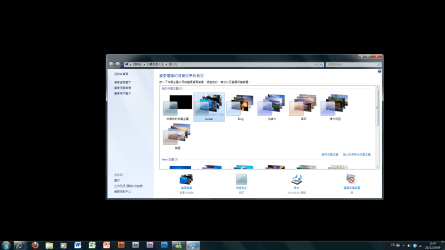
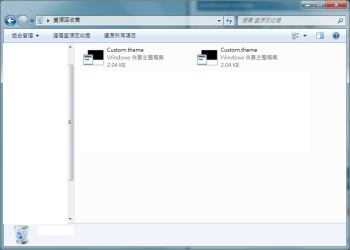
After I've pressed the other theme(s), the wallpaper still didn't change to what it should look like. When I tried to delete the "solid black" custom theme, it just copied the custom.theme to the recycle bin instead of delete it.

Is there any way to reset all the theme settings, such as delete the folder which contains all the user theme settings? Please help me, thanks!
 

Attachments

  • changed_theme_but_still_cannot_show_the_correct_theme_settings.png
    changed_theme_but_still_cannot_show_the_correct_theme_settings.png
    95.8 KB · Views: 156
  • bin.png
    bin.png
    21.3 KB · Views: 67

My Computer

OS
Windows 7
Did you bother to follow seekermeister's advice?

Do a system restore previous to the DreamScene install.
 

My Computer

Computer Manufacturer/Model Number
Home Grown
OS
Windows 7 Ultimate (64)
CPU
i7-2600K
Motherboard
Asus P8P67-M Pro
Memory
G.SKILL Ripjaws X Series 8GB (2 x 4GB)
Graphics Card(s)
ATI 5750
Sound Card
On-Board
Monitor(s) Displays
LG W2486L
Screen Resolution
1920X1080
Hard Drives
Intel X-25M 80 Gig SSD | Intel X-25M 160 Gig SSD | WD Black 500MB - External eSata
PSU
Zalman ZM770-XT 770 Watts
Case
Antec 180 mini
Cooling
Cooler Master V8
Internet Speed
15MB - Cable
Other Info
Sissy OC - 4.6 @ 1.3175 24/7 | 18' Idle - 55' Load
it looks the same as the problem i had before altho the cause is different...you have the black desktop problem and i have tried lot to solve it with no luck and i did what i didnt want to resort to which i formatted and reinstall windows 7....it could be a bug as i couldnt find a fix for it online

hope this help
 

My Computer

OS
windows 7 ultimate
i m having the same problem too... anyone can help???
 

My Computer

OS
windows 7 Home Premium 32bit
This may be a long shot but I would run a SFC /scannow which will fix any corrupted system files.
 

My Computer

Computer type
PC/Desktop
Computer Manufacturer/Model Number
Dell Dimension E521
OS
Windows 7 Ultimate x86 w/SP1
Memory
3GB
i have try the scf /verifyonly but it show no problem found...
 

My Computer

OS
windows 7 Home Premium 32bit
Back
Top