
Mark and 2 Cats
New member
- Local time
- 8:04 PM
- Messages
- 6
I have two computers, both running Windows 7. I can access one via Remote Desktop, but when I try it from the other computer, I get an error message: "Your computer can't connect to the remote computer because an error occured on the remote computer you want to connect to".
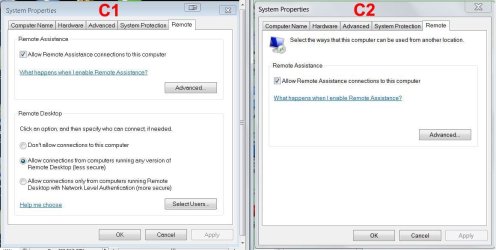
The computer I can connect to I will call C1, and the one I can't connect to, C2.
They can both see each each other's file directories, but I can only run Remote Desktop from C2.
On C2, when I try to configure allowed users, the Select Users button etc are missing.
What must I do to get Remote Desktop working on C2?
TY!
The computer I can connect to I will call C1, and the one I can't connect to, C2.
They can both see each each other's file directories, but I can only run Remote Desktop from C2.
On C2, when I try to configure allowed users, the Select Users button etc are missing.
What must I do to get Remote Desktop working on C2?
TY!
Attachments
My Computer
- Computer type
- PC/Desktop
- OS
- Windows 7 64-bit
- CPU
- Intel(R) Core(TM) i3 CPU - 540 @ 3.07GHz
- Motherboard
- Intel Corporation DH55TC (XU1)
- Memory
- 8GB Dual-Channel DDR3 @ 665MHz (9-9-9-24)
- Graphics Card(s)
- NVIDIA GeForce GTX 550 Ti
- Sound Card
- SB X-Fi Surround 5.1
- Screen Resolution
- 1920x1080
- Hard Drives
- 466GB Western Digital WDC WD5000AAKS-00V1A0 ATA Device (SATA)
- Antivirus
- NOD32


