
Cannot connect headset to computer. No driver found.

logo897

New member
Member
VIP
Local time
9:38 AM
Messages
422
Hey all,

I'm trying to use this headset I have but when I install it to my PC, it just refuses to download any drivers and it says my device is unknown. Here's a picture below.

I have no idea what my headset is called either... or what company it is

Thanks.

EDIT: I tried snappy driver installer and no such luck either, couldn't identify it.
 

Attachments
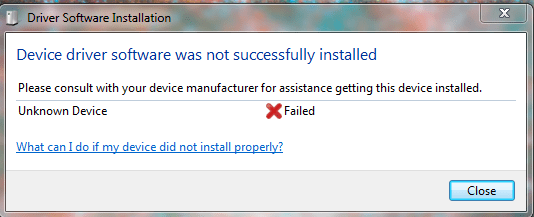
  • audio issue.PNG
    audio issue.PNG
    16.2 KB · Views: 11

My Computer

Computer type
PC/Desktop
Computer Manufacturer/Model Number
Maingear Custom PC
OS
Windows 7 Pro
CPU
Intel Core i7 2600k @4.6Ghz
Motherboard
Gigabyte GA-Z68X-UD4-B3
Memory
16 GB DDR3 1600mhz
Graphics Card(s)
EVGA GTX 980Ti
Sound Card
Onboard
Monitor(s) Displays
Curved MSI 144hz 1ms
Screen Resolution
1920x1080
Hard Drives
250GB Samsung 860 Evo SSD
PSU
Seasonic 650 Watts Gold Rating
Case
Custom Maingear Case
Cooling
60mm Maingear Liquid Cooling CPU
Keyboard
Basic Wireless Keyboard
Mouse
Basic Wireless Mouse
Antivirus
Microsoft Security Essentials
Browser
Google Chrome (Latest Version)
Logo, is this a bluetooth headset? If so, is there a way for you to try pairing it to another computer? We might get lucky this way, and find out the manufacturer (or at least get a driver).

Keep us posted, Good Luck!
 

My Computer

Computer type
PC/Desktop
Computer Manufacturer/Model Number
Custom
OS
Microsoft Windows 7 Ultimate 32-bit 7601 Multiprocessor Free Service Pack 1
CPU
Pentium(R) Dual-Core CPU E6500 @ 2.93GHz
Motherboard
Gigabyte Technology Co., Ltd. EP45-UD3L
Memory
G.Skill 2.00 GB
Graphics Card(s)
NVIDIA GeForce 8400 GS
Sound Card
High Definition Audio Device
Screen Resolution
1680 x 1050 x 32 bits (4294967296 colors) @ 59 Hz
Hard Drives
(1) ST1500DL003-9VT16L ATA Device (2) WDC WD3200AAKS-00L9A0 ATA Device (3) WDC WD7501AALS-00J7B0 ATA Device
Antivirus
MSE, Avast 17.2
Browser
Firefox
Logo, is this a bluetooth headset? If so, is there a way for you to try pairing it to another computer? We might get lucky this way, and find out the manufacturer (or at least get a driver).

Keep us posted, Good Luck!

Hello,

No unfortunately this is not Bluetooth and is USB wired.
 

My Computer

Computer type
PC/Desktop
Computer Manufacturer/Model Number
Maingear Custom PC
OS
Windows 7 Pro
CPU
Intel Core i7 2600k @4.6Ghz
Motherboard
Gigabyte GA-Z68X-UD4-B3
Memory
16 GB DDR3 1600mhz
Graphics Card(s)
EVGA GTX 980Ti
Sound Card
Onboard
Monitor(s) Displays
Curved MSI 144hz 1ms
Screen Resolution
1920x1080
Hard Drives
250GB Samsung 860 Evo SSD
PSU
Seasonic 650 Watts Gold Rating
Case
Custom Maingear Case
Cooling
60mm Maingear Liquid Cooling CPU
Keyboard
Basic Wireless Keyboard
Mouse
Basic Wireless Mouse
Antivirus
Microsoft Security Essentials
Browser
Google Chrome (Latest Version)
Ok, that helps. In Device Manager, delete any USB drivers and then plug in your headset. It should look for the correct driver and install it. If successful, no problem. If that doesn't cure it, you should go to the Lenovo site and download the drivers for your mobo. Update the driver from Device Manager, you should be good.

Keep us posted, Good Luck!
 

My Computer

Computer type
PC/Desktop
Computer Manufacturer/Model Number
Custom
OS
Microsoft Windows 7 Ultimate 32-bit 7601 Multiprocessor Free Service Pack 1
CPU
Pentium(R) Dual-Core CPU E6500 @ 2.93GHz
Motherboard
Gigabyte Technology Co., Ltd. EP45-UD3L
Memory
G.Skill 2.00 GB
Graphics Card(s)
NVIDIA GeForce 8400 GS
Sound Card
High Definition Audio Device
Screen Resolution
1680 x 1050 x 32 bits (4294967296 colors) @ 59 Hz
Hard Drives
(1) ST1500DL003-9VT16L ATA Device (2) WDC WD3200AAKS-00L9A0 ATA Device (3) WDC WD7501AALS-00J7B0 ATA Device
Antivirus
MSE, Avast 17.2
Browser
Firefox
Back
Top