Cannot connect to internet

jennyg

New member
Local time
2:36 AM
Messages
4
Hi, I have been trying to set up a wireless network connection via a Speedstream 6520 modem on a new laptop operating windows 7. It seems to be picking up the connection, but when I click connect a Windows Security screen comes up asking for network authentication. It will not accept any username and password I put in - I have tried my ISP password, modem password and computer log on details, nothing works. I have been into wireless network properties and tried changing things under the security tab - what is the network security key? At the moment I am connected by another laptop operating XP which works fine - I use a Netgear adapter on the XP laptop - do I need one of these for the new laptop? Any help would be great. Thanks
 

My Computer

OS
windows 7
Hi, I have been trying to set up a wireless network connection via a Speedstream 6520 modem on a new laptop operating windows 7. It seems to be picking up the connection, but when I click connect a Windows Security screen comes up asking for network authentication. It will not accept any username and password I put in - I have tried my ISP password, modem password and computer log on details, nothing works. I have been into wireless network properties and tried changing things under the security tab - what is the network security key? At the moment I am connected by another laptop operating XP which works fine - I use a Netgear adapter on the XP laptop - do I need one of these for the new laptop? Any help would be great. Thanks
Look on the back or underneath of your router,it should say somewhere WPA KEY or Wireless Key
Thats the key you need.

If it does not work,there is a way to check it,but it will require an ethernet cable and the password for your router.
 

My Computer

Computer Manufacturer/Model Number
Blue Shards 1.0
OS
Windows 7 Ultimate 64bit
CPU
AMD Phenom II 555 Black Edition Quad Core OC'd to 4.0GHz
Motherboard
ASUS M4A88T-M
Memory
G Skill RipJaw 1333MHz 4GB
Graphics Card(s)
ATI raideon 4250 HD/XFX ATI Radeon 1GB HD4650
Sound Card
Realteck HD Audio
Monitor(s) Displays
2x 22" Widescreen HD Monitors
Hard Drives
500GB Sata 7500RPM
80GB IDE
PSU
850W OCUK Modular
Case
Antec Dark Fleet DF-30
Cooling
Titan Fenrir Pro (CPU)
Keyboard
Logitech Wireless
Mouse
Logitech Wireless
Internet Speed
24Meg
Other Info
Getting soon-
2TB 7200RPM HDD
+8GB RAM
30GB SSD
HD6950/70
I couldn't find a WPA key on the router. My Speedstream was originally supplied by bigpond but I have since changed my ISP and did configure the Speedstream to work with the new ISP. I have found my bigpond installation CD and book containing Wi-Fi Pin, Wi-Fi WEP Key and Wi-Fi SSID - Can I use the bigpond installation CD to set up the connection on the second laptop, even though I am no longer with bigpon? Looking through the bigpond book it says "You can also use your CD when you want to add computers to your home Wi-Fi network, however this only works with the adapters that bigpond supplies - they supplied a Netgear Wi-Fi adapter WG111v2" - this is the same adapter I am using with the XP laptop - maybe I need one of these for the windows 7 laptop??
 

My Computer

OS
windows 7
I couldn't find a WPA key on the router. My Speedstream was originally supplied by bigpond but I have since changed my ISP and did configure the Speedstream to work with the new ISP. I have found my bigpond installation CD and book containing Wi-Fi Pin, Wi-Fi WEP Key and Wi-Fi SSID - Can I use the bigpond installation CD to set up the connection on the second laptop, even though I am no longer with bigpon? Looking through the bigpond book it says "You can also use your CD when you want to add computers to your home Wi-Fi network, however this only works with the adapters that bigpond supplies - they supplied a Netgear Wi-Fi adapter WG111v2" - this is the same adapter I am using with the XP laptop - maybe I need one of these for the windows 7 laptop??
You will need to get iformation from your current isp
Userame,passwrod,vci etc
But your adapter will work yes.
 

My Computer

Computer Manufacturer/Model Number
Blue Shards 1.0
OS
Windows 7 Ultimate 64bit
CPU
AMD Phenom II 555 Black Edition Quad Core OC'd to 4.0GHz
Motherboard
ASUS M4A88T-M
Memory
G Skill RipJaw 1333MHz 4GB
Graphics Card(s)
ATI raideon 4250 HD/XFX ATI Radeon 1GB HD4650
Sound Card
Realteck HD Audio
Monitor(s) Displays
2x 22" Widescreen HD Monitors
Hard Drives
500GB Sata 7500RPM
80GB IDE
PSU
850W OCUK Modular
Case
Antec Dark Fleet DF-30
Cooling
Titan Fenrir Pro (CPU)
Keyboard
Logitech Wireless
Mouse
Logitech Wireless
Internet Speed
24Meg
Other Info
Getting soon-
2TB 7200RPM HDD
+8GB RAM
30GB SSD
HD6950/70
Did your new ISP not mentioned anything about them needing to re-setup your connection? they may need to port your modem details to their service, otherwise you're modem still have the old ISP's settings.

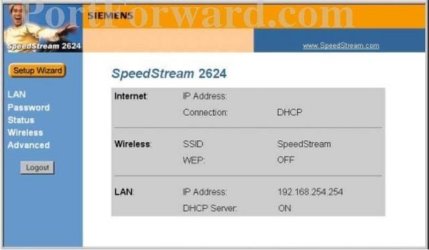
What is the model of the Speedstream? are you able to get into it's control panel and check a few things?

Example.
Speedstream-26242.jpg
 

My Computer

Computer Manufacturer/Model Number
Lenovo ThinkPad T60
OS
Windows 7 Ultimate 64Bit
CPU
GenuineIntel Intel(R) Core(TM) DuoCore T2400 @ 1.83GHz
Motherboard
Intel(R) 82801G (ICH7 Family)
Memory
2.00 GB
Graphics Card(s)
Mobile Intel(R) 945 Express Chipset
Sound Card
SoundMAX Integrated Digital HD Audio
Monitor(s) Displays
ThinkPad Display
Screen Resolution
1400x1050
Hard Drives
100Gb SATA
Keyboard
Standard Keyboard
Mouse
HID-compliant Mouse
Internet Speed
Cable Broadband - 54Mbps
Other Info
Intel(R) PRO/1000 PL Network Connection
11a/b/g Wireless LAN Mini PCI Express Adapter
No, my ISP didn't mention anything about re-setup. I can get into the Siemens Gateway on my laptop running XP - is that what you mean? I have a SpeedStream 6520, originally supplied by Bigpond, but I set it up (after hours of hair pulling) to work with my new provider AAPT. It is working fine on the laptop running XP, but not so for the laptop running Windows 7. I have tried to get a WEP key from Siemens, they tell me I should contact my ISP and they tell me I need to contact Siemens. Also, I am having trouble with my AAPT internet username and password, which I discovered after trying to get into my free webspace, waiting to hear back from APPT as the username and password I have matches the one they have....maybe this has something to do with the non-acceptance of the network authentication details??
 

My Computer

OS
windows 7
I recon your ISP needs to know that you have bought a new modem so that they can, if need be add your MAC details to the service. As for the security key, i would have thought, this is made by you when you setup your wireless network (SSID name) through the router.
 

My Computer

Computer Manufacturer/Model Number
Lenovo ThinkPad T60
OS
Windows 7 Ultimate 64Bit
CPU
GenuineIntel Intel(R) Core(TM) DuoCore T2400 @ 1.83GHz
Motherboard
Intel(R) 82801G (ICH7 Family)
Memory
2.00 GB
Graphics Card(s)
Mobile Intel(R) 945 Express Chipset
Sound Card
SoundMAX Integrated Digital HD Audio
Monitor(s) Displays
ThinkPad Display
Screen Resolution
1400x1050
Hard Drives
100Gb SATA
Keyboard
Standard Keyboard
Mouse
HID-compliant Mouse
Internet Speed
Cable Broadband - 54Mbps
Other Info
Intel(R) PRO/1000 PL Network Connection
11a/b/g Wireless LAN Mini PCI Express Adapter
Thanks for your suggestions. My Wi-Fi WEP key was setup by Bigpond and I have told my ISP that I am using a modem originally supplied by Bigpond. I can use the wireless modem with my new ISP through my XP laptop. I have just managed to connect the Windows 7 laptop to the wireless modem using the ethernet cable......is there something I should do from here to get a wireless connection going?
 

My Computer

OS
windows 7

My Computer

Computer Manufacturer/Model Number
Lenovo ThinkPad T60
OS
Windows 7 Ultimate 64Bit
CPU
GenuineIntel Intel(R) Core(TM) DuoCore T2400 @ 1.83GHz
Motherboard
Intel(R) 82801G (ICH7 Family)
Memory
2.00 GB
Graphics Card(s)
Mobile Intel(R) 945 Express Chipset
Sound Card
SoundMAX Integrated Digital HD Audio
Monitor(s) Displays
ThinkPad Display
Screen Resolution
1400x1050
Hard Drives
100Gb SATA
Keyboard
Standard Keyboard
Mouse
HID-compliant Mouse
Internet Speed
Cable Broadband - 54Mbps
Other Info
Intel(R) PRO/1000 PL Network Connection
11a/b/g Wireless LAN Mini PCI Express Adapter
Had the same exact problem with a laptop with Windows 7 and this Speedstream 6520 wireless Bigpond ADSL modem. All laptops using windows XP have no issues. Windows 7 will ask you to input a username and password, which all combos fail to login.

Solution: Login to the modem configuration page (10.0.0.138) and change the wireless settings from WEP to WAP security. Windows 7 will then only ask for the wireless password.

Hope this helps
 

My Computer

OS
windows 7
Back
Top