Solved Cannot convert flash drive to NTFS

Uchiha

New member
Member
VIP
Local time
10:08 AM
Messages
126
As the title suggests, I simply can't convert my flash drive to NTFS.
It's a 32 GB Kingston Data-traveler.
The " convert G: /FS:NTFS " gives "First sector of NTFS is unwritable, etc..
And when trying to format by right-clicking and selecting NTFS, it says that Windows could not format successfully.

IMPORTANT : Under Computer Management > Device Management, the Disk does not have a format.. :shock:
 

Attachments
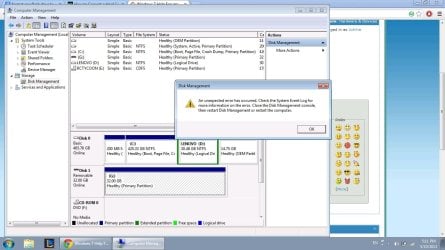
  • Disk Management.jpg
    Disk Management.jpg
    122.6 KB · Views: 7

My Computer

Computer Manufacturer/Model Number
Lenovo Y560
OS
Windows 7 Home Premium x64
CPU
Intel Core i5
Motherboard
M460 @ 2.53GHz
Memory
4 GB
Graphics Card(s)
ATI Mobility Radeon HD 5370
Good that you are there.

Do you have any data on your drive? Or you just want to format your drive to NTFS?
 

My Computer

OS
Windows 7 Home Premium 32 bit
Good that you are there.

Do you have any data on your drive? Or you just want to format your drive to NTFS?

I have no data in my drive.
I just need to transfer around 30 GB to another computer, so you can see the problem, the format being FAT32.
 

My Computer

Computer Manufacturer/Model Number
Lenovo Y560
OS
Windows 7 Home Premium x64
CPU
Intel Core i5
Motherboard
M460 @ 2.53GHz
Memory
4 GB
Graphics Card(s)
ATI Mobility Radeon HD 5370
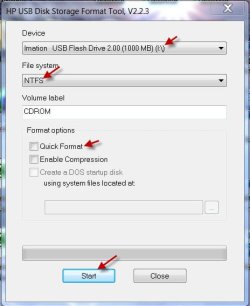
OK, download HP USB Disk Storage Format Tool v2.2.3 Download HP USB Disk Storage Format Tool 2.2.3 Free - Windows-based Format Utility for HP Drive Key or DiskOnKey USB Device

Plug in your pen drive.

Right click on HPUSBDisk.exe and run as administrator.

Make sure you have selected the correct drive, choose NTFS and uncheck the Quick Format option, so that a full format will be done and start.

10-05-2013 18-24-09.jpg

Let us see whether it takes care of the possible bad sectors and is able to format.

If it fails, then you may have to try a low level format. But first the above.
 

My Computer

OS
Windows 7 Home Premium 32 bit
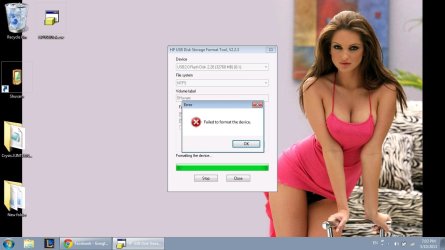
Another failed attempt.....
 

Attachments

  • SC.jpg
    SC.jpg
    83.2 KB · Views: 6

My Computer

Computer Manufacturer/Model Number
Lenovo Y560
OS
Windows 7 Home Premium x64
CPU
Intel Core i5
Motherboard
M460 @ 2.53GHz
Memory
4 GB
Graphics Card(s)
ATI Mobility Radeon HD 5370
OK, Now do the following.

Low Level Format:

Download Windows Executable (works without installation) of HDD Low Level Format Tool version 4.25 from HDDGURU: HDD LLF Low Level Format Tool run it and low level format the pen drive. Make sure to select the correct drive for formatting. If low level formatting is completed successfully, do a regular format in Windows Disk Management.


My Computer

OS
Windows 7 Home Premium 32 bit
Any more tricks up your sleeves ?
 

Attachments

  • Unsuccess.jpg
    Unsuccess.jpg
    126.4 KB · Views: 4

My Computer

Computer Manufacturer/Model Number
Lenovo Y560
OS
Windows 7 Home Premium x64
CPU
Intel Core i5
Motherboard
M460 @ 2.53GHz
Memory
4 GB
Graphics Card(s)
ATI Mobility Radeon HD 5370
You didn't say whether the low level format completed successfully.:)

And I have many more up my sleeves :). But I think you would now like to go to bed, na
 

My Computer

OS
Windows 7 Home Premium 32 bit

My Computer

Computer Manufacturer/Model Number
Lenovo Y560
OS
Windows 7 Home Premium x64
CPU
Intel Core i5
Motherboard
M460 @ 2.53GHz
Memory
4 GB
Graphics Card(s)
ATI Mobility Radeon HD 5370
You didn't say whether the low level format completed successfully.:)

And I have many more up my sleeves :). But I think you would now like to go to bed, na

I'm wide awake :sleepy:
 

My Computer

Computer Manufacturer/Model Number
Lenovo Y560
OS
Windows 7 Home Premium x64
CPU
Intel Core i5
Motherboard
M460 @ 2.53GHz
Memory
4 GB
Graphics Card(s)
ATI Mobility Radeon HD 5370
Try using Diskpart.

Click on the :orb: button type CMD inside the Search programs and features. Right click on CMD under neath Programs (1) choose Run as administrator. On the User Access Control window click on the Yes button. Command Prompt opens to path C:\Windows\System32>_

Type the commands below . Press <ENTER> after every command inputted.
Code:
DISKPART
LIST DISK
SELECT DISK #
CLEAN
CREATE PRIMARY PARTITION
FORMAT FS=NTFS QUICK
EXIT
EXIT

   Note
The # is the USB flash drive number. Usually it is Disk 1 when you have only 1 hard drive installed. Disk 0 is your internal Hard drive
 

My Computer

Computer Manufacturer/Model Number
Custom Built
OS
Windows 7 Ultimate 32-Bit & Windows 7 Ultimate 64-Bit
CPU
Intel Core i7 CPU 950 @ 3.07GHz
Motherboard
ASUS P6T DELUXE V2
Memory
OCZ 6GB (3 x 2GB) 240-Pin DDR3 SDRAM DDR3 1600 OCZ3X1600R2
Graphics Card(s)
ATI Radeon HD 5700 Series
Sound Card
OnBoard
Hard Drives
WD6400AACS-00M3B0 (640GB SATA )
PSU
CORSAIR 850w
Case
NZXT LEXA
Cooling
Intel Stock Heatsink Fan
Keyboard
Microsoft Wireless Laser Keyboard 7000
Mouse
Microsoft Wireless Laser Mouse 7000
OK, now repeat the Low Level format, but now check Perform quick wipe (just remove partitions and MBR) and then Format this device. This will just take a second to undo whatever has been done by Windows Disk Management.

Then format to FAT32 with the HP Tool. If it goes through we will know that your pen drive is good.

After ascertaining this, format it with the same HP Tool to NTFS.( In both cases quick format will do as your first sector will be clean)

I shall wait for your reply before going to bed.

EDIT: You can try VistaKing's suggestion too. your choice.:)
 

My Computer

OS
Windows 7 Home Premium 32 bit
Try using Diskpart.

Click on the :orb: button type CMD inside the Search programs and features. Right click on CMD under neath Programs (1) choose Run as administrator. On the User Access Control window click on the Yes button. Command Prompt opens to path C:\Windows\System32>_

Type the commands below . Press <ENTER> after every command inputted.
Code:
DISKPART
LIST DISK
SELECT DISK #
CLEAN
CREATE PRIMARY PARTITION
FORMAT FS=NTFS QUICK
EXIT
EXIT

   Note
The # is the USB flash drive number. Usually it is Disk 1 when you have only 1 hard drive installed. Disk 0 is your internal Hard drive

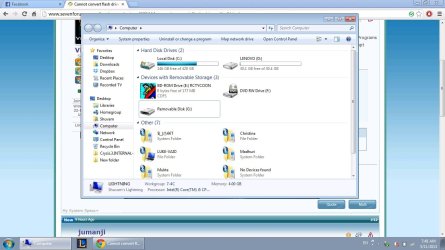
So, what will be my # ?
 

Attachments

  • Untitled.jpg
    Untitled.jpg
    106.8 KB · Views: 5

My Computer

Computer Manufacturer/Model Number
Lenovo Y560
OS
Windows 7 Home Premium x64
CPU
Intel Core i5
Motherboard
M460 @ 2.53GHz
Memory
4 GB
Graphics Card(s)
ATI Mobility Radeon HD 5370
You can't tell in Windows, it give drives letter, while diskpart gives them numbers. A real big clue is to look at the size of the drive in diskpart.
 

My Computer

Computer type
PC/Desktop
Computer Manufacturer/Model Number
Home Built Desktop By DataTech
OS
Windows 7 Ultimate X64 SP1
CPU
Intel i5-2550K, Differing ~4.4-4.8GHz No built in GPU
Motherboard
ASUS P8Z68-V PRO/GEN3
Memory
16GB G.Skill Sniper 1866MHz @ 2133MHz 2x8GB
Graphics Card(s)
ASUS GTX650TIB-DC2OC-2GD5, (650TI Boost)
Sound Card
Onboard Realtek 5-1
Monitor(s) Displays
Samsung P2570HD
Screen Resolution
1920x1080
Hard Drives
Samsung 840 Pro 256GB SSD for OS, 500GB Seagate Constellation (Enterprise drive) for Data
PSU
Corsair HX650W
Case
Inwin Dragon Rider
Cooling
Hyper 212 EVO w/two Noctua fans, push-pull, @1300 RPM
Keyboard
E-Z Eyes, bright yellow keys with large characters
Mouse
steelseries SENSEI Laser Pro Gaming
Internet Speed
48-51Mbs Mbs down, 11 Mbs up Xfinity Cable
Antivirus
Norton Internet Security 2013
Browser
IE 10, Opera, Pale Moon if needed
Other Info
4 case fans, LG BluRay-RE, ASUS DVD-RW, Mr. Fusion power supply, 1.21 gigawatts.
What to do now ?
 

Attachments

  • Untitled.jpg
    Untitled.jpg
    99.4 KB · Views: 5

My Computer

Computer Manufacturer/Model Number
Lenovo Y560
OS
Windows 7 Home Premium x64
CPU
Intel Core i5
Motherboard
M460 @ 2.53GHz
Memory
4 GB
Graphics Card(s)
ATI Mobility Radeon HD 5370
Yep, you can have a look at this tutorial on diskpart Clean, Clean all http://www.sevenforums.com/tutorials/52129-disk-clean-clean-all-diskpart-command.html

List Disk will show you all the disks, and you should select the number that shows your pen drive capacity.

Essentially, the next clean command does the same thing, as what the LLF Tool will do when you select "Perform quick wipe (just remove partitions and MBR)"
 

My Computer

OS
Windows 7 Home Premium 32 bit
The command is

Code:
CREATE PARTITION PRIMARY
FORMAT FS=NTFS QUICK

   Note
If you don't add the " Quick " command formatting the drive will take a while
 

My Computer

Computer Manufacturer/Model Number
Custom Built
OS
Windows 7 Ultimate 32-Bit & Windows 7 Ultimate 64-Bit
CPU
Intel Core i7 CPU 950 @ 3.07GHz
Motherboard
ASUS P6T DELUXE V2
Memory
OCZ 6GB (3 x 2GB) 240-Pin DDR3 SDRAM DDR3 1600 OCZ3X1600R2
Graphics Card(s)
ATI Radeon HD 5700 Series
Sound Card
OnBoard
Hard Drives
WD6400AACS-00M3B0 (640GB SATA )
PSU
CORSAIR 850w
Case
NZXT LEXA
Cooling
Intel Stock Heatsink Fan
Keyboard
Microsoft Wireless Laser Keyboard 7000
Mouse
Microsoft Wireless Laser Mouse 7000
You forgot the select disk #(Your USB drive) part. It will respond with Disk # is now the selected disk. Now do the format fs=ntfs quick
 

My Computer

Computer type
PC/Desktop
Computer Manufacturer/Model Number
Home Built Desktop By DataTech
OS
Windows 7 Ultimate X64 SP1
CPU
Intel i5-2550K, Differing ~4.4-4.8GHz No built in GPU
Motherboard
ASUS P8Z68-V PRO/GEN3
Memory
16GB G.Skill Sniper 1866MHz @ 2133MHz 2x8GB
Graphics Card(s)
ASUS GTX650TIB-DC2OC-2GD5, (650TI Boost)
Sound Card
Onboard Realtek 5-1
Monitor(s) Displays
Samsung P2570HD
Screen Resolution
1920x1080
Hard Drives
Samsung 840 Pro 256GB SSD for OS, 500GB Seagate Constellation (Enterprise drive) for Data
PSU
Corsair HX650W
Case
Inwin Dragon Rider
Cooling
Hyper 212 EVO w/two Noctua fans, push-pull, @1300 RPM
Keyboard
E-Z Eyes, bright yellow keys with large characters
Mouse
steelseries SENSEI Laser Pro Gaming
Internet Speed
48-51Mbs Mbs down, 11 Mbs up Xfinity Cable
Antivirus
Norton Internet Security 2013
Browser
IE 10, Opera, Pale Moon if needed
Other Info
4 case fans, LG BluRay-RE, ASUS DVD-RW, Mr. Fusion power supply, 1.21 gigawatts.
The command is

Code:
CREATE PARTITION PRIMARY
FORMAT FS=NTFS QUICK

   Note
If you don't add the " Quick " command formatting the drive will take a while

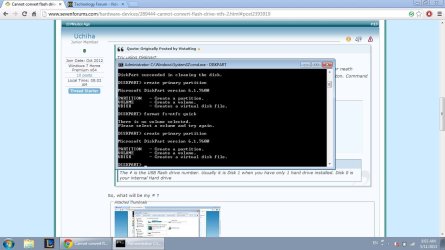
After create primary partition, I get three options.
And format fs=ntfs quick, results in "There is no volume selected".
 

Attachments

  • Untitled.jpg
    Untitled.jpg
    130.7 KB · Views: 3

My Computer

Computer Manufacturer/Model Number
Lenovo Y560
OS
Windows 7 Home Premium x64
CPU
Intel Core i5
Motherboard
M460 @ 2.53GHz
Memory
4 GB
Graphics Card(s)
ATI Mobility Radeon HD 5370
After you type Create primary partition type the commands below

Code:
SELECT PARTITION 1
FORMAT FS=NTFS QUICK
ASSIGN LETTER=[B][COLOR="Red"]?[/COLOR][/B]
EXIT
EXIT

   Note
The ? Is for a drive letter .
 

My Computer

Computer Manufacturer/Model Number
Custom Built
OS
Windows 7 Ultimate 32-Bit & Windows 7 Ultimate 64-Bit
CPU
Intel Core i7 CPU 950 @ 3.07GHz
Motherboard
ASUS P6T DELUXE V2
Memory
OCZ 6GB (3 x 2GB) 240-Pin DDR3 SDRAM DDR3 1600 OCZ3X1600R2
Graphics Card(s)
ATI Radeon HD 5700 Series
Sound Card
OnBoard
Hard Drives
WD6400AACS-00M3B0 (640GB SATA )
PSU
CORSAIR 850w
Case
NZXT LEXA
Cooling
Intel Stock Heatsink Fan
Keyboard
Microsoft Wireless Laser Keyboard 7000
Mouse
Microsoft Wireless Laser Mouse 7000
Back
Top