Cannot create new folder

tooney

New member
Local time
4:22 PM
Messages
14
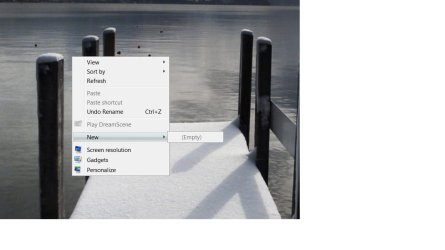
Recently I've found that when i right click, I cant create a new folder (or a new anything). I checked my permissions and I'm set as admin, and tried suggested registry fixes which havent worked.

screenshot attached
 

Attachments

  • newfolder.jpg
    newfolder.jpg
    104.1 KB · Views: 50

My Computer

OS
Windows 7 Ultimate x64
Graphics Card(s)
Radeon X300/X550/X1050 Series
Monitor(s) Displays
Toshiba Regza 32" LCD HD TV
Keyboard
Logitech Wave
Recently I've found that when i right click, I cant create a new folder (or a new anything). I checked my permissions and I'm set as admin, and tried suggested registry fixes which havent worked.

screenshot attached


Its not that you cant create it, its that the context menu items are missing. I seem to recall a fix on a thread here at SF. Try searching for it.

Ken
 

My Computer

Computer Manufacturer/Model Number
HP Pavillion dv-7 1005 Tx
OS
Win 8 Release candidate 8400
CPU
[email protected]
Memory
4 gigs
Graphics Card(s)
Nvidia 9600M
Sound Card
HD built-in
Monitor(s) Displays
17" Wxga
Screen Resolution
1440x900
Cooling
none
Internet Speed
45Mb down 5Mb up
Recently I've found that when i right click, I cant create a new folder (or a new anything). I checked my permissions and I'm set as admin, and tried suggested registry fixes which havent worked.

screenshot attached

hi tooney , run the system file checker [sfc /scannow, note the space] to eliminate corrupt system files :)
 

My Computer

Computer type
PC/Desktop
Computer Manufacturer/Model Number
self build
OS
win 7 ultimate32bit, Win8.1pro wmc 32bit
CPU
amd phenom x4 9600
Motherboard
asus m2n32-sli deluxe
Memory
corsair twinxs 2x2gb
Graphics Card(s)
2x nvidia 1gb 8500gt
Sound Card
onboard
Monitor(s) Displays
23" PB Viseo 233d
Screen Resolution
1920x1080
Hard Drives
maxtor sata 500gb
maxtor sata 320gb
fujitsu sata200gb
PSU
oryxx tornado 750w
Case
thermaltake xaser lll
Cooling
artic freezer64 pro + 7 case fans

My Computer

Computer type
PC/Desktop
Computer Manufacturer/Model Number
Self built custom
OS
64-bit Windows 11 Pro for Workstations
CPU
Intel i7-8700K OC'd to 5 GHz
Motherboard
ASUS ROG Maximus XI Formula Z390
Memory
64 GB (4x16GB) G.SKILL TridentZ RGB DDR4 3600 MHz
Graphics Card(s)
ASUS ROG-STRIX-GTX1080TI-O11G-GAMING
Sound Card
Integrated
Monitor(s) Displays
2 x Samsung Odyssey G7 27"
Screen Resolution
2560x1440
Hard Drives
1TB Samsung 990 PRO M.2,
4TB Samsung 990 PRO PRO M.2,
TerraMaster F8 SSD Plus NAS
PSU
Seasonic Prime Titanium 850W
Case
Thermaltake Core P3
Cooling
Corsair Hydro H115i
Keyboard
Logitech wireless K800
Mouse
Logitech MX Master 4
Internet Speed
2 Gb/s Download and 100 Mb/s Upload
Antivirus
Malwarebyte Anti-Malware Premium
Browser
Google Chrome
Other Info
Logitech Z625 speaker system,
Logitech BRIO 4K Pro webcam,
HP Color LaserJet Pro MFP M477fdn,
APC SMART-UPS RT 1000 XL - SURT1000XLI,
Galaxy S23 Plus phone
heys guys sorry for the late reply here been a while since I've had time to get on

thanks for the suggestions, tried them all and none of them worked. Still have the same problem but nothing else seems to have been affected so far
 

My Computer

OS
Windows 7 Ultimate x64
Graphics Card(s)
Radeon X300/X550/X1050 Series
Monitor(s) Displays
Toshiba Regza 32" LCD HD TV
Keyboard
Logitech Wave
No problem Tooney.

As a test, create a new administrator account to see if it works properly in it.

If not and you have a retail Windows 7 copy, then you could do a repair install to fix this.
 

My Computer

Computer type
PC/Desktop
Computer Manufacturer/Model Number
Self built custom
OS
64-bit Windows 11 Pro for Workstations
CPU
Intel i7-8700K OC'd to 5 GHz
Motherboard
ASUS ROG Maximus XI Formula Z390
Memory
64 GB (4x16GB) G.SKILL TridentZ RGB DDR4 3600 MHz
Graphics Card(s)
ASUS ROG-STRIX-GTX1080TI-O11G-GAMING
Sound Card
Integrated
Monitor(s) Displays
2 x Samsung Odyssey G7 27"
Screen Resolution
2560x1440
Hard Drives
1TB Samsung 990 PRO M.2,
4TB Samsung 990 PRO PRO M.2,
TerraMaster F8 SSD Plus NAS
PSU
Seasonic Prime Titanium 850W
Case
Thermaltake Core P3
Cooling
Corsair Hydro H115i
Keyboard
Logitech wireless K800
Mouse
Logitech MX Master 4
Internet Speed
2 Gb/s Download and 100 Mb/s Upload
Antivirus
Malwarebyte Anti-Malware Premium
Browser
Google Chrome
Other Info
Logitech Z625 speaker system,
Logitech BRIO 4K Pro webcam,
HP Color LaserJet Pro MFP M477fdn,
APC SMART-UPS RT 1000 XL - SURT1000XLI,
Galaxy S23 Plus phone
Hello Tooney,
This is what happened to me...Bought a new Lenovo Laptop with Windows 7 Home installed from Best Buy five days ago. While trying to install my data files from my previous PC's Hard Drive I discovered I did not have the option to create a new Folder, SubFolder, etc. The only option available was to create a Briefcase or the "new" window was "empty". The "New Folder" button on top of my Windows Explorer window did not work at all. I contacted Microsoft and was told it was a Lenovo/IBM problem since they get their fingers in the Operating Systems pie and make "some necessary changes". I contacted Lenovo/Support and one of their reps was able to take over my Laptop & update/change my registry. I can now create new Folders, SubFolders, etc. I hope this helps you. JerryB
 

My Computer

Computer type
PC/Desktop
Computer Manufacturer/Model Number
custom
OS
Windows 7 Pro 64bit
CPU
intel
Motherboard
intel
Memory
4gb
Hard Drives
160gb
Antivirus
norton internet security
Browser
window internet explorer
Back
Top
