Cannot create new taskbar toolbar

gerryr1gerry

New member
Local time
4:15 PM
Messages
2
I've had Windows 7 for about 10 Days.One of the first things I did was create a quick launch section on the task bar. Had about 8 icons in this quick launch and everything worked fine for about 5 days.Then the quick launch area on the tool bar just vanished. The rest of the tool bar is still there and works just fine.I thought I would just create a new toolbar and start over, however when I click on the "tooolbars>new toolbar" up pops the Explorer " libraries>documents" page. This page also pops up if I try to pin anything to the task bar.EG I click and drag an icon to the task bar,click "pin to taskbar" and instead of the icon showing up a copy of "libraries" folder appears instead.
Would appreciate any suggestions.
Thanks hope someone can help
 

My Computer

OS
Windows 7
When Windows Explorer pops up, it expects you do choose a folder to use for the new toolbar. I created a folder called "Shortcuts" in my User folder and added that as my new toolbar - then I just drop shortcuts into the Shortcuts folder and they show up at the toolbar.
 

My Computer

OS
Windows 7 Ultimate
CPU
AMD Athlon XP 2400
Memory
2GB

My Computer

Computer Manufacturer/Model Number
HP, Dell, Gateway, Toshiba - 4 laptops and 2 desktops
OS
Vista, Windows7, Mint Mate, Zorin, Windows 8
CPU
from 1.6GHz Duo to i7
Monitor(s) Displays
2x HP w2207
Hard Drives
5x HDD, 7x SSD, 12x Externals
Keyboard
with trackball - no mices
Mouse
Trackball mice
Internet Speed
DSL 6000
Thanks for the input.
It would seem that Microsoft in its infinite wisdom has decided the we can only have .exe files displayed on the task bar as icons. Any other link shortcuts must go in that inconvenient Explorer folder on the task bar.As for not being able to create a new task bar without it being linked to "Libraries" who thought that one up.Might be convenient for Microsoft but it sure aint for us users.As usual we have to go away from Microsoft products and look to outside software to give us what we want.I went for "RocketDock".
 

My Computer

OS
Windows 7
Thanks for the input.
It would seem that Microsoft in its infinite wisdom has decided the we can only have .exe files displayed on the task bar as icons. Any other link shortcuts must go in that inconvenient Explorer folder on the task bar.As for not being able to create a new task bar without it being linked to "Libraries" who thought that one up.Might be convenient for Microsoft but it sure aint for us users.As usual we have to go away from Microsoft products and look to outside software to give us what we want.I went for "RocketDock".


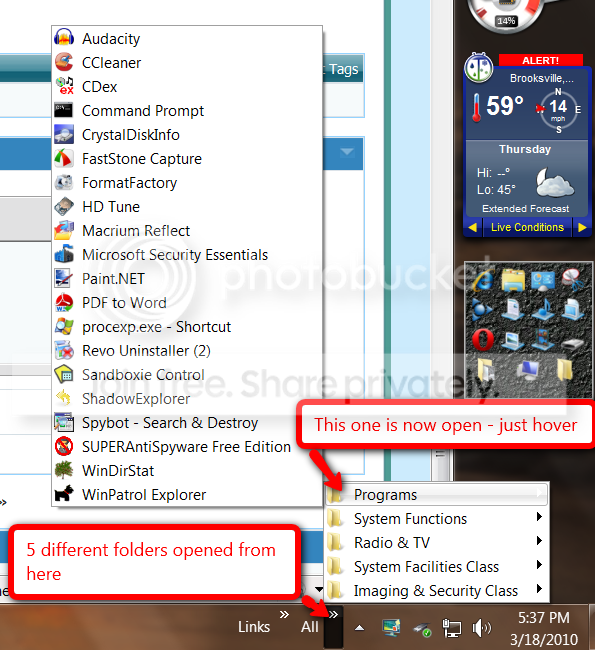
I use both, Rocket Dock and Taskbar where I parked a lot of programs and folders. In Rocket Dock there would not be enough space for all of this.

toolbar.png
 

My Computer

Computer Manufacturer/Model Number
HP, Dell, Gateway, Toshiba - 4 laptops and 2 desktops
OS
Vista, Windows7, Mint Mate, Zorin, Windows 8
CPU
from 1.6GHz Duo to i7
Monitor(s) Displays
2x HP w2207
Hard Drives
5x HDD, 7x SSD, 12x Externals
Keyboard
with trackball - no mices
Mouse
Trackball mice
Internet Speed
DSL 6000
Back
Top