
You are using an out of date browser. It may not display this or other websites correctly.
You should upgrade or use an alternative browser.
You should upgrade or use an alternative browser.
Cannot create partition over 13gb when i have 80gb free
- Thread starter h4mza
- Start date

Hello
Before we make any specific recommendations will you please post a snip/screen-shot of the entire disk management drive map with a full description as to which drive/partition is which, so we can see what you have going on as there may be a fairly simple way to resolve the situation.
In the Windows start menu right click computer and click manage, in the left pane of the "Computer Management" window that opens click disk management and post a snip of that.
How to Upload and Post a Screenshot and File in Seven Forums
Before we make any specific recommendations will you please post a snip/screen-shot of the entire disk management drive map with a full description as to which drive/partition is which, so we can see what you have going on as there may be a fairly simple way to resolve the situation.
In the Windows start menu right click computer and click manage, in the left pane of the "Computer Management" window that opens click disk management and post a snip of that.
How to Upload and Post a Screenshot and File in Seven Forums
My Computer
At a glance
W 7 64-bit UltimateIntel Q9550 Yorkfield8GB Dominator 8500C5DATI : XFX 5870
- Computer Manufacturer/Model Number
- * BFK Customs *
- OS
- W 7 64-bit Ultimate
- CPU
- Intel Q9550 Yorkfield
- Motherboard
- ASUS P5Q Pro
- Memory
- 8GB Dominator 8500C5D
- Graphics Card(s)
- ATI : XFX 5870
- Sound Card
- Realtek HD Audio 7-1
- Monitor(s) Displays
- 1x 47" LCD HDMI & 3x 26" LCD HDMI
- Screen Resolution
- 1920x1080P & 1920x1200
- Hard Drives
- 1x 80GB Intel X25-M G2 SSD : 1x 500GB & 1x 640GB WD Caviar Black(s)
- PSU
- Corsair 620HX
- Case
- Cooler Master RC-690
- Cooling
- Tuniq Tower 120, 2x 140mm and 3x 120mm case fans
- Keyboard
- Microsoft 500
- Mouse
- Razer Diamondback 3G
- Internet Speed
- 14 Mb/s
- Other Info
- 1x Koutech 3Gb/s SATA HDD Hot Swap Rack

Can you post a screen shot of Disk management?
http://www.sevenforums.com/tutorials/9733-how-post-screenshot-seven-forums.html
Screenshot tools.
http://www.sevenforums.com/general-...ed-method-uploading-posting-screen-shots.html
How to Use the Snipping Tool in Vista - Vista Forums
Snipping Tool - Windows 7 features - Microsoft Windows
Use Snipping Tool to capture screen shots
http://www.sevenforums.com/tutorials/9717-screenshot-paint.html
http://www.sevenforums.com/tutorials/51160-screenshot-upload-using-mwsnap.html
fscapture free download
Use Snipping Tool to capture screen shots
http://www.sevenforums.com/tutorials/9733-how-post-screenshot-seven-forums.html
Screenshot tools.
http://www.sevenforums.com/general-...ed-method-uploading-posting-screen-shots.html
How to Use the Snipping Tool in Vista - Vista Forums
Snipping Tool - Windows 7 features - Microsoft Windows
Use Snipping Tool to capture screen shots
http://www.sevenforums.com/tutorials/9717-screenshot-paint.html
http://www.sevenforums.com/tutorials/51160-screenshot-upload-using-mwsnap.html
fscapture free download
Use Snipping Tool to capture screen shots
My Computer
At a glance
ME/XP/Vista/Win7
- OS
- ME/XP/Vista/Win7
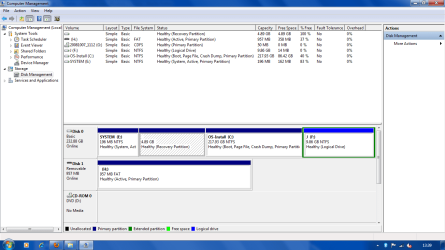
I need somewhere to backup my files, so i split the c drive so i could put my files in one drive and install windows on the other. But when i split the drive it only goes up to 13gb and i have 90gb of files to backup.
I have more than 90gb of free space in c drive so why does it only split upto 13gb, why not 90gb?
I have more than 90gb of free space in c drive so why does it only split upto 13gb, why not 90gb?
My Computer
At a glance
Windows 7 Home Premium 32bit
- OS
- Windows 7 Home Premium 32bit
Here's how to do it.
Download and install to Windows 7 the Partition Wizard Home program from this link below.
Partition Wizard Free Home Edition
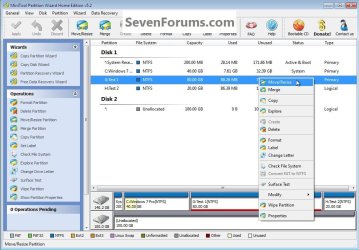
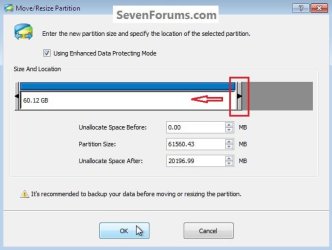
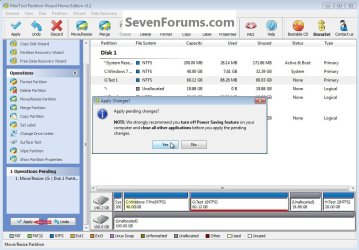
Then use the outline in these snips to resize the Windows 7 C: partition to create unallocated space that the F: partition can then be resized into.
My Test 1 G: - equales your Windows 7 C:
My Test 2 H: - equales your J F:
Download and install to Windows 7 the Partition Wizard Home program from this link below.
Partition Wizard Free Home Edition
Then use the outline in these snips to resize the Windows 7 C: partition to create unallocated space that the F: partition can then be resized into.
My Test 1 G: - equales your Windows 7 C:
My Test 2 H: - equales your J F:
click an image to enlarge

My Computer
At a glance
W 7 64-bit UltimateIntel Q9550 Yorkfield8GB Dominator 8500C5DATI : XFX 5870
- Computer Manufacturer/Model Number
- * BFK Customs *
- OS
- W 7 64-bit Ultimate
- CPU
- Intel Q9550 Yorkfield
- Motherboard
- ASUS P5Q Pro
- Memory
- 8GB Dominator 8500C5D
- Graphics Card(s)
- ATI : XFX 5870
- Sound Card
- Realtek HD Audio 7-1
- Monitor(s) Displays
- 1x 47" LCD HDMI & 3x 26" LCD HDMI
- Screen Resolution
- 1920x1080P & 1920x1200
- Hard Drives
- 1x 80GB Intel X25-M G2 SSD : 1x 500GB & 1x 640GB WD Caviar Black(s)
- PSU
- Corsair 620HX
- Case
- Cooler Master RC-690
- Cooling
- Tuniq Tower 120, 2x 140mm and 3x 120mm case fans
- Keyboard
- Microsoft 500
- Mouse
- Razer Diamondback 3G
- Internet Speed
- 14 Mb/s
- Other Info
- 1x Koutech 3Gb/s SATA HDD Hot Swap Rack
I need somewhere to backup my files, so i split the c drive so i could put my files in one drive and install windows on the other. But when i split the drive it only goes up to 13gb and i have 90gb of files to backup.
I have more than 90gb of free space in c drive so why does it only split upto 13gb, why not 90gb?
If you BackUp to the same Hd, you are backing up.And your HD goes down, you will lose your backup aswell.
Always backup to a 2nd Hd.

Last edited:
My Computer
At a glance
ME/XP/Vista/Win7
- OS
- ME/XP/Vista/Win7
Just want to be sure you see my post #7 above.
My Computer
At a glance
W 7 64-bit UltimateIntel Q9550 Yorkfield8GB Dominator 8500C5DATI : XFX 5870
- Computer Manufacturer/Model Number
- * BFK Customs *
- OS
- W 7 64-bit Ultimate
- CPU
- Intel Q9550 Yorkfield
- Motherboard
- ASUS P5Q Pro
- Memory
- 8GB Dominator 8500C5D
- Graphics Card(s)
- ATI : XFX 5870
- Sound Card
- Realtek HD Audio 7-1
- Monitor(s) Displays
- 1x 47" LCD HDMI & 3x 26" LCD HDMI
- Screen Resolution
- 1920x1080P & 1920x1200
- Hard Drives
- 1x 80GB Intel X25-M G2 SSD : 1x 500GB & 1x 640GB WD Caviar Black(s)
- PSU
- Corsair 620HX
- Case
- Cooler Master RC-690
- Cooling
- Tuniq Tower 120, 2x 140mm and 3x 120mm case fans
- Keyboard
- Microsoft 500
- Mouse
- Razer Diamondback 3G
- Internet Speed
- 14 Mb/s
- Other Info
- 1x Koutech 3Gb/s SATA HDD Hot Swap Rack

- Local time
- 8:34 AM
- Messages
- 50,634
Theog has a good point that backing up your data to the same HD is no real backup since if the HD goes down you lose the backup. Best to backup to another HD, DVD or another computer on your network or connected to make an ad-hoc network.
Nevertheless you should get more shrinkage out of your OS partition by using the Partition Wizard boot disk which can move System files that are running in the Home Edition. Be sure to run Disk Cleanup or CCleaner and defrag first.
A more advanced defrag can be done using free Perfect Disk 10 defrag. First run defrag to shrink for compactness, then rightclick your OS partition to Offline defrag System files.
Nevertheless you should get more shrinkage out of your OS partition by using the Partition Wizard boot disk which can move System files that are running in the Home Edition. Be sure to run Disk Cleanup or CCleaner and defrag first.
A more advanced defrag can be done using free Perfect Disk 10 defrag. First run defrag to shrink for compactness, then rightclick your OS partition to Offline defrag System files.
It is a very bad idea to shrink the Windows 7 partition too small, installed programs/apps will not have the needed room for expansion if needed and you will not have room to install new programs or games.
That was the reasoning behind using the installed Partition Wizard program.
That was the reasoning behind using the installed Partition Wizard program.
My Computer
At a glance
W 7 64-bit UltimateIntel Q9550 Yorkfield8GB Dominator 8500C5DATI : XFX 5870
- Computer Manufacturer/Model Number
- * BFK Customs *
- OS
- W 7 64-bit Ultimate
- CPU
- Intel Q9550 Yorkfield
- Motherboard
- ASUS P5Q Pro
- Memory
- 8GB Dominator 8500C5D
- Graphics Card(s)
- ATI : XFX 5870
- Sound Card
- Realtek HD Audio 7-1
- Monitor(s) Displays
- 1x 47" LCD HDMI & 3x 26" LCD HDMI
- Screen Resolution
- 1920x1080P & 1920x1200
- Hard Drives
- 1x 80GB Intel X25-M G2 SSD : 1x 500GB & 1x 640GB WD Caviar Black(s)
- PSU
- Corsair 620HX
- Case
- Cooler Master RC-690
- Cooling
- Tuniq Tower 120, 2x 140mm and 3x 120mm case fans
- Keyboard
- Microsoft 500
- Mouse
- Razer Diamondback 3G
- Internet Speed
- 14 Mb/s
- Other Info
- 1x Koutech 3Gb/s SATA HDD Hot Swap Rack