Solved Cannot create partition

PW boot disk has never failed before and is a Windows tool, not Linux.

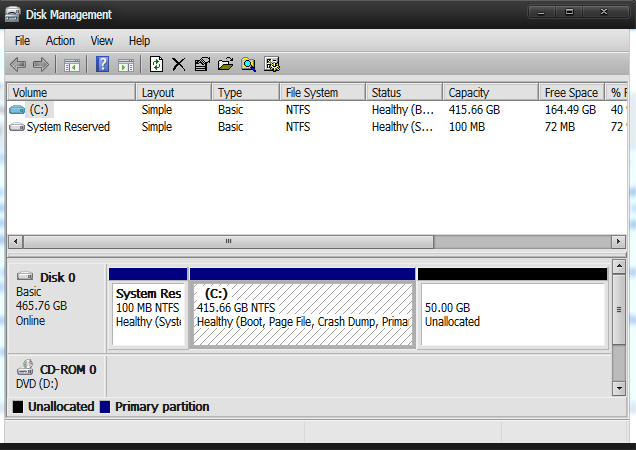
There is something different about what little I can see in the background of the PW Boot disk snapshot, showing two Logical partitions out of four on the first disk, while your original Disk Mgmt screenshot only showed two Primary Partitions. The Resize operation also seems to be running on a Logical partition which can present complications.

This disparity may be the problem, so let us see the full drive map with all listings in another PW boot snapshot.
 
I've never had ANY problems with GPARTED - download either the stand alone version or download any decent Linux live CD and start it from the command line ==>GPARTED -- It's a graphical program - any Windows user shouldn't have any trouble in using it.
I always use GParted to partition my HDDs.
It has always worked for me.

IMO, GParted's resize function is better than Windows Disk Manager.

For some strange reason Linux Mint MATE doesn't come with GParted!
I don't know what the default GUI partion tool is called, but it is much worse than Windows Disk Manager.

GParted is one of the two programs I install as soon as the OS installation has finished (the other is Wireshark).
 

My Computer

Computer type
PC/Desktop
Computer Manufacturer/Model Number
n/a
OS
W7 Ultimate SP1, LM19.2 MATE, W10 Home 1703, W10 Pro 1703 VM, #All 64 bit
CPU
AMD Phenom II x6 1100T, 3.3 GHz
Motherboard
ASUS M4A88T-M/USB3 (AM3)
Memory
12GB DDR3 1333 G-Skill (4GB x 2), G-Skill (2GB x 2)
Graphics Card(s)
NVIDIA GeForce GTX 660
Sound Card
Realtek?
Monitor(s) Displays
Samsung S23B350
Screen Resolution
1920x1080
Hard Drives
WD Green 2TB (SATA), WD Green 3TB (SATA), WD Blue 4TB (SATA), WD Blue 6TB (SATA)
PSU
Cooler Master
Case
Antec GX300 Tower
Cooling
3x Antec TRICOOL 120mm Fans
Mouse
Wired Optical
Internet Speed
DSL
Antivirus
Avast
Browser
Pale Moon (64 bit)
Other Info
2018-12-27 Upgraded HDDs
2015-12-10 Upgraded case, graphics card, storage
2015-08-15 Upgraded motherboard & RAM
2015-07-15 Upgraded LM17.1 to LM17.2
Hi there
I've never had ANY problems with GPARTED - download either the stand alone version or download any decent Linux live CD and start it from the command line ==>GPARTED -- It's a graphical program - any Windows user shouldn't have any trouble in using it.

Screenshot (Although this is on a Linux Host the GUI and menu is identical when used on Windows). Handles NTFS / FAT32 etc partitions also - no problems -- just adjust partition by re-sizing the partition space to get the size you want -- works perfectly.

Cheers
jimbo

Thank you so much! it worked :3

Many many thanks to other people who tried to help me :)

PW boot disk has never failed before and is a Windows tool, not Linux.

There is something different about what little I can see in the background of the PW Boot disk snapshot, showing two Logical partitions out of four on the first disk, while your original Disk Mgmt screenshot only showed two Primary Partitions. The Resize operation also seems to be running on a Logical partition which can present complications.

This disparity may be the problem, so let us see the full drive map with all listings in another PW boot snapshot.

PW boot tried to created 2 partition instead of one, that's why you are seeing 2 unallocated partition there

Here my new one:
9CJHuMu.png


Btw anyway thanks for helping me.
 

My Computer

Computer type
Laptop
Computer Manufacturer/Model Number
Dell
OS
Microsoft Windows 7 Ultimate 64-bit Multiprocessor Service Pack 1
CPU
Intel(R) Core(TM)2 Duo CPU P8600 @ 2.40GHz
Motherboard
Dell Inc. 0U692R
Memory
4.00 GB
Graphics Card(s)
(1) Mobile Intel(R) 4 Series Express Chipset Family
Sound Card
(1) Intel(R) / IDT High Definition Audio HDMI
Screen Resolution
1440 x 900 x 32 bits (4294967296 colors) @ 40 Hz
Hard Drives
TOSHIBA MQ01ABD050 ATA Device
Mouse
E-Blue Cobra Junior
Internet Speed
15 MBs
Antivirus
Microsoft Security Essentials
Browser
Chrome
Back
Top