
Cannot create rules in Hotmail

daniellouwrens

New member
Member
VIP
Local time
9:57 AM
Messages
173
Hi

I have Win7 x64 Pro and a Hotmail account that I access in IE9.

I am trying to set up rules but when I go to the section
"Rules for sorting new messages" and click on the "New"
button, nothing happens.

Is there something I am missing here?

Thanks

Daniel
 

My Computer

Computer type
PC/Desktop
Computer Manufacturer/Model Number
Multimedia PC MEDION® Akoya® E7330 D
OS
Microsoft Windows 7 Professional 32-bit 7601 Multiprocessor Free Service Pack 1
CPU
Intel(R) Core(TM)2 Quad CPU Q8300 @ 2.50GHz
Motherboard
MEDIONPC MS-7366
Memory
4.00 GB
Graphics Card(s)
NVIDIA GeForce GT 220
Sound Card
(1) High Definition Audio Device (2) High Definition Audio
Screen Resolution
1920 x 1080 x 32 bits (4294967296 colors) @ 60 Hz
Hard Drives
(1) WDC WD10EZEX-00WN4A0 ATA Device (2) WDC WD6400AACS-00G8B1 ATA Device (3) Generic Flash HS-CF USB Device (4) Generic Flash HS-MS/SD USB Device (5) Generic Flash HS-SM USB Device (6) HP Officejet 5740 s USB Device (7) USB Flash Disk USB
Is there an error icon on the loaded page down to the bottom left of the screen?
 

My Computer

OS
7 Pro
Hi

I have Win7 x64 Pro and a Hotmail account that I access in IE9.

I am trying to set up rules but when I go to the section
"Rules for sorting new messages" and click on the "New"
button, nothing happens.

Is there something I am missing here?

Thanks

Daniel

Have a look at my screenshot. It might explains what you asked.
hotmail - rules.png
 

My Computer

Computer Manufacturer/Model Number
Acer Aspire 7741Z
OS
Windows 7 Home Premium 64-bit, SP1
CPU
Intel Pentium P6200, Cores 2, 2.13 GHz
Memory
4 GB
Graphics Card(s)
Intel HD
Sound Card
unknown
Monitor(s) Displays
17.3 inches
Screen Resolution
1600 x 900
Hard Drives
640 GB, 5400 PRM
Hi

it does not matter which one I select, nothing happens when I press the "New" button.
Also I xannot put a check in the box.

Regards

Daniel
 

My Computer

Computer type
PC/Desktop
Computer Manufacturer/Model Number
Multimedia PC MEDION® Akoya® E7330 D
OS
Microsoft Windows 7 Professional 32-bit 7601 Multiprocessor Free Service Pack 1
CPU
Intel(R) Core(TM)2 Quad CPU Q8300 @ 2.50GHz
Motherboard
MEDIONPC MS-7366
Memory
4.00 GB
Graphics Card(s)
NVIDIA GeForce GT 220
Sound Card
(1) High Definition Audio Device (2) High Definition Audio
Screen Resolution
1920 x 1080 x 32 bits (4294967296 colors) @ 60 Hz
Hard Drives
(1) WDC WD10EZEX-00WN4A0 ATA Device (2) WDC WD6400AACS-00G8B1 ATA Device (3) Generic Flash HS-CF USB Device (4) Generic Flash HS-MS/SD USB Device (5) Generic Flash HS-SM USB Device (6) HP Officejet 5740 s USB Device (7) USB Flash Disk USB
Is there an error icon on the loaded page down to the bottom left of the screen?
Hi

no there is not and BTW I have tried with both 32 and 64 bit IE9

regards

Daniel
 

My Computer

Computer type
PC/Desktop
Computer Manufacturer/Model Number
Multimedia PC MEDION® Akoya® E7330 D
OS
Microsoft Windows 7 Professional 32-bit 7601 Multiprocessor Free Service Pack 1
CPU
Intel(R) Core(TM)2 Quad CPU Q8300 @ 2.50GHz
Motherboard
MEDIONPC MS-7366
Memory
4.00 GB
Graphics Card(s)
NVIDIA GeForce GT 220
Sound Card
(1) High Definition Audio Device (2) High Definition Audio
Screen Resolution
1920 x 1080 x 32 bits (4294967296 colors) @ 60 Hz
Hard Drives
(1) WDC WD10EZEX-00WN4A0 ATA Device (2) WDC WD6400AACS-00G8B1 ATA Device (3) Generic Flash HS-CF USB Device (4) Generic Flash HS-MS/SD USB Device (5) Generic Flash HS-SM USB Device (6) HP Officejet 5740 s USB Device (7) USB Flash Disk USB
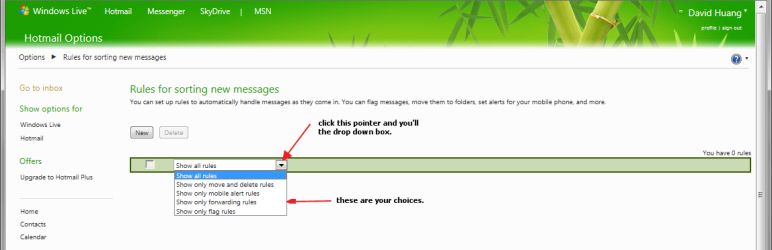
Hi

it does not matter which one I select, nothing happens when I press the "New" button.
Also I xannot put a check in the box.

Regards

Daniel

Here is an answer from a very knowledeagble computer user :
The following is a direct copy/paste. No paraphrasing.
Source of the info :
http://www.vistax64.com/live-mail/135698-message-rules.html

Name of the answer is Ildhund

Two suggestions:
(1) Invest $20 a year in converting your account to Hotmail Plus and use
POP3 to access it. Then you can use rules.
(2) Set up your rules in Hotmail on the web (Options > More options >
Automatically sort your mail into folders). This doesn't allow for
sub-folders, but at least you should be able to achieve the sort of
first-line sorting that you're after. The folders you set up will be
synchronized in WLMail.
--
Noel


My Computer

Computer Manufacturer/Model Number
Acer Aspire 7741Z
OS
Windows 7 Home Premium 64-bit, SP1
CPU
Intel Pentium P6200, Cores 2, 2.13 GHz
Memory
4 GB
Graphics Card(s)
Intel HD
Sound Card
unknown
Monitor(s) Displays
17.3 inches
Screen Resolution
1600 x 900
Hard Drives
640 GB, 5400 PRM
Hi

Re the post you copied

"Two suggestions:
(1) Invest $20 a year in converting your account to Hotmail Plus and use
[COLOR=#3676A2 !important][COLOR=#3676A2 !important]POP3[/COLOR][/COLOR] to access it. Then you can use rules.
(2) Set up your rules in Hotmail on the web (Options > More options >
Automatically sort your mail into folders). This doesn't allow for
sub-folders, but at least you should be able to achieve the sort of
first-line sorting that you're after. The folders you set up will be
synchronized in WLMail."


RE: Suggestion 1) I could also use may other email clients but my question was about my Hotmail account.

RE: Suggestion 2) I am using Hotmail :Set up your rules in Hotmail on the web (Options > More options >
Automatically sort your mail into folders)" But it is not working, that is what my OP is about.

Regards

Daniel
 

My Computer

Computer type
PC/Desktop
Computer Manufacturer/Model Number
Multimedia PC MEDION® Akoya® E7330 D
OS
Microsoft Windows 7 Professional 32-bit 7601 Multiprocessor Free Service Pack 1
CPU
Intel(R) Core(TM)2 Quad CPU Q8300 @ 2.50GHz
Motherboard
MEDIONPC MS-7366
Memory
4.00 GB
Graphics Card(s)
NVIDIA GeForce GT 220
Sound Card
(1) High Definition Audio Device (2) High Definition Audio
Screen Resolution
1920 x 1080 x 32 bits (4294967296 colors) @ 60 Hz
Hard Drives
(1) WDC WD10EZEX-00WN4A0 ATA Device (2) WDC WD6400AACS-00G8B1 ATA Device (3) Generic Flash HS-CF USB Device (4) Generic Flash HS-MS/SD USB Device (5) Generic Flash HS-SM USB Device (6) HP Officejet 5740 s USB Device (7) USB Flash Disk USB
Hi

Re the post you copied

"Two suggestions:
(1) Invest $20 a year in converting your account to Hotmail Plus and use
[COLOR=#3676A2 !important][COLOR=#3676A2 !important]POP3[/COLOR][/COLOR] to access it. Then you can use rules.
(2) Set up your rules in Hotmail on the web (Options > More options >
Automatically sort your mail into folders). This doesn't allow for
sub-folders, but at least you should be able to achieve the sort of
first-line sorting that you're after. The folders you set up will be
synchronized in WLMail."

RE: Suggestion 1) I could also use may other email clients but my question was about my Hotmail account.

RE: Suggestion 2) I am using Hotmail :Set up your rules in Hotmail on the web (Options > More options >
Automatically sort your mail into folders)" But it is not working, that is what my OP is about.

Regards

Daniel

He was saying you can NOT apply rules unless it is a POP3.
And, in order to do that, you need to pay $20 a year to switch to Hotnmail Plus. Then, you can set up rules.
Notice that there is no " Automatically sort your mail into folders " option for us ?
That is why it is not working.

That is how I understood what he said.
 

My Computer

Computer Manufacturer/Model Number
Acer Aspire 7741Z
OS
Windows 7 Home Premium 64-bit, SP1
CPU
Intel Pentium P6200, Cores 2, 2.13 GHz
Memory
4 GB
Graphics Card(s)
Intel HD
Sound Card
unknown
Monitor(s) Displays
17.3 inches
Screen Resolution
1600 x 900
Hard Drives
640 GB, 5400 PRM
Hi

I am advised that Hotmail has Rules capability of the type I need, in fact the Option 2) confirms that.

Here is a copy of a statement by a MVP on the MS Forums.

"Only pop3 accounts can use message rules.
Login in to your account with your browser and make your rules online. The folders and messages will be synched back to your computer."


Either way I am sure I will find out.

Regards

Daniel
 

My Computer

Computer type
PC/Desktop
Computer Manufacturer/Model Number
Multimedia PC MEDION® Akoya® E7330 D
OS
Microsoft Windows 7 Professional 32-bit 7601 Multiprocessor Free Service Pack 1
CPU
Intel(R) Core(TM)2 Quad CPU Q8300 @ 2.50GHz
Motherboard
MEDIONPC MS-7366
Memory
4.00 GB
Graphics Card(s)
NVIDIA GeForce GT 220
Sound Card
(1) High Definition Audio Device (2) High Definition Audio
Screen Resolution
1920 x 1080 x 32 bits (4294967296 colors) @ 60 Hz
Hard Drives
(1) WDC WD10EZEX-00WN4A0 ATA Device (2) WDC WD6400AACS-00G8B1 ATA Device (3) Generic Flash HS-CF USB Device (4) Generic Flash HS-MS/SD USB Device (5) Generic Flash HS-SM USB Device (6) HP Officejet 5740 s USB Device (7) USB Flash Disk USB
Hi

in case anyone else here has the same problem, here is a work around, found in the post by JND66

Cheers

Daniel
 

My Computer

Computer type
PC/Desktop
Computer Manufacturer/Model Number
Multimedia PC MEDION® Akoya® E7330 D
OS
Microsoft Windows 7 Professional 32-bit 7601 Multiprocessor Free Service Pack 1
CPU
Intel(R) Core(TM)2 Quad CPU Q8300 @ 2.50GHz
Motherboard
MEDIONPC MS-7366
Memory
4.00 GB
Graphics Card(s)
NVIDIA GeForce GT 220
Sound Card
(1) High Definition Audio Device (2) High Definition Audio
Screen Resolution
1920 x 1080 x 32 bits (4294967296 colors) @ 60 Hz
Hard Drives
(1) WDC WD10EZEX-00WN4A0 ATA Device (2) WDC WD6400AACS-00G8B1 ATA Device (3) Generic Flash HS-CF USB Device (4) Generic Flash HS-MS/SD USB Device (5) Generic Flash HS-SM USB Device (6) HP Officejet 5740 s USB Device (7) USB Flash Disk USB
Workaround

WORKAROUND ¸if you have IE (in addition to Geowalm):

1. Go onto the "Rules for sorting new messages" page with Internet Explorer 8 or 9.
2. Press F12 to show Developper tools.
3. Click on the select Arrow toolbar button (or "Find" -> "Select element by click")
4. Select the "New" button in the page
5. In the "HTML" tab, you should have a selected text string similar to "onclick=$BSI.navigateTo('EditRule.aspx?n=472214545');"
6. In your browser's address bar, replace "ManageRules.aspx?n=1223147531" part with the "EditRule.aspx?n=472214545" part
7. Press enter
8. Your browser should now navigate to the New rule page.

Waiting for a Microsoft fix.
 
Last edited:

My Computer

OS
Windows 7 Ultimate x64
Step-by-step instructions for a work-around

Thanks for the plug, Daniel. I have to give credit to"Geowalm" (see Unable to create more Rules in my hotmail inbox acct ) for coming up with a solution. I've written step-by-step instructions (see below). This isn't a perfect solution - Microsoft/Windows Live still needs to fix the problem with the "New" button in the create new rule option, but in the meantime, try this:

To use the “Sweep” feature as a work-around (until Microsoft fixes the existing problem for creating a new rule for sorting messages):

  1. While logged into your Windows Live Mail/Hotmail account from your web browser, put a check mark beside one of the emails you want to go into a specific folder (the folder must already be created before doing this).
  2. Then, at the very top of the page, you will see “Sweep”. (It is in the same row as “New” “Delete” “Junk” “Sweep” “Mark as” and “Move to”.) Click “Sweep”.
  3. Then click “Move all from…”.
  4. A pop-up box will appear asking “Move all of them?”. Using the drop-down menu in that pop-up box, select the folder that you want the email to go into.
  5. Be sure to check the “Also move future messages” box. That will ensure that any future messages you receive from that same sender’s email address will automatically be sorted into the folder you selected.
  6. Then click the “Move all” button. You will briefly see a small box showing that it is searching for and moving all messages from that particular email address into the folder you selected.
NOTE: Even though the sender name may appear the same in the emails you receive from that sender, some businesses use different email addresses, depending on the purpose of the email. For example, you may want all email from the sender Best Buy to go into a folder you’ve created for Best Buy, but Best Buy may send email about their sales from one email address and email about special promotions from a slightly different email address. You’ll have to use the “Sweep” feature (making sure to check “move future messages”, as stated in Step 5 above) for each different Best Buy email address, in order for them all to go into the Best Buy folder.
 

My Computer

Computer Manufacturer/Model Number
Velocity Micro
OS
Windows Vista Ultimate 32-bit
sixstorm1's workaround does work, albeit a bit technical

WORKAROUND ¸if you have IE (in addition to Geowalm):

1. Go onto the "Rules for sorting new messages" page with Internet Explorer 8 or 9.
2. Press F12 to show Developper tools.
3. Click on the select Arrow toolbar button (or "Find" -> "Select element by click")
4. Select the "New" button in the page
5. In the "HTML" tab, you should have a selected text string similar to "onclick=$BSI.navigateTo('EditRule.aspx?n=472214545');"
6. In your browser's address bar, replace "ManageRules.aspx?n=1223147531" part with the "EditRule.aspx?n=472214545" part
7. Press enter
8. Your browser should now navigate to the New rule page.

Waiting for a Microsoft fix.


sixstorm1,

I have never used "Developer Tools" before, so your workaround was not exactly a breeze for me. But after wandering around a bit in that foreign territory ;), I did manage to get it to work, so thanks for posting! Maybe it would have been easier if I was accustomed to making technical edits like that, but since I'm not,
I am hoping Microsoft fixes the new rule problem soon. I wouldn't want to have to do that page editing (or whatever it's called :o) every time I need to create a new rule for sorting messages.

But I will admit, it did feel kind of good to be able to do something that techie (for me, anyway). :)
 

My Computer

Computer Manufacturer/Model Number
Velocity Micro
OS
Windows Vista Ultimate 32-bit
WORKAROUND ¸if you have IE (in addition to Geowalm):

1. Go onto the "Rules for sorting new messages" page with Internet Explorer 8 or 9.
2. Press F12 to show Developper tools.
3. Click on the select Arrow toolbar button (or "Find" -> "Select element by click")
4. Select the "New" button in the page
5. In the "HTML" tab, you should have a selected text string similar to "onclick=$BSI.navigateTo('EditRule.aspx?n=472214545');"
6. In your browser's address bar, replace "ManageRules.aspx?n=1223147531" part with the "EditRule.aspx?n=472214545" part
7. Press enter
8. Your browser should now navigate to the New rule page.

Waiting for a Microsoft fix.


sixstorm1,

I have never used "Developer Tools" before, so your workaround was not exactly a breeze for me. But after wandering around a bit in that foreign territory ;), I did manage to get it to work, so thanks for posting! Maybe it would have been easier if I was accustomed to making technical edits like that, but since I'm not, I am hoping Microsoft fixes the new rule problem soon. I wouldn't want to have to do that page editing (or whatever it's called :o) every time I need to create a new rule for sorting messages.

But I will admit, it did feel kind of good to be able to do something that techie (for me, anyway). :)

Yeah I have to admit the fact that this workaround may not be the best and simplest for the average user, although I tried to make the steps as clear as possible. But hey, it works!! and I'm glad it did for you.

To get a bit more technical, it's just an ASP scripting issue in the page, this is not a server-side issue. The workaround just tells the browser to manually navigate to the onclick event of the button, which for an unknown reason does not trigger automatically when pressed. (This is not exactly called page-editing ;)).

I will submit the issue to MS TechNet so they become aware of it...

sixstorm1,
Microsoft Certified Technology Specialist
 

My Computer

OS
Windows 7 Ultimate x64
Just replace "ManageRules.aspx?" part with the "EditRule.aspx?" part in your browser's address bar.
 

My Computer

OS
Windows 7 x64
Back
Top