
Cannot delete a second administrative user account

websquad

New member
Member
Local time
3:32 PM
Messages
78
I have two user accounts

  • "Bob"
  • "Delete Me"
Both are administrative accounts; I just installed "Delete Me" today and no longer need it. Neither has a password.

While logged on as "Bob" I tried to delete the user account, and failed. I then searched this forum for help, and got this page. I tried all of the proposed methods, but none of them worked. For the two (as I recall) that required using a command prompt, I was careful to open that as an administrator.

I'm lost. How can I get rid of this thing?
 

My Computer

Computer type
PC/Desktop
Computer Manufacturer/Model Number
Homebrew Intel 6600-based
OS
Win 7/Pro 64-bit
CPU
Intel 6600 Quad
Motherboard
eVGA 780i
Memory
8 GB DDR2
Graphics Card(s)
EVGA 512 9500 GT + nVidia GT
Monitor(s) Displays
4: (1) HP 22"W + (2) 19" + (1) 15" (pgm. icons only)
Hard Drives
SanDisk 120GB SSD (sys+pgms);WD Raptor 150GB (sys/pgm backup). Also, two of Seagate Barracuda ES.2's (data + backup)) and WD Raptor 150GB (spare)
Case
Cooler Master CM Cosmose 1000 (tower)
Keyboard
MS Natural (desktop)
Mouse
Logitech Performance Lase Wireless Mouse
Internet Speed
17 Mbs download (cable)
Antivirus
MS Defender
Other Info
Windows Experience Index on tower system: 7.1/7.1/6.9/6.9/7.0
Hello Bob,

What happened when it failed? Any error messages?

Is the one you want to delete still listed in User Accounts (Control Panel) like below, or is it just it's C:\Users\Delete Me folder still there?
170351d1313396505-user-account-delete-user-accounts-2.jpg

If so, then go ahead and create a password for the Bob account that you want to keep. Afterwards, try deleting the other one again.

Hope this helps for now, :)
Shawn
 

My Computer

Computer type
PC/Desktop
Computer Manufacturer/Model Number
Self built custom
OS
64-bit Windows 11 Pro for Workstations
CPU
Intel i7-8700K OC'd to 5 GHz
Motherboard
ASUS ROG Maximus XI Formula Z390
Memory
64 GB (4x16GB) G.SKILL TridentZ RGB DDR4 3600 MHz
Graphics Card(s)
ASUS ROG-STRIX-GTX1080TI-O11G-GAMING
Sound Card
Integrated
Monitor(s) Displays
2 x Samsung Odyssey G7 27"
Screen Resolution
2560x1440
Hard Drives
1TB Samsung 990 PRO M.2,
4TB Samsung 990 PRO PRO M.2,
TerraMaster F8 SSD Plus NAS
PSU
Seasonic Prime Titanium 850W
Case
Thermaltake Core P3
Cooling
Corsair Hydro H115i
Keyboard
Logitech wireless K800
Mouse
Logitech MX Master 4
Internet Speed
2 Gb/s Download and 100 Mb/s Upload
Antivirus
Malwarebyte Anti-Malware Premium
Browser
Google Chrome
Other Info
Logitech Z625 speaker system,
Logitech BRIO 4K Pro webcam,
HP Color LaserJet Pro MFP M477fdn,
APC SMART-UPS RT 1000 XL - SURT1000XLI,
Galaxy S23 Plus phone
Ah, it gets interesting now. Before I tried to delete it, I renamed the account from "Administrator" to "Delete Me" ... That's when I started to try to delete the account. Prodded by your response, I checked what was in the "Users" folders, and did not find "Delete Me" but "Administrator" -- so, when I renamed the user it did not rename the folder.

Suggestions?

PS: I added a password to the other account, but that didn't let me delete "Delete Me" ... I also tried to rename "Delete Me" to "Administrator" -- but it would not let me. Yikes !!
 
Last edited:

My Computer

Computer type
PC/Desktop
Computer Manufacturer/Model Number
Homebrew Intel 6600-based
OS
Win 7/Pro 64-bit
CPU
Intel 6600 Quad
Motherboard
eVGA 780i
Memory
8 GB DDR2
Graphics Card(s)
EVGA 512 9500 GT + nVidia GT
Monitor(s) Displays
4: (1) HP 22"W + (2) 19" + (1) 15" (pgm. icons only)
Hard Drives
SanDisk 120GB SSD (sys+pgms);WD Raptor 150GB (sys/pgm backup). Also, two of Seagate Barracuda ES.2's (data + backup)) and WD Raptor 150GB (spare)
Case
Cooler Master CM Cosmose 1000 (tower)
Keyboard
MS Natural (desktop)
Mouse
Logitech Performance Lase Wireless Mouse
Internet Speed
17 Mbs download (cable)
Antivirus
MS Defender
Other Info
Windows Experience Index on tower system: 7.1/7.1/6.9/6.9/7.0

My Computer

Computer type
PC/Desktop
Computer Manufacturer/Model Number
Self built custom
OS
64-bit Windows 11 Pro for Workstations
CPU
Intel i7-8700K OC'd to 5 GHz
Motherboard
ASUS ROG Maximus XI Formula Z390
Memory
64 GB (4x16GB) G.SKILL TridentZ RGB DDR4 3600 MHz
Graphics Card(s)
ASUS ROG-STRIX-GTX1080TI-O11G-GAMING
Sound Card
Integrated
Monitor(s) Displays
2 x Samsung Odyssey G7 27"
Screen Resolution
2560x1440
Hard Drives
1TB Samsung 990 PRO M.2,
4TB Samsung 990 PRO PRO M.2,
TerraMaster F8 SSD Plus NAS
PSU
Seasonic Prime Titanium 850W
Case
Thermaltake Core P3
Cooling
Corsair Hydro H115i
Keyboard
Logitech wireless K800
Mouse
Logitech MX Master 4
Internet Speed
2 Gb/s Download and 100 Mb/s Upload
Antivirus
Malwarebyte Anti-Malware Premium
Browser
Google Chrome
Other Info
Logitech Z625 speaker system,
Logitech BRIO 4K Pro webcam,
HP Color LaserJet Pro MFP M477fdn,
APC SMART-UPS RT 1000 XL - SURT1000XLI,
Galaxy S23 Plus phone
I think that the issue is that just after I installed Windows 7, I changed the name of the built-in administrator account to "Bob" -- because before I created the "Administrator" account there was only the following:

Bob (Administrator)
Guest (Guest account is off)

When I go to Bob's account page, there are options to change the account name, create a password, change the picture, set up parental controls, change the account type, and delete the account.

When I go to Delete Me's account page, there are NO options to change the account type or delete the account. And, unlike Bob, there is no Delete Me subdirectory under Users; only Administrator --- and I can't rename it.
 

My Computer

Computer type
PC/Desktop
Computer Manufacturer/Model Number
Homebrew Intel 6600-based
OS
Win 7/Pro 64-bit
CPU
Intel 6600 Quad
Motherboard
eVGA 780i
Memory
8 GB DDR2
Graphics Card(s)
EVGA 512 9500 GT + nVidia GT
Monitor(s) Displays
4: (1) HP 22"W + (2) 19" + (1) 15" (pgm. icons only)
Hard Drives
SanDisk 120GB SSD (sys+pgms);WD Raptor 150GB (sys/pgm backup). Also, two of Seagate Barracuda ES.2's (data + backup)) and WD Raptor 150GB (spare)
Case
Cooler Master CM Cosmose 1000 (tower)
Keyboard
MS Natural (desktop)
Mouse
Logitech Performance Lase Wireless Mouse
Internet Speed
17 Mbs download (cable)
Antivirus
MS Defender
Other Info
Windows Experience Index on tower system: 7.1/7.1/6.9/6.9/7.0

My Computer

Computer type
PC/Desktop
Computer Manufacturer/Model Number
Self built custom
OS
64-bit Windows 11 Pro for Workstations
CPU
Intel i7-8700K OC'd to 5 GHz
Motherboard
ASUS ROG Maximus XI Formula Z390
Memory
64 GB (4x16GB) G.SKILL TridentZ RGB DDR4 3600 MHz
Graphics Card(s)
ASUS ROG-STRIX-GTX1080TI-O11G-GAMING
Sound Card
Integrated
Monitor(s) Displays
2 x Samsung Odyssey G7 27"
Screen Resolution
2560x1440
Hard Drives
1TB Samsung 990 PRO M.2,
4TB Samsung 990 PRO PRO M.2,
TerraMaster F8 SSD Plus NAS
PSU
Seasonic Prime Titanium 850W
Case
Thermaltake Core P3
Cooling
Corsair Hydro H115i
Keyboard
Logitech wireless K800
Mouse
Logitech MX Master 4
Internet Speed
2 Gb/s Download and 100 Mb/s Upload
Antivirus
Malwarebyte Anti-Malware Premium
Browser
Google Chrome
Other Info
Logitech Z625 speaker system,
Logitech BRIO 4K Pro webcam,
HP Color LaserJet Pro MFP M477fdn,
APC SMART-UPS RT 1000 XL - SURT1000XLI,
Galaxy S23 Plus phone
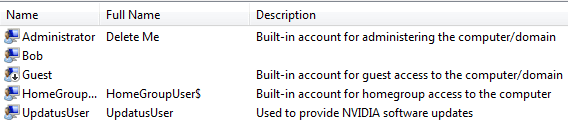
Got caught up with a more pressing job for last few days ... and to defer working on this. Here is the "Local Users and Groups" from "Computer Management" (.png file attached)... Yep, the file I renamed was indeed the built-in administrative account.
 

Attachments

  • Capture.PNG
    Capture.PNG
    3.8 KB · Views: 21

My Computer

Computer type
PC/Desktop
Computer Manufacturer/Model Number
Homebrew Intel 6600-based
OS
Win 7/Pro 64-bit
CPU
Intel 6600 Quad
Motherboard
eVGA 780i
Memory
8 GB DDR2
Graphics Card(s)
EVGA 512 9500 GT + nVidia GT
Monitor(s) Displays
4: (1) HP 22"W + (2) 19" + (1) 15" (pgm. icons only)
Hard Drives
SanDisk 120GB SSD (sys+pgms);WD Raptor 150GB (sys/pgm backup). Also, two of Seagate Barracuda ES.2's (data + backup)) and WD Raptor 150GB (spare)
Case
Cooler Master CM Cosmose 1000 (tower)
Keyboard
MS Natural (desktop)
Mouse
Logitech Performance Lase Wireless Mouse
Internet Speed
17 Mbs download (cable)
Antivirus
MS Defender
Other Info
Windows Experience Index on tower system: 7.1/7.1/6.9/6.9/7.0
No problem. I understand how busy it is out there. :)

Are you able to rename it back to Administrator in lusrmgr.msc?
 

My Computer

Computer type
PC/Desktop
Computer Manufacturer/Model Number
Self built custom
OS
64-bit Windows 11 Pro for Workstations
CPU
Intel i7-8700K OC'd to 5 GHz
Motherboard
ASUS ROG Maximus XI Formula Z390
Memory
64 GB (4x16GB) G.SKILL TridentZ RGB DDR4 3600 MHz
Graphics Card(s)
ASUS ROG-STRIX-GTX1080TI-O11G-GAMING
Sound Card
Integrated
Monitor(s) Displays
2 x Samsung Odyssey G7 27"
Screen Resolution
2560x1440
Hard Drives
1TB Samsung 990 PRO M.2,
4TB Samsung 990 PRO PRO M.2,
TerraMaster F8 SSD Plus NAS
PSU
Seasonic Prime Titanium 850W
Case
Thermaltake Core P3
Cooling
Corsair Hydro H115i
Keyboard
Logitech wireless K800
Mouse
Logitech MX Master 4
Internet Speed
2 Gb/s Download and 100 Mb/s Upload
Antivirus
Malwarebyte Anti-Malware Premium
Browser
Google Chrome
Other Info
Logitech Z625 speaker system,
Logitech BRIO 4K Pro webcam,
HP Color LaserJet Pro MFP M477fdn,
APC SMART-UPS RT 1000 XL - SURT1000XLI,
Galaxy S23 Plus phone
Don't know what lusrmgr.msc is (I assume it is a command that I would execute from a command window when started as an administrator) ... and don't know the command syntex.
 

My Computer

Computer type
PC/Desktop
Computer Manufacturer/Model Number
Homebrew Intel 6600-based
OS
Win 7/Pro 64-bit
CPU
Intel 6600 Quad
Motherboard
eVGA 780i
Memory
8 GB DDR2
Graphics Card(s)
EVGA 512 9500 GT + nVidia GT
Monitor(s) Displays
4: (1) HP 22"W + (2) 19" + (1) 15" (pgm. icons only)
Hard Drives
SanDisk 120GB SSD (sys+pgms);WD Raptor 150GB (sys/pgm backup). Also, two of Seagate Barracuda ES.2's (data + backup)) and WD Raptor 150GB (spare)
Case
Cooler Master CM Cosmose 1000 (tower)
Keyboard
MS Natural (desktop)
Mouse
Logitech Performance Lase Wireless Mouse
Internet Speed
17 Mbs download (cable)
Antivirus
MS Defender
Other Info
Windows Experience Index on tower system: 7.1/7.1/6.9/6.9/7.0
Sorry, lusrmgr.msc is the Local Users and Group window in your screenshot, or OPTION TWO in the tutorial above.

You can't delete the account since it's the built-in Administrator (renamed: Delete Me) account, but you can disable it. Afterwards, you should be able to delete it's C:\Users\Delete Me or Administrator folder if it or it's contents are not be shared.

File Sharing - Set to "Share with" and "Stop Sharing" in Windows 8
 

My Computer

Computer type
PC/Desktop
Computer Manufacturer/Model Number
Self built custom
OS
64-bit Windows 11 Pro for Workstations
CPU
Intel i7-8700K OC'd to 5 GHz
Motherboard
ASUS ROG Maximus XI Formula Z390
Memory
64 GB (4x16GB) G.SKILL TridentZ RGB DDR4 3600 MHz
Graphics Card(s)
ASUS ROG-STRIX-GTX1080TI-O11G-GAMING
Sound Card
Integrated
Monitor(s) Displays
2 x Samsung Odyssey G7 27"
Screen Resolution
2560x1440
Hard Drives
1TB Samsung 990 PRO M.2,
4TB Samsung 990 PRO PRO M.2,
TerraMaster F8 SSD Plus NAS
PSU
Seasonic Prime Titanium 850W
Case
Thermaltake Core P3
Cooling
Corsair Hydro H115i
Keyboard
Logitech wireless K800
Mouse
Logitech MX Master 4
Internet Speed
2 Gb/s Download and 100 Mb/s Upload
Antivirus
Malwarebyte Anti-Malware Premium
Browser
Google Chrome
Other Info
Logitech Z625 speaker system,
Logitech BRIO 4K Pro webcam,
HP Color LaserJet Pro MFP M477fdn,
APC SMART-UPS RT 1000 XL - SURT1000XLI,
Galaxy S23 Plus phone
Back
Top