Cannot Delete Old System Restore Entries

BearAttack

New member
Local time
8:48 AM
Messages
5
I have searched around the web and there doesn't seem to be any answers to this issue.

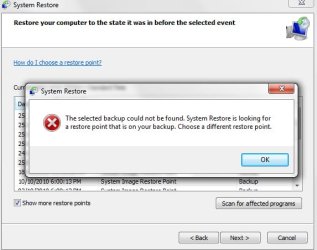
When opening System Restore, there are a whole bunch of old entries. I cannot remove them, and even deleting all other shadow copies doesn't affect them. When trying to restore from them, an error message shows up.

It appears these restore points do not actually exist anymore and are just references to old points. Is there anyway I can delete them from the list??

Thanks
 

Attachments

  • shot1.jpg
    shot1.jpg
    59.1 KB · Views: 10
  • shot2.jpg
    shot2.jpg
    52.7 KB · Views: 20

My Computer

OS
Windows 7 Professional x64
I have searched around the web and there doesn't seem to be any answers to this issue.

When opening System Restore, there are a whole bunch of old entries. I cannot remove them, and even deleting all other shadow copies doesn't affect them. When trying to restore from them, an error message shows up.

It appears these restore points do not actually exist anymore and are just references to old points. Is there anyway I can delete them from the list??

Thanks

It's a problem with your backups. There is a catalog showing that those backups exist, yet the drive they are on is either disconnected or the backups have been improperly deleted from the drive. The restore points marked "backup" are not standard restore points.
 

My Computer

Computer Manufacturer/Model Number
Custom
OS
Windows 7 Ultimate RTM (Technet)
CPU
3.00 gigahertz Intel Core2 Duo E8400
Motherboard
ASUSTeK Computer INC. P5K/EPU Rev 1.xx
Memory
4GB
Graphics Card(s)
ATI Radeon X1950 Pro
Sound Card
Built in HD Audio
Monitor(s) Displays
22" Gateway LCD
Screen Resolution
1920 x 1200
Hard Drives
ST3160023A [Hard drive] (160.04 GB) -- drive 0, rev 8.01, ST3500630AS [Hard drive] (500.11 GB) -- drive 2, rev 3.AAK
ST3500630AS [Hard drive] (500.11 GB) -- drive 1, rev 3.AAK
Keyboard
Logitech G11
Mouse
Microsoft Wireless Laser Mouse 5000
Internet Speed
13.44 Mbps
Even after disconnecting the backup drive, these restore points are still shown. How can I remove them? Will reformatting the backup drive help?
 

My Computer

OS
Windows 7 Professional x64
Even after disconnecting the backup drive, these restore points are still shown. How can I remove them? Will reformatting the backup drive help?

Go into the backup system and delete the old backups.
 

My Computer

Computer Manufacturer/Model Number
Custom
OS
Windows 7 Ultimate RTM (Technet)
CPU
3.00 gigahertz Intel Core2 Duo E8400
Motherboard
ASUSTeK Computer INC. P5K/EPU Rev 1.xx
Memory
4GB
Graphics Card(s)
ATI Radeon X1950 Pro
Sound Card
Built in HD Audio
Monitor(s) Displays
22" Gateway LCD
Screen Resolution
1920 x 1200
Hard Drives
ST3160023A [Hard drive] (160.04 GB) -- drive 0, rev 8.01, ST3500630AS [Hard drive] (500.11 GB) -- drive 2, rev 3.AAK
ST3500630AS [Hard drive] (500.11 GB) -- drive 1, rev 3.AAK
Keyboard
Logitech G11
Mouse
Microsoft Wireless Laser Mouse 5000
Internet Speed
13.44 Mbps
Don't know if this any use in this case, but CCleaner will remove old System Restore Points.
 

My Computer

Computer Manufacturer/Model Number
OEM - Me
OS
Windows 7 Home Premium x64
CPU
AMD Phenom II X6 1600T
Motherboard
GigaByte GZ-990FXA-UD3
Memory
16GB PC3-10700 (1342MHz)
Graphics Card(s)
ATI Radeon 5770 HD (x2) CrossFire
Sound Card
On-board RealTek chipset
Monitor(s) Displays
3x Hanns-G 1920x1080 Monitors
Screen Resolution
3x Hanns-G 1920x1080 Monitors
Hard Drives
Intel 25-V SSD 40GB: 218 MB/s AT: 0.1ms
Intel X-25M SSD 80GB: 230MB/s AT: 0.1ms
Seagate 750GB: 133 MB/s AT: 13ms (perpendicular storage)
Buffalo HD-PCTU3 1TB External drive
PSU
OCZ Stealth X Stream 750W
Case
Cheap (unknown)
Cooling
Stock
Keyboard
HP USB
Mouse
LogiTech USB
Internet Speed
1.5 Mbps - Slow - At the tail-end of a rural network
Other Info
Printer: Epson Stylus C-84
Scanner: HP 3500C Flatbed
DVD-RW: Plextor
DVD-ROM: Unknown
WEI: 7.4
I have tried CCleaner, the restore points to not even appear there!
They seem as though they are not even treated as regular restore points (clearing all other restore points leaves these in tact).

I have only made backups on one computer, the one I am using now, and I have found no way to delete these redundant entries.
 

My Computer

OS
Windows 7 Professional x64
Back
Top