
stevebirks
New member
- Local time
- 11:20 PM
- Messages
- 10
Hi all,
may I say what an excellent forum this is.
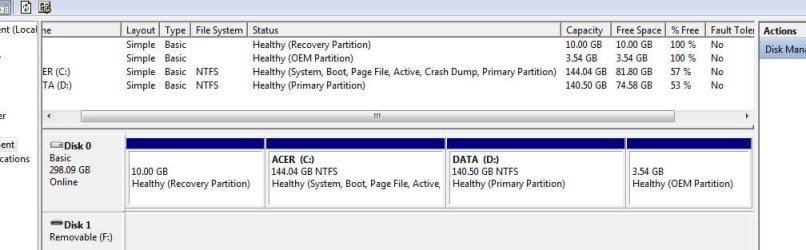
My problems is that I have 2 back up/revovery partitions that I would like to have usable storage. My machine previously had vista installed and I believe these are remnants of the old system, although I did do a clean install of 7 home Premium.
I have been through the tutorial but unfortuantely dont have any right click options available for these 2 back up partitions in disk management.
I have attached a screen dump of the disk layout, which may be of some use.
may I say what an excellent forum this is.
My problems is that I have 2 back up/revovery partitions that I would like to have usable storage. My machine previously had vista installed and I believe these are remnants of the old system, although I did do a clean install of 7 home Premium.
I have been through the tutorial but unfortuantely dont have any right click options available for these 2 back up partitions in disk management.
I have attached a screen dump of the disk layout, which may be of some use.
Attachments
My Computer
- Computer Manufacturer/Model Number
- ACER ASPIRE 6530
- OS
- win 7 home premium (32 bit), OS Version: 6.1.7600,
- CPU
- AMD Turion(tm) X2 Dual-Core Mobile RM-72 hypertransport 3.0
- Motherboard
- AMD M780 Chipset
- Memory
- 3Gb DDR2
- Graphics Card(s)
- ATI Radeon HD3200
- Sound Card
- Realtek HD audio (model no. ???)
- Monitor(s) Displays
- generic PnP
- Screen Resolution
- 1024*768
- Hard Drives
- 320 Gb
- Other Info
- Clean (custom install). Windows.old deleted. AV is AVG 9.0 (FREE), MalwareBytes, SPybot S+D.


