Solved Cannot delete WLM Contacts

HowardButler

New member
Local time
7:36 AM
Messages
3
Using Windows Live Mail, the contacts list has multiple copies of many of my contacts. I would like to delete some of them, but the option to delete is grayed out in the context menu. I looked in the contacts folder under my user name and some of the contacts shown in WLM are not there. How do I get rid of them?
Have seen multiple post about deleting contacts but they do not address the delete option being grayed out.
 

My Computer

Computer type
PC/Desktop
Computer Manufacturer/Model Number
HP
OS
windows 7 home premium 64 bit
CPU
AMD phenom 2.8 gz
Memory
6 gig
Antivirus
Norton 360
Browser
IE11, Chrome
Hi HowardButler, welcome to Seven Forums.
Open your 'Contacts' folder & right click what you want deleted or other options.
 

My Computer

Computer Manufacturer/Model Number
Look in my Signature.
OS
Win7 H.Prem. 32bit+SP1
No help, because as I said the delete option is grayed out.
 

My Computer

Computer type
PC/Desktop
Computer Manufacturer/Model Number
HP
OS
windows 7 home premium 64 bit
CPU
AMD phenom 2.8 gz
Memory
6 gig
Antivirus
Norton 360
Browser
IE11, Chrome
Hi Howard, use this link to see if you have the latest version of WLM. Run the file, select what you want installed, if you have older programs installed, they will get updated.
None of your details will be changed, & you won't lose anything.
 

My Computer

Computer Manufacturer/Model Number
Look in my Signature.
OS
Win7 H.Prem. 32bit+SP1
P.S. if you see your photo with the option to 'Sign in' it could be the root of your problem.

RR.jpg
 

My Computer

Computer Manufacturer/Model Number
Look in my Signature.
OS
Win7 H.Prem. 32bit+SP1
also if you logged into WLM with a live account go to
https://login.live.com/login
and sign into the account
Look and see if all your contacts are there, if yes,
Now go back into the WLM program. Sign out of WLM if it signs you in. Like the picture that Roderunner showed you.
Once signed out- close the Program
Re open the program and try to sign in again and see if the contacts are now not greyed out

If the contacts are NOT on the Website when you signed in, then somehow you deleted them and that is also why they could be greyed out.
Let us know what happened after you try these steps
 

My Computer

Computer type
PC/Desktop
Computer Manufacturer/Model Number
Dell Computers
OS
Windows 7 Pro 32/64 bit and Windows 10 Pro 32 Bit/64bit
Memory
4gigs
Graphics Card(s)
AMD Radeon HD and Nvidia
Monitor(s) Displays
Samsung 24". INC 19". Dell 22 ". Dell 17" & 19"
It worked! Thank you so much. The edit and delete options are available and some duplicates (which were not in the contacts folder under my name on the hard drive) are gone. Problem solved.
 

My Computer

Computer type
PC/Desktop
Computer Manufacturer/Model Number
HP
OS
windows 7 home premium 64 bit
CPU
AMD phenom 2.8 gz
Memory
6 gig
Antivirus
Norton 360
Browser
IE11, Chrome
We are glad it worked!
 

My Computer

Computer type
PC/Desktop
Computer Manufacturer/Model Number
Dell Computers
OS
Windows 7 Pro 32/64 bit and Windows 10 Pro 32 Bit/64bit
Memory
4gigs
Graphics Card(s)
AMD Radeon HD and Nvidia
Monitor(s) Displays
Samsung 24". INC 19". Dell 22 ". Dell 17" & 19"
This didn't work for me. But this forum seems to have the most appropriate advice.

I have exported my WLM (2012 version). They are now corrected and in a CSV file. Now I go to WLM and import and it ADDED the corrected contacts. So I go to delete all contacts so that I can import to a clean slate. I was able to delete about the first 25 but now my only option to delete (of 500+ contacts now) I can only delete one at a time. I followed the advice on this thread, but when I click on
also if you logged into WLM with a live account go to
https://login.live.com/login
and sign into the account
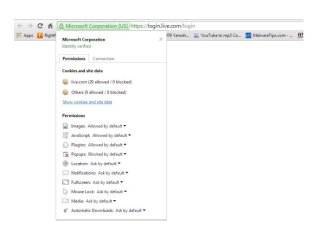
I don't see an option to sign on to anything. My browser is Google Chrome. I can do a pull down list as shown in the screen shot. My Delete x is still grayed out except for individual contacts, and right clicking on multiple contacts doesn't have the delete option.

I'm now in a real mess with most contacts duplicated and about 25 (don't know which ones) deleted.

Please help me to delete my WLM contacts so that I can import the CSV file with the edited contacts that I've worked on all day!

Thanks....
 

Attachments

  • WLM delete problem from sevenforums.jpg
    WLM delete problem from sevenforums.jpg
    24.3 KB · Views: 0
Last edited:

My Computer

Computer type
PC/Desktop
Computer Manufacturer/Model Number
Dell Inspiron 530
OS
Win 7 pro 64 bit
CPU
Intel Q6600 @ 2.4 GHz
Memory
4 MB RAM
Graphics Card(s)
Radeon 1 GB HD 4650
Hard Drives
500 GB boot drive Samsung HD 501J ATA
1 TB rive Samsung HD 103UJ ATA
2 TB Seagate GoFlex USB drive for backup
PSU
750 Watt
Internet Speed
25 Mbps down; 1.7 Mbps up
Antivirus
Avast free
Browser
Google Chrome / IE 9
Other Info
Acronis True Image 2012 for backups
Try doing this with ie browser, crome might not be letting you see the delete tab
 

My Computer

Computer type
PC/Desktop
Computer Manufacturer/Model Number
Dell Computers
OS
Windows 7 Pro 32/64 bit and Windows 10 Pro 32 Bit/64bit
Memory
4gigs
Graphics Card(s)
AMD Radeon HD and Nvidia
Monitor(s) Displays
Samsung 24". INC 19". Dell 22 ". Dell 17" & 19"
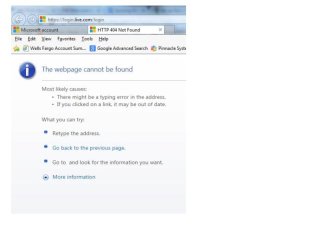
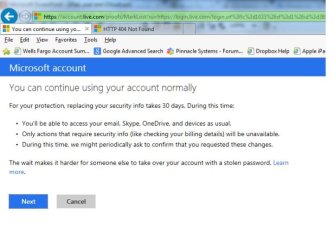
Bummer. I tried IE and got the 404 error shown in one screen capture. So I tried messing around with the MSFT site to log into something and it asks for my security information (the other screen capture). It took me through a number of steps, the most critical is for a discontinued email address that I apparently used in the past, then said that I need to wait 30 days.

I don't even know if the "wait 30" is at the right place.

[rhetorical]How can it be so complicated to delete contacts??[/rhetorical]

I appreciate your continued help.
 

Attachments

  • 404 error.jpg
    404 error.jpg
    23.2 KB · Views: 0
  • Wait 30 days.jpg
    Wait 30 days.jpg
    47.1 KB · Views: 0

My Computer

Computer type
PC/Desktop
Computer Manufacturer/Model Number
Dell Inspiron 530
OS
Win 7 pro 64 bit
CPU
Intel Q6600 @ 2.4 GHz
Memory
4 MB RAM
Graphics Card(s)
Radeon 1 GB HD 4650
Hard Drives
500 GB boot drive Samsung HD 501J ATA
1 TB rive Samsung HD 103UJ ATA
2 TB Seagate GoFlex USB drive for backup
PSU
750 Watt
Internet Speed
25 Mbps down; 1.7 Mbps up
Antivirus
Avast free
Browser
Google Chrome / IE 9
Other Info
Acronis True Image 2012 for backups
I am confused, did you just try to login in using your live mail account and password? And if yes why did this not work? Did you not use your regular live mail info? Why did you put in a discountinued username and password
 

My Computer

Computer type
PC/Desktop
Computer Manufacturer/Model Number
Dell Computers
OS
Windows 7 Pro 32/64 bit and Windows 10 Pro 32 Bit/64bit
Memory
4gigs
Graphics Card(s)
AMD Radeon HD and Nvidia
Monitor(s) Displays
Samsung 24". INC 19". Dell 22 ". Dell 17" & 19"
I wasn't able to log in at all. When I tried to access the site using the URL that you provided I got the 404 error. When that happened, I tried to mine through by copying the root of the URL. That's what led me to the MSFT security loop that asked for my account info that is associated with the bad email address which was provided by MSFT during the verification protocol. I did NOT enter a bad email address.

Is there a working URL that I need to use other than the one that you offered? See if you can get a valid return by clicking on the URL. If it's still active maybe we can figure out why I cant enter...

I'm confused too - but not as savvy as you.
 
Last edited:

My Computer

Computer type
PC/Desktop
Computer Manufacturer/Model Number
Dell Inspiron 530
OS
Win 7 pro 64 bit
CPU
Intel Q6600 @ 2.4 GHz
Memory
4 MB RAM
Graphics Card(s)
Radeon 1 GB HD 4650
Hard Drives
500 GB boot drive Samsung HD 501J ATA
1 TB rive Samsung HD 103UJ ATA
2 TB Seagate GoFlex USB drive for backup
PSU
750 Watt
Internet Speed
25 Mbps down; 1.7 Mbps up
Antivirus
Avast free
Browser
Google Chrome / IE 9
Other Info
Acronis True Image 2012 for backups
Hi lbeck, do you have WLM installed on your pc?
 

My Computer

Computer Manufacturer/Model Number
Look in my Signature.
OS
Win7 H.Prem. 32bit+SP1
Try logging in here. https://login.live.com/login.srf?wa...ve.com/m/&lc=1033&id=64855&pcexp=false&snsc=1


Also roserunner made a good point, do you have windows live mail on your pc? If not you should download it and install it
Log in using your live account. Once logged in, it will sync all your contacts, then you can delete the ones you do not want. In fact you can delete them all and then import your csv
You can pick it up here
Windows Essentials - Download Windows Live Essentials

When you first install it just check Windows live mail, leave the rest unchecked
 

My Computer

Computer type
PC/Desktop
Computer Manufacturer/Model Number
Dell Computers
OS
Windows 7 Pro 32/64 bit and Windows 10 Pro 32 Bit/64bit
Memory
4gigs
Graphics Card(s)
AMD Radeon HD and Nvidia
Monitor(s) Displays
Samsung 24". INC 19". Dell 22 ". Dell 17" & 19"
Thanks to you both. Yes, I do have WLM installed on my PC. That's where I exported/imported the contacts and have done the screen captures. But I've done enough work trying to repair/edit WLM 2012 that I think my best avenue at this point is to uninstall WLM and re-install. You say that I can leave the other "live" programs unchecked.

Assuming that all goes well with the new install, I'm assuming that the contacts will be empty, that there isn't somehow a hidden database (e.g., on the cloud), and then I then can import my CSV contacts. Assuming this is all okay at that point, what do I do on my iPhone and iPad? Do I need to delete those apps/accounts on those iDevices, or go into settings and choose Gmail as my option for contacts instead of iCloud and everything will sync from my PC via the cloud - or do I need to hook them up to my PC for the sync process?

Your comments here will be helpful, but getting past getting my WLM contacts repaired is kind of a different issue. I can work on that separately once I have a good contacts list on my PC.

Thanks again.
 

My Computer

Computer type
PC/Desktop
Computer Manufacturer/Model Number
Dell Inspiron 530
OS
Win 7 pro 64 bit
CPU
Intel Q6600 @ 2.4 GHz
Memory
4 MB RAM
Graphics Card(s)
Radeon 1 GB HD 4650
Hard Drives
500 GB boot drive Samsung HD 501J ATA
1 TB rive Samsung HD 103UJ ATA
2 TB Seagate GoFlex USB drive for backup
PSU
750 Watt
Internet Speed
25 Mbps down; 1.7 Mbps up
Antivirus
Avast free
Browser
Google Chrome / IE 9
Other Info
Acronis True Image 2012 for backups
when you uninstall WLM and reinstall it make sure you do not login to your live account. Sometimes when you uninstall the program and reinstall it, everything comes back to the way you had it before because it is being held up in the registry.

I would prefer if possible for you to go to the live account through the website I gave you or try this one

https://login.live.com/

If you get in then delete all the contacts that way first. This way if by chance you reinstall wlm and log in after you have done this, there will be no contacts to come back to.

Then I would import the cvs in (still not logged into windows live mail program on the pc)
Once the contacts are all fine= now log in
Allow WLM to sync up your contacts that you just put in through the cvs

see if this works
 

My Computer

Computer type
PC/Desktop
Computer Manufacturer/Model Number
Dell Computers
OS
Windows 7 Pro 32/64 bit and Windows 10 Pro 32 Bit/64bit
Memory
4gigs
Graphics Card(s)
AMD Radeon HD and Nvidia
Monitor(s) Displays
Samsung 24". INC 19". Dell 22 ". Dell 17" & 19"
as for the iphone, if this is a windows live account, do not click on the mail app until you have fixed it on the website and on the pc or you will wind up with duplicates again. wait until all is fixed via the website and the pc
 

My Computer

Computer type
PC/Desktop
Computer Manufacturer/Model Number
Dell Computers
OS
Windows 7 Pro 32/64 bit and Windows 10 Pro 32 Bit/64bit
Memory
4gigs
Graphics Card(s)
AMD Radeon HD and Nvidia
Monitor(s) Displays
Samsung 24". INC 19". Dell 22 ". Dell 17" & 19"
Okay, I've made real progress on this foray. By following the link https://login.live.com/login.srf?wa=...p=false&snsc=1 I was redirected to the MSFT Outlook site, which I understand now replaces Hotmail, and was asked to choose which Google account to merge - I had forgotten that I have an old account that I no longer use. In any event, after a few steps, I was able to pull up my contacts, deleted them all, and successfully imported my CSV file.

I still have some remaining issues, but they deal mainly with iPhone and I think I can work through those or get help from the Apple forum. Mainly, my iPhone has some phone numbers that are not part of my gmail database, many of which are for people that I call and don't have email or that I don't know their email address. This has occurred because my CSV database was exported from my email client and the iPhone has phone numbers entered manually for making phone calls prior to getting an iPhone that can do both. But I'm pretty sure that I can simply add this phone data to my contacts database now that I have a corrected one. That way I'll have one database that can be used for email and phone.

I'm fairly proficient with spreadsheets. I'm comfortable there, and I like the idea of having a master database that I can keep for email, phone, addresses, and other data.

Point is that I'm now in an area that deviates from the toipic of this thread so I'll move on. I just wanted to return to thank you....
 

My Computer

Computer type
PC/Desktop
Computer Manufacturer/Model Number
Dell Inspiron 530
OS
Win 7 pro 64 bit
CPU
Intel Q6600 @ 2.4 GHz
Memory
4 MB RAM
Graphics Card(s)
Radeon 1 GB HD 4650
Hard Drives
500 GB boot drive Samsung HD 501J ATA
1 TB rive Samsung HD 103UJ ATA
2 TB Seagate GoFlex USB drive for backup
PSU
750 Watt
Internet Speed
25 Mbps down; 1.7 Mbps up
Antivirus
Avast free
Browser
Google Chrome / IE 9
Other Info
Acronis True Image 2012 for backups
Back
Top