

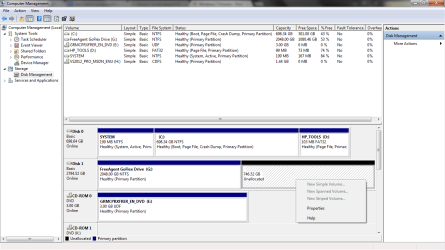
I have a 3TB external drive that I've been using for backup and general storage, and decided to make a new partition on it to keep the two things separated better. Using Windows' Disk Management tool I tried to shrink the volume by 775GB, but ended up with two new slots of unallocated space, one was about 28GB and the other is 746GB. I was able to create a new volume using the 28GB, but deleted it since it wasn't enough and extended the primary partition using that space. HOWEVER, the larger block of unallocated space I can't seem to be able to do anything with. As you can see in the screens, everything is grey'd out.
Do I need to reformat the whole drive to be able to use this space again?
Do I need to reformat the whole drive to be able to use this space again?
Attachments

My Computer
- Computer type
- PC/Desktop
- Computer Manufacturer/Model Number
- Custom
- OS
- Windows 7 Professional x64 w/SP1
- CPU
- Intel i7-3770 3.4GHz
- Motherboard
- Gigabyte GA-Z77-D3H
- Memory
- 32GB (8GB x4) DDR3 1600MHz Corsair Vengeance Dual Channel
- Graphics Card(s)
- Sapphire Radeon HD 7950 3GB GDDR5 VRAM
- Sound Card
- Sound Blaster ZxR PCIe
- Monitor(s) Displays
- 1x 21.5"
- Screen Resolution
- 1920x1080
- Hard Drives
- 128GB OCZ Vertex 4 SSD
1TB 7200 rpm Seagate Barracuda
4TB 7200 rpm Western Digital Black
- PSU
- 600W Coolmax ZU-600B
- Case
- Antec Nine Hundred Two V3
- Cooling
- 4 stock case fans. 1 stock cpu fan. 2 stock gpu fans
- Keyboard
- Logitech K800 wireless backlit
- Mouse
- Roccat Tyon
- Internet Speed
- 400 KB/s or so
- Antivirus
- 992KB Hosts file, Hardware firewall, not clicking on links
- Browser
- Chrome


