Cannot drag windows above top screen boundry.

Xirix

New member
Member
Local time
6:02 PM
Messages
43
For whatever reason I cannot have a window off-screen even a little bit if it's poking above the top of the screen, I can have a window off-screen as much as I want on the left, right and bottom, but if I try the top it snaps back vertically. Is there a way I can circumvent this?

If there isn't, is there a way to remove the re-size limit on windows? I can only resize them vertically so much before they refuse.

I'm using Windows 7.
 

My Computer

Computer type
PC/Desktop
Computer Manufacturer/Model Number
Custom Build
OS
Windows 7 Ultimate 64
CPU
Intel(R) Core(TM) i5 CPU 750 @ 2.67GHz
Motherboard
ASUSTeK Computer INC. P7P55D-E LX
Memory
12.00 GB
Graphics Card(s)
ATI Radeon HD 5700 Series (1 gig I think)
Sound Card
(1) M-Audio Revolution 5.1 (2) AMD High Definition Audio D
Monitor(s) Displays
Asus VE278H 27"
Screen Resolution
1920x1080
Hard Drives
(1) MAXTOR STM3250310AS ATA Device (2) ST2000DM001-1CH164 ATA Device (3) ST2000DM001-1ER164 ATA Device (4) WDC WD10EARS-22Y5B1 ATA Device (5) Generic USB SD Reader USB Device
PSU
OCZ700
For whatever reason I cannot have a window off-screen even a little bit if it's poking above the top of the screen, I can have a window off-screen as much as I want on the left, right and bottom, but if I try the top it snaps back vertically. Is there a way I can circumvent this?

If there isn't, is there a way to remove the re-size limit on windows? I can only resize them vertically so much before they refuse.

I'm using Windows 7.
See this post http://www.sevenforums.com/general-...bar-window-off-top-my-screen.html#post3137254

AutoIt can resize the window as well.
 

My Computer

Computer type
Laptop
Computer Manufacturer/Model Number
Employer provided Dell Latitude
OS
W7 Pro SP1 64bit
CPU
i7
Memory
8GB
Graphics Card(s)
Intel HD Graphics
Hard Drives
crappy SSD
Antivirus
Employer mandated Symantec Endpoint Protection
Browser
Pale Moon 64bit, IE11 64bit & Chrome 64bit
Right click on the windows title bar then select Move. Use the arrow keys to move it wherever you want it.
 

My Computer

Computer type
PC/Desktop
Computer Manufacturer/Model Number
Lenovo IdeaCenter 450
OS
Windows 10 Pro X64
CPU
Intel Quad Core i7-4770 @ 3.4Ghz
Memory
16.0GB PC3-12800 DDR3 SDRAM 1600 MHz
Graphics Card(s)
Intel Integrated HD Graphics
Sound Card
Realtek HD Audio
Monitor(s) Displays
HP 22" LCD
Screen Resolution
1680 x 1050
Hard Drives
250GB Samsung EVO SATA-3 SSD
2TB Seagate ST2000DM001 SATA-2
1.5TB Seagate ST3150041AS SATA
Keyboard
Dell USB
Mouse
Lenovo USB
Internet Speed
Cable via Road Runner 3MB Upload, 30MB Download
Antivirus
Windows Defender, MBAM Pro, MBAE
Browser
Seamonkey
Other Info
UEFI/GPT
PLDS DVD-RW DH16AERSH
Right click on the windows title bar then select Move. Use the arrow keys to move it wherever you want it.
That does not work for me.

In the thread that I linked to, it did not work for the OP either.

Try putting the top of a window at a minus 55 pixels as requested in the thread that I linked to.

Please let me know if it works for you...
...because I would like to figure out how you did that.
 

My Computer

Computer type
Laptop
Computer Manufacturer/Model Number
Employer provided Dell Latitude
OS
W7 Pro SP1 64bit
CPU
i7
Memory
8GB
Graphics Card(s)
Intel HD Graphics
Hard Drives
crappy SSD
Antivirus
Employer mandated Symantec Endpoint Protection
Browser
Pale Moon 64bit, IE11 64bit & Chrome 64bit
How would I know where minus 55 pixels is?

I can move the window entirely off the top screen if I want.

MovedWindows.jpg
 

My Computer

Computer type
PC/Desktop
Computer Manufacturer/Model Number
Lenovo IdeaCenter 450
OS
Windows 10 Pro X64
CPU
Intel Quad Core i7-4770 @ 3.4Ghz
Memory
16.0GB PC3-12800 DDR3 SDRAM 1600 MHz
Graphics Card(s)
Intel Integrated HD Graphics
Sound Card
Realtek HD Audio
Monitor(s) Displays
HP 22" LCD
Screen Resolution
1680 x 1050
Hard Drives
250GB Samsung EVO SATA-3 SSD
2TB Seagate ST2000DM001 SATA-2
1.5TB Seagate ST3150041AS SATA
Keyboard
Dell USB
Mouse
Lenovo USB
Internet Speed
Cable via Road Runner 3MB Upload, 30MB Download
Antivirus
Windows Defender, MBAM Pro, MBAE
Browser
Seamonkey
Other Info
UEFI/GPT
PLDS DVD-RW DH16AERSH
I take that back. It actually ends up reducing the size of the window and aligns the top edge of it to the top of the screen as soon as I press the enter key. Okay right, left and down though.

Yhis has got to be a bug induced by the snap feature, which I thought I had turned off.
 

My Computer

Computer type
PC/Desktop
Computer Manufacturer/Model Number
Lenovo IdeaCenter 450
OS
Windows 10 Pro X64
CPU
Intel Quad Core i7-4770 @ 3.4Ghz
Memory
16.0GB PC3-12800 DDR3 SDRAM 1600 MHz
Graphics Card(s)
Intel Integrated HD Graphics
Sound Card
Realtek HD Audio
Monitor(s) Displays
HP 22" LCD
Screen Resolution
1680 x 1050
Hard Drives
250GB Samsung EVO SATA-3 SSD
2TB Seagate ST2000DM001 SATA-2
1.5TB Seagate ST3150041AS SATA
Keyboard
Dell USB
Mouse
Lenovo USB
Internet Speed
Cable via Road Runner 3MB Upload, 30MB Download
Antivirus
Windows Defender, MBAM Pro, MBAE
Browser
Seamonkey
Other Info
UEFI/GPT
PLDS DVD-RW DH16AERSH
How would I know where minus 55 pixels is?
~~~
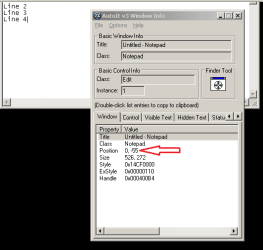
With a window info tool - of course :-)

I can type in the window after it has been moved.
It does not change size or snap back down.

notepad.PNG


I take that back. It actually ends up reducing the size of the window and aligns the top edge of it to the top of the screen as soon as I press the enter key. Okay right, left and down though.

This has got to be a bug induced by the snap feature, which I thought I had turned off.
Nope. It does it in XP too. The screenshot above is from XP.

Why would anyone want to do this?
Read the thread that I linked to earlier.

Also, have you every worked on a netbook with Windows 7 Starter Edition? You cannot always see the "OK" button at the bottom of a dialog box. AutoIt can be used automatically move the window up as you move the mouse cursor down. You just leave the script running all of the time. Such a script would normally only move a window that is bigger than the screen... but, as you see in the screenshot above, AutoIt can move most any window wherever you want :-)

Most of this is covered in the thread that I linked to.
 

My Computer

Computer type
Laptop
Computer Manufacturer/Model Number
Employer provided Dell Latitude
OS
W7 Pro SP1 64bit
CPU
i7
Memory
8GB
Graphics Card(s)
Intel HD Graphics
Hard Drives
crappy SSD
Antivirus
Employer mandated Symantec Endpoint Protection
Browser
Pale Moon 64bit, IE11 64bit & Chrome 64bit
I find I can't move a window very far up as it has to be dragged by the mouse when clicked on the Title bar but the mouse will not go off-screen at the top, can't drag beyond that limit even though most of the Title bar has been moved out of sight, mouse can barely hold it. The mouse has the same limit at the left and bottom edges. It will go out of sight on the right side but just barely, limit can be seen over a maximized window or a smaller one with its right border at the edge of the screen.
 

My Computer

Computer type
PC/Desktop
Computer Manufacturer/Model Number
Customs, Dell, Gateway, HP, Toshiba, Acer, ASUS
OS
Windows 7 Ultimate 64-bit, Windows 8.1 64-bit, Mac OS X 10.10, Linux Mint 17, Windows 10 Pro TP
Keyboard
Microsoft
Mouse
Microsoft
I made this autohotkey script to move windows.

Code:
~#LButton::
SetWinDelay,30
MouseGetPos,x,y,w
Loop
{
  GetKeyState,lbutton,LButton,P
  GetKeyState,LWin,LWin,P
  If (lbutton="U" Or LWin="U")
    Break
  MouseGetPos,mx,my
  WinGetPos,wx,wy,ww,wh,ahk_id %w%
  wx:=wx+mx-x
  wy:=wy+my-y
  WinMove,ahk_id %w%,,%wx%,%wy%
  x:=mx
  y:=my
}
Return
Win+LButton - hold the windows key and drag any window anywhere you click on it(not just the titlebar)
 

My Computer

Computer type
PC/Desktop
Computer Manufacturer/Model Number
Custom Build
OS
Windows 7 Ultimate x64 SP1
CPU
i7 4771 3.5Ghz
Motherboard
ASUS B85 Plus
Memory
2x8GB DDR3 GEIL EVO LEGGERA
Graphics Card(s)
PALIT GTX 750 TI StormX Duo
Monitor(s) Displays
Samsung T24D390
Screen Resolution
1920x1080
Hard Drives
Samsung SSD 840 EVO 128GB
2TB Seagate SATA 3
600GB WD Blue SATA 2
PSU
Seasonic S12II 520W Bronze
Case
Cooler Master Force 500
Antivirus
Avast Free
Browser
Firefox
Will Xirix know how to create the script? Having the code to use is quite nice and appreciated but that's not all there is to using it, all too common on forums to post code but leave off the mechanics, suggests a level of expertise that may not exist.
 

My Computer

Computer type
PC/Desktop
Computer Manufacturer/Model Number
Customs, Dell, Gateway, HP, Toshiba, Acer, ASUS
OS
Windows 7 Ultimate 64-bit, Windows 8.1 64-bit, Mac OS X 10.10, Linux Mint 17, Windows 10 Pro TP
Keyboard
Microsoft
Mouse
Microsoft
Um what exactly do I have to explain....install Autohotkey=>create a new autohotkey file(it's actually text file with ahk extension)=>paste the code inside=>save and run the script.

Or do I have to explain what each line in the script does
 

My Computer

Computer type
PC/Desktop
Computer Manufacturer/Model Number
Custom Build
OS
Windows 7 Ultimate x64 SP1
CPU
i7 4771 3.5Ghz
Motherboard
ASUS B85 Plus
Memory
2x8GB DDR3 GEIL EVO LEGGERA
Graphics Card(s)
PALIT GTX 750 TI StormX Duo
Monitor(s) Displays
Samsung T24D390
Screen Resolution
1920x1080
Hard Drives
Samsung SSD 840 EVO 128GB
2TB Seagate SATA 3
600GB WD Blue SATA 2
PSU
Seasonic S12II 520W Bronze
Case
Cooler Master Force 500
Antivirus
Avast Free
Browser
Firefox
Not everyone uses the program or even knows about it. Providing instructions in a friendly manner helps other folks understand what a program does and how to make use of it.
 

My Computer

Computer type
PC/Desktop
Computer Manufacturer/Model Number
Customs, Dell, Gateway, HP, Toshiba, Acer, ASUS
OS
Windows 7 Ultimate 64-bit, Windows 8.1 64-bit, Mac OS X 10.10, Linux Mint 17, Windows 10 Pro TP
Keyboard
Microsoft
Mouse
Microsoft
I made this autohotkey script to move windows.

Code:
~#LButton::
SetWinDelay,30
MouseGetPos,x,y,w
Loop
{
  GetKeyState,lbutton,LButton,P
  GetKeyState,LWin,LWin,P
  If (lbutton="U" Or LWin="U")
    Break
  MouseGetPos,mx,my
  WinGetPos,wx,wy,ww,wh,ahk_id %w%
  wx:=wx+mx-x
  wy:=wy+my-y
  WinMove,ahk_id %w%,,%wx%,%wy%
  x:=mx
  y:=my
}
Return
Win+LButton - hold the windows key and drag any window anywhere you click on it(not just the titlebar)

Um what exactly do I have to explain....install Autohotkey=>create a new autohotkey file(it's actually text file with ahk extension)=>paste the code inside=>save and run the script.

Or do I have to explain what each line in the script does


What is Win+LButton?
 

My Computer

Computer type
Laptop
Computer Manufacturer/Model Number
Employer provided Dell Latitude
OS
W7 Pro SP1 64bit
CPU
i7
Memory
8GB
Graphics Card(s)
Intel HD Graphics
Hard Drives
crappy SSD
Antivirus
Employer mandated Symantec Endpoint Protection
Browser
Pale Moon 64bit, IE11 64bit & Chrome 64bit

My Computer

Computer type
PC/Desktop
Computer Manufacturer/Model Number
Custom Build
OS
Windows 7 Ultimate x64 SP1
CPU
i7 4771 3.5Ghz
Motherboard
ASUS B85 Plus
Memory
2x8GB DDR3 GEIL EVO LEGGERA
Graphics Card(s)
PALIT GTX 750 TI StormX Duo
Monitor(s) Displays
Samsung T24D390
Screen Resolution
1920x1080
Hard Drives
Samsung SSD 840 EVO 128GB
2TB Seagate SATA 3
600GB WD Blue SATA 2
PSU
Seasonic S12II 520W Bronze
Case
Cooler Master Force 500
Antivirus
Avast Free
Browser
Firefox
Thanks - I should have spent more time looking at your code.
The answer was right there in the GetKeyState lines :-)

I used that syntax for several years with early versions of AutoIt. When the AutoIt devs changed syntax, some devs left and started AHK. I stuck with the old syntax for a while and then converted. I've been away from that "AHK syntax" for more than a decade.

Anyway - let's hope that the OP returns to this thread and makes use of your code. You are kind to offer it.
 

My Computer

Computer type
Laptop
Computer Manufacturer/Model Number
Employer provided Dell Latitude
OS
W7 Pro SP1 64bit
CPU
i7
Memory
8GB
Graphics Card(s)
Intel HD Graphics
Hard Drives
crappy SSD
Antivirus
Employer mandated Symantec Endpoint Protection
Browser
Pale Moon 64bit, IE11 64bit & Chrome 64bit
Back
Top