Solved Cannot Dual-Boot Windows 7 w/ 8

surge411

New member
Power User
Local time
9:43 PM
Messages
93
Hi peeps,

So I have this virtual machine with Windows 8 installed on it and working perfectly. I thought i would start using my Windows 8 copy installed "for real" and sort of get it to go faster, so that I could get use to it too. I mean like sort of "unvirtualize" it. So i worked a few days, trying to find a way to convert a vhd "Virtual Hard Disk" to a real physical disk. Yesterday I finally was able to get it working by mounting the vhd and then cloning it to a partition. It working perfectly, so i marked the partition with the new copy of windows 8 as active. I rebooted, and as expected, windows 8 started properly and was working as good as new. And yet i had it the exact state as when it was a virtual machine!
Now the problem:
It won't boot to windows 7 anymore!! I searched a bit, and realized that windows 7 isn't in the list of msconfig! So then i realized that the windows 7 partition was marked as inactive, thus the BIOS was not detecting it. So thinking it would work, I marked it as active and rebooted.
Guess what? No windows 8 this time! As expected the windows 8 partition was now marked inactive. So I did some research that only one partition per disk could be active. But then how was I able to dual-boot the same way a few weeks ago when I attempted the exact same thing, except the only difference being that I installed windows 8 from scratch. Still on a partition on the same disk as windows 7 though.
So how can I do that without having to reinstall? Is it possible? Is my boot loader for windows 8 screwed up?


p.s. Yes I have another disk but it's always been a GPT disk, thus my BIOS not supporting it. Remember, this dual boot setup worked a few weeks ago with the EXACT same hardware!
 

My Computer

Computer type
PC/Desktop
Computer Manufacturer/Model Number
Custom Build
OS
Windows 7 Enterprise x64
CPU
Intel(R) Core(TM) i5-3570k Ivy Bridge @ 3.40Ghz
Motherboard
ASUS P8Z77-v LX
Memory
4GB
Graphics Card(s)
EVGA 2GB NVIDIA GTX 760
Monitor(s) Displays
SAMSUNG
Screen Resolution
1920 x 1080
Hard Drives
Seagate Barracuda
WesternDigital
PSU
Corsair CX750M 750W Modular PSU
Case
Modded Case
Cooling
3 Input Fans 1 Exhaust fan 2 GPU Exhaust Fans 1 CPU Fan
Keyboard
Logitech Wireless Combo mk360 Keyboard
Mouse
Logitech G400 Gaming Mouse; Logitech Wireless Combo mk360
Internet Speed
27mbps (download) & 7mbps (upload) (FREE, France)
Antivirus
Microsoft Security Essentials
Browser
Google Chrome
Other Info
New Custom built gaming rig.
Better yet isolate the dual boot if you have either 8 added into the 7 BCD store or 7 added into the 8 BCD store! The dual boot here between 7 and 8 ended up disasterously with both versions crashing!

Unlike Vista/7 and XP/7 dual boots the two do not work together. The best option is to see 8 go on a totally separate drive as a stand alone OS and simply bring up the boot device menu at post time to select the drive 8 is installed onto.

Originally the CP was added into the 7 BCD and the 8 disk was needed to rewrite the mbr to 8 in order to see both boot without problem. If I were to add the retail 8 on at some point the 7 drive would simply be unplugged first to isolate the two. It solves a list of problems when trying out any newer version or new OS!
 

My Computers

System One System Two

  • Computer type
    PC/Desktop
    Computer Manufacturer/Model Number
    Custom builds = 2
    OS
    W7 Ultimate x64/W10 Pro x64/W11 Pro Triple Boot - Main PC W7 Remote PC Micro ATX W7 Pro x64/W11 Pro
    CPU
    AMD Phenom II X4 975 Deneb 3.6ghz - 965 2nd remote pc
    Motherboard
    Gigabyte GA-790XTA-UD4-Gigabyte GA-880GM-D2H remote pc
    Memory
    Kingston Hyper X DDR3 1600 1.5v 16gb - Hyper X Fury 8gb 2nd
    Graphics Card(s)
    MSI HD Radeon 5750 1gb - MSI HD Radeon 6450 on mini tower
    Sound Card
    Creative Labs X-Fi Xtreme Audio P - Realtek onooard 2nd case
    Monitor(s) Displays
    ASUS VW199T-P 19" HP 2082a Main-HP 2082a 20" remote pc
    Screen Resolution
    Asus 1440x900 - HP 1600x900
    Hard Drives
    WD Black 1TB HD per OS W7, W10, and pending W11 presently on 500gb OS Drive - Pending Triple 1TB HDs for Spanned Storage/backup volume
    Single 2TB external USB enclosure, single 1TB System 7 Host/Boot drive, Pending 8TB external HD for system image b
    PSU
    Corsair 750TX - primary / Corsair CX600 - second
    Case
    Antec 900-2 - SSD compatible / NZXT Vulcan mini tower
    Cooling
    Zalman CNPS9900A
    Keyboard
    AZIO L70 Backlit Letters Gaming - ONN Cordless/USB
    Mouse
    MSI DS200 Programmable, Logitech Cordless
    Internet Speed
    30mbps upgrade - primary hard wired - mini tower usb WiFi
    Antivirus
    GFI VIPRE Internet Security 2014 on W7 2016 beta on W10,
    Browser
    Cyberfox, WaterFox 64bit FF variants, FireFox x64, Pale Moon
    Other Info
    Accomdata fan cooled usb 2.0 PIDE/Sata II, III external enclosure.
    Sambient usb/eSata PATA/Sata II, III external enclosure.
  • Computer type
    PC/Desktop
    System Manufacturer/Model Number
    CUSTOM ASSEMBLY
    OS
    W7 Pro x64/W11 Pro
    CPU
    AMD Deneb 3.6ghz - 965
    Motherboard
    Gigabyte GA-880GM-D2H remote pc
    Memory
    Kingston Hyper X Fury 8gb
    Graphics Card(s)
    MSI HD Radeon 6450 DVI Output
    Sound Card
    Realtek onooard Creative or Other separate PENDING
    Monitor(s) Displays
    VIZIO 32" LCD TV Separate LCD Pending
    Screen Resolution
    1600x1080
    Hard Drives
    WD 500GB OS Host/Boot WD Green 1TB Storage/Backup
    PSU
    Corsair 600W - THERMALTAKE 600W spare case
    Case
    NZXT Vulcan mini tower
    Cooling
    Twin 120mm Top Fans - 240mm Side Cover
    Keyboard
    ONN Cordless/USB Logitech Cordless
    Mouse
    ONN USB/Cordless - Logitech Cordless
    Internet Speed
    DSL 5G
    Browser
    MS Edge, FireFox, WaterFox x64, FireFox Nightly
    Other Info
    OS Testing-Remote Access to Main TeamViewer
Hmm i dont quite get it, but you said something about putting the 8 into the 7 BCD? How can you do that? I know thats its probably possible since ive installed rp before as dual boot.
 

My Computer

Computer type
PC/Desktop
Computer Manufacturer/Model Number
Custom Build
OS
Windows 7 Enterprise x64
CPU
Intel(R) Core(TM) i5-3570k Ivy Bridge @ 3.40Ghz
Motherboard
ASUS P8Z77-v LX
Memory
4GB
Graphics Card(s)
EVGA 2GB NVIDIA GTX 760
Monitor(s) Displays
SAMSUNG
Screen Resolution
1920 x 1080
Hard Drives
Seagate Barracuda
WesternDigital
PSU
Corsair CX750M 750W Modular PSU
Case
Modded Case
Cooling
3 Input Fans 1 Exhaust fan 2 GPU Exhaust Fans 1 CPU Fan
Keyboard
Logitech Wireless Combo mk360 Keyboard
Mouse
Logitech G400 Gaming Mouse; Logitech Wireless Combo mk360
Internet Speed
27mbps (download) & 7mbps (upload) (FREE, France)
Antivirus
Microsoft Security Essentials
Browser
Google Chrome
Other Info
New Custom built gaming rig.
I told you how to do it. Did you even see my post?

Boot into WIn8 Recovery Options to run Automatic Repair which will automate the function.
 
The BCD store is the boot configuration store. You can either manually use the BCD editor in Windows or a 3rd party program like EasyBCD to add a new boot entry into the boot options.

One thing to know here is once you add an entry into 7 for booting into the new version you will need to boot up from the 8 dvd or usb install key if not repair cd in order to correct the mbr for the newer version of Windows. Instead of seeing the Startup repair tool it is now called the Automatic repair found in the repair tools on the 8 dvd you buy or burn or when booting from the usb install key.

The same was seen when adding a boot entry for 7 into the Vista BCD store being the first version with the present form of boot loader. For XP you may have added the boot entry only if you installed XP after 7 where installing 7 last automatically added in an entry for XP.
 

My Computers

System One System Two

  • Computer type
    PC/Desktop
    Computer Manufacturer/Model Number
    Custom builds = 2
    OS
    W7 Ultimate x64/W10 Pro x64/W11 Pro Triple Boot - Main PC W7 Remote PC Micro ATX W7 Pro x64/W11 Pro
    CPU
    AMD Phenom II X4 975 Deneb 3.6ghz - 965 2nd remote pc
    Motherboard
    Gigabyte GA-790XTA-UD4-Gigabyte GA-880GM-D2H remote pc
    Memory
    Kingston Hyper X DDR3 1600 1.5v 16gb - Hyper X Fury 8gb 2nd
    Graphics Card(s)
    MSI HD Radeon 5750 1gb - MSI HD Radeon 6450 on mini tower
    Sound Card
    Creative Labs X-Fi Xtreme Audio P - Realtek onooard 2nd case
    Monitor(s) Displays
    ASUS VW199T-P 19" HP 2082a Main-HP 2082a 20" remote pc
    Screen Resolution
    Asus 1440x900 - HP 1600x900
    Hard Drives
    WD Black 1TB HD per OS W7, W10, and pending W11 presently on 500gb OS Drive - Pending Triple 1TB HDs for Spanned Storage/backup volume
    Single 2TB external USB enclosure, single 1TB System 7 Host/Boot drive, Pending 8TB external HD for system image b
    PSU
    Corsair 750TX - primary / Corsair CX600 - second
    Case
    Antec 900-2 - SSD compatible / NZXT Vulcan mini tower
    Cooling
    Zalman CNPS9900A
    Keyboard
    AZIO L70 Backlit Letters Gaming - ONN Cordless/USB
    Mouse
    MSI DS200 Programmable, Logitech Cordless
    Internet Speed
    30mbps upgrade - primary hard wired - mini tower usb WiFi
    Antivirus
    GFI VIPRE Internet Security 2014 on W7 2016 beta on W10,
    Browser
    Cyberfox, WaterFox 64bit FF variants, FireFox x64, Pale Moon
    Other Info
    Accomdata fan cooled usb 2.0 PIDE/Sata II, III external enclosure.
    Sambient usb/eSata PATA/Sata II, III external enclosure.
  • Computer type
    PC/Desktop
    System Manufacturer/Model Number
    CUSTOM ASSEMBLY
    OS
    W7 Pro x64/W11 Pro
    CPU
    AMD Deneb 3.6ghz - 965
    Motherboard
    Gigabyte GA-880GM-D2H remote pc
    Memory
    Kingston Hyper X Fury 8gb
    Graphics Card(s)
    MSI HD Radeon 6450 DVI Output
    Sound Card
    Realtek onooard Creative or Other separate PENDING
    Monitor(s) Displays
    VIZIO 32" LCD TV Separate LCD Pending
    Screen Resolution
    1600x1080
    Hard Drives
    WD 500GB OS Host/Boot WD Green 1TB Storage/Backup
    PSU
    Corsair 600W - THERMALTAKE 600W spare case
    Case
    NZXT Vulcan mini tower
    Cooling
    Twin 120mm Top Fans - 240mm Side Cover
    Keyboard
    ONN Cordless/USB Logitech Cordless
    Mouse
    ONN USB/Cordless - Logitech Cordless
    Internet Speed
    DSL 5G
    Browser
    MS Edge, FireFox, WaterFox x64, FireFox Nightly
    Other Info
    OS Testing-Remote Access to Main TeamViewer
Ok ill try the repair first and see if that works. If not ill have to do it manually
 

My Computer

Computer type
PC/Desktop
Computer Manufacturer/Model Number
Custom Build
OS
Windows 7 Enterprise x64
CPU
Intel(R) Core(TM) i5-3570k Ivy Bridge @ 3.40Ghz
Motherboard
ASUS P8Z77-v LX
Memory
4GB
Graphics Card(s)
EVGA 2GB NVIDIA GTX 760
Monitor(s) Displays
SAMSUNG
Screen Resolution
1920 x 1080
Hard Drives
Seagate Barracuda
WesternDigital
PSU
Corsair CX750M 750W Modular PSU
Case
Modded Case
Cooling
3 Input Fans 1 Exhaust fan 2 GPU Exhaust Fans 1 CPU Fan
Keyboard
Logitech Wireless Combo mk360 Keyboard
Mouse
Logitech G400 Gaming Mouse; Logitech Wireless Combo mk360
Internet Speed
27mbps (download) & 7mbps (upload) (FREE, France)
Antivirus
Microsoft Security Essentials
Browser
Google Chrome
Other Info
New Custom built gaming rig.
Once you are booted from the 8 dvd or flash drive used the command prompt will offer the manual method option for Fixboot and Fixmbr commands. The Automatic repair however is the fast and easy fix.
 

My Computers

System One System Two

  • Computer type
    PC/Desktop
    Computer Manufacturer/Model Number
    Custom builds = 2
    OS
    W7 Ultimate x64/W10 Pro x64/W11 Pro Triple Boot - Main PC W7 Remote PC Micro ATX W7 Pro x64/W11 Pro
    CPU
    AMD Phenom II X4 975 Deneb 3.6ghz - 965 2nd remote pc
    Motherboard
    Gigabyte GA-790XTA-UD4-Gigabyte GA-880GM-D2H remote pc
    Memory
    Kingston Hyper X DDR3 1600 1.5v 16gb - Hyper X Fury 8gb 2nd
    Graphics Card(s)
    MSI HD Radeon 5750 1gb - MSI HD Radeon 6450 on mini tower
    Sound Card
    Creative Labs X-Fi Xtreme Audio P - Realtek onooard 2nd case
    Monitor(s) Displays
    ASUS VW199T-P 19" HP 2082a Main-HP 2082a 20" remote pc
    Screen Resolution
    Asus 1440x900 - HP 1600x900
    Hard Drives
    WD Black 1TB HD per OS W7, W10, and pending W11 presently on 500gb OS Drive - Pending Triple 1TB HDs for Spanned Storage/backup volume
    Single 2TB external USB enclosure, single 1TB System 7 Host/Boot drive, Pending 8TB external HD for system image b
    PSU
    Corsair 750TX - primary / Corsair CX600 - second
    Case
    Antec 900-2 - SSD compatible / NZXT Vulcan mini tower
    Cooling
    Zalman CNPS9900A
    Keyboard
    AZIO L70 Backlit Letters Gaming - ONN Cordless/USB
    Mouse
    MSI DS200 Programmable, Logitech Cordless
    Internet Speed
    30mbps upgrade - primary hard wired - mini tower usb WiFi
    Antivirus
    GFI VIPRE Internet Security 2014 on W7 2016 beta on W10,
    Browser
    Cyberfox, WaterFox 64bit FF variants, FireFox x64, Pale Moon
    Other Info
    Accomdata fan cooled usb 2.0 PIDE/Sata II, III external enclosure.
    Sambient usb/eSata PATA/Sata II, III external enclosure.
  • Computer type
    PC/Desktop
    System Manufacturer/Model Number
    CUSTOM ASSEMBLY
    OS
    W7 Pro x64/W11 Pro
    CPU
    AMD Deneb 3.6ghz - 965
    Motherboard
    Gigabyte GA-880GM-D2H remote pc
    Memory
    Kingston Hyper X Fury 8gb
    Graphics Card(s)
    MSI HD Radeon 6450 DVI Output
    Sound Card
    Realtek onooard Creative or Other separate PENDING
    Monitor(s) Displays
    VIZIO 32" LCD TV Separate LCD Pending
    Screen Resolution
    1600x1080
    Hard Drives
    WD 500GB OS Host/Boot WD Green 1TB Storage/Backup
    PSU
    Corsair 600W - THERMALTAKE 600W spare case
    Case
    NZXT Vulcan mini tower
    Cooling
    Twin 120mm Top Fans - 240mm Side Cover
    Keyboard
    ONN Cordless/USB Logitech Cordless
    Mouse
    ONN USB/Cordless - Logitech Cordless
    Internet Speed
    DSL 5G
    Browser
    MS Edge, FireFox, WaterFox x64, FireFox Nightly
    Other Info
    OS Testing-Remote Access to Main TeamViewer
Okay so i first attempted Automatic Repair, and it said that a needed device was missing. I forgot the exact error, but the code was 0x000000e.
Anyways, i then put my Windows 8 installation USB stick and ran it from there. It ran fine, but it failed to fix the problem.
Then atlast i decided to do it manually, and surprisingly it was very easy. I mean even easier than trying to get to the automatic repair thing. (Im still not so familiar with windows 8)

Anyways thanks alot guys for helping me out. For others that are stuck still, just use EasyBCD (Freeware!!) to Add new entry and then choose the type of operating system, and specify which drive (or partition) the operating is in.
Anyways ill mark this thread as Solved, and thanks again guys!
 

My Computer

Computer type
PC/Desktop
Computer Manufacturer/Model Number
Custom Build
OS
Windows 7 Enterprise x64
CPU
Intel(R) Core(TM) i5-3570k Ivy Bridge @ 3.40Ghz
Motherboard
ASUS P8Z77-v LX
Memory
4GB
Graphics Card(s)
EVGA 2GB NVIDIA GTX 760
Monitor(s) Displays
SAMSUNG
Screen Resolution
1920 x 1080
Hard Drives
Seagate Barracuda
WesternDigital
PSU
Corsair CX750M 750W Modular PSU
Case
Modded Case
Cooling
3 Input Fans 1 Exhaust fan 2 GPU Exhaust Fans 1 CPU Fan
Keyboard
Logitech Wireless Combo mk360 Keyboard
Mouse
Logitech G400 Gaming Mouse; Logitech Wireless Combo mk360
Internet Speed
27mbps (download) & 7mbps (upload) (FREE, France)
Antivirus
Microsoft Security Essentials
Browser
Google Chrome
Other Info
New Custom built gaming rig.
I was waiting to hear back from you before recommending EasyBCD (click Download - no Name or Email required) as the secondary method since it should be supported by now.

But I believe Automatic Repair is supposed to do this, while checking all other parameters - a big benefit of using Startup Repair which is why we lean toward it in these situations - however the error may mean you have deeper problems so I would google it to learn more about it.
 
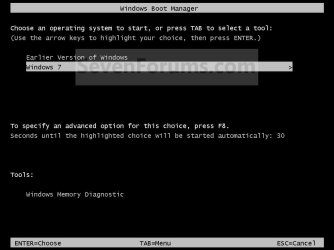
NOTE: EasyBCD will use the Windows 7 Boot Loader.

Example.jpg


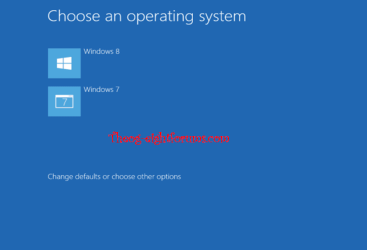
After you have made the dual boot with EasyECD, If you would like to use the Windows 8 Boot Loader, do a
Refresh Windows 8
After doing a refresh, you will be using the Windows 8 Boot Loader.

2 HD boot 001.PNG

Refresh will also delete EasyBCD.

2 HD boot 002.PNG


   Warning
Refresh may delete other app aswell.
 

My Computer

OS
ME/XP/Vista/Win7
Not if you have EasyBCD installed on 7! That would be the place to see the entry for 8 added in since booting into 7 from the 8 boot loader can end up seeing problems like numerous drive errors.

I ran into that with the Release Preview where both versions froze up solid after running it that way for a period of time. With the CP however I booted into 8 from the 7 options and no issues came up.

Once you add the boot entry into the 7 BCD Store(Boot Configuration Data Store) you then boot live with the 8 media being used and enter the repair tools to run the Automatic repair tool as advised already to see the mbr information rewritten for 8. 8 should then load right up when selected.

If needed you may have to run the Automatic repair 2 or 3 times in the worst case. This is sometimes the case for the 7 Startup repair as already known about. The guide for the Automatic repair tool is seen at Automatic Repair - Run in Windows 8
 

My Computers

System One System Two

  • Computer type
    PC/Desktop
    Computer Manufacturer/Model Number
    Custom builds = 2
    OS
    W7 Ultimate x64/W10 Pro x64/W11 Pro Triple Boot - Main PC W7 Remote PC Micro ATX W7 Pro x64/W11 Pro
    CPU
    AMD Phenom II X4 975 Deneb 3.6ghz - 965 2nd remote pc
    Motherboard
    Gigabyte GA-790XTA-UD4-Gigabyte GA-880GM-D2H remote pc
    Memory
    Kingston Hyper X DDR3 1600 1.5v 16gb - Hyper X Fury 8gb 2nd
    Graphics Card(s)
    MSI HD Radeon 5750 1gb - MSI HD Radeon 6450 on mini tower
    Sound Card
    Creative Labs X-Fi Xtreme Audio P - Realtek onooard 2nd case
    Monitor(s) Displays
    ASUS VW199T-P 19" HP 2082a Main-HP 2082a 20" remote pc
    Screen Resolution
    Asus 1440x900 - HP 1600x900
    Hard Drives
    WD Black 1TB HD per OS W7, W10, and pending W11 presently on 500gb OS Drive - Pending Triple 1TB HDs for Spanned Storage/backup volume
    Single 2TB external USB enclosure, single 1TB System 7 Host/Boot drive, Pending 8TB external HD for system image b
    PSU
    Corsair 750TX - primary / Corsair CX600 - second
    Case
    Antec 900-2 - SSD compatible / NZXT Vulcan mini tower
    Cooling
    Zalman CNPS9900A
    Keyboard
    AZIO L70 Backlit Letters Gaming - ONN Cordless/USB
    Mouse
    MSI DS200 Programmable, Logitech Cordless
    Internet Speed
    30mbps upgrade - primary hard wired - mini tower usb WiFi
    Antivirus
    GFI VIPRE Internet Security 2014 on W7 2016 beta on W10,
    Browser
    Cyberfox, WaterFox 64bit FF variants, FireFox x64, Pale Moon
    Other Info
    Accomdata fan cooled usb 2.0 PIDE/Sata II, III external enclosure.
    Sambient usb/eSata PATA/Sata II, III external enclosure.
  • Computer type
    PC/Desktop
    System Manufacturer/Model Number
    CUSTOM ASSEMBLY
    OS
    W7 Pro x64/W11 Pro
    CPU
    AMD Deneb 3.6ghz - 965
    Motherboard
    Gigabyte GA-880GM-D2H remote pc
    Memory
    Kingston Hyper X Fury 8gb
    Graphics Card(s)
    MSI HD Radeon 6450 DVI Output
    Sound Card
    Realtek onooard Creative or Other separate PENDING
    Monitor(s) Displays
    VIZIO 32" LCD TV Separate LCD Pending
    Screen Resolution
    1600x1080
    Hard Drives
    WD 500GB OS Host/Boot WD Green 1TB Storage/Backup
    PSU
    Corsair 600W - THERMALTAKE 600W spare case
    Case
    NZXT Vulcan mini tower
    Cooling
    Twin 120mm Top Fans - 240mm Side Cover
    Keyboard
    ONN Cordless/USB Logitech Cordless
    Mouse
    ONN USB/Cordless - Logitech Cordless
    Internet Speed
    DSL 5G
    Browser
    MS Edge, FireFox, WaterFox x64, FireFox Nightly
    Other Info
    OS Testing-Remote Access to Main TeamViewer
If needed you may have to run the Automatic repair 2 or 3 times in the worst case. This is sometimes the case for the 7 Startup repair as already known about. The guide for the Automatic repair tool is seen at Automatic Repair - Run in Windows 8

I tested that same time age, give up after the tenth time of running, refresh works first time.
 

My Computer

OS
ME/XP/Vista/Win7
If needed you may have to run the Automatic repair 2 or 3 times in the worst case. This is sometimes the case for the 7 Startup repair as already known about. The guide for the Automatic repair tool is seen at Automatic Repair - Run in Windows 8

I tested that same time age, give up after the tenth time of running, refresh works first time.

It worked here the first time as well. Normally even the Startup repair in 7 will work the firs time around while on some occasions you had to run it a second time due to some glitch seen the first time.

Likewise with 8 being latest that possibility could still come up since everyone is running different sets of hardwares as well as some running SSDs while others are running off of Sata II or Sata iII model drives. As with any software never rule anything out 100% for all occasions.
 

My Computers

System One System Two

  • Computer type
    PC/Desktop
    Computer Manufacturer/Model Number
    Custom builds = 2
    OS
    W7 Ultimate x64/W10 Pro x64/W11 Pro Triple Boot - Main PC W7 Remote PC Micro ATX W7 Pro x64/W11 Pro
    CPU
    AMD Phenom II X4 975 Deneb 3.6ghz - 965 2nd remote pc
    Motherboard
    Gigabyte GA-790XTA-UD4-Gigabyte GA-880GM-D2H remote pc
    Memory
    Kingston Hyper X DDR3 1600 1.5v 16gb - Hyper X Fury 8gb 2nd
    Graphics Card(s)
    MSI HD Radeon 5750 1gb - MSI HD Radeon 6450 on mini tower
    Sound Card
    Creative Labs X-Fi Xtreme Audio P - Realtek onooard 2nd case
    Monitor(s) Displays
    ASUS VW199T-P 19" HP 2082a Main-HP 2082a 20" remote pc
    Screen Resolution
    Asus 1440x900 - HP 1600x900
    Hard Drives
    WD Black 1TB HD per OS W7, W10, and pending W11 presently on 500gb OS Drive - Pending Triple 1TB HDs for Spanned Storage/backup volume
    Single 2TB external USB enclosure, single 1TB System 7 Host/Boot drive, Pending 8TB external HD for system image b
    PSU
    Corsair 750TX - primary / Corsair CX600 - second
    Case
    Antec 900-2 - SSD compatible / NZXT Vulcan mini tower
    Cooling
    Zalman CNPS9900A
    Keyboard
    AZIO L70 Backlit Letters Gaming - ONN Cordless/USB
    Mouse
    MSI DS200 Programmable, Logitech Cordless
    Internet Speed
    30mbps upgrade - primary hard wired - mini tower usb WiFi
    Antivirus
    GFI VIPRE Internet Security 2014 on W7 2016 beta on W10,
    Browser
    Cyberfox, WaterFox 64bit FF variants, FireFox x64, Pale Moon
    Other Info
    Accomdata fan cooled usb 2.0 PIDE/Sata II, III external enclosure.
    Sambient usb/eSata PATA/Sata II, III external enclosure.
  • Computer type
    PC/Desktop
    System Manufacturer/Model Number
    CUSTOM ASSEMBLY
    OS
    W7 Pro x64/W11 Pro
    CPU
    AMD Deneb 3.6ghz - 965
    Motherboard
    Gigabyte GA-880GM-D2H remote pc
    Memory
    Kingston Hyper X Fury 8gb
    Graphics Card(s)
    MSI HD Radeon 6450 DVI Output
    Sound Card
    Realtek onooard Creative or Other separate PENDING
    Monitor(s) Displays
    VIZIO 32" LCD TV Separate LCD Pending
    Screen Resolution
    1600x1080
    Hard Drives
    WD 500GB OS Host/Boot WD Green 1TB Storage/Backup
    PSU
    Corsair 600W - THERMALTAKE 600W spare case
    Case
    NZXT Vulcan mini tower
    Cooling
    Twin 120mm Top Fans - 240mm Side Cover
    Keyboard
    ONN Cordless/USB Logitech Cordless
    Mouse
    ONN USB/Cordless - Logitech Cordless
    Internet Speed
    DSL 5G
    Browser
    MS Edge, FireFox, WaterFox x64, FireFox Nightly
    Other Info
    OS Testing-Remote Access to Main TeamViewer
Back
Top