JavaScript is disabled. For a better experience, please enable JavaScript in your browser before proceeding.
You are using an out of date browser. It may not display this or other websites correctly.
You should upgrade or use an
alternative browser .
Solved Cannot edit my personalization
I've tried to play a very old game, once I did, my Win7's theme had to change to be compatible with the conditions of the game, but it never turned back to its normal status again. It's not messy and desktop wallpapers don't look entirely pure.
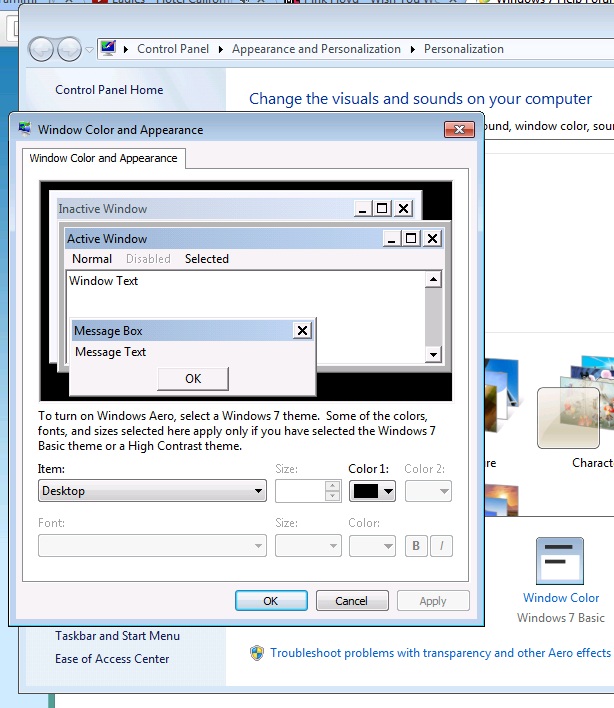
Also, the taskbar has that solid color, whenever I try to edit it through "Color" in the Personalization window, I get this Windows-XP-like window, not the Win7 one (Which can customize the transparency, taskbar color, and all..):
Help please? Thanks
Computer type Laptop Computer Manufacturer/Model Number TOSHIBA OS Windows 7 Ultimate x64 CPU i5-3210M @ 2.50GHz 2.50GHz Memory 8 GB Graphics Card(s) 1 GB Hard Drives 500 GB Antivirus AVAST! Browser Chrome
Computer type PC/Desktop Computer Manufacturer/Model Number Home made Desktop OS Windows 10 Pro. 64/ version 1709 Windows 7 Pro/64 CPU Intel i7-6800K @ 4.3 Motherboard ASUS X-99 Deluxe II Memory Corsair Platinum 16 gig @2400 Graphics Card(s) EVGA GTX 1070 OC Monitor(s) Displays Asus 27" LED LCD/VE278Q Screen Resolution 1920-1080 or 1280-720 HDMI Hard Drives INTEL SSD 730-240 Gb Sata 3.0/ PSU EVGA Platium 1200W Case Phanteks Luxe Tempered Glass 8 fans/ one radiator Cooling XSPC/ Water Cooled CPU Keyboard Das 4 Professional Mouse Logitech M705/MX Anywhere 2-S Internet Speed 100 mbits Antivirus Microsoft Security Essentials/ Malwarebytes Premium 3.0/ SAS Browser I.E. 11 default/Firefox/ ISP Time Warner Cable/Spectrum Other Info LG BluRay Burner/
New member
Thread Starter
Thank you!
I usually make the Taskbar blackish and transparent, and wallpapers' colors are supposed to look neat, not like if they were 16 bit colors.
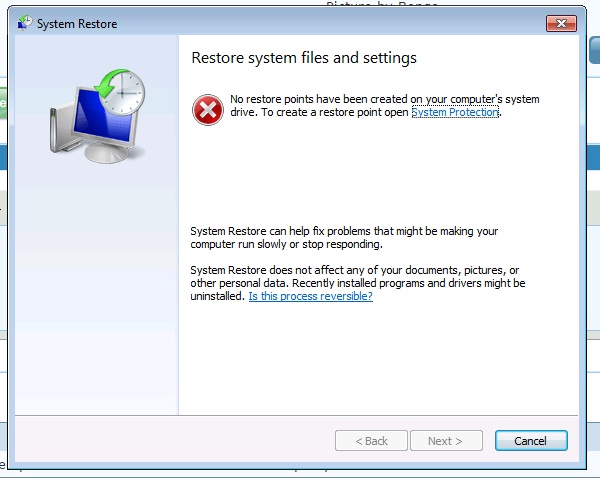
When I try System Restore:
Computer type Laptop Computer Manufacturer/Model Number TOSHIBA OS Windows 7 Ultimate x64 CPU i5-3210M @ 2.50GHz 2.50GHz Memory 8 GB Graphics Card(s) 1 GB Hard Drives 500 GB Antivirus AVAST! Browser Chrome
The only other suggestion I have is Right tick on Desktop and select Personalize.
Computer type PC/Desktop Computer Manufacturer/Model Number Home made Desktop OS Windows 10 Pro. 64/ version 1709 Windows 7 Pro/64 CPU Intel i7-6800K @ 4.3 Motherboard ASUS X-99 Deluxe II Memory Corsair Platinum 16 gig @2400 Graphics Card(s) EVGA GTX 1070 OC Monitor(s) Displays Asus 27" LED LCD/VE278Q Screen Resolution 1920-1080 or 1280-720 HDMI Hard Drives INTEL SSD 730-240 Gb Sata 3.0/ PSU EVGA Platium 1200W Case Phanteks Luxe Tempered Glass 8 fans/ one radiator Cooling XSPC/ Water Cooled CPU Keyboard Das 4 Professional Mouse Logitech M705/MX Anywhere 2-S Internet Speed 100 mbits Antivirus Microsoft Security Essentials/ Malwarebytes Premium 3.0/ SAS Browser I.E. 11 default/Firefox/ ISP Time Warner Cable/Spectrum Other Info LG BluRay Burner/
New member
Thread Starter
I've no idea, I used to have a couple and now they're gone.
Well that's the problem, when I go to Personalize and edit the color, a window like this is supposed to pop up:
Computer type Laptop Computer Manufacturer/Model Number TOSHIBA OS Windows 7 Ultimate x64 CPU i5-3210M @ 2.50GHz 2.50GHz Memory 8 GB Graphics Card(s) 1 GB Hard Drives 500 GB Antivirus AVAST! Browser Chrome
New member
Thread Starter
SOLVED!
I used the troubleshooting option at the Personlization window and it fixed everything up.
Thank you tho!
Computer type Laptop Computer Manufacturer/Model Number TOSHIBA OS Windows 7 Ultimate x64 CPU i5-3210M @ 2.50GHz 2.50GHz Memory 8 GB Graphics Card(s) 1 GB Hard Drives 500 GB Antivirus AVAST! Browser Chrome
Now that is applying yourself. You did it.
Computer type PC/Desktop Computer Manufacturer/Model Number Home made Desktop OS Windows 10 Pro. 64/ version 1709 Windows 7 Pro/64 CPU Intel i7-6800K @ 4.3 Motherboard ASUS X-99 Deluxe II Memory Corsair Platinum 16 gig @2400 Graphics Card(s) EVGA GTX 1070 OC Monitor(s) Displays Asus 27" LED LCD/VE278Q Screen Resolution 1920-1080 or 1280-720 HDMI Hard Drives INTEL SSD 730-240 Gb Sata 3.0/ PSU EVGA Platium 1200W Case Phanteks Luxe Tempered Glass 8 fans/ one radiator Cooling XSPC/ Water Cooled CPU Keyboard Das 4 Professional Mouse Logitech M705/MX Anywhere 2-S Internet Speed 100 mbits Antivirus Microsoft Security Essentials/ Malwarebytes Premium 3.0/ SAS Browser I.E. 11 default/Firefox/ ISP Time Warner Cable/Spectrum Other Info LG BluRay Burner/