
Cannot enable GeForce GT 710 NVIDIA card with 2 monitors

Iluvatar

New member
Local time
8:13 PM
Messages
11
I have just installed a 'new' GeForce GT 710 NVIDIA card into a PC, seeking to utilise 2 monitors. This adapter was working perfectly on another Win 7 machine (now sent to the recycling depot) with these monitors.

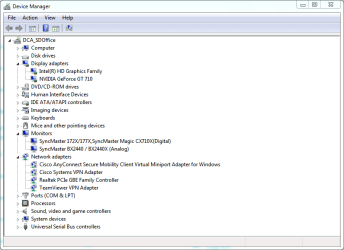
The system "recognises" these as shown here:
Device Manager.PNG

You can see the GeForce GT 710 adapter and the 2 SyncMaster monitors.

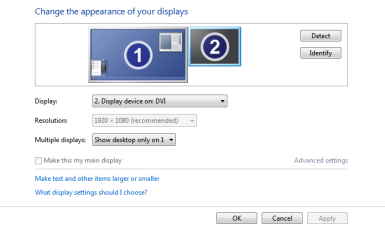
However, when I look at the displays via Control Panel > Displays, I get the following:
From Control Panel - Display.PNG

Display 2 should be the SyncMaster 172X Digital display connected to the DVI port of the GeForce GT 710 adapter.

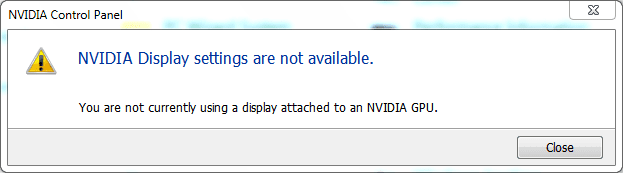
So, if I attempt to execute the NVIDIA Control Panel it gives me this error message:
NVIDIA response on execution.PNG

WTF?

So, I have tried all manner of 'solutions', including enabling and disabling monitors and drivers. I have re-installed drivers.... but all to no avail.

Can anyone please enlighten me, and help me see the error of my :confused: ways ?

Yours in hope .......
 

My Computer My Computer

At a glance

New South Wales
Computer type
PC/Desktop
OS
New South Wales
Couple of things.

1) Go into the control panel | Administrative Tools | Services.

Click the top tab bar to organize all services by alphabetical order.

Now scroll down to the N's and find all services related to Nvidia. If any are set to disabled then enable and start them. You probably don't need any Nvidia service related to networking.

If these services are already enabled, then stop and restart them. Try the control panel again.


2) Is there an integrated GPU in your CPU? If so, I'd turn that off in BIOS.

And A TIP.

If you install all of the Nvidia crap except just the driver and have Experience installed, it sends telemetry back to their servers. To combat that you want to add the following to your hosts file in Windows.

To find your hosts file download and install Everything.exe. Now search for hosts. It will be in the system32/drivers/etc folder. In Everything.exe you can right click the hosts file and open its location. Now temporally rename the hosts file hosts.txt. Add the following:


Code:
# nVidia Telemetry
127.0.0.1 gfwsl.geforce.com
127.0.0.1 gfe.geforce.com
127.0.0.1 telemetry.nvidia.com
127.0.0.1 gfe.nvidia.com
127.0.0.1 telemetry.gfe.nvidia.com
127.0.0.1 events.gfe.nvidia.com
::1 gfwsl.geforce.com
::1 gfe.geforce.com
::1 telemetry.nvidia.com
::1 gfe.nvidia.com
::1 telemetry.gfe.nvidia.com
::1 events.gfe.nvidia.com
Save the hosts file and remove the .txt file extension.

Now for security purposes right click the hosts file and select the read only option. That will help keep malware adding crap to your hosts file.

Downloads - voidtools
 

My Computer My Computer

At a glance

Windows 7 Ultimate x64
Computer type
PC/Desktop
OS
Windows 7 Ultimate x64
Hi F22 Simpilot,

I did all of the relevant steps in your post but to no avail. I then uninstalled the NVIDIA utility, powered the machine off and re-installed only the video card driver. Again, no satisfactory result.

I am now at a loss as to what do do next. Is there any more information one needs to solve this problem, as it seems now to be in the finer detail ?

Thanks.
 

My Computer My Computer

At a glance

New South Wales
Computer type
PC/Desktop
OS
New South Wales
Back
Top