
I recently tried to follow the guide by Brink located at http://www.sevenforums.com/tutorials/8057-dual-boot-installation-windows-7-xp.html about how to dual boot my old XP and Windows 7. Well, I didn't have an actual XP Media Center Edition installation disk (all I had was the OEM), so I tried to dissect the OEM disk to salvage what I could of the files to install XP. Behold, I came up with nothing but the blue screen of death upon trying to install (it worked for a couple of seconds).
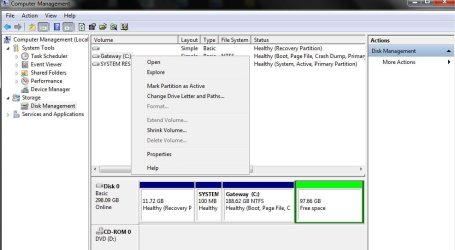
So, I just want to "re-expand" my C: to take the unused space I reserved for XP. But, 7 will not let me. I've been playing around but all I can think of as a last resort is to go to an earlier restore point (but, I'm not sure if that would work either). Any help would be greatly appreciated, screenie is attached.
Also, if anyone was wondering, I wanted XP for my gaming (my Gateway NV52 is only clocking at 2.2 GHz with ATI Radeon HD 3200 graphics). It handles some games okay, but Gateway decided to sell laptops with Windows 7 incompatible drivers, so my games will frequently crash or lag (and make some horrible noise). I was going to test if I could install XP MCE with some XPLite settings to get the most I could from my poor weak cpu.
Any help with either would be great =) Cheers
So, I just want to "re-expand" my C: to take the unused space I reserved for XP. But, 7 will not let me. I've been playing around but all I can think of as a last resort is to go to an earlier restore point (but, I'm not sure if that would work either). Any help would be greatly appreciated, screenie is attached.
Also, if anyone was wondering, I wanted XP for my gaming (my Gateway NV52 is only clocking at 2.2 GHz with ATI Radeon HD 3200 graphics). It handles some games okay, but Gateway decided to sell laptops with Windows 7 incompatible drivers, so my games will frequently crash or lag (and make some horrible noise). I was going to test if I could install XP MCE with some XPLite settings to get the most I could from my poor weak cpu.
Any help with either would be great =) Cheers
Attachments
My Computer
- Computer Manufacturer/Model Number
- Gateway NV52
- OS
- Windows 7 Home Premium
- CPU
- 2.1 GHz
- Graphics Card(s)
- ATI Radeon HD 3200 Graphics

