
Cannot Expand Primary OS Partition

abc617

New member
Local time
5:05 PM
Messages
13
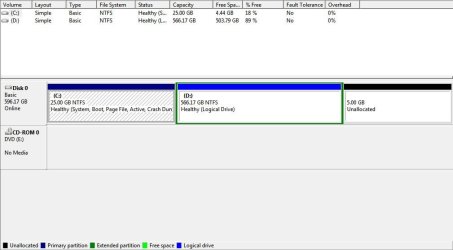
So I'm trying to expand my primary partition to allow for more space. Problem is that I can't.

I tried using Disk Management, doesn't work. I have Acronis Disk Director and that doesn't work. I can't expand the size of my primary partition using this program either.

See attached for screenshot of how current HDD is partitioned.

So is there any way I can expand the size of my primary (trying to get it to go 30gb as you can tell by the currently unallocated 5gb of space).
 

Attachments
  • Capture.JPG
    Capture.JPG
    46.2 KB · Views: 171

My Computer

OS
Windows 7 Ultimate
So I'm trying to expand my primary partition to allow for more space. Problem is that I can't.

I tried using Disk Management, doesn't work. I have Acronis Disk Director and that doesn't work. I can't expand the size of my primary partition using this program either.

See attached for screenshot of how current HDD is partitioned.

So is there any way I can expand the size of my primary (trying to get it to go 30gb as you can tell by the currently unallocated 5gb of space).

Parigon Disk suite (free trial). You need to enlarge D to include the 5 gigs, then shrink it to the right, leaving 5 gigs empty adjacent to your OS, then expand you C.
 

My Computer

Computer Manufacturer/Model Number
HP Pavillion dv-7 1005 Tx
OS
Win 8 Release candidate 8400
CPU
[email protected]
Memory
4 gigs
Graphics Card(s)
Nvidia 9600M
Sound Card
HD built-in
Monitor(s) Displays
17" Wxga
Screen Resolution
1440x900
Cooling
none
Internet Speed
45Mb down 5Mb up
You're trying to do the impossible. The C: partition cant extend into the unallocated space because the D: partition is midway between the two. Just expand D: to use up the unallocated space first. To expand C: you'll need to shrink D: partition from the left and create free space there (into which you can then expand C: ) which can be done easily with Partition wizard. Option 3 in this tut.

http://www.sevenforums.com/tutorials/93322-partition-wizard-use-bootable-cd.html
 

My Computer

Computer Manufacturer/Model Number
Too many to describe...
OS
Windows 7 x64 pro/ Windows 7 x86 Pro/ XP SP3 x86
Thanks for the tip. I just changed the "available space before ..." for the D:\ drive to give 5gb and "available space after..." the D:\ drive to 0 bytes with the program I was using, and it worked. Thanks for the simple solution.
 

My Computer

OS
Windows 7 Ultimate
Back
Top