
adrichards88
New member
- Local time
- 3:55 PM
- Messages
- 3
Hello,
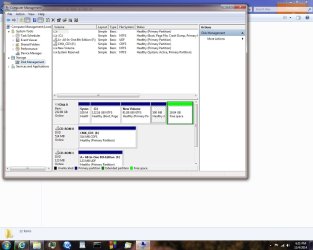
I'm trying to use disk manager to extend my C: partition into 20gb of unused space. The extend option is faded. When I try to delete the 20gb of free space, I get an error telling me I don't have enough disk space to delete the volume. I can format the 20gb volume and mount it, but I cannot get rid of it and extend my C: drive. Is it some default setting that some portion of the HDD must be an extended volume?
I have my 500mb set aside for critical boot files.
I'm trying to use disk manager to extend my C: partition into 20gb of unused space. The extend option is faded. When I try to delete the 20gb of free space, I get an error telling me I don't have enough disk space to delete the volume. I can format the 20gb volume and mount it, but I cannot get rid of it and extend my C: drive. Is it some default setting that some portion of the HDD must be an extended volume?
I have my 500mb set aside for critical boot files.
Attachments
My Computer
- Computer type
- PC/Desktop
- Computer Manufacturer/Model Number
- Custom Build
- OS
- Windows 7 Home 64bit
- CPU
- AMD
- Motherboard
- MSI
- Memory
- 2GB
- Graphics Card(s)
- APU - Radeon 8370D
- Hard Drives
- Western Digital 250GB
- Antivirus
- Microsoft Security Essentials
- Browser
- IE
