Cannot Find a Network for Media Streaming

saade15

New member
Local time
8:49 PM
Messages
3
I am trying to setup a home network but my system is not seeing it. I have an active internet connection but when i go into my network settings, it is setup as a public network and i am unable to change it to a home network as there is not one available. I have tried installing a wireless card and this also does not appear as a active network. I have a windows 7 laptop that is connected to my home network just fine.

The intention is to set up my desktop computer as a media server and stream video to my ps3 over the network. I am currently doing this with my laptop but would like to instead use my desktop so i can hook up external harddrives.

Any help will be greatly appreciated.
 

My Computer

Computer Manufacturer/Model Number
HP/s5212y
OS
Windows 7 Home Premium
CPU
Pentium(R) Dual-Core CPU ES200 @ 2.50 GHz 2.50 GHz
Memory
3 GB

Attachments

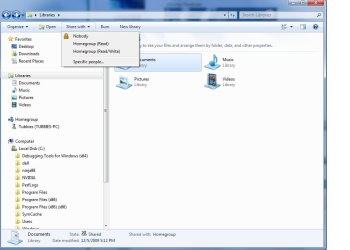
  • Libraries share with.jpg
    Libraries share with.jpg
    53.3 KB · Views: 35

My Computer

Computer type
PC/Desktop
Computer Manufacturer/Model Number
Home built
OS
Windows 7 Ult, Windows 8.1 Pro,
CPU
Q9650-4.275GHz, E8600 4.5GHz, E6750-3.8GHz
Motherboard
Evga 780i FTW
Memory
G.Skill PC2 9600 1200Mhz 5 5 5 15 2T
Graphics Card(s)
GTX480
Sound Card
Asus Xonar D2
Monitor(s) Displays
HannsG
Screen Resolution
1680X1050
Hard Drives
GSkill Phoenix Pro 120GB SSD
PSU
ThermalTake Toughpower 1000Watt modular
Case
ThermalTake XaserV
Cooling
Xigmatek S1283
Keyboard
Logitech G15
Mouse
Logitech G9
Internet Speed
T1
This is all what i did on my laptop. My problem with the desktop is that even though i have an ethernet connection and can use the internet, my network and sharing center does not recognise that i have any network connections. It tells me "Not Connected - No conections are available".
 

My Computer

Computer Manufacturer/Model Number
HP/s5212y
OS
Windows 7 Home Premium
CPU
Pentium(R) Dual-Core CPU ES200 @ 2.50 GHz 2.50 GHz
Memory
3 GB
Simply resetting the router should get that working unless something is blocking the connection like an A/V software or third party firewall.
 

My Computer

Computer type
PC/Desktop
Computer Manufacturer/Model Number
Home built
OS
Windows 7 Ult, Windows 8.1 Pro,
CPU
Q9650-4.275GHz, E8600 4.5GHz, E6750-3.8GHz
Motherboard
Evga 780i FTW
Memory
G.Skill PC2 9600 1200Mhz 5 5 5 15 2T
Graphics Card(s)
GTX480
Sound Card
Asus Xonar D2
Monitor(s) Displays
HannsG
Screen Resolution
1680X1050
Hard Drives
GSkill Phoenix Pro 120GB SSD
PSU
ThermalTake Toughpower 1000Watt modular
Case
ThermalTake XaserV
Cooling
Xigmatek S1283
Keyboard
Logitech G15
Mouse
Logitech G9
Internet Speed
T1
This is the exact problem i am having.

  • I have a LAN connection that works im using it right now to write this post
  • My current profile is set to public
  • I am trying to join my homegroup
  • to do this i need to change my current profile to home/work
  • I go into network and sharing center
  • Under "View Your Active Networks" i see "You are not currently connected to any networks."
  • I select "Connect to a network"
  • This pops up a small window in the bottom right of the screen that should have a list of connections.
  • Instead i get "Not Connected - No Connections are available."
All i am trying to do is set up this desktop onto the existing homegroup that is set up on my laptop.

Also i checked my network in Windows Explorer and i can see all the computers connected to my router/cable modem including a XP box and my Windows 7 laptop. But in the top it says "This computer is not connected to a network. Click to connect..." This also brings up the small window in the bottom right that says "Not Connected - No Connections are available."

I dont know what is wrong but I have removed my Anti Virus software and restarted the router as you said that these may be problems but this has changed nothing.
 

My Computer

Computer Manufacturer/Model Number
HP/s5212y
OS
Windows 7 Home Premium
CPU
Pentium(R) Dual-Core CPU ES200 @ 2.50 GHz 2.50 GHz
Memory
3 GB
Back
Top