in vista basic, openoffice writer and brother printer driver software were easily found in startup services and could be blocked...in windows 7 they dont even show up in the ' services ' list to be enabled or disabled. why? and where are they so I can block them from being on startup? ( I know about going into msconfig and taking them off startup list but that is selective startup not normal startup and I dont like doing that ).
My Computer
Computer Manufacturer/Model Number
HP pavilion dv9000
OS
windows 7 home premium - 32 bit
CPU
AMD Turion 64x2 mobile technology TL-58 1.90 GH
Memory
2.00 GB
Graphics Card(s)
NVIDIA nforce PCI system management
Sound Card
conexant high definition smartaudio HD2
Monitor(s) Displays
generic pnp monitor
Screen Resolution
1440 x 900
Hard Drives
toshiba MK 1637 GSx ATA device
PSU
HP A/C adaptor HP PPP012 H-S wide range input 1-240V 90 watt
Run as Administrator. If you don't get a shortcut (on your desktop), open the control panel and you'll see an icon that says startup ... right click, run as admin
Attachments
startup control.jpg
1.1 KB
· Views: 101
My Computer
Computer type
PC/Desktop
Computer Manufacturer/Model Number
Bruce ... somewhere in his 40's
OS
Windows 7 Ultimate 32bit SP1
CPU
Intel(R) Core(TM)2 Quad CPU @ 2.40GHz, 2400 MHz
Motherboard
INTEL/D975XBX2
Memory
4 GB
Graphics Card(s)
ATI Radeon HD 2600 Pro
Monitor(s) Displays
Samsung SyncMaster 914v
Screen Resolution
1280 x 1024
Hard Drives
2/500GB each ... ST3500630AS ATA Device.
One is not connected
Are they services or are they just startup programs?
There are two startup folders, one for yourself and one for all users. Maybe they are in the all users and you have been looking in the one for yourself?
My Computer
Computer Manufacturer/Model Number
Scratch built
OS
Windows 7 x64 Ultimate
CPU
i7 960
Motherboard
Asus P6X58D
Memory
12 Gig Corsair Dominator
Graphics Card(s)
Nvidia 480
Sound Card
Maudio Delta 44 + breakout box
Monitor(s) Displays
Dell UltraSharp U2410 24in and Samsung 21 dual monitors
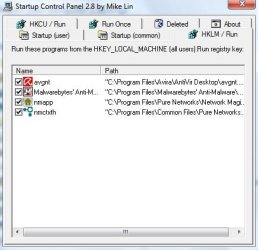
This is a pretty good little app. As you can see, there are tabs with start up programs ... uncheck the ones you don't want to automatically load. My example:
Attachments
start up.jpg
26.2 KB
· Views: 4
My Computer
Computer type
PC/Desktop
Computer Manufacturer/Model Number
Bruce ... somewhere in his 40's
OS
Windows 7 Ultimate 32bit SP1
CPU
Intel(R) Core(TM)2 Quad CPU @ 2.40GHz, 2400 MHz
Motherboard
INTEL/D975XBX2
Memory
4 GB
Graphics Card(s)
ATI Radeon HD 2600 Pro
Monitor(s) Displays
Samsung SyncMaster 914v
Screen Resolution
1280 x 1024
Hard Drives
2/500GB each ... ST3500630AS ATA Device.
One is not connected
Sadly I am not on my W7 box so this may not be quite right, but on XP it was right click the start button and select "Open All Users" at the bottom. Then navigate to the "Programs" then "Startup". Startup program shortcuts common to all system users are there.
My Computer
Computer Manufacturer/Model Number
Scratch built
OS
Windows 7 x64 Ultimate
CPU
i7 960
Motherboard
Asus P6X58D
Memory
12 Gig Corsair Dominator
Graphics Card(s)
Nvidia 480
Sound Card
Maudio Delta 44 + breakout box
Monitor(s) Displays
Dell UltraSharp U2410 24in and Samsung 21 dual monitors
Crud, probably because that would require admin privs. Well maybe someone here can figure out how to get there.
While external programs for managing those things are nice, I personally like to know how to do them "natively" as I am in front of so many computers and whatever nice program I may have at home is just not going to be installed on everything I am working on
My Computer
Computer Manufacturer/Model Number
Scratch built
OS
Windows 7 x64 Ultimate
CPU
i7 960
Motherboard
Asus P6X58D
Memory
12 Gig Corsair Dominator
Graphics Card(s)
Nvidia 480
Sound Card
Maudio Delta 44 + breakout box
Monitor(s) Displays
Dell UltraSharp U2410 24in and Samsung 21 dual monitors