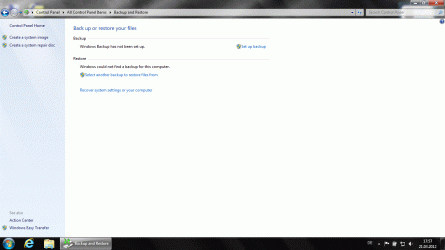
Solved cannot find “Manage space” in the “Backup and restore” section

upiter77

New member
Member
Local time
11:26 AM
Messages
86
Last edited by a moderator:

My Computer My Computer

At a glance

Windows7 64bitIntel(R) Core(TM) i7-2600S CPU @ 2.80GHz8.00 GBIntel HD Graphics 2000 (Sandy Bridge GT1) 217...
Computer type
PC/Desktop
Computer Manufacturer/Model Number
ThinkCentre Edge 71 (1578E1G)
OS
Windows7 64bit
CPU
Intel(R) Core(TM) i7-2600S CPU @ 2.80GHz
Motherboard
LENOVO To be filled by O.E.M.
Memory
8.00 GB
Graphics Card(s)
Intel HD Graphics 2000 (Sandy Bridge GT1) 2172 MBytes
Sound Card
RealTek ALC662
Monitor(s) Displays
DELL E197FP
Screen Resolution
1280 x 1024 x 32 bits (4294967296 colors) @ 75 Hz
Hard Drives
WDC WD5003ABYX-01WER SCSI Disk Device
PSU
PC9059, 180W
Case
Desktop
Cooling
Noiseblocker BlackSilent XLP Rev. 3.00
Keyboard
DELL SK-8125 Keyboard
Mouse
Logitech USB Optical Mouse
Internet Speed
cable 75Mbps
Antivirus
McAfee VSE 8.8 SP2
Browser
SeaMonkey 2.24
You have to have taken a "backup" for it to show. I don't know if taking a System Image will allow the manage tile to show itself.....
 

My Computer My Computer

At a glance

Windows 7AMD Phenom II X2 (dual-core)4Gintegrated ATI HD 4200
Computer type
PC/Desktop
Computer Manufacturer/Model Number
Custom
OS
Windows 7
CPU
AMD Phenom II X2 (dual-core)
Motherboard
GA-MA785GM-US2H
Memory
4G
Graphics Card(s)
integrated ATI HD 4200
Sound Card
integrated
Monitor(s) Displays
Samsung 24"
Screen Resolution
1920x1080
Hard Drives
1 SSD - Samsung 840 - 500 GB - OS and DATA partitions
1 SSD - Intel 320 - 120 GB (used for backups) - Misc/BACKUP
1 SATA HD - WD, 500 GB - BACKUP
PSU
Ultra X4 500W
Case
Ultra X-blaster
Keyboard
Microsoft Digital Media Pro
Mouse
Logitech WIRED!
Internet Speed
15 Mbps FIOS
You can manage system restore space. Is that what you mean ?

Start>Right Click Computer>Properties>System Protection
 

My Computer My Computer

At a glance

Windows 10 Pro x64Intel Core i7 6700KGSkill TridentZ RGB 16GB 3600 16-16-16-36EVGA GTX 980 Ti SC x2
Computer type
PC/Desktop
Computer Manufacturer/Model Number
Skylake Special #666
OS
Windows 10 Pro x64
CPU
Intel Core i7 6700K
Motherboard
Asus Sabertooth Z170 Mark 1
Memory
GSkill TridentZ RGB 16GB 3600 16-16-16-36
Graphics Card(s)
EVGA GTX 980 Ti SC x2
Sound Card
Realtek High Definition
Monitor(s) Displays
AOC G2460PG
Screen Resolution
1920 x 1080 144Hz
Hard Drives
Samsung 860 Pro 256GB, Seagate Barracuda 4TB x2
PSU
EVGA 1000 P2, EVGA White Custom Braided Cables
Case
Corsair Vengeance C70 Gunmetal Black
Cooling
Corsair H100i v2, Corsair ML120 x2, Thermal Grizzly Kryonaut
Keyboard
Logitech G910 Orion Spectrum
Mouse
Logitech G700s
Internet Speed
Verizon Fios Quantum Gateway 75/75
Antivirus
Windows Defender, Malwarebytes Free 3.8.3
Browser
Chrome
Other Info
Corsair SP120 x4, LG Blu-ray Drive, Durabrand HT-395 100 Watt Dolby Digital Amp, Corsair H2100 Wireless 7.1 Headset
No, my problem is the following:
I have done a System Image on drive E:\ on the same Hard Disk.
Then I have formated E:\ and created a new System Image.
Now if I try to restore I see both system images.
I cannot find where and howto delete the first System Image from the system memory.
I don't have an option “Manage space” in the “Backup and restore” section.
 

My Computer My Computer

At a glance

Windows7 64bitIntel(R) Core(TM) i7-2600S CPU @ 2.80GHz8.00 GBIntel HD Graphics 2000 (Sandy Bridge GT1) 217...
Computer type
PC/Desktop
Computer Manufacturer/Model Number
ThinkCentre Edge 71 (1578E1G)
OS
Windows7 64bit
CPU
Intel(R) Core(TM) i7-2600S CPU @ 2.80GHz
Motherboard
LENOVO To be filled by O.E.M.
Memory
8.00 GB
Graphics Card(s)
Intel HD Graphics 2000 (Sandy Bridge GT1) 2172 MBytes
Sound Card
RealTek ALC662
Monitor(s) Displays
DELL E197FP
Screen Resolution
1280 x 1024 x 32 bits (4294967296 colors) @ 75 Hz
Hard Drives
WDC WD5003ABYX-01WER SCSI Disk Device
PSU
PC9059, 180W
Case
Desktop
Cooling
Noiseblocker BlackSilent XLP Rev. 3.00
Keyboard
DELL SK-8125 Keyboard
Mouse
Logitech USB Optical Mouse
Internet Speed
cable 75Mbps
Antivirus
McAfee VSE 8.8 SP2
Browser
SeaMonkey 2.24
Hello upiter77. You have to first press the Set Up Backup button and do a backup before the manage space option will show.
If you only want to do a system image make sure you select "let me choose" and untick all the other boxes and just tick the include the drives needed for windows to run (create a system image) option at the bottom. Once the backup has completed the option for manage space will appear.
 

My Computer My Computer

At a glance

Win 7 Ultimate, Win 8.1 Pro, Linux Mint 19 Ci...Intel i5 4690KCorsair Vengeance LP 32GB DDR3MSI GTX 1060 GAMING X 6GB
Computer type
PC/Desktop
Computer Manufacturer/Model Number
Custom Build
OS
Win 7 Ultimate, Win 8.1 Pro, Linux Mint 19 Cinnamon (All 64-Bit)
CPU
Intel i5 4690K
Motherboard
Gigabyte Z97X-UD3H
Memory
Corsair Vengeance LP 32GB DDR3
Graphics Card(s)
MSI GTX 1060 GAMING X 6GB
Sound Card
Onboard
Hard Drives
Samsung 850 EVO 250GB SSD (x2)
Samsung 860 EVO 1TB SSD (x2)
Crucial MX300 525GB SSD
WD Blue 2TB 5400rpm Intellipark Disabled (x2)
PSU
Corsair HX750i
Case
Phanteks Enthoo Pro
Cooling
CM Hyper 212 EVO on CPU, Noctua Redux NF-P14S 1500rpm (x6)
Keyboard
Corsair K70 RGB LUX
Mouse
Corsair Sabre RGB
Antivirus
Avast Free, MalwareBytes, SAS & CryptoPrevent
Browser
Chrome
Other Info
StarTech PEXESAT322I 2 Port PCI-E SATA Card
ASUS PCE-AC56 Dual-band AC1300 Wireless Card
Akasa FC.Six Manual Fan Controller
And a Partridge in a Pear Tree!
Thx a lot, it works now.
Before, I've done an "system image" using "create a system image" button.
To get “Manage space”, works only using "Set up backup".

BTW what are differences, if I create a "system image" instead of "Set up backup", full backup with all options enabled?
Can I later NOT restore some files from a "system image, only a whole system?
 

My Computer My Computer

At a glance

Windows7 64bitIntel(R) Core(TM) i7-2600S CPU @ 2.80GHz8.00 GBIntel HD Graphics 2000 (Sandy Bridge GT1) 217...
Computer type
PC/Desktop
Computer Manufacturer/Model Number
ThinkCentre Edge 71 (1578E1G)
OS
Windows7 64bit
CPU
Intel(R) Core(TM) i7-2600S CPU @ 2.80GHz
Motherboard
LENOVO To be filled by O.E.M.
Memory
8.00 GB
Graphics Card(s)
Intel HD Graphics 2000 (Sandy Bridge GT1) 2172 MBytes
Sound Card
RealTek ALC662
Monitor(s) Displays
DELL E197FP
Screen Resolution
1280 x 1024 x 32 bits (4294967296 colors) @ 75 Hz
Hard Drives
WDC WD5003ABYX-01WER SCSI Disk Device
PSU
PC9059, 180W
Case
Desktop
Cooling
Noiseblocker BlackSilent XLP Rev. 3.00
Keyboard
DELL SK-8125 Keyboard
Mouse
Logitech USB Optical Mouse
Internet Speed
cable 75Mbps
Antivirus
McAfee VSE 8.8 SP2
Browser
SeaMonkey 2.24
No differences really unless you select other files to backup along with the system image. If you select other files and you have your data files on a separate partition you would have to restore the data partition along with the system drive. I do an initial system image using the set up backup option (just so that I can access the manage space option) then all my subsequent images are done using the create a system image option.

I don't include my data partition in my system image as I prefer to have a separate backup for my files using a 3rd party backup tool.

Restoring from a system image will restore everything not individual files.

You can however attach the system image as a virtual drive in disk management and pull individual files from it.
 

My Computer My Computer

At a glance

Win 7 Ultimate, Win 8.1 Pro, Linux Mint 19 Ci...Intel i5 4690KCorsair Vengeance LP 32GB DDR3MSI GTX 1060 GAMING X 6GB
Computer type
PC/Desktop
Computer Manufacturer/Model Number
Custom Build
OS
Win 7 Ultimate, Win 8.1 Pro, Linux Mint 19 Cinnamon (All 64-Bit)
CPU
Intel i5 4690K
Motherboard
Gigabyte Z97X-UD3H
Memory
Corsair Vengeance LP 32GB DDR3
Graphics Card(s)
MSI GTX 1060 GAMING X 6GB
Sound Card
Onboard
Hard Drives
Samsung 850 EVO 250GB SSD (x2)
Samsung 860 EVO 1TB SSD (x2)
Crucial MX300 525GB SSD
WD Blue 2TB 5400rpm Intellipark Disabled (x2)
PSU
Corsair HX750i
Case
Phanteks Enthoo Pro
Cooling
CM Hyper 212 EVO on CPU, Noctua Redux NF-P14S 1500rpm (x6)
Keyboard
Corsair K70 RGB LUX
Mouse
Corsair Sabre RGB
Antivirus
Avast Free, MalwareBytes, SAS & CryptoPrevent
Browser
Chrome
Other Info
StarTech PEXESAT322I 2 Port PCI-E SATA Card
ASUS PCE-AC56 Dual-band AC1300 Wireless Card
Akasa FC.Six Manual Fan Controller
And a Partridge in a Pear Tree!
THX, I'll do a backup from the whole hard disk to a NAS using Acronis as well.
 

My Computer My Computer

At a glance

Windows7 64bitIntel(R) Core(TM) i7-2600S CPU @ 2.80GHz8.00 GBIntel HD Graphics 2000 (Sandy Bridge GT1) 217...
Computer type
PC/Desktop
Computer Manufacturer/Model Number
ThinkCentre Edge 71 (1578E1G)
OS
Windows7 64bit
CPU
Intel(R) Core(TM) i7-2600S CPU @ 2.80GHz
Motherboard
LENOVO To be filled by O.E.M.
Memory
8.00 GB
Graphics Card(s)
Intel HD Graphics 2000 (Sandy Bridge GT1) 2172 MBytes
Sound Card
RealTek ALC662
Monitor(s) Displays
DELL E197FP
Screen Resolution
1280 x 1024 x 32 bits (4294967296 colors) @ 75 Hz
Hard Drives
WDC WD5003ABYX-01WER SCSI Disk Device
PSU
PC9059, 180W
Case
Desktop
Cooling
Noiseblocker BlackSilent XLP Rev. 3.00
Keyboard
DELL SK-8125 Keyboard
Mouse
Logitech USB Optical Mouse
Internet Speed
cable 75Mbps
Antivirus
McAfee VSE 8.8 SP2
Browser
SeaMonkey 2.24
I think using a second imaging program as well as say Windows Imaging is good insurance. I use Windows inbuilt plus free Macrium Reflect.
What I do for Windows backup is:
1) I always use the "Create a system image" button to make an image when I choose. I only make one image and either delete it move it within a partition or rename it. Multiple images are stored using a difference image kept in shadow storage. I personally don't think this is a robust procedure.
2) When setting up the backup schedule I choose "Let me Choose" and untick the create an image box. I leave the other default settings. I also choose to create a file/folder backup manually using "Create a Backup Now".

You can extract files and folders quite easily from images using this tutorial:
http://www.sevenforums.com/tutorials/24771-system-image-extract-files-using-disk-management.html
 

My Computer My Computer

At a glance

Windows 7x64 Home Premium SP1Intel i7 2600kG.Skill Ripjaws (DDR3-1600) 2x4GBNvidia GeForce GTS 450; Intel HD Graphics 300...
Computer type
PC/Desktop
Computer Manufacturer/Model Number
Own build
OS
Windows 7x64 Home Premium SP1
CPU
Intel i7 2600k
Motherboard
ASUS P8Z68 Deluxe
Memory
G.Skill Ripjaws (DDR3-1600) 2x4GB
Graphics Card(s)
Nvidia GeForce GTS 450; Intel HD Graphics 3000(GT2+)
Monitor(s) Displays
Dell Ultrasharp IPS panel U2311H, Samsung SyncMaster P2350
Screen Resolution
1920x1080
Hard Drives
Samsung 850 Pro SSD 256GB, Samsung SSD 840 120GB, Seagates 1TB Barracuda ST31000528AS x2
PSU
Seasonic M12II 520W
Case
Lian Li Lancool PC-K60
Cooling
Case: 1x120mm, 3x140mm CPU: Hyper 212+
Keyboard
Logitech MK520 (wireless)
Mouse
Logitech MK520
Internet Speed
6-7 Mbps
Antivirus
Norton Security Premium, Malwarebytes on 2 (MSE on 3rd PC)
Browser
FireFox
Other Info
Audio: Logitech Z523 2.1
THX
 

My Computer My Computer

At a glance

Windows7 64bitIntel(R) Core(TM) i7-2600S CPU @ 2.80GHz8.00 GBIntel HD Graphics 2000 (Sandy Bridge GT1) 217...
Computer type
PC/Desktop
Computer Manufacturer/Model Number
ThinkCentre Edge 71 (1578E1G)
OS
Windows7 64bit
CPU
Intel(R) Core(TM) i7-2600S CPU @ 2.80GHz
Motherboard
LENOVO To be filled by O.E.M.
Memory
8.00 GB
Graphics Card(s)
Intel HD Graphics 2000 (Sandy Bridge GT1) 2172 MBytes
Sound Card
RealTek ALC662
Monitor(s) Displays
DELL E197FP
Screen Resolution
1280 x 1024 x 32 bits (4294967296 colors) @ 75 Hz
Hard Drives
WDC WD5003ABYX-01WER SCSI Disk Device
PSU
PC9059, 180W
Case
Desktop
Cooling
Noiseblocker BlackSilent XLP Rev. 3.00
Keyboard
DELL SK-8125 Keyboard
Mouse
Logitech USB Optical Mouse
Internet Speed
cable 75Mbps
Antivirus
McAfee VSE 8.8 SP2
Browser
SeaMonkey 2.24
Back
Top