Cannot Find Wireless Networks

Superman187

New member
Local time
12:09 AM
Messages
7
Location
East Midlands, United Kingdom
Hey, i got my mum a new pc a couple of days ago, and searched on microsoft for a Windows 7 compatible Wireless Network Adapter, and came across the D-Link DWA-130 so i when't out and bought it, it install's fine no problems there, but it doesnt find any networks, when i 1st installed it, it found my network and 1 other, i tried connecting to mine, after typing in my password, it just said it was unable to connect, i can connect using my ethernet cable so i know the router is working fine, im running on Windows 7 Home Premium 64-bit if any1 could help me solve this problem, id really appreciate it.
 

My Computer

Computer Manufacturer/Model Number
Compaq-Presario
OS
Windows 7 Home Premium 64-bit
Hi, you said when you 1st installed it, it found your network. Are you using the Windows builtin utility (bottom right network icon)? If you are not able to log on after W7 has detected it, you might not have entered the correct security key.

Check that the router's broadcasted network security type is the same as W7's. That is, if the router is using WPA, make sure W7 also has WPA. If the router is broadcasting WEP, change it to WPA to match W7's and try again.
 

My Computer

Computer Manufacturer/Model Number
Lenovo ThinkPad T60
OS
Windows 7 Ultimate 64Bit
CPU
GenuineIntel Intel(R) Core(TM) DuoCore T2400 @ 1.83GHz
Motherboard
Intel(R) 82801G (ICH7 Family)
Memory
2.00 GB
Graphics Card(s)
Mobile Intel(R) 945 Express Chipset
Sound Card
SoundMAX Integrated Digital HD Audio
Monitor(s) Displays
ThinkPad Display
Screen Resolution
1400x1050
Hard Drives
100Gb SATA
Keyboard
Standard Keyboard
Mouse
HID-compliant Mouse
Internet Speed
Cable Broadband - 54Mbps
Other Info
Intel(R) PRO/1000 PL Network Connection
11a/b/g Wireless LAN Mini PCI Express Adapter
That is, if the router is using WPA, make sure W7 also has WPA. If the router is broadcasting WEP, change it to WPA to match W7's and try again.

Im new to W7 lol, how do i check what security type W7 is using?

EDIT: My router is running with WPA security, this is the security i chose when inputting my password after installing the Wireless adapter, i have also gone to the router site and reset my password, ive uninstalled an reinstalled the adapter that many times ive lost count lol, it's getting really annoying now, it's my mums b-day in 2days i thought a new pc with W& would be really nice, but if you cant get wireless internet it seems like a waste of money lol
 

My Computer

Computer Manufacturer/Model Number
Compaq-Presario
OS
Windows 7 Home Premium 64-bit
At bottom right, the wireless icon, click it, right-click the SSID (your wireless network, the one that tou created), Properties. Go in Security Tab. Make sure your selections in there matches the one what is broadcasted by the router.
 

My Computer

Computer Manufacturer/Model Number
Lenovo ThinkPad T60
OS
Windows 7 Ultimate 64Bit
CPU
GenuineIntel Intel(R) Core(TM) DuoCore T2400 @ 1.83GHz
Motherboard
Intel(R) 82801G (ICH7 Family)
Memory
2.00 GB
Graphics Card(s)
Mobile Intel(R) 945 Express Chipset
Sound Card
SoundMAX Integrated Digital HD Audio
Monitor(s) Displays
ThinkPad Display
Screen Resolution
1400x1050
Hard Drives
100Gb SATA
Keyboard
Standard Keyboard
Mouse
HID-compliant Mouse
Internet Speed
Cable Broadband - 54Mbps
Other Info
Intel(R) PRO/1000 PL Network Connection
11a/b/g Wireless LAN Mini PCI Express Adapter
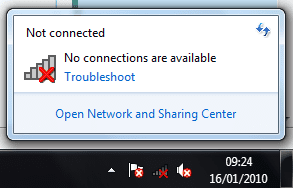
Ive had a look but there are no networks to check, all i see is this,

Untitled.png

Im Connected right now using an ethernet cable, really annoying me now lol

anyway it's 9:30am here, ive been trying to get this sorted for hours now, time for bed i think, will come back and get even more pissed off later lol :p

I Appreciate you trying to help aem thanx:), but cant be arsed anymore right now lol

P.S i would Rep u, but i only joined the forum this morning so dont know how, or even if im able 2 just yet lol :confused:
 

My Computer

Computer Manufacturer/Model Number
Compaq-Presario
OS
Windows 7 Home Premium 64-bit
That my friend i think means your wireless adapter is either not enabled or switched off. Can you confirmed that. Has this ever happened b4?
 

My Computer

Computer Manufacturer/Model Number
Lenovo ThinkPad T60
OS
Windows 7 Ultimate 64Bit
CPU
GenuineIntel Intel(R) Core(TM) DuoCore T2400 @ 1.83GHz
Motherboard
Intel(R) 82801G (ICH7 Family)
Memory
2.00 GB
Graphics Card(s)
Mobile Intel(R) 945 Express Chipset
Sound Card
SoundMAX Integrated Digital HD Audio
Monitor(s) Displays
ThinkPad Display
Screen Resolution
1400x1050
Hard Drives
100Gb SATA
Keyboard
Standard Keyboard
Mouse
HID-compliant Mouse
Internet Speed
Cable Broadband - 54Mbps
Other Info
Intel(R) PRO/1000 PL Network Connection
11a/b/g Wireless LAN Mini PCI Express Adapter
It's a brand new adapter, and pc, so no this hasn't happened before, i installed the drivers for it off the cd but kept gettin the BSOD which pissed me off lol, after reading a few forums i found out that if you install the DWA-130 drivers off the CD it comes with, this will keep happening, i downloaded the drivers from the D-Link website, and haven't got BSOD yet(fingers crossed) but still no connection unless i used ethernet,

But that means i cant take comp upstairs lol, was supposed to be a suprise for me mum, but hard to hide when your sitting at it hours on end trying to get it sorted lol
 

My Computer

Computer Manufacturer/Model Number
Compaq-Presario
OS
Windows 7 Home Premium 64-bit
Sounds like a driver issue. Have you tried having Windows update find the drivers? You can either re plug it in or go from Device Manager.
 

My Computer

OS
Windows 7
Looking at the image ypou posted, looks like you also have a few things disabled.

Go into your Device Manager and see if all the devices are enabled, on second thoughts can u screenshot it.
 

My Computer

Computer Manufacturer/Model Number
Lenovo ThinkPad T60
OS
Windows 7 Ultimate 64Bit
CPU
GenuineIntel Intel(R) Core(TM) DuoCore T2400 @ 1.83GHz
Motherboard
Intel(R) 82801G (ICH7 Family)
Memory
2.00 GB
Graphics Card(s)
Mobile Intel(R) 945 Express Chipset
Sound Card
SoundMAX Integrated Digital HD Audio
Monitor(s) Displays
ThinkPad Display
Screen Resolution
1400x1050
Hard Drives
100Gb SATA
Keyboard
Standard Keyboard
Mouse
HID-compliant Mouse
Internet Speed
Cable Broadband - 54Mbps
Other Info
Intel(R) PRO/1000 PL Network Connection
11a/b/g Wireless LAN Mini PCI Express Adapter
Yes ive tried having windows download the drivers for me, but this doesn't solve the problem, here's a screenshot of my network adapters in device manager.

Untitled.png

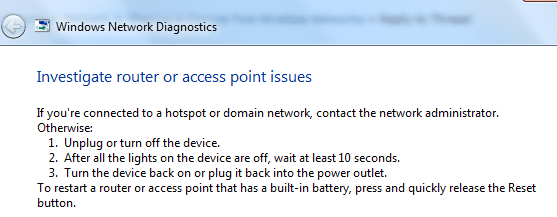
sometimes when i uninstall the adapter and reinstall it, 1 time out of 10 it finds my network and the neighbours but if i try and connect to mine it says it's unable to connect to the network, if i run the trouble shoot it shows this message.

Untitled1.png


i do all that then i get this message

Untitled2.png

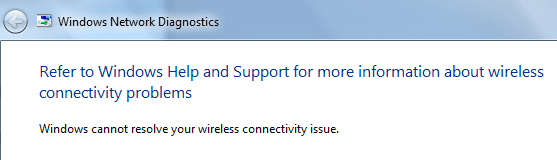
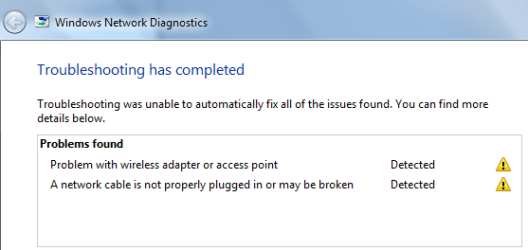
then when i click next i get this 1

Untitled3.png

It say's that there is a problem with the Wireless Adapter, but Device manager says
it is working properly :confused:

i have absoloutly no idea what's wrong with it.

Ive also rang D-Link and they said, because they do not deal with the DWA-130 there's not much they can do for me. (i live in the UK and dlink.co.uk dont deal with the dwa-130 ) they reccomended going to dlink.com for the drivers, i did this and still no joy.
 

My Computer

Computer Manufacturer/Model Number
Compaq-Presario
OS
Windows 7 Home Premium 64-bit
It also say about the access point, which is the router. Normally if you can access the router's wireless network, but have issue with the internet, there'll be a orange spot on the wireless icon, not a red X.

Could it be a MAC setting in the router?
 

My Computer

Computer Manufacturer/Model Number
Lenovo ThinkPad T60
OS
Windows 7 Ultimate 64Bit
CPU
GenuineIntel Intel(R) Core(TM) DuoCore T2400 @ 1.83GHz
Motherboard
Intel(R) 82801G (ICH7 Family)
Memory
2.00 GB
Graphics Card(s)
Mobile Intel(R) 945 Express Chipset
Sound Card
SoundMAX Integrated Digital HD Audio
Monitor(s) Displays
ThinkPad Display
Screen Resolution
1400x1050
Hard Drives
100Gb SATA
Keyboard
Standard Keyboard
Mouse
HID-compliant Mouse
Internet Speed
Cable Broadband - 54Mbps
Other Info
Intel(R) PRO/1000 PL Network Connection
11a/b/g Wireless LAN Mini PCI Express Adapter
There cant be a problem with the router, in the house we have, another PC, a Laptop, PSP, and PS3 all connected to the internet with no problems, it's just this stupid windows 7 comp or the adapter, works fine right now with the Ethernet cable plugged in lol

And i Appreciate you spending time trying to help me solve this problem Thanx :)
 

My Computer

Computer Manufacturer/Model Number
Compaq-Presario
OS
Windows 7 Home Premium 64-bit
Then there's one way to find out about W7 vs adapter, replace the adapter with another and see how it go?
 

My Computer

Computer Manufacturer/Model Number
Lenovo ThinkPad T60
OS
Windows 7 Ultimate 64Bit
CPU
GenuineIntel Intel(R) Core(TM) DuoCore T2400 @ 1.83GHz
Motherboard
Intel(R) 82801G (ICH7 Family)
Memory
2.00 GB
Graphics Card(s)
Mobile Intel(R) 945 Express Chipset
Sound Card
SoundMAX Integrated Digital HD Audio
Monitor(s) Displays
ThinkPad Display
Screen Resolution
1400x1050
Hard Drives
100Gb SATA
Keyboard
Standard Keyboard
Mouse
HID-compliant Mouse
Internet Speed
Cable Broadband - 54Mbps
Other Info
Intel(R) PRO/1000 PL Network Connection
11a/b/g Wireless LAN Mini PCI Express Adapter
Ive tried the adapter in the pc my mom uses it's a buffalo adapter (not to sure of the model) but windows 7 doesn't pick that up at all(dont think it's compatible)

so ive orderd a new adapter which should be here in a day or 2, ive thought about upgrading the firmware of the router but cant see that being the problem as it connects using the ethernet cable


My Computer

Computer Manufacturer/Model Number
Compaq-Presario
OS
Windows 7 Home Premium 64-bit
Do you think with all the problems with the PC now, and you needing to buy another adapter, that it might be best to get her a laptop? I mean alot of the issue i have come across is one that when people buy their systems, they haven't included what they need. Usually it pays to know what you want before you buy, ask all the questions about the system, and what are the optional devices that comes with it. People often neglect these basics, and that's where their problems arises. They either get an incompatible device, have limited vendor support (as it wasn't bought with the system initially etc).
 

My Computer

Computer Manufacturer/Model Number
Lenovo ThinkPad T60
OS
Windows 7 Ultimate 64Bit
CPU
GenuineIntel Intel(R) Core(TM) DuoCore T2400 @ 1.83GHz
Motherboard
Intel(R) 82801G (ICH7 Family)
Memory
2.00 GB
Graphics Card(s)
Mobile Intel(R) 945 Express Chipset
Sound Card
SoundMAX Integrated Digital HD Audio
Monitor(s) Displays
ThinkPad Display
Screen Resolution
1400x1050
Hard Drives
100Gb SATA
Keyboard
Standard Keyboard
Mouse
HID-compliant Mouse
Internet Speed
Cable Broadband - 54Mbps
Other Info
Intel(R) PRO/1000 PL Network Connection
11a/b/g Wireless LAN Mini PCI Express Adapter
Back
Top