

bhaveshnande
New member
- Local time
- 2:42 PM
- Messages
- 8
I want to create a boot disc for Windows 7, I copied all the contents of original Windows 7 CD to my recently brought clean DVD-R disc with NERO. It just worked once on my friends computer and when I tried it second time, it failed to boot from DVD-R. I had set the BIOS settings correctly in boot menu. It tried to boot from DVD but it didn't find any boot info.
(When I insert original windows 7 CD it boots correctly)
Then I deleted all the folders in DVD and thought I would paste them again later, all the folders got deleted leaving behind used space. When I open it, it shows the DVD empty but almost 1/2 of the space is used up and I cannot paste my Windows 7 setup in it again.
I tried formatting it again and again but it still shows 50-60% used space.
Is there some way to completely erase my DVD-R?
(When I insert original windows 7 CD it boots correctly)
Then I deleted all the folders in DVD and thought I would paste them again later, all the folders got deleted leaving behind used space. When I open it, it shows the DVD empty but almost 1/2 of the space is used up and I cannot paste my Windows 7 setup in it again.
I tried formatting it again and again but it still shows 50-60% used space.
Is there some way to completely erase my DVD-R?
Attachments
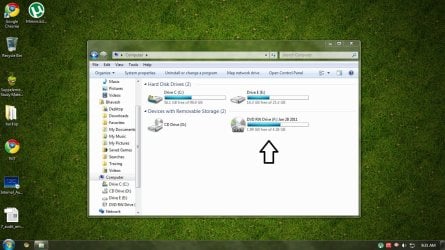
My Computer
- Computer Manufacturer/Model Number
- HP Compaq
- OS
- Windows 7 Ultimate 32Bit
- CPU
- AMD Athlon(tm) 64 X2 Dual Core Processor 5000+ 2.60GHz
- Motherboard
- Pegatron corporation
- Memory
- DDR2 PC2-6400 400MHz (2GB)
- Graphics Card(s)
- NVIDIA GeForce 6150SE nForce 430
- Sound Card
- RealTek High Definition Audio
- Monitor(s) Displays
- HP 1859 Series Wide LCD Monitor
- Screen Resolution
- 1366x768
- Hard Drives
- ST332081 3AS SCSI Disk Device
- Keyboard
- Standard PS/2 Keyboard
- Mouse
- PS/2 Compatible Mouse
- Internet Speed
- ~750Kbps


 So keep reading.
