
Solved Cannot format partition

Gerge

New member
Local time
5:27 PM
Messages
10
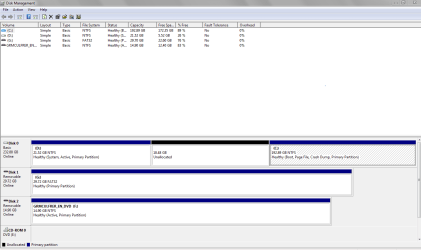
I recently acquired a computer, and attempted to re-image the hard drive. The imaging failed, miserably, and I installed a fresh copy of Windows 7. However, the partition (D:) which I re-imaged is taking up disk space and I can't format it. How do I reformat this partition?

The image was of Windows Vista, I still get an option to boot into Windows Vista when I turn the computer on. I shrunk this partition, and I can not extend my primary partition (C:). Is it possible to fix those problems, too?
 

My Computer

Computer type
PC/Desktop
Computer Manufacturer/Model Number
Custom
OS
Windows 7 Ultimate x64 on desktop, Windows 7 Ultimate x86 on two laptops.

My Computer

Computer type
PC/Desktop
Computer Manufacturer/Model Number
home built
OS
Multi-Boot W7_Pro_x64 W8.1_Pro_x64 W10_Pro_x64 +Linux_VMs +Chromium_VM
CPU
AMD Athlon II x4 620
Motherboard
Gigabyte GA-MA785G-UD3H
Memory
6GB GSkill DDR2 800
Graphics Card(s)
AMD 4670 GPU + AMD 4200 IGP
Sound Card
on board Realtek ALC889A
Monitor(s) Displays
RCA 40" LCD TV, Insignia 32" LCD TV, HP 15" LCD monitor
Screen Resolution
1680 x 1050
Hard Drives
OCZ Vertex 3 120GB,
Samsung F3 1TB (3),
Several others - WD, Seagate, Hitachi, ...
PSU
Corsair 500 W
Case
Rosewill mid tower
Cooling
CM 90mm rifle
Keyboard
Gyration wireless, Logitech wireless, Dell USB wired
Mouse
Gyration wireless, Logitech wireless, V7 USB wired
Internet Speed
Spectrum - 100Mbps D / 10Mbps U
Antivirus
Avast, MBAM3, EMET, WinPatrol
Browser
Pale Moon, Firefox, IE
Other Info
2 multi-boot PC's
Mainly HTPC/Office/Gen purpose (no gaming).
Trendnet USB KVM.
LG DVD burner/Blue Ray Player.
Tray system for removable SATA backup drives.

Not currently OCd, under-volted.
I use Hybrid sleep, rarely re-boot or shutdown.

Hauppauge HD-PVR, Avermedia PCIe TV Tuner, Hauppauge PCI TV Tuner.
This is the best I can do for an image, it's huge. The two removable disks are an SD card and a USB stick.
 

Attachments

  • Capture.PNG
    Capture.PNG
    22.5 KB · Views: 6

My Computer

Computer type
PC/Desktop
Computer Manufacturer/Model Number
Custom
OS
Windows 7 Ultimate x64 on desktop, Windows 7 Ultimate x86 on two laptops.
Here is what I would do:

1. Move the bootmgr to C. Then you can get rid of D also. Here is how.

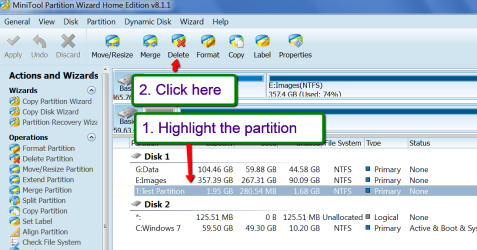
2. I would get rid of D so that you have a contiguous unallocated space of 40GBs. For that you need the bootable CD of Partition Wizard. Download that .iso and burn it to CD and boot the PC with that CD. Then you can delete D. Here is how: (don't forget APPLY top left)

2015-02-02_1521.png


Then whilst you are booted into Partition Wizard, you extend C with the 40GB free space. Here is how:

Extend Partition can be quite easy even if there is no unallocated space.

Make sure you always click on APPLY in the top left corner. Else your operation will not be executed.


Regarding the Vista showing up at boot - for that you have to remove the Vista BCD from the bootmgr. Do steps 3, 4 and 5 of my tutorial ==> http://www.sevenforums.com/tutorials/210983-dual-boot-delete-os.html#post1767171
 

My Computer

Computer Manufacturer/Model Number
HP, Dell, Gateway, Toshiba - 4 laptops and 2 desktops
OS
Vista, Windows7, Mint Mate, Zorin, Windows 8
CPU
from 1.6GHz Duo to i7
Monitor(s) Displays
2x HP w2207
Hard Drives
5x HDD, 7x SSD, 12x Externals
Keyboard
with trackball - no mices
Mouse
Trackball mice
Internet Speed
DSL 6000
Yes, just do as what WHS say. Besides, you can also use "Merge Partition" feature of partition wizard to extend your c partition.
Still, I want to tell you why you cannot extend your primary partition with the unallocated space. The point is on the location of the unallocated space. If it's very behind the partition you want to extend, you can extend it in Disk Management; otherwise, the "Extend Volume" button will greyed out of usage.
 

My Computer

Computer type
PC/Desktop
OS
Windows 7 Enterprise x32
Since it involves in system partition, so do it in care
 

My Computer

Computer type
PC/Desktop
OS
Windows 7 Enterprise x32
My partition wizard LiveDVD won't boot (I don't have a CD handy) and I don't know if, or how, it would function from a USB. Is there any alternative? Or a method to use partition wizard from a USB?
 

My Computer

Computer type
PC/Desktop
Computer Manufacturer/Model Number
Custom
OS
Windows 7 Ultimate x64 on desktop, Windows 7 Ultimate x86 on two laptops.

My Computer

Computer Manufacturer/Model Number
HP, Dell, Gateway, Toshiba - 4 laptops and 2 desktops
OS
Vista, Windows7, Mint Mate, Zorin, Windows 8
CPU
from 1.6GHz Duo to i7
Monitor(s) Displays
2x HP w2207
Hard Drives
5x HDD, 7x SSD, 12x Externals
Keyboard
with trackball - no mices
Mouse
Trackball mice
Internet Speed
DSL 6000
Everything worked fine until it came to removing the Vista entry in the bootmenu. I followed the tutorial you linked me to, and it caused a... unique problem. The laptop now does nothing but emit a high pitched screaming noise when I boot it. I'm going to try repairs with the Windows 7 install disc now. Maybe I made some stupid mistake, maybe the laptop is uncooperative. Who knows?
 

My Computer

Computer type
PC/Desktop
Computer Manufacturer/Model Number
Custom
OS
Windows 7 Ultimate x64 on desktop, Windows 7 Ultimate x86 on two laptops.
Hmm, sorry to hear that. You must have missed a bend somewhere. This tutorial was used by many people without problems.
 

My Computer

Computer Manufacturer/Model Number
HP, Dell, Gateway, Toshiba - 4 laptops and 2 desktops
OS
Vista, Windows7, Mint Mate, Zorin, Windows 8
CPU
from 1.6GHz Duo to i7
Monitor(s) Displays
2x HP w2207
Hard Drives
5x HDD, 7x SSD, 12x Externals
Keyboard
with trackball - no mices
Mouse
Trackball mice
Internet Speed
DSL 6000
Startup repair didn't do a thing, I'm not sure it detected my installation of Windows 7?
Should I start a new thread for this issue?
 

My Computer

Computer type
PC/Desktop
Computer Manufacturer/Model Number
Custom
OS
Windows 7 Ultimate x64 on desktop, Windows 7 Ultimate x86 on two laptops.
Is the windows partition marked active ?

It has to be for the startup repair to work.
 

My Computer

Computer type
PC/Desktop
Computer Manufacturer/Model Number
Skylake Special #666
OS
Windows 10 Pro x64
CPU
Intel Core i7 6700K
Motherboard
Asus Sabertooth Z170 Mark 1
Memory
GSkill TridentZ RGB 16GB 3600 16-16-16-36
Graphics Card(s)
EVGA GTX 980 Ti SC x2
Sound Card
Realtek High Definition
Monitor(s) Displays
AOC G2460PG
Screen Resolution
1920 x 1080 144Hz
Hard Drives
Samsung 860 Pro 256GB, Seagate Barracuda 4TB x2
PSU
EVGA 1000 P2, EVGA White Custom Braided Cables
Case
Corsair Vengeance C70 Gunmetal Black
Cooling
Corsair H100i v2, Corsair ML120 x2, Thermal Grizzly Kryonaut
Keyboard
Logitech G910 Orion Spectrum
Mouse
Logitech G700s
Internet Speed
Verizon Fios Quantum Gateway 75/75
Antivirus
Windows Defender, Malwarebytes Free 3.8.3
Browser
Chrome
Other Info
Corsair SP120 x4, LG Blu-ray Drive, Durabrand HT-395 100 Watt Dolby Digital Amp, Corsair H2100 Wireless 7.1 Headset
Can you determine where the loud noise is coming from? It might be a fan bearing that's gone bad and can be replaced. But a loud mechanical sound other than a tone would never be the OS so Startup Repair is uncalled for.

But let's reset it to be sure it isn't something simple. Unplug power cable and battery, hold Power button down for 30 seconds, now plug back in both and try starting it. What happens?

Someone should have mentioned to back up any files you want from D before deleting it.
 
Last edited:
The laptop now does nothing but emit a high pitched screaming noise when I boot it.

A high pitched screaming noise could be a mechanical or electrical noise / problem.

I'm not sure how to describe the difference so you know which it is, it's something i've learned over the years, having heard both types...

EDIT: I guess if it has a "grinding" sound, it's mechanical ... not sure that helps
 

My Computer

Computer type
PC/Desktop
Computer Manufacturer/Model Number
home built
OS
Multi-Boot W7_Pro_x64 W8.1_Pro_x64 W10_Pro_x64 +Linux_VMs +Chromium_VM
CPU
AMD Athlon II x4 620
Motherboard
Gigabyte GA-MA785G-UD3H
Memory
6GB GSkill DDR2 800
Graphics Card(s)
AMD 4670 GPU + AMD 4200 IGP
Sound Card
on board Realtek ALC889A
Monitor(s) Displays
RCA 40" LCD TV, Insignia 32" LCD TV, HP 15" LCD monitor
Screen Resolution
1680 x 1050
Hard Drives
OCZ Vertex 3 120GB,
Samsung F3 1TB (3),
Several others - WD, Seagate, Hitachi, ...
PSU
Corsair 500 W
Case
Rosewill mid tower
Cooling
CM 90mm rifle
Keyboard
Gyration wireless, Logitech wireless, Dell USB wired
Mouse
Gyration wireless, Logitech wireless, V7 USB wired
Internet Speed
Spectrum - 100Mbps D / 10Mbps U
Antivirus
Avast, MBAM3, EMET, WinPatrol
Browser
Pale Moon, Firefox, IE
Other Info
2 multi-boot PC's
Mainly HTPC/Office/Gen purpose (no gaming).
Trendnet USB KVM.
LG DVD burner/Blue Ray Player.
Tray system for removable SATA backup drives.

Not currently OCd, under-volted.
I use Hybrid sleep, rarely re-boot or shutdown.

Hauppauge HD-PVR, Avermedia PCIe TV Tuner, Hauppauge PCI TV Tuner.
It's hard to describe. It's a constant, high pitched tone. "Screaming" was probably the wrong choice for a word. The hard drive itself makes the occasional clicking sound but it did that before, too.

Also, when I boot to the HDD, all I get (visually) is a blank command prompt, for lack of a better term. The little underscore-ish thing cycles through every space for a character. I haven't let it get to the bottom, yet.

Resetting had no effect (affect?). D: was a botched attempt at re-imaging, I didn't want to save anything.

Dell's built in diagnostics told me nothing is wrong.

I think I'm going to attempt to re-image the hard drive w/ a liveCD.
 
Last edited:

My Computer

Computer type
PC/Desktop
Computer Manufacturer/Model Number
Custom
OS
Windows 7 Ultimate x64 on desktop, Windows 7 Ultimate x86 on two laptops.
Besides, you can also use "Merge Partition" feature of partition wizard to extend your c partition.
It should be pointed out that "merge partition" is a feature only of the non-free editions of Partition Wizard. It is not available with the free version.


About "Merge Partition"

Merge Partition function helps users merge two adjacent partitions. It is noteworthy that this function only works for NTFS partitions. If the target partition is formatted with FAT12/FAT16/FAT32, please use "Convert FAT to NTFS" function of the software to convert partition to NTFS at first.

Note: The free edition of MiniTool Partition software does not support “merge partition”. So please select professional edition or advanced editions for this support.You could also view the comparison of MiniTool partition software
 

My Computer

Computer type
PC/Desktop
Computer Manufacturer/Model Number
Home-built, two systems (1) and (2)
OS
Windows 7 Pro x64 (1), Win7 Pro X64 (2)
CPU
i5-3350p 3.1Ghz/6MB-cache (1); E8400 3.0Ghz/6MB-cache (2)
Motherboard
ASUS P8Z77-V Pro (1); ASUS P5Q3 (2)
Memory
8GB PC3-12800 DDR3 (1); 4GB PC3-10600 DDR3 (2)
Graphics Card(s)
ATI HD7750 (1), (see TV cards); ATI R7 250 (2)
Sound Card
Realtek ALC892 HD Audio (1); Realtek ALC1200 HD Audio (2)
Monitor(s) Displays
Eizo HD2441W LCD, Eizo S2433W (1); Eizo 24" S2433W (2)
Screen Resolution
1920x1200, 1920x1200 (1); 1920x1200 (2)
Hard Drives
(1) 1TB SATA-II (7200RPM), 2x2TB SATA-III (7200RPM), 250GB SATA-III (10000RPM) for OS; 2x2TB external USB 3.0

(2) 320GB SATA-II (7200RPM), 750GB SATA-II (7200RPM), 150GB SATA-II (10000RPM) for OS; 2TB external USB 3.0
PSU
Nesteq ECS-6001 600W (1); Nesteq ECS-5001 500W (2)
Case
Acousti-Case 360 (1) and (2)
Cooling
Noctua NH-U12P SE2 for CPU, 2x120mm case fans (1) and (2)
Keyboard
IBM PS/2 (1) and (2)
Mouse
Logitech MX Revolution wireless (1); Microsoft wired (2)
Internet Speed
100mbps down / 10mbps up
Antivirus
Microsoft Security Essentials; Malwarebyte Anti-Malware Pro
Browser
Firefox
Other Info
Ceton InfiniTV 4-tuner cablecard-enabled TV card as well as Hauppauge HVR-2250 OTA/ATSC 2-tuner TV card in (1), running under Win7 WMC
LiveCD for Macrium Reflect couldn't do a thing. Plan B is to try and figure out what's going on with an Ubuntu LiveCD. Will report what happens.
 

My Computer

Computer type
PC/Desktop
Computer Manufacturer/Model Number
Custom
OS
Windows 7 Ultimate x64 on desktop, Windows 7 Ultimate x86 on two laptops.
Ubuntu keeps giving me errors, telling me that the disk is in use. Or is faulty. I got a good look at partitions, it seems there's a 256 MB partition (X?) and a 250 GB partition (C?) and no others. Ubuntu won't install, but LiveCD works fine. Is there anything I can/should do from here?
 

My Computer

Computer type
PC/Desktop
Computer Manufacturer/Model Number
Custom
OS
Windows 7 Ultimate x64 on desktop, Windows 7 Ultimate x86 on two laptops.
How about running a chkdsk /F

Btw - the occasional clicking sound is probably from the optical reader and not from the HDD. You hear it when you boot.
 

My Computer

Computer Manufacturer/Model Number
HP, Dell, Gateway, Toshiba - 4 laptops and 2 desktops
OS
Vista, Windows7, Mint Mate, Zorin, Windows 8
CPU
from 1.6GHz Duo to i7
Monitor(s) Displays
2x HP w2207
Hard Drives
5x HDD, 7x SSD, 12x Externals
Keyboard
with trackball - no mices
Mouse
Trackball mice
Internet Speed
DSL 6000
Back
Top