Cannot get D Link DIR 615 to work with Windows 7

Red Raspberry

New member
Member
Local time
3:03 AM
Messages
45
I've tried this before and failed. What I have

Windows 7 64 bit
D Link DIR 615 router
Internet connection is incoming ethernet from wireless antenna, static IP

I can get the router to see the internet that gets plugged into it's internet port.
I can on my laptop see and connect to the wireless connection

On the windows 7 machine, which is connected with an cable, between the LAN 1 port and my Ethernet card.

But I cannot get any internet connection.


It is hard to diagnose as every time I have to revert back to the incoming ethernet the static IP it has to be manually entered. Then switch the ethernet cable with the incoming internet ethernet cable.

Maybe a different router?

What I want is a hard wire from my Win 7 machine to a wireless router that has the internet connected to it's Internet port.

Then my wireless devices can work through the router.
 

My Computer My Computer

Computer Manufacturer/Model Number
Lenovo Ideacenter
OS
Windows 7 Pro 64 bit
Memory
8 Gb
From what I've read about this router it may require a firmware update in order work with Windows 7 and apparently you can't update using the D-link firmware unless you are on an XP machine, this is probably due to IE in XP having more relaxed restrictions on what type of files can be run. This is just what a read about this router so not sure.

It also appears that dd-WRT has some firmware that is made to work on this router and from what I have read, it works much better than D-link's firmware.

You can find this firmware in the link below, you need to know the router's exact version number to get the correct firmware. Just type DIR into the search.
Router Database | www.dd-wrt.com
 

My Computer My Computer

Computer type
PC/Desktop
Computer Manufacturer/Model Number
Home built
OS
Windows 7 Ult, Windows 8.1 Pro,
CPU
Q9650-4.275GHz, E8600 4.5GHz, E6750-3.8GHz
Motherboard
Evga 780i FTW
Memory
G.Skill PC2 9600 1200Mhz 5 5 5 15 2T
Graphics Card(s)
GTX480
Sound Card
Asus Xonar D2
Monitor(s) Displays
HannsG
Screen Resolution
1680X1050
Hard Drives
GSkill Phoenix Pro 120GB SSD
PSU
ThermalTake Toughpower 1000Watt modular
Case
ThermalTake XaserV
Cooling
Xigmatek S1283
Keyboard
Logitech G15
Mouse
Logitech G9
Internet Speed
T1
It is certified by Microsoft for Win 7 and I have had it work before I was assigned a static IP. It will not even connect through it's default IP address now.
 

My Computer My Computer

Computer Manufacturer/Model Number
Lenovo Ideacenter
OS
Windows 7 Pro 64 bit
Memory
8 Gb
It is certified by Microsoft for Win 7 and I have had it work before I was assigned a static IP. It will not even connect through it's default IP address now.

Yes that is true it is certified although from what I have read this router works much better when running dd-WRT firmware so it's something you might consider.

I assume that you have tried to reset the router? This is typically the first thing that's done when ever there is a router problem.
 

My Computer My Computer

Computer type
PC/Desktop
Computer Manufacturer/Model Number
Home built
OS
Windows 7 Ult, Windows 8.1 Pro,
CPU
Q9650-4.275GHz, E8600 4.5GHz, E6750-3.8GHz
Motherboard
Evga 780i FTW
Memory
G.Skill PC2 9600 1200Mhz 5 5 5 15 2T
Graphics Card(s)
GTX480
Sound Card
Asus Xonar D2
Monitor(s) Displays
HannsG
Screen Resolution
1680X1050
Hard Drives
GSkill Phoenix Pro 120GB SSD
PSU
ThermalTake Toughpower 1000Watt modular
Case
ThermalTake XaserV
Cooling
Xigmatek S1283
Keyboard
Logitech G15
Mouse
Logitech G9
Internet Speed
T1
I had my IP address wrong which is why I could not connect directly with it.

Anyway, when I'm get into the router through IE and try to set up manually a with a static IP it tells me the default gateway address won't work as the lst value is 1 from my provider but the router wants something between 192 and 254.
 

My Computer My Computer

Computer Manufacturer/Model Number
Lenovo Ideacenter
OS
Windows 7 Pro 64 bit
Memory
8 Gb
Yes it is set back to default. Now that I am connected I will try the dd-wrt firmware.
 

My Computer My Computer

Computer Manufacturer/Model Number
Lenovo Ideacenter
OS
Windows 7 Pro 64 bit
Memory
8 Gb
I had my IP address wrong which is why I could not connect directly with it.

Anyway, when I'm get into the router through IE and try to set up manually a with a static IP it tells me the default gateway address won't work as the lst value is 1 from my provider but the router wants something between 192 and 254.

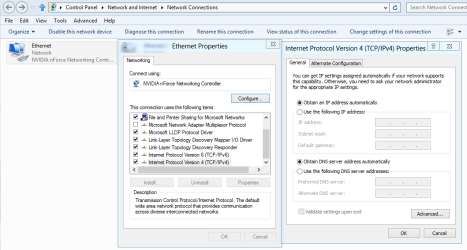
You can also set up a static IP by going into the IPv4 properties of your network adaptor and typing in the desired IP there along with the default gateway, DNS server and subnet. That may work better for you although I'm not sure why you need to use a static IP.

If you can look in your router's settings for the DHCP range I can give you more specific information on what IP to use.
 

Attachments

  • IPv4 properties.PNG
    IPv4 properties.PNG
    27.1 KB · Views: 53

My Computer My Computer

Computer type
PC/Desktop
Computer Manufacturer/Model Number
Home built
OS
Windows 7 Ult, Windows 8.1 Pro,
CPU
Q9650-4.275GHz, E8600 4.5GHz, E6750-3.8GHz
Motherboard
Evga 780i FTW
Memory
G.Skill PC2 9600 1200Mhz 5 5 5 15 2T
Graphics Card(s)
GTX480
Sound Card
Asus Xonar D2
Monitor(s) Displays
HannsG
Screen Resolution
1680X1050
Hard Drives
GSkill Phoenix Pro 120GB SSD
PSU
ThermalTake Toughpower 1000Watt modular
Case
ThermalTake XaserV
Cooling
Xigmatek S1283
Keyboard
Logitech G15
Mouse
Logitech G9
Internet Speed
T1
It would not take the dd-wrt firmware. Says it's either the wrong file for the hardware.
 

My Computer My Computer

Computer Manufacturer/Model Number
Lenovo Ideacenter
OS
Windows 7 Pro 64 bit
Memory
8 Gb
This static IP from your ISP, or are you trying to assign it through the router to your computer? If it is from your ISP, set it in the appropriate page in the router's config pages, no need to enter the static IP in Windows. Then just make sure that the router is set to DCHP and leave Windows at its default (which is to obtain an IP automatically), and you should be able to connect without any problems.
 

My Computer My Computer

Computer type
PC/Desktop
Computer Manufacturer/Model Number
Me
OS
Win 7 Ultimate x64
CPU
FX-8350 @ 4.6 GHz so far
Motherboard
Asus M5A97 EVO
Memory
ADATA XPG V1 Series Black 8GB DDR3 1600
Graphics Card(s)
Sapphire R9 270x Dual-X
Sound Card
Xonar DGX w/ Corsair Vengence 1300
Monitor(s) Displays
Acer S232HL Abid
Screen Resolution
1920x1080
Hard Drives
120 GB OCZ Vertex 3
500 GB Seagate 7200.12
PSU
Antec Earthwatts 650W Green
Case
Antec Three Hundred
Cooling
Cooler Master 212 EVO
Keyboard
Logitech G510
Mouse
Logitech G500s
Internet Speed
35000/3000
I have to have static for my wireless Ethernet Internet connection that comes from the antenna on my roof.

But need to revert back to auto when the router is connected.
 

My Computer My Computer

Computer Manufacturer/Model Number
Lenovo Ideacenter
OS
Windows 7 Pro 64 bit
Memory
8 Gb
I have to have static for my wireless Ethernet Internet connection that comes from the antenna on my roof.

But need to revert back to auto when the router is connected.

That's a new one on me LOL. Never heard of such a set up. I'm wondering why all this wasn't explained to begin with. :confused:
 

My Computer My Computer

Computer type
PC/Desktop
Computer Manufacturer/Model Number
Home built
OS
Windows 7 Ult, Windows 8.1 Pro,
CPU
Q9650-4.275GHz, E8600 4.5GHz, E6750-3.8GHz
Motherboard
Evga 780i FTW
Memory
G.Skill PC2 9600 1200Mhz 5 5 5 15 2T
Graphics Card(s)
GTX480
Sound Card
Asus Xonar D2
Monitor(s) Displays
HannsG
Screen Resolution
1680X1050
Hard Drives
GSkill Phoenix Pro 120GB SSD
PSU
ThermalTake Toughpower 1000Watt modular
Case
ThermalTake XaserV
Cooling
Xigmatek S1283
Keyboard
Logitech G15
Mouse
Logitech G9
Internet Speed
T1
I have the router connected to the internet by setting my providers static IP address. And am seeing the router through the pc. But the pc will not connect to the internet through the router This is as far as I always get no matter if it is my laptop on XP or the dresktop with Win 7.

On my laptop it connects to the wireless connection from the router but the browsers will not connect to the internet.
 

My Computer My Computer

Computer Manufacturer/Model Number
Lenovo Ideacenter
OS
Windows 7 Pro 64 bit
Memory
8 Gb
What is really aggravating is I had an earlier version of a D Link and it got hit by lightening. This one has never connected as it should.

So let me clarify if I may....

My internet signal is an ethernet signal that comes from the antenna on the roof. It requires a static IP address. It works when plugged directly into the PC ethernet port and when the static address is applied under the adapter settings for IPv4.

I can set the router to this static IP address and the router sees the internet.

I then set the PC IPv4 settings to auto.

The PC does not see the internet.
 

My Computer My Computer

Computer Manufacturer/Model Number
Lenovo Ideacenter
OS
Windows 7 Pro 64 bit
Memory
8 Gb
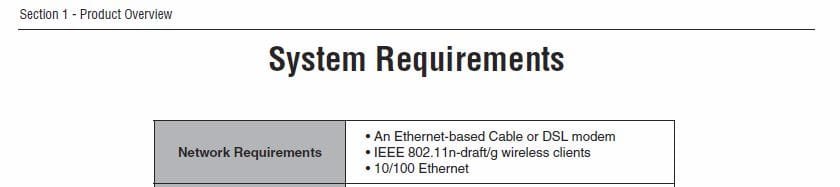
there is no mention of a MODEM in any of your posts--the DIR 615 'requires' a modem to connect to the internet (see attached from DIR 615 user manual)--if I'm understanding your connection it is meant for ONE computer only (connected directly)--the router is acting only as a switch, without a modem you will NOT get an internet connection.

who is your ISP? and what country are you in? the direct connection from an antenna makes me think you're in asia...
 

Attachments

  • Capture.JPG
    Capture.JPG
    19.6 KB · Views: 9

My Computer My Computer

Computer Manufacturer/Model Number
SALEON model 2.2b
OS
win7 ultimate 32bit
CPU
core2 Extreme QX6850-OCd to 3.15 GHz
Motherboard
ASUS P5G41-M LE
Memory
4 GB
Graphics Card(s)
NVidia 8600 GT
Monitor(s) Displays
23" acer
Hard Drives
one SATA 250GB partitioned equally in half
one SATA 160GB-internal storage
PSU
500W Thermaltake
Case
mini tower
there is no mention of a MODEM in any of your posts--the DIR 615 'requires' a modem to connect to the internet (see attached from DIR 615 user manual)--if I'm understanding your connection it is meant for ONE computer only-connected directly

My incoming ethernet is the modem. And it will work through a wireless router. In fact it is working now at the router. But the PC when connected with an ethernet cable to the router or the laptop when connected to the router through a wireless connection will not connect to the internet through the browsers.
 

My Computer My Computer

Computer Manufacturer/Model Number
Lenovo Ideacenter
OS
Windows 7 Pro 64 bit
Memory
8 Gb
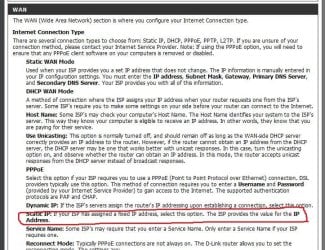
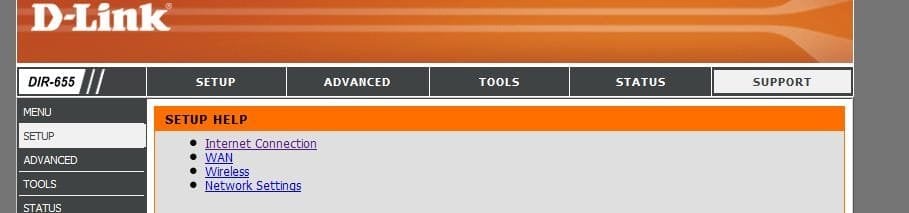
take a look at the 'setup' help section of your router--it should help you to setup your WAN (these screnshots are for a DIR 655 but the theory is the same)
 

Attachments

  • Capture.JPG
    Capture.JPG
    112.4 KB · Views: 22
  • Capture1.JPG
    Capture1.JPG
    27.1 KB · Views: 13

My Computer My Computer

Computer Manufacturer/Model Number
SALEON model 2.2b
OS
win7 ultimate 32bit
CPU
core2 Extreme QX6850-OCd to 3.15 GHz
Motherboard
ASUS P5G41-M LE
Memory
4 GB
Graphics Card(s)
NVidia 8600 GT
Monitor(s) Displays
23" acer
Hard Drives
one SATA 250GB partitioned equally in half
one SATA 160GB-internal storage
PSU
500W Thermaltake
Case
mini tower
Again, the router sees the internet. When connected to the router with a wireless connection the Internet connection is there as reported by windows in XP. But the browser(s) do not connect.

When the Win7 machine tries to connect through an ethernet cable it sees nothing.

The Internet light on the router is active. The port for the Ethernet cable is active.

The DIR 645 (I think) was what I had before and it connected OK. I wonder if the problem is inherent in the 615 model? It has the latest factory firmware, E3 v5.10.
 

My Computer My Computer

Computer Manufacturer/Model Number
Lenovo Ideacenter
OS
Windows 7 Pro 64 bit
Memory
8 Gb
What is the make and model of the modem?
 

My Computer My Computer

Computer type
PC/Desktop
Computer Manufacturer/Model Number
Me
OS
Win 7 Ultimate x64
CPU
FX-8350 @ 4.6 GHz so far
Motherboard
Asus M5A97 EVO
Memory
ADATA XPG V1 Series Black 8GB DDR3 1600
Graphics Card(s)
Sapphire R9 270x Dual-X
Sound Card
Xonar DGX w/ Corsair Vengence 1300
Monitor(s) Displays
Acer S232HL Abid
Screen Resolution
1920x1080
Hard Drives
120 GB OCZ Vertex 3
500 GB Seagate 7200.12
PSU
Antec Earthwatts 650W Green
Case
Antec Three Hundred
Cooling
Cooler Master 212 EVO
Keyboard
Logitech G510
Mouse
Logitech G500s
Internet Speed
35000/3000
I don't have a modem. All I have is an antenna, I assume some sort of ethernet converter that terminates with an Ethernet cable coming into the house.

This is wireless long range Internet service that normally plugs into the ethernet port.
 

My Computer My Computer

Computer Manufacturer/Model Number
Lenovo Ideacenter
OS
Windows 7 Pro 64 bit
Memory
8 Gb
This is what I had and worked but it got hit by lightening. D-Link Rangebooster N Dual Brand Router. It is difficult to get screen shots of what is going on as I have to keep manually changing the IP address to get back on the internet when the Internet connection is directly connected to the PC.
 

My Computer My Computer

Computer Manufacturer/Model Number
Lenovo Ideacenter
OS
Windows 7 Pro 64 bit
Memory
8 Gb
Back
Top