Cannot get D Link DIR 615 to work with Windows 7

I don't have a modem. All I have is an antenna, I assume some sort of ethernet converter that terminates with an Ethernet cable coming into the house.

This is wireless long range Internet service that normally plugs into the ethernet port.

That is kind of a required piece of hardware. A router cannot connect to the internet without a modem of some kind connected to it via the WAN port.

How about a picture (photo or drawn) of how everything is connected. Would go a long way to see how you have things hooked up.
 

My Computer My Computer

Computer type
PC/Desktop
Computer Manufacturer/Model Number
Me
OS
Win 7 Ultimate x64
CPU
FX-8350 @ 4.6 GHz so far
Motherboard
Asus M5A97 EVO
Memory
ADATA XPG V1 Series Black 8GB DDR3 1600
Graphics Card(s)
Sapphire R9 270x Dual-X
Sound Card
Xonar DGX w/ Corsair Vengence 1300
Monitor(s) Displays
Acer S232HL Abid
Screen Resolution
1920x1080
Hard Drives
120 GB OCZ Vertex 3
500 GB Seagate 7200.12
PSU
Antec Earthwatts 650W Green
Case
Antec Three Hundred
Cooling
Cooler Master 212 EVO
Keyboard
Logitech G510
Mouse
Logitech G500s
Internet Speed
35000/3000
Here is my antenna. I'm not sure of the model number, and that is my providers web site. I have residential wireless broadband. http://www.barbeck.com/downloads/motorola/ems/wireless_broadband/ptp300_brochure.pdf

Wireless Broadband Point-to-Point Bridges PTP BARBECK Communications Group Inc. Motorola Two Way Radio Dealer, Central Illinois

e92le.jpg


h9pd8.jpg
 

My Computer My Computer

Computer Manufacturer/Model Number
Lenovo Ideacenter
OS
Windows 7 Pro 64 bit
Memory
8 Gb
You can't get online because you don't have anything connected to the WAN ethernet port (the white one) on the router. The router might be wireless, but that is for sending and receiving signals to computers or other network enabled devices. It still requires a wired connection for a modem of some kind to the WAN port to be able to get online.
 

My Computer My Computer

Computer type
PC/Desktop
Computer Manufacturer/Model Number
Me
OS
Win 7 Ultimate x64
CPU
FX-8350 @ 4.6 GHz so far
Motherboard
Asus M5A97 EVO
Memory
ADATA XPG V1 Series Black 8GB DDR3 1600
Graphics Card(s)
Sapphire R9 270x Dual-X
Sound Card
Xonar DGX w/ Corsair Vengence 1300
Monitor(s) Displays
Acer S232HL Abid
Screen Resolution
1920x1080
Hard Drives
120 GB OCZ Vertex 3
500 GB Seagate 7200.12
PSU
Antec Earthwatts 650W Green
Case
Antec Three Hundred
Cooling
Cooler Master 212 EVO
Keyboard
Logitech G510
Mouse
Logitech G500s
Internet Speed
35000/3000
Sorry that was unplugged at the time because I was on the internet and it was connected to the laptop ethernet port. Usually the ethernet antenna cable is there.
 

My Computer My Computer

Computer Manufacturer/Model Number
Lenovo Ideacenter
OS
Windows 7 Pro 64 bit
Memory
8 Gb
according to the links you posted to 'barbeck' you don't (technically) have a modem--it's a Motorola 300 wireless bridge--hers is a link about setting up a wireless bridge....according to step 6--after configuring the bridge--you connect the 'router' and configure it.

How to Set Up a Wireless Bridge | eHow.com

and here is link to DIR-615 support pages (see the FAQs section)

D-Link - Home & Home Office
 

My Computer My Computer

Computer Manufacturer/Model Number
SALEON model 2.2b
OS
win7 ultimate 32bit
CPU
core2 Extreme QX6850-OCd to 3.15 GHz
Motherboard
ASUS P5G41-M LE
Memory
4 GB
Graphics Card(s)
NVidia 8600 GT
Monitor(s) Displays
23" acer
Hard Drives
one SATA 250GB partitioned equally in half
one SATA 160GB-internal storage
PSU
500W Thermaltake
Case
mini tower
Thanks, I'll check that out.
 

My Computer My Computer

Computer Manufacturer/Model Number
Lenovo Ideacenter
OS
Windows 7 Pro 64 bit
Memory
8 Gb
Well them two links are not much help. I did find some info about the Dir 615 does not have a bridge mode. But with the earlier mention aftermarket firmware it could be made to work. But I cannot get the router to accept the new firmware.
 

My Computer My Computer

Computer Manufacturer/Model Number
Lenovo Ideacenter
OS
Windows 7 Pro 64 bit
Memory
8 Gb
these steps should work
1.configure bridge/modem
2. connect only AC power to router and push the reset button to set it to 'default'
3. on both computers set your network connection to 'automatically' obtain IP address and DNS address
4.connect router to 'bridge' and to power it up
5. connect computer to router and access the router via your browser using the instruction that came with the router--you should see a webpage that has login page--leave the password field blank
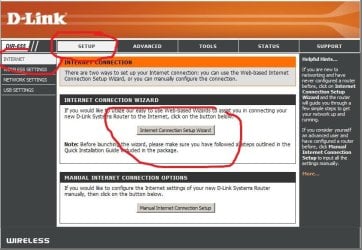
6. login then go to SETUP > INTERNET > use the wizard to setup (assuming this works--then you only need to access the router again to setup a password for your wireless so no one can piggyback on your wireless--and it will probably be a good thing to setup a primary password for the router)
 

Attachments

  • Capture.JPG
    Capture.JPG
    26.4 KB · Views: 4
  • Capture1.JPG
    Capture1.JPG
    81.8 KB · Views: 13

My Computer My Computer

Computer Manufacturer/Model Number
SALEON model 2.2b
OS
win7 ultimate 32bit
CPU
core2 Extreme QX6850-OCd to 3.15 GHz
Motherboard
ASUS P5G41-M LE
Memory
4 GB
Graphics Card(s)
NVidia 8600 GT
Monitor(s) Displays
23" acer
Hard Drives
one SATA 250GB partitioned equally in half
one SATA 160GB-internal storage
PSU
500W Thermaltake
Case
mini tower
I get that.
 

My Computer My Computer

Computer Manufacturer/Model Number
Lenovo Ideacenter
OS
Windows 7 Pro 64 bit
Memory
8 Gb
" I did find some info about the Dir 615 does not have a bridge mode"

no no no ---you don't setup bridge mode in the router--YOUR internet connection IS a BRIDGE (Motorola 300)--the first link was from your ISP about how to configure it properly.

I think I understand that you are trying to update the firmware for win7 compatibility--so--first--plug the XP machine into the router and update the firmware re: these links

D-Link - Home & Home Office

http://dlink.com/us/en/home-solutio...i-upgrade-my-firmware-on-my-dir-series-router

then--reconnect win7 machine.

you know this process should take about 15 minutes tops, except I'm sitting here is Seattle and trying to communicate via this forum--the steps that I've outlined should work perfectly--good luck to ya--am out for now.
 

My Computer My Computer

Computer Manufacturer/Model Number
SALEON model 2.2b
OS
win7 ultimate 32bit
CPU
core2 Extreme QX6850-OCd to 3.15 GHz
Motherboard
ASUS P5G41-M LE
Memory
4 GB
Graphics Card(s)
NVidia 8600 GT
Monitor(s) Displays
23" acer
Hard Drives
one SATA 250GB partitioned equally in half
one SATA 160GB-internal storage
PSU
500W Thermaltake
Case
mini tower

My Computer My Computer

Computer Manufacturer/Model Number
SALEON model 2.2b
OS
win7 ultimate 32bit
CPU
core2 Extreme QX6850-OCd to 3.15 GHz
Motherboard
ASUS P5G41-M LE
Memory
4 GB
Graphics Card(s)
NVidia 8600 GT
Monitor(s) Displays
23" acer
Hard Drives
one SATA 250GB partitioned equally in half
one SATA 160GB-internal storage
PSU
500W Thermaltake
Case
mini tower
Well them two links are not much help. I did find some info about the Dir 615 does not have a bridge mode. But with the earlier mention aftermarket firmware it could be made to work. But I cannot get the router to accept the new firmware.

I use that same Router but my ISP and setup are far different... So I can not help there. sorry.....but....

Here are the instructions on how to get that 3rd party firmware on the DIR-615 E3 Router you have.

D-Link DIR-615 rev E3 - DD-WRT Wiki:


P.s. v5.10 is the latest Firmware for DIR 615 E3 router, You said that is what yours has so, NO update needed.
 

My Computer My Computer

Computer type
PC/Desktop
Computer Manufacturer/Model Number
Jeepmann/Custom Built
OS
Windows 7 Ultimate 64bit
CPU
Intel Core i7-2600K Sandy Bridge 3.4GHz (@[email protected])
Motherboard
Asus Maximus IV Extreme LGA 1155 Intel P67
Memory
G.SKILL Ripjaws X Series 16GB 1600Mhz (4 x 4GB) (Stock)
Graphics Card(s)
x2 EVGA GeForce GTX 760's w/ACXCoolers in SLI Surround
Sound Card
On-Board
Monitor(s) Displays
3x Acer 24" HDMI Widescreen LCD Monitor
Screen Resolution
3@ 1920x1080 (5760x1080 In Surround)
Hard Drives
Samsung 830 128gb ssd
Western Digital Caviar Black 640GB 7200 RPM
Western Digital Caviar Black 500GB 7200 RPM
Seagate 2tb 7200 RPM
PSU
COOLER MASTER Silent Pro 1000W
Case
COOLER MASTER HAF X Black
Cooling
CORSAIR Hydro H70
Keyboard
Logitech G510
Mouse
Zalman M300
Internet Speed
100mbps-ish Down & 5mbps-ish Up
Other Info
I installed the stock 140mm case fan outside of case then installed the H70+ 1 of its 120mm fans inside case. Used the 2nd 120mm from the H70 to go in the Gpu tunnel.
230mm Front,200mm side,200mm top,120mm Gpu tunnel,120mm&140mm on H70.
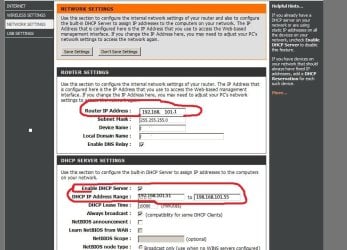
I did some research--these 'may' be the settings for your router to function with Barbeck(ISP)----login to router--click SETUP--on the left choose NETWORK SETTINGS--then try entering the settings shown in the attached screenshot (if these settings don't work, then contact your ISP)
 

Attachments

  • Capture.JPG
    Capture.JPG
    94.1 KB · Views: 36

My Computer My Computer

Computer Manufacturer/Model Number
SALEON model 2.2b
OS
win7 ultimate 32bit
CPU
core2 Extreme QX6850-OCd to 3.15 GHz
Motherboard
ASUS P5G41-M LE
Memory
4 GB
Graphics Card(s)
NVidia 8600 GT
Monitor(s) Displays
23" acer
Hard Drives
one SATA 250GB partitioned equally in half
one SATA 160GB-internal storage
PSU
500W Thermaltake
Case
mini tower
I can get the router to see the internet. I can get the wireless laptop to see the router. I can't get windows to see the internet through the router on either the wireless xp laptop or the hardwired ethernet desktop running windows 7.

I guess what I have is an ethernet bridge setup then?

I feel this is a windows setting somewhere.
 

My Computer My Computer

Computer Manufacturer/Model Number
Lenovo Ideacenter
OS
Windows 7 Pro 64 bit
Memory
8 Gb
I've researched everything I can think of--the problem seems to have something to do with the primary internet connection--contact your ISP--I give up
 

My Computer My Computer

Computer Manufacturer/Model Number
SALEON model 2.2b
OS
win7 ultimate 32bit
CPU
core2 Extreme QX6850-OCd to 3.15 GHz
Motherboard
ASUS P5G41-M LE
Memory
4 GB
Graphics Card(s)
NVidia 8600 GT
Monitor(s) Displays
23" acer
Hard Drives
one SATA 250GB partitioned equally in half
one SATA 160GB-internal storage
PSU
500W Thermaltake
Case
mini tower
I gave up too and ordered a Cisco Linksys E1200 Wireless-N Router.
 

My Computer My Computer

Computer Manufacturer/Model Number
Lenovo Ideacenter
OS
Windows 7 Pro 64 bit
Memory
8 Gb
I got the Cisco router to work. But I belive it was one of the ISP static addresses that was off. Although I could use the internet when connected directly to the computer apparently a router need something slightly different.

Anyway thanks for all the trouble.
 

My Computer My Computer

Computer Manufacturer/Model Number
Lenovo Ideacenter
OS
Windows 7 Pro 64 bit
Memory
8 Gb
Back
Top