
Cannot get dual boot: Windows 7 and XP

Rev Anton

New member
Local time
4:31 PM
Messages
6
Hi there,

Thanks for looking.

I have just put together a system for a colleague. It was originally a Windows 7 Utimate on a 250 Gig disk.
I have just added a 1TB disk. At first upon boot up I had the dual boot option of both Windows 7 operating systems and everything was fine. The requirement was to have Windows XP Home installed on the 250gig. I did this while in the new Windows 7 system and rebooted. The dual boot option was no longer available and I could not boot the Windows 7 disk at all. I unplugged the XP disk after trying all the suggestions on Windows 7 Forum related to this problem and booted the 7 disk with the DVD, then carried out the Start up repair several times. It still won't work. I ended up reintalling Windows 7 on the 1TB disk while the 250Gig disk was unplugged.

They both boot now, but only separately and only if one or the other is unplugged. If they are both plugged in the last system to boot is the only one that will boot.

Setting disk priorities in BIOS does not have an effect on this.

The system is as follows:

Stock Case
500 watt PSU
Intel Core Duo Quad Core 775
Gigabite 775 Socket motherboard
1 x 4 Gigabyte Stick DDR3 RAM
1 x 1TB WD HDD
1 x Maxtor 250Gig HDD
Windows 7 Ultimate
XP Home

I will note that the first time I installed 7 it used the whole drive as apartition. This time around it has created a 100 MB partition for system on the 1TB disk. I have a screenshot of the system.
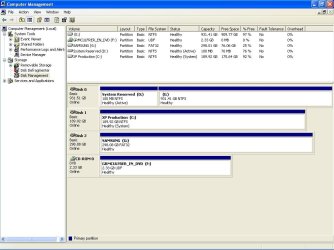
System.jpg

I have tried the DOS methods advised on various threads here including making the disk active actions. I just can't get the system to simply give me the dual boot option upon startup.

Can someone point me in the right direction?

Thank you very much for reading.

Peace and Regards,
 

My Computer My Computer

Computer Manufacturer/Model Number
DELL LATITUDE E5500
OS
Windows 7 Ultimate
Hard Drives
160 GB
With both drives plugged in (disk 0 and disk 1):

Does it give you bootmenu with win7 and winxp (most of time named "previous version of windows")
Which of the 2 works? If only one option, you normally don't see bootmenu. What operating system starts?
 

My Computer My Computer

Computer type
Laptop
Computer Manufacturer/Model Number
ACER ASPIRE 5742G
OS
Microsoft Windows 7 Home Premium 64-bits 7601 Multiprocessor Free Service Pack 1
CPU
Intel(R) Core(TM) i3 CPU M 370 @ 2.40GHz
Motherboard
Acer Aspire 5742G
Memory
4,00 GB
Graphics Card(s)
ATI Mobility Radeon HD 5400 Series
Sound Card
(1) AMD High Definition Audio Device (2) Realtek High Defi
Screen Resolution
1366 x 768 x 32 bits (4294967296 colors) @ 60 Hz
Hard Drives
WDC WD5000BEVT-22ZAT0
They both boot now, but only separately and only if one or the other is unplugged. If they are both plugged in the last system to boot is the only one that will boot.
If win7 disk is unplugged your system doesn't boot at all. This is because win7 disk has the only active partition
 

My Computer My Computer

Computer type
Laptop
Computer Manufacturer/Model Number
ACER ASPIRE 5742G
OS
Microsoft Windows 7 Home Premium 64-bits 7601 Multiprocessor Free Service Pack 1
CPU
Intel(R) Core(TM) i3 CPU M 370 @ 2.40GHz
Motherboard
Acer Aspire 5742G
Memory
4,00 GB
Graphics Card(s)
ATI Mobility Radeon HD 5400 Series
Sound Card
(1) AMD High Definition Audio Device (2) Realtek High Defi
Screen Resolution
1366 x 768 x 32 bits (4294967296 colors) @ 60 Hz
Hard Drives
WDC WD5000BEVT-22ZAT0
Do I read this well? Did you install winxp from within win7? If so, where is ntldr and boot.ini on "system reserved" or winxp partition? It must be in root folder. And they hidden system files.

attrib d:\ntldr
attrib d:\boot.ini
attrib c:\ntldr
attrib c:\boot.ini

Do it from within winxp command prompt. Is it on D or C?
 

My Computer My Computer

Computer type
Laptop
Computer Manufacturer/Model Number
ACER ASPIRE 5742G
OS
Microsoft Windows 7 Home Premium 64-bits 7601 Multiprocessor Free Service Pack 1
CPU
Intel(R) Core(TM) i3 CPU M 370 @ 2.40GHz
Motherboard
Acer Aspire 5742G
Memory
4,00 GB
Graphics Card(s)
ATI Mobility Radeon HD 5400 Series
Sound Card
(1) AMD High Definition Audio Device (2) Realtek High Defi
Screen Resolution
1366 x 768 x 32 bits (4294967296 colors) @ 60 Hz
Hard Drives
WDC WD5000BEVT-22ZAT0
Hi there,

Thanks for loking at this.

If either HDD is plugged in on it's own the respective system will boot and operate without an issue.
I just don't get a boot menu on start up which is what I am trying to obtain. There are no options given. After 'Verifying DMI Pool Data' the sytem simply boots up as normal, depending on which is plugged it.

If I plug in XP and boot, it will have the only active partition and it will be labelled 'C:' and the exact same for Windows 7 HDD if that is plugged in on its own, booted and rebooted after plugging them both in.

In answer to you final post, Originally installed XP from 7, but ended up reinstalling 7 on the 1TB drive without XP HDD plugged in at all. the labels C and D swap depending on which is booted.


I will try thse attrib commands when I get back to the unit.

Thanks very much. :)
All I need is to get the bootmenu on start up.
 

My Computer My Computer

Computer Manufacturer/Model Number
DELL LATITUDE E5500
OS
Windows 7 Ultimate
Hard Drives
160 GB
attrib command not needed anymore!

mark winxp partition as inactive and try to boot with both attached
 

My Computer My Computer

Computer type
Laptop
Computer Manufacturer/Model Number
ACER ASPIRE 5742G
OS
Microsoft Windows 7 Home Premium 64-bits 7601 Multiprocessor Free Service Pack 1
CPU
Intel(R) Core(TM) i3 CPU M 370 @ 2.40GHz
Motherboard
Acer Aspire 5742G
Memory
4,00 GB
Graphics Card(s)
ATI Mobility Radeon HD 5400 Series
Sound Card
(1) AMD High Definition Audio Device (2) Realtek High Defi
Screen Resolution
1366 x 768 x 32 bits (4294967296 colors) @ 60 Hz
Hard Drives
WDC WD5000BEVT-22ZAT0
Hi there
If this is inappropriate just ignore
but seriously with some good FREE Virtual machine software around why even BOTHER to dual boot Windows XP.
Just "Virtualize" it.

When it asks for re-activation the first time just activate by phone. No problems --just tell MS you've installed XP on a new machine --you have to have XP to run some legacy hardware and applications.

If your copy of XP is an OEM copy you *Should* be able to re-activate it as it's still on the same physical machine.

Otherwise you can use XP mode.

Unless you absolutely HAVE to dual boot I'd go the Virtual machine route --the other advantage is just shut it down when you don't need it any more. In General Dual Booting should really be considered a thing of the past. Only if you have a very special type of program which DIRECTLY addresses the hardware do you actually need to boot into a separate physical machine.

vmware player and VBOX both work very well indeed and are FREE. Plenty of tutorials and advice on these Forums for setting up virtual machines.

If you still want to go with the dual boot method --please ignore this post -- but using VM's is not hard at all and worth a try.

Cheers
jimbo
 

My Computer My Computer

Computer type
PC/Desktop
Computer Manufacturer/Model Number
Custom built, several laptops HP/ASUS
OS
Linux CENTOS 7 / various Windows OS'es and servers
CPU
Intel i7 Intel i5
Memory
8GB, 16GB
Graphics Card(s)
On Motherboard
Sound Card
Realtek HD audio
Monitor(s) Displays
Apple Cinema display, Samsung LCD
Screen Resolution
1920 X 1080
Hard Drives
4 X 1TB SATA
Mouse
Toshiba wireless laser
Internet Speed
> 20MB up
Hi Kaktusoft,

I'll give this a go. That will mean that both will be marked as inactive.

Will try and get back to you.

Thanks again.
 

My Computer My Computer

Computer Manufacturer/Model Number
DELL LATITUDE E5500
OS
Windows 7 Ultimate
Hard Drives
160 GB
Jimbo,

Thanks for the heads up. I have thought of VXP but there are a few apps that simply will not work with 7 and have not had later versions written, as yet.

Thanks :)
 

My Computer My Computer

Computer Manufacturer/Model Number
DELL LATITUDE E5500
OS
Windows 7 Ultimate
Hard Drives
160 GB
Hello Rev :)

As both the OSs are installed in separate HDDs, the best way to use the boot menu key to decide which HDD is to boot from. Using dual boot is sometimes problematic, coz it integrates both the installations , and if one corrupts, it affects the other, too.

For a Gigabyte motherboard , the boot menu key is F12. Press and hold F12 when the motherboard splash screen is seen after power up, it will list up all the possible locations to boot from. Choose HDD0 to boot windows7, or choose HDD1 to boot from XP.

If you want a dual boot, you can do it using EasyBCD . Download the free non-commercial version, install it in XP (the latest version of .net framework will be needed), run it, add a windows 7 boot entry using it, save, close the program, and restart the computer. There should be a dual boot menu now.

Let us know if it worked or not.
 

My Computer My Computer

Computer type
PC/Desktop
Computer Manufacturer/Model Number
Self Assembled
OS
Microsoft Windows 10 Pro Insider Preview 64-bit
CPU
Intel(R) Core(TM) i3-4130 CPU @ 3.40GHz
Motherboard
Gigabyte Technology Co., Ltd. B85M-D3H
Memory
Corsair Vengence 4GB x2 (8.00GB Dual-Channel DDR3 @ 798MHz)
Graphics Card(s)
2047MB GeForce GTS 450 (ZOTAC International)
Sound Card
Onboard (Realtek High Definition Audio)
Monitor(s) Displays
LG Flatron E2040T
Screen Resolution
1600x900
Hard Drives
Western Digital 1 TB
Seagate 500 GB
PSU
Corsair VS550
Case
Cooler Master K380
Cooling
Cooler Master Seidon 120V Plus
Keyboard
Logitech MK260r
Mouse
Logitech MK260r
Internet Speed
PMPL Broadband
Antivirus
Windows Defender + MBAM
Browser
Firefox
Other Info
Dell Studio 15" Laptop
mark "system reserved" as active and winxp as inactive. Then reboot with both disks attached. win7 should boot then.

What is drive letter of winpx if booted in win7? I assume F.

In http://www.sevenforums.com/tutorials/783-elevated-command-prompt.html:

Code:
bcdedit  /create  {ntldr}  /d "WindowsXP"
bcdedit  /set  {ntldr}  device  partition=F:
bcdedit  /set  {ntldr}  path  \ntldr
bcdedit  /displayorder  {ntldr}  /addlast

Replace F with actual drive letter.

Try to boot both operating systems. I think winxp still fails. If it does fail .... swap the two ide or sata cables and try again.

Post results
 

My Computer My Computer

Computer type
Laptop
Computer Manufacturer/Model Number
ACER ASPIRE 5742G
OS
Microsoft Windows 7 Home Premium 64-bits 7601 Multiprocessor Free Service Pack 1
CPU
Intel(R) Core(TM) i3 CPU M 370 @ 2.40GHz
Motherboard
Acer Aspire 5742G
Memory
4,00 GB
Graphics Card(s)
ATI Mobility Radeon HD 5400 Series
Sound Card
(1) AMD High Definition Audio Device (2) Realtek High Defi
Screen Resolution
1366 x 768 x 32 bits (4294967296 colors) @ 60 Hz
Hard Drives
WDC WD5000BEVT-22ZAT0
Hi Arc,

No long till I'm in front of the pc now so I will try both methods and post result, but this solution feels posistive.

Thank you very much :)

Rev
 

My Computer My Computer

Computer Manufacturer/Model Number
DELL LATITUDE E5500
OS
Windows 7 Ultimate
Hard Drives
160 GB
You are welcome, Rev. Tet us know what actually happened . :)

EDIT : BTW, have you tried the startup repair using the installation disk or recovery disk ?
:ar: Startup Repair

If you follow this method, run startup repair for three separate times, with restarts after every single run, it will add both the startup entries, as your system reserved is already marked as active.
 

My Computer My Computer

Computer type
PC/Desktop
Computer Manufacturer/Model Number
Self Assembled
OS
Microsoft Windows 10 Pro Insider Preview 64-bit
CPU
Intel(R) Core(TM) i3-4130 CPU @ 3.40GHz
Motherboard
Gigabyte Technology Co., Ltd. B85M-D3H
Memory
Corsair Vengence 4GB x2 (8.00GB Dual-Channel DDR3 @ 798MHz)
Graphics Card(s)
2047MB GeForce GTS 450 (ZOTAC International)
Sound Card
Onboard (Realtek High Definition Audio)
Monitor(s) Displays
LG Flatron E2040T
Screen Resolution
1600x900
Hard Drives
Western Digital 1 TB
Seagate 500 GB
PSU
Corsair VS550
Case
Cooler Master K380
Cooling
Cooler Master Seidon 120V Plus
Keyboard
Logitech MK260r
Mouse
Logitech MK260r
Internet Speed
PMPL Broadband
Antivirus
Windows Defender + MBAM
Browser
Firefox
Other Info
Dell Studio 15" Laptop
The best way to dual boot with separate HD's is via the BIOS. Set the preferred HD to boot first, then when needed boot the other by using the one-time BIOS Boot Menu key to trigger it.

You've apparently missed that you must use the one-time BIOS Boot Menu key to trigger the other HD.

If this is not possible, then install EasyBCD to Win7 to add XP on Add OS Entry tab: accept offered boot files, autocompletes, Save, Reboot. EasyBCD (free Download at bottom of page - no name or email required). Make sure Win7 HD is set first to boot in BIOS setup.

There is a problem in your Disk configuration which may be only because it is viewed from XP. You said you installed each OS with the other HD's unplugged, yet Win7 doesn't not show System Active flags on it's boot partition. Normally it would only be missing the System flag if its boot files were placed on XP partition during 7 install while XP is plugged in. To test this, unplug XP HD and see if Win7 will boot on its own. If not, mark 100mb Active and run Startup Repair - Run 3 Separate Times until Win7 boot partition correctly shows System Active flags - Boot flag only means it is the OS booted.

XP also only shows System though it should be System Active to boot on its own. You can leave the Active flag off if it is going to be booted via Win7 using Easybcd.
 
Hi All,

Problem solved.

Thanks to everyone who offered their solutions.

Grabbhed EasyBCD and installed on XP. This did not work so disconnected and reconnected, rebooted twice and loaded Easy BCD and worked like a dream.

Thanks. :))
 

My Computer My Computer

Computer Manufacturer/Model Number
DELL LATITUDE E5500
OS
Windows 7 Ultimate
Hard Drives
160 GB
You are welcome Rev :) Nice to know that it is solved !
 

My Computer My Computer

Computer type
PC/Desktop
Computer Manufacturer/Model Number
Self Assembled
OS
Microsoft Windows 10 Pro Insider Preview 64-bit
CPU
Intel(R) Core(TM) i3-4130 CPU @ 3.40GHz
Motherboard
Gigabyte Technology Co., Ltd. B85M-D3H
Memory
Corsair Vengence 4GB x2 (8.00GB Dual-Channel DDR3 @ 798MHz)
Graphics Card(s)
2047MB GeForce GTS 450 (ZOTAC International)
Sound Card
Onboard (Realtek High Definition Audio)
Monitor(s) Displays
LG Flatron E2040T
Screen Resolution
1600x900
Hard Drives
Western Digital 1 TB
Seagate 500 GB
PSU
Corsair VS550
Case
Cooler Master K380
Cooling
Cooler Master Seidon 120V Plus
Keyboard
Logitech MK260r
Mouse
Logitech MK260r
Internet Speed
PMPL Broadband
Antivirus
Windows Defender + MBAM
Browser
Firefox
Other Info
Dell Studio 15" Laptop
I was trying to bring up the boot options ( last good config etc, as I had on my XP machine using f8)
When I pressed f8, it brought up a boot menu option .
I have a second hdd with xp in my Windows 7 computer - I can now boot from either one.
 

My Computer My Computer

Computer type
PC/Desktop
Computer Manufacturer/Model Number
Self-Built
OS
Windows 7 Professional X64
CPU
Core i7 (2nd gen) i7-2600K / 3.40GHz
Motherboard
ASUS P8Z77-V Intel 7 Series Motherboard
Memory
DDR3 2400MHz (OC) 16gb
Graphics Card(s)
Intel(R) HD Graphics 3000, -1988 Mb
Sound Card
8 ChannelsAudio Chipset Realtek ALC892
Monitor(s) Displays
LG 29UM65 Black 29"
Screen Resolution
2560 x 1080
Hard Drives
840 EVO 250 GB SSD ;2tb (2);Seagate;1tb Seagate; 750 gb Seagate; wd ext (2) 750 gb,WD 2tb X 2;WD 3TB Black
PSU
750 watt
Case
Thermaltake RX -1
Cooling
2120mm Fans Included 1Other Fan Ports 5x 200mm Fan Ports
Keyboard
Microsoft Digital Media Pro
Mouse
Microsoft Wireless 6000
Internet Speed
U-verse 18 mbps
Antivirus
MSE
Browser
Firefox, Chrome and my favorite: Pale Moon
Other Info
HdHomerun Dual Tuner.
SRS Audio Lab,
Pioneer BDR 208-DBK
PS3-What a difference in my Surround Sound Receiver!
HP 4540s - My new Toy.
Epson R280 Printer- To personalize my Dvds.
Canon MP 560 - For scanning.

My Computer My Computer

Computer type
PC/Desktop
Computer Manufacturer/Model Number
Self Assembled
OS
Microsoft Windows 10 Pro Insider Preview 64-bit
CPU
Intel(R) Core(TM) i3-4130 CPU @ 3.40GHz
Motherboard
Gigabyte Technology Co., Ltd. B85M-D3H
Memory
Corsair Vengence 4GB x2 (8.00GB Dual-Channel DDR3 @ 798MHz)
Graphics Card(s)
2047MB GeForce GTS 450 (ZOTAC International)
Sound Card
Onboard (Realtek High Definition Audio)
Monitor(s) Displays
LG Flatron E2040T
Screen Resolution
1600x900
Hard Drives
Western Digital 1 TB
Seagate 500 GB
PSU
Corsair VS550
Case
Cooler Master K380
Cooling
Cooler Master Seidon 120V Plus
Keyboard
Logitech MK260r
Mouse
Logitech MK260r
Internet Speed
PMPL Broadband
Antivirus
Windows Defender + MBAM
Browser
Firefox
Other Info
Dell Studio 15" Laptop
Your motherboard is Asus ?

Which one was installed first in the dual boot environment ?

First, mark the system reserved partition as active . http://www.sevenforums.com/tutorials/71432-partition-mark-active.html

Then run http://www.sevenforums.com/tutorials/681-startup-repair.html , for at least three times, with restarts in between every single run.

Let us know if it worked or not .

The Motherboard is Asus P8z77-v.
I installed both hdds - xp and windows 7 -hit f8 and it brought up the boot window.
I was then able to boot from either hdd.
 

My Computer My Computer

Computer type
PC/Desktop
Computer Manufacturer/Model Number
Self-Built
OS
Windows 7 Professional X64
CPU
Core i7 (2nd gen) i7-2600K / 3.40GHz
Motherboard
ASUS P8Z77-V Intel 7 Series Motherboard
Memory
DDR3 2400MHz (OC) 16gb
Graphics Card(s)
Intel(R) HD Graphics 3000, -1988 Mb
Sound Card
8 ChannelsAudio Chipset Realtek ALC892
Monitor(s) Displays
LG 29UM65 Black 29"
Screen Resolution
2560 x 1080
Hard Drives
840 EVO 250 GB SSD ;2tb (2);Seagate;1tb Seagate; 750 gb Seagate; wd ext (2) 750 gb,WD 2tb X 2;WD 3TB Black
PSU
750 watt
Case
Thermaltake RX -1
Cooling
2120mm Fans Included 1Other Fan Ports 5x 200mm Fan Ports
Keyboard
Microsoft Digital Media Pro
Mouse
Microsoft Wireless 6000
Internet Speed
U-verse 18 mbps
Antivirus
MSE
Browser
Firefox, Chrome and my favorite: Pale Moon
Other Info
HdHomerun Dual Tuner.
SRS Audio Lab,
Pioneer BDR 208-DBK
PS3-What a difference in my Surround Sound Receiver!
HP 4540s - My new Toy.
Epson R280 Printer- To personalize my Dvds.
Canon MP 560 - For scanning.
Are you asking for help or reporting that what was suggested for Rev Anton's Dual Boot in this thread has also worked for you?
 
Back
Top