Cannot get Internet connectivity on wired router.

Dastardly

New member
Local time
11:22 AM
Messages
9
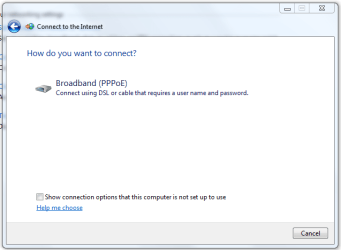
I have reinstalled W7 due to this issue. It seems that W7 only gives an option to setup a PPoE connection ONLY if it requires a username / password.

There is no 'always on' setup that I can find anywhere. Of course there is no such problem on my XP partition.

Any Ideas?

Thx peeps! :cry:
 

My Computer

Computer Manufacturer/Model Number
Mine
OS
Windows 7
CPU
E7200 intel Dual Core
Motherboard
ASUS P5NSLI
Memory
4GB
Graphics Card(s)
2x NVidia 9500
Sound Card
On-board SoundMax
Monitor(s) Displays
Asus 22in.
Screen Resolution
1920x1080
Hard Drives
2x Samsung 750 GB
PSU
700w
Case
Midtower
Cooling
Standard
Internet Speed
WHOA!
Ppoe

I have reinstalled W7 due to this issue. It seems that W7 only gives an option to setup a PPoE connection ONLY if it requires a username / password.

There is no 'always on' setup that I can find anywhere. Of course there is no such problem on my XP partition.

Any Ideas?

Thx peeps! :cry:

Hey

Win 7 gives othere options. Is this a clean install or upgrade?

Ken
 

My Computer

Computer Manufacturer/Model Number
HP Pavillion dv-7 1005 Tx
OS
Win 8 Release candidate 8400
CPU
[email protected]
Memory
4 gigs
Graphics Card(s)
Nvidia 9600M
Sound Card
HD built-in
Monitor(s) Displays
17" Wxga
Screen Resolution
1440x900
Cooling
none
Internet Speed
45Mb down 5Mb up
This is a clean install on a separate HDD on my dual boot system
 

My Computer

Computer Manufacturer/Model Number
Mine
OS
Windows 7
CPU
E7200 intel Dual Core
Motherboard
ASUS P5NSLI
Memory
4GB
Graphics Card(s)
2x NVidia 9500
Sound Card
On-board SoundMax
Monitor(s) Displays
Asus 22in.
Screen Resolution
1920x1080
Hard Drives
2x Samsung 750 GB
PSU
700w
Case
Midtower
Cooling
Standard
Internet Speed
WHOA!
Ppoe

This is a clean install on a separate HDD on my dual boot system

OK lets take a look at the network and sharing cpanel

Ken
 
Last edited:

My Computer

Computer Manufacturer/Model Number
HP Pavillion dv-7 1005 Tx
OS
Win 8 Release candidate 8400
CPU
[email protected]
Memory
4 gigs
Graphics Card(s)
Nvidia 9600M
Sound Card
HD built-in
Monitor(s) Displays
17" Wxga
Screen Resolution
1440x900
Cooling
none
Internet Speed
45Mb down 5Mb up
How do I post a capture of my panel to show you?
 

My Computer

Computer Manufacturer/Model Number
Mine
OS
Windows 7
CPU
E7200 intel Dual Core
Motherboard
ASUS P5NSLI
Memory
4GB
Graphics Card(s)
2x NVidia 9500
Sound Card
On-board SoundMax
Monitor(s) Displays
Asus 22in.
Screen Resolution
1920x1080
Hard Drives
2x Samsung 750 GB
PSU
700w
Case
Midtower
Cooling
Standard
Internet Speed
WHOA!
ppoe

How do I post a capture of my panel to show you?

Use the snipping tool (type snip in search) and save. then use the paperclip icon to attach and upload

Ken
 

My Computer

Computer Manufacturer/Model Number
HP Pavillion dv-7 1005 Tx
OS
Win 8 Release candidate 8400
CPU
[email protected]
Memory
4 gigs
Graphics Card(s)
Nvidia 9600M
Sound Card
HD built-in
Monitor(s) Displays
17" Wxga
Screen Resolution
1440x900
Cooling
none
Internet Speed
45Mb down 5Mb up
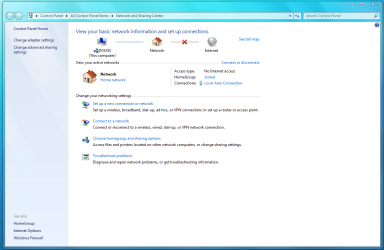
I hope this worked...the capture I mean :)
 

Attachments

  • Capture.PNG
    Capture.PNG
    58.7 KB · Views: 284

My Computer

Computer Manufacturer/Model Number
Mine
OS
Windows 7
CPU
E7200 intel Dual Core
Motherboard
ASUS P5NSLI
Memory
4GB
Graphics Card(s)
2x NVidia 9500
Sound Card
On-board SoundMax
Monitor(s) Displays
Asus 22in.
Screen Resolution
1920x1080
Hard Drives
2x Samsung 750 GB
PSU
700w
Case
Midtower
Cooling
Standard
Internet Speed
WHOA!
internet connectivity

I hope this worked...the capture I mean :)

You using wired or wireless?

Go to the serice you use and click on it. snip settings and post

Ken
 

My Computer

Computer Manufacturer/Model Number
HP Pavillion dv-7 1005 Tx
OS
Win 8 Release candidate 8400
CPU
[email protected]
Memory
4 gigs
Graphics Card(s)
Nvidia 9600M
Sound Card
HD built-in
Monitor(s) Displays
17" Wxga
Screen Resolution
1440x900
Cooling
none
Internet Speed
45Mb down 5Mb up
I have a wired router.
I always have connectivity on my XP partition.
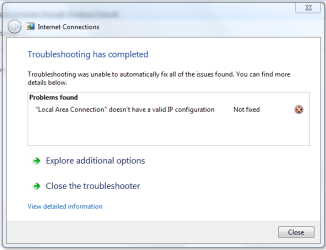
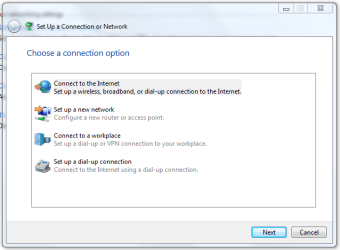
These are what I can bring up:
 

Attachments

  • problem.PNG
    problem.PNG
    13.9 KB · Views: 104
  • onlyoption.PNG
    onlyoption.PNG
    13.5 KB · Views: 70
  • setup1.PNG
    setup1.PNG
    17.7 KB · Views: 81

My Computer

Computer Manufacturer/Model Number
Mine
OS
Windows 7
CPU
E7200 intel Dual Core
Motherboard
ASUS P5NSLI
Memory
4GB
Graphics Card(s)
2x NVidia 9500
Sound Card
On-board SoundMax
Monitor(s) Displays
Asus 22in.
Screen Resolution
1920x1080
Hard Drives
2x Samsung 750 GB
PSU
700w
Case
Midtower
Cooling
Standard
Internet Speed
WHOA!
ppoe

I have a wired router.
I always have connectivity on my XP partition.
These are what I can bring up:

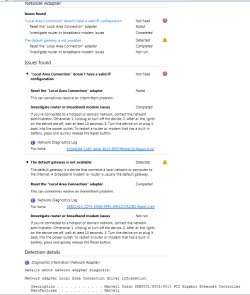
OK in pic one where it says not fixed in the bottom it says more details on what/why, click that and see what it says. If its relevant upload it.

Ken
 

My Computer

Computer Manufacturer/Model Number
HP Pavillion dv-7 1005 Tx
OS
Win 8 Release candidate 8400
CPU
[email protected]
Memory
4 gigs
Graphics Card(s)
Nvidia 9600M
Sound Card
HD built-in
Monitor(s) Displays
17" Wxga
Screen Resolution
1440x900
Cooling
none
Internet Speed
45Mb down 5Mb up
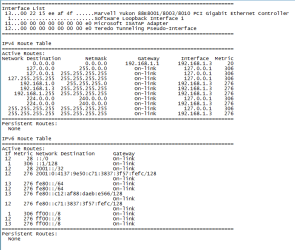
From what I can see your version for some reason did not get a NEW IP for Win7.

now you can do this. normally it corrects my customers setup.
1. start --> cmd (run as admin) in popup. type ipconfig /renew
wait for popup.
2. unplug your router for for 2 min, then replug.

wait for a bit while your (icon) in the taskbar goes from RED to yellow to approved.

PPPOE is a piece of CRAP. and many times fails to reset the IP correctly.
once you have the IP set for Win7 and your other OS. 99% of the time it will reset automatically.
 
Okay, perhaps this will help (x's crippled fingers) :o
 

Attachments

  • ipInfo.PNG
    ipInfo.PNG
    20.7 KB · Views: 74
  • moreInfo.PNG
    moreInfo.PNG
    13 KB · Views: 43
  • page1.PNG
    page1.PNG
    33.3 KB · Views: 53
  • page2.PNG
    page2.PNG
    16.3 KB · Views: 37

My Computer

Computer Manufacturer/Model Number
Mine
OS
Windows 7
CPU
E7200 intel Dual Core
Motherboard
ASUS P5NSLI
Memory
4GB
Graphics Card(s)
2x NVidia 9500
Sound Card
On-board SoundMax
Monitor(s) Displays
Asus 22in.
Screen Resolution
1920x1080
Hard Drives
2x Samsung 750 GB
PSU
700w
Case
Midtower
Cooling
Standard
Internet Speed
WHOA!
ip problem

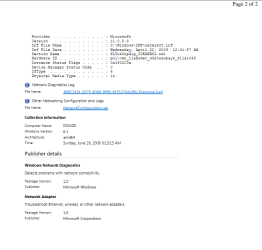
Okay, perhaps this will help (x's crippled fingers) :o

Two things I see. First snuffy is right you should renew your lease, then reboot the router, then the pc's. You may have to install then re-install networking but only as a last step.

Let us know how its going. Im subscribed to this thread so everytime something is posted I get email

Ken
 

My Computer

Computer Manufacturer/Model Number
HP Pavillion dv-7 1005 Tx
OS
Win 8 Release candidate 8400
CPU
[email protected]
Memory
4 gigs
Graphics Card(s)
Nvidia 9600M
Sound Card
HD built-in
Monitor(s) Displays
17" Wxga
Screen Resolution
1440x900
Cooling
none
Internet Speed
45Mb down 5Mb up
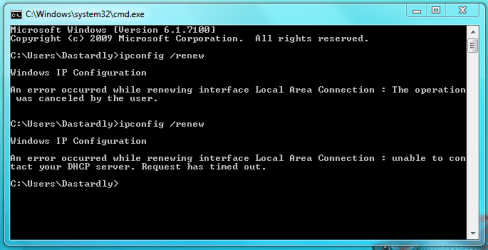
Been there...done that

:sarc: Deleted my adapter, let it reinstall... Even put in the Mac addy in IP advanced. When I do the CMD: IPCONFIG /RENEW I still get the following;
 

Attachments

  • cmdResult.PNG
    cmdResult.PNG
    15.2 KB · Views: 90

My Computer

Computer Manufacturer/Model Number
Mine
OS
Windows 7
CPU
E7200 intel Dual Core
Motherboard
ASUS P5NSLI
Memory
4GB
Graphics Card(s)
2x NVidia 9500
Sound Card
On-board SoundMax
Monitor(s) Displays
Asus 22in.
Screen Resolution
1920x1080
Hard Drives
2x Samsung 750 GB
PSU
700w
Case
Midtower
Cooling
Standard
Internet Speed
WHOA!
Ip problem

:sarc: Deleted my adapter, let it reinstall... Even put in the Mac addy in IP advanced. When I do the CMD: IPCONFIG /RENEW I still get the following;

Just out of curiosity, what nic are you using? have you tried re-installing the driver?

We have to create another connection to the internet, then kill the ppoe one.

We are gonna worry this one till its fixed.

Ken
 

My Computer

Computer Manufacturer/Model Number
HP Pavillion dv-7 1005 Tx
OS
Win 8 Release candidate 8400
CPU
[email protected]
Memory
4 gigs
Graphics Card(s)
Nvidia 9600M
Sound Card
HD built-in
Monitor(s) Displays
17" Wxga
Screen Resolution
1440x900
Cooling
none
Internet Speed
45Mb down 5Mb up
Marvell Yukon 88E8001/8003/8010 PCI Gigabit Ethernet controller
 

My Computer

Computer Manufacturer/Model Number
Mine
OS
Windows 7
CPU
E7200 intel Dual Core
Motherboard
ASUS P5NSLI
Memory
4GB
Graphics Card(s)
2x NVidia 9500
Sound Card
On-board SoundMax
Monitor(s) Displays
Asus 22in.
Screen Resolution
1920x1080
Hard Drives
2x Samsung 750 GB
PSU
700w
Case
Midtower
Cooling
Standard
Internet Speed
WHOA!
It appears to be connecting to the router, but not the internet. So, I don't think its your network card connection. Try typing this in your web browser address bar then hit enter:
Code:
http://192.168.100.1

it should log you onto your Modem if it is connected properly to your network. All I want to know is if it connects or if you get the address not found window. If that does not log you on, try unplugging the modem and router AC power, disconnect wired connection from PC to router, then power up the modem first and wait for all the lights to come on, then power on the router and wait for it to complete, then connect PC(s). Try and surf web.

One other thing you can try is connecting the PC directly to the modem and see if it connects to web.

Lastly, and I hate suggesting stupid stuff like this, but this has happened to me. Have you set a firewall/internet security to block all network traffic???
 

My Computer

Computer Manufacturer/Model Number
POS
OS
OS3.5
CPU
celery
Motherboard
Good Question ...Unknown
Memory
memory never forgets
Graphics Card(s)
OB
Sound Card
OB
Monitor(s) Displays
HUGE
Screen Resolution
168000000x105000000
Hard Drives
full
PSU
OEM 65watt
Case
N/A
Cooling
OB
Keyboard
OB
Mouse
mouse
Internet Speed
1 Trillion MBps
Other Info
Still An Awesome Forum!
no connectivity

Marvell Yukon 88E8001/8003/8010 PCI Gigabit Ethernet controller

While I was looking thru the thread I noticed in pic 4 from yesterday that the troubleshooter generated two reports. if you could run the troubleshooter again and upload the diagnostic reports it generated I would be happy to have a look

Ken
 

My Computer

Computer Manufacturer/Model Number
HP Pavillion dv-7 1005 Tx
OS
Win 8 Release candidate 8400
CPU
[email protected]
Memory
4 gigs
Graphics Card(s)
Nvidia 9600M
Sound Card
HD built-in
Monitor(s) Displays
17" Wxga
Screen Resolution
1440x900
Cooling
none
Internet Speed
45Mb down 5Mb up
That adapter is exactly the same as in my ACER LAPTOP.
I also have PPPOE. my method.
1. open network and sharing
2. setup a connection
3. follow the instructions and when ask insert your log name then pass
once complete finished if it does not go from RED to yellow and connect.
start --> cmd (right click run as admin) popup
type ipconfig /renew

then watch the icon in taskbar, ( you did click so it will show)?
it should then turn blue showing connection allowed.
move your mouse over the icon and it will show what ever name you named your iinternet connection. some times i says unknown access point , that alwys goes away after I reboot.

PS: the very first time I have not had to setup my connection was when I upgraded to 7260-RTM
 
Back
Top