Cannot get proper resolution anymore 1920x1200

Luigi2012SM64DS

New member
Local time
7:16 PM
Messages
13
I have a SOYO Topaz S. For the first year(yes year) this monitor worked perfectly and had no problems and I had 1920x1200. Now I am stuck at 1600x1200 with no higher resolution. I've tried everything I could do from reinstalling graphics and monitor drivers to unplugging and rebooting and editing the registry. I don't know what to do now. The LCD monitor appears as a CRT in the ATI Catalyst Control Center. I tried several things and nothing worked. In Linux the monitor appears as unknown and i cannot select a resolution higher then 1024x768 but i could use XrandR to get my full res.
 

My Computer My Computer

Computer Manufacturer/Model Number
eMachines MX4624
OS
7 Performance Edition x86 Prince NRVL
CPU
AMD Mobile Sempron 3300+
Motherboard
N/A
Memory
2.00 GB
Graphics Card(s)
ATI Mobility Radeon Xpress 200M
Sound Card
N/A
Monitor(s) Displays
Samsung SyncMaster 760V TFT
Screen Resolution
1280x1024
Hard Drives
N/A
PSU
N/A
Cooling
Fan?
Antivirus
No Antivirus
Browser
Google Chrome
Sometimes changing the refresh rate will help. What is the current refresh rate?
 

My Computer My Computer

Computer Manufacturer/Model Number
Custom built
OS
Windows 7 Ultimate 64 bit
CPU
AMD Phenom II X4 965 Black Edition
Motherboard
Gigabyte GA-MA790X-DS4
Memory
GSkill 4 X 2 GB PC 8500
Graphics Card(s)
XFX Radeon HD 6790 D
Sound Card
On board RealTek HD
Monitor(s) Displays
Dual monitors:Samsung SyncMaster S20B300
Screen Resolution
1600 X 900
Hard Drives
Seagate Barracuda 1TB (primary)
Seagate Barracuda 2 X 320 GB
PSU
Ultra X4 750 watt fully modular
Case
Thermaltake Overseer RX 1 full tower
Cooling
Core-Contact 92 mm CPU Cooler
Keyboard
Logitech G510
Mouse
Razor DeathAdder
Internet Speed
50/5 Mbps UL/DL
Other Info
Optical: Super Muliti DVD burner w/lightscribe, Hauppauge WinTV HVR-1800
Can you remember anything you did just before the problem started? Did you install any windows updates or new software?

To me it sounds like a driver issue, but you say you have reinstalled graphics drivers. Did you install the latest drivers from the AMD website?
 

My Computer My Computer

OS
Windows 7 Professional 64 bit
I cannot get the refresh rate higher then 60. Which is guess is fine. I don't know what happened before this problem because it belongs to my brother. And of course I got the latest drivers from AMD.
 

My Computer My Computer

Computer Manufacturer/Model Number
eMachines MX4624
OS
7 Performance Edition x86 Prince NRVL
CPU
AMD Mobile Sempron 3300+
Motherboard
N/A
Memory
2.00 GB
Graphics Card(s)
ATI Mobility Radeon Xpress 200M
Sound Card
N/A
Monitor(s) Displays
Samsung SyncMaster 760V TFT
Screen Resolution
1280x1024
Hard Drives
N/A
PSU
N/A
Cooling
Fan?
Antivirus
No Antivirus
Browser
Google Chrome
I had a similar problem, go to the catalyst control center, and force the old resolution.

If that does not help, I recommend you reinstall AMD's drivers again, and read carefully about what you are actually installing.
 

My Computer My Computer

Computer type
PC/Desktop
OS
Windows 7 professional X64
CPU
AMD A10-5800K OC@ 4.4Ghz.
Motherboard
Gigabyte F2A85X-UP4
Memory
8GB Kingston HyperX Blu 1333mhz
Graphics Card(s)
XFX HD7870 2GB Core Edition
Monitor(s) Displays
Acer AL2216W
Screen Resolution
1680x1050
Hard Drives
Seagate Barracuda 500gb 7200rpm
Seagate Barracuda 1.5TB 7200rpm
PSU
Cooler Master Silent Pro M 850W
Case
Thermaltake Commander MS-I
Cooling
Cooler Master N520
Mouse
Logitech M504
Internet Speed
10Mbps
How do you force resolution? The only thing i can select is 1600x1200. ALSO, i reinstalled drivers and it didn't help.
 

My Computer My Computer

Computer Manufacturer/Model Number
eMachines MX4624
OS
7 Performance Edition x86 Prince NRVL
CPU
AMD Mobile Sempron 3300+
Motherboard
N/A
Memory
2.00 GB
Graphics Card(s)
ATI Mobility Radeon Xpress 200M
Sound Card
N/A
Monitor(s) Displays
Samsung SyncMaster 760V TFT
Screen Resolution
1280x1024
Hard Drives
N/A
PSU
N/A
Cooling
Fan?
Antivirus
No Antivirus
Browser
Google Chrome
Did you uninstall said driver before reinstalling?
 

My Computer My Computer

Computer Manufacturer/Model Number
Custom built
OS
Windows 7 Ultimate 64 bit
CPU
AMD Phenom II X4 965 Black Edition
Motherboard
Gigabyte GA-MA790X-DS4
Memory
GSkill 4 X 2 GB PC 8500
Graphics Card(s)
XFX Radeon HD 6790 D
Sound Card
On board RealTek HD
Monitor(s) Displays
Dual monitors:Samsung SyncMaster S20B300
Screen Resolution
1600 X 900
Hard Drives
Seagate Barracuda 1TB (primary)
Seagate Barracuda 2 X 320 GB
PSU
Ultra X4 750 watt fully modular
Case
Thermaltake Overseer RX 1 full tower
Cooling
Core-Contact 92 mm CPU Cooler
Keyboard
Logitech G510
Mouse
Razor DeathAdder
Internet Speed
50/5 Mbps UL/DL
Other Info
Optical: Super Muliti DVD burner w/lightscribe, Hauppauge WinTV HVR-1800

My Computer My Computer

Computer Manufacturer/Model Number
eMachines MX4624
OS
7 Performance Edition x86 Prince NRVL
CPU
AMD Mobile Sempron 3300+
Motherboard
N/A
Memory
2.00 GB
Graphics Card(s)
ATI Mobility Radeon Xpress 200M
Sound Card
N/A
Monitor(s) Displays
Samsung SyncMaster 760V TFT
Screen Resolution
1280x1024
Hard Drives
N/A
PSU
N/A
Cooling
Fan?
Antivirus
No Antivirus
Browser
Google Chrome
How do you force resolution? The only thing i can select is 1600x1200. ALSO, i reinstalled drivers and it didn't help.
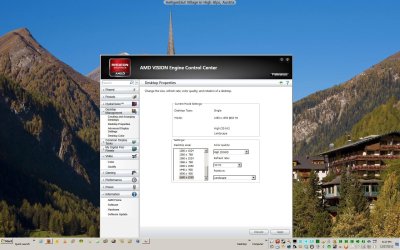
Make sure in this window the display resolution is set to the highest the monitor can show:
 

Attachments

  • ScreenShot001.jpg
    ScreenShot001.jpg
    212.4 KB · Views: 14

My Computer My Computer

Computer type
PC/Desktop
Computer Manufacturer/Model Number
Bluethunder II
OS
Windows 7 x64 Ultimate and numerous virtual machines
CPU
AMD FX-8350 Vishera 32nm Technology @ 4.2 GHz default
Motherboard
ASUSTeK COMPUTER INC. SABERTOOTH 990FX R2.0 (Socket 942)
Memory
G Skill 32.0GB Dual-Channel DDR3 @ 1204MHz (11-13-13-31)
Graphics Card(s)
EVGA GeForce GTX 960 4GB Super SC ACX 2.0+ with Back Plate
Sound Card
Creative X-Fi Titanium HD Audiophile PCIe
Monitor(s) Displays
LG L227WTG x 3
Screen Resolution
1680 x 1050 16:10
Hard Drives
238GB Samsung850 PRO SATA Disk Device (SSD)
1863GB Seagate ST2000DM 001-1CH164 (SATA)
1397GB Seagate ST1500DL 003-9VT16L(SATA)
466GB Western Digital WDC WD50 03AZEX-00K1GA0 (SATA) x 2
932GB Seagate ST310005 28AS SATA Disk Device (SATA)
PSU
Enermax Revolution87+ 1000 Watts Gold Certified Power Supply
Case
Rocketfish Full Tower
Cooling
Cooler Master Hyper 212 EVO Push Pull 120mm Fans
Keyboard
Logitech K740
Mouse
Logitech G100S Laser LED + Logitech Gamepad F310
Internet Speed
500 mbs down and 30mbs up
Antivirus
Malwarebytes Pro & Avast and MSE on certain Virtual Machines
Browser
Firefox (Main) Chrome, Internet Explorer (Back Up)
Other Info
Logitech X 230 2.1 Stereo System and 5.1 Yamaha RX V2090
B&W DM6 Monitor Speakers + Center and Surround Speakers
Using Mouse Without Borders (Google it)
Back
Top