
Cannot Initialize HDD

Andrew Miller

New member
Local time
4:50 PM
Messages
3
Hey there,

I'm having trouble getting my new Seagate Barracuda 1.5TB HDD to initialize. It Shows up under devices, and I'm able to see it's properties etc... When I locate it with the device manager, and right click it, I'm only given the options to Uninstall, Update the Drives, Disable, Scan for Hardware Changes and Properties.

On the properties tab, I've populated the drive, and it specifically states that it is "Not Initialized" but I can't find a way to remedy it.

Currently its hooked up via a Super Speed USB 3.0 port via a Rosewill case.

Any Help would be greatly appreciated,

Thanks

Andrew
 

My Computer

OS
Windows 7
Motherboard
Gigabyte EP45T-UD3P
Hard Drives
1 - WD 320GB
1 - Seagate 300GB
1 - Seagate 1TB
1 - Seagate 1.5TB
What happens when you right click on the Not Initialized disk and click on Initialize ?

If you haven't tried it, then right click on the drive in Disk Management and select "Initialize". Should take a couple of seconds to finish. After that right click again and Format the drive.

EDIT: One more thing, If the Rosewill case has an external power adaptor, connect that also and try initializing.
 

My Computer

Computer type
Laptop
Computer Manufacturer/Model Number
HP EliteBook 8530w Mobile Workstation
OS
Windows 7 Ultimate x64 (XP, 98SE, 95, 3.11, DOS 7.10 on VM) + Ubuntu 10.04 LTS Lucid Lynx
CPU
Intel Core 2 Duo Processor P8600 (2.40 GHz, 3 MB L2 cache)
Motherboard
Mobile Intel PM45 Express Chipset ICH9M-Enhanced
Memory
4GB 800 MHz DDR2 SDRAM
Graphics Card(s)
ATI Mobility FireGL V5700 with 256 MB
Sound Card
SoundMAX Integrated Digital HD Audio
Monitor(s) Displays
15.4-inch WXGA anti-glare (1280 x 800 resolution)
Screen Resolution
1280 x 800
Hard Drives
500GB + 1TB
Mouse
Synaptics PS/2 Port Touchpad, USB Mouse
Internet Speed
4 Mbps
Antivirus
MSE
Browser
Firefox, Chrome, IE
Other Info
Authentec AES2810 Fingerprint Reader
First,
Thank you for the response Gladson, but I'm unable to follow the steps given.

It won't let me click on not initialized. I've included a couple screen shots for clarification.

This is the drive in the Device Manager, along with the drop down menu that shows up when I Right Click
Pic One

And this is the drive in the properties menu, after I "populate" it, where it tells me it is not initialized.
Pic Two

The Rosewill case requires a separate power supply anyway, so it is already plugged in.

Hopefully this helps clarify,

Thanks,
Andrew
 

My Computer

OS
Windows 7
Motherboard
Gigabyte EP45T-UD3P
Hard Drives
1 - WD 320GB
1 - Seagate 300GB
1 - Seagate 1TB
1 - Seagate 1.5TB
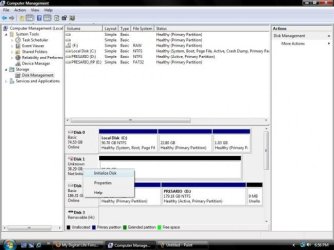
The right click was not for Device Manager, it was for Disk Management

Click the start orb and type "Disk Management"
You should get something similar to this
Initialize.jpg

Right click on the disk that says Not Initialized and select "Initialize Disk"
 

My Computer

Computer type
Laptop
Computer Manufacturer/Model Number
HP EliteBook 8530w Mobile Workstation
OS
Windows 7 Ultimate x64 (XP, 98SE, 95, 3.11, DOS 7.10 on VM) + Ubuntu 10.04 LTS Lucid Lynx
CPU
Intel Core 2 Duo Processor P8600 (2.40 GHz, 3 MB L2 cache)
Motherboard
Mobile Intel PM45 Express Chipset ICH9M-Enhanced
Memory
4GB 800 MHz DDR2 SDRAM
Graphics Card(s)
ATI Mobility FireGL V5700 with 256 MB
Sound Card
SoundMAX Integrated Digital HD Audio
Monitor(s) Displays
15.4-inch WXGA anti-glare (1280 x 800 resolution)
Screen Resolution
1280 x 800
Hard Drives
500GB + 1TB
Mouse
Synaptics PS/2 Port Touchpad, USB Mouse
Internet Speed
4 Mbps
Antivirus
MSE
Browser
Firefox, Chrome, IE
Other Info
Authentec AES2810 Fingerprint Reader
Yay!

Success! Thanks a million for the help, I probly would have realized what you said initially if I hadn't been trying to do it at 4am. :)

Drives workin perfect, thanks for the help!

Andrew
 

My Computer

OS
Windows 7
Motherboard
Gigabyte EP45T-UD3P
Hard Drives
1 - WD 320GB
1 - Seagate 300GB
1 - Seagate 1TB
1 - Seagate 1.5TB
Glad it worked out :)
 

My Computer

Computer type
Laptop
Computer Manufacturer/Model Number
HP EliteBook 8530w Mobile Workstation
OS
Windows 7 Ultimate x64 (XP, 98SE, 95, 3.11, DOS 7.10 on VM) + Ubuntu 10.04 LTS Lucid Lynx
CPU
Intel Core 2 Duo Processor P8600 (2.40 GHz, 3 MB L2 cache)
Motherboard
Mobile Intel PM45 Express Chipset ICH9M-Enhanced
Memory
4GB 800 MHz DDR2 SDRAM
Graphics Card(s)
ATI Mobility FireGL V5700 with 256 MB
Sound Card
SoundMAX Integrated Digital HD Audio
Monitor(s) Displays
15.4-inch WXGA anti-glare (1280 x 800 resolution)
Screen Resolution
1280 x 800
Hard Drives
500GB + 1TB
Mouse
Synaptics PS/2 Port Touchpad, USB Mouse
Internet Speed
4 Mbps
Antivirus
MSE
Browser
Firefox, Chrome, IE
Other Info
Authentec AES2810 Fingerprint Reader
Back
Top