Cannot install active x control

Odd Job

New member
Member
Local time
2:52 AM
Messages
93
I'm trying to download and install an active x control to enable me to watch internet tv from my ISP, but I keep getting this
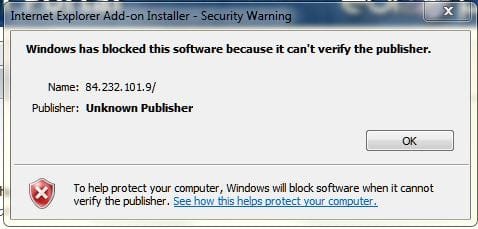
Europa.JPG

I've tried turning off the firewall and UAC but to no avail. I've also tried turning off security settings in IE, and adding the website as trusted, but still no joy. Surely I can bypass this somehow.

Why does windows treat every user like a complete numpty, it's bloody annoying :mad2::mad2:
 

My Computer

Computer type
PC/Desktop
Computer Manufacturer/Model Number
Self build
OS
Windows 7 professional X 64
CPU
Phenom 11 X 6 1090t 3.2 GHz
Motherboard
Asus Crosshair III Formula 790FX
Memory
8 gb Corsair 1600MHz C9 DDR3
Graphics Card(s)
2 X Saphire HD5770 Vapour X in crossfire
Sound Card
SupremeFX X-Fi
Monitor(s) Displays
Samsung 24" full HD
Screen Resolution
1920 X 1080
Hard Drives
1 X 1Tb Sata HHD
PSU
Corsair TX 650 watt
Case
Antec 902 ultimate gamer case
Cooling
Zalman CNPS 9900
I'm not using IE,but found this. Give a try
This article provides information on enabling ActiveX control in Internet Explorer browser. Please follow these steps in order for Enabling activeX control in Internet Explorer 6.x/7.x.
  1. Open Internet Explorer.
  2. Click on Tools then Internet Options.
  3. Choose Security Tab.
  4. Click on Custom Level.
  5. Check the radio button against Enable, under ActiveX controls and Plug-ins.
  6. Click OK.
  7. In warning window asking Are you sure you want to change the security settings at this zone?, Click Yes.
  8. Click Apply and then Click OK.
 

My Computer

Computer type
PC/Desktop
Computer Manufacturer/Model Number
Custom Build
OS
Windows 10 Pro x64
CPU
Intel Core i5 4440 @Stock
Motherboard
Gigabyte Z97 D3H
Memory
4 x 4GB HyperX Fury DDR3
Graphics Card(s)
Gigabyte GTX 1050Ti O4G
Sound Card
Integrated
Monitor(s) Displays
Dell P2417H
Screen Resolution
1920 x 1080
Hard Drives
Samsung EVO 850 120GB / Toshiba DT01ACA050 1TB 7200prm 32MB
PSU
Riotoro Onyx 750W
Case
NZXT H500 Black-Red
Cooling
Stock CPU + NZXT 120mm + 2x120mm red fans
Keyboard
Modecom Volcano Lanparty
Mouse
Asus ROG Gladius / DeepCool E-Pad Plus
Internet Speed
DOCSIS 50/3 Mbit
Browser
Google Chrome
Other Info
Asus K55VJ(i5 3210M, GT635M / 2GB, 8GB DDR3, 500GB HDD)
Why does windows treat every user like a complete numpty, it's bloody annoying :mad2::mad2:


As far as I can see you are on Windows 7 professional X 64. So you should have group policies.

Press Start, write gpedit.msc , right click, run as administrator.
Go to:
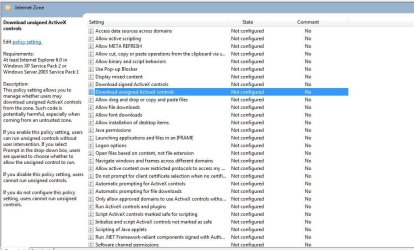
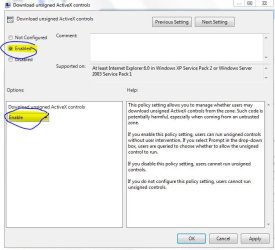
Computer configurations -> Administrative templates -> windows components -> Internet Explorer -> Internet Control Panel -> Security Page -> Internet Zone -> "Download Unsigned Activex controls"

Double -click it, choose enable, and choose enable or prompt from drop down menu. Click apply or OK.
 

Attachments

  • Capture.JPG
    Capture.JPG
    112.3 KB · Views: 1,215
  • Capture1.JPG
    Capture1.JPG
    55.3 KB · Views: 996

My Computer

OS
Windows 7 Ultimate x86 SP1
Thanks for the replies. Jav, that worked a treat.
 

My Computer

Computer type
PC/Desktop
Computer Manufacturer/Model Number
Self build
OS
Windows 7 professional X 64
CPU
Phenom 11 X 6 1090t 3.2 GHz
Motherboard
Asus Crosshair III Formula 790FX
Memory
8 gb Corsair 1600MHz C9 DDR3
Graphics Card(s)
2 X Saphire HD5770 Vapour X in crossfire
Sound Card
SupremeFX X-Fi
Monitor(s) Displays
Samsung 24" full HD
Screen Resolution
1920 X 1080
Hard Drives
1 X 1Tb Sata HHD
PSU
Corsair TX 650 watt
Case
Antec 902 ultimate gamer case
Cooling
Zalman CNPS 9900
glad it helped you. ;)
 

My Computer

OS
Windows 7 Ultimate x86 SP1
thanks Jav this fix worked a treat for me ;)
 

My Computer

OS
windows 7 proffesional 64bit
Didn't work for me

I am unhappy to report that this fix did not work for me at all. I would like to enable ActiveX controls on the Asus webiste to trouble shoot my motherboard. How do I accomplish this?
Thanks,
Denny M

Why does windows treat every user like a complete numpty, it's bloody annoying :mad2::mad2:


As far as I can see you are on Windows 7 professional X 64. So you should have group policies.

Press Start, write gpedit.msc , right click, run as administrator.
Go to:
Computer configurations -> Administrative templates -> windows components -> Internet Explorer -> Internet Control Panel -> Security Page -> Internet Zone -> "Download Unsigned Activex controls"

Double -click it, choose enable, and choose enable or prompt from drop down menu. Click apply or OK.
 

My Computer

Computer Manufacturer/Model Number
Asus P9X79 Pro Mobo, 32 gig Gskill Ram, Intel i73930K Processor, Quadro 2000 graphics card
OS
Win 7 Pro 64 bit SP1
CPU
Intel i7 3930K
Motherboard
Asus P9X79 Pro
Memory
Asus p9x79 Pro
Graphics Card(s)
Nvidia Quadro 2000
Sound Card
Realtec Onboard
Monitor(s) Displays
23 inch Samsung
Hard Drives
Seagate 1.5TB
Seagate 1.5TB
Seagate 750 Gig
Seagate 500 Gig All drives are SATA
PSU
Corsair Gold 850AX
Case
Coolermaster Mid Tower
Cooling
Noctua nh-d14
Keyboard
Logitech MX5500
Mouse
Logitech Revolution 5000 BT
Back
Top