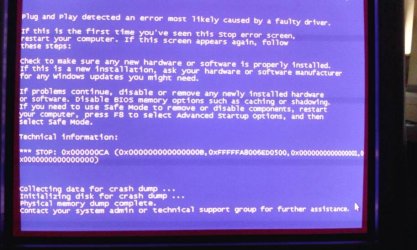
cannot install ati drivers . crashes system

chamjiee

Banned
Local time
4:03 AM
Messages
58
Hi
i have ati 2400 pro pci express gpu .. i have installed it in my system . it works with windows drivers .

to get full advantage of it i tried to install ati/amd drivers in it . but i canot seem to install it ..
every time i run the drivers setup it crashed the system.


my windows is latest as of now . all updates applied.
i tried both the latest drivers . the final and beta version . both behave similarly.

when i start its setup then it asks whether i want custom or express setup . it the progresses after selecting eithr one and then the first progress bar is of detecting the hardware .. it crashes .. my windows .

i have twice re downloaded them .. i do not run any antivirus.
or firewall as this is standalone isolated system.

the driver file names that i tried are
13-1-legacy_vista_win7_win8_64_dd_ccc.exe
and
13-4_win7_win8_64_dd_ccc_whql.exe

both behave similaly

any help in this regard ?
i am trying it on win 7 x64 ultimate sp1

i also tried cleaning the system of ati drivers with ati driver removal tool .. still same result.

I also tried guru drive sweeper and then rebooted and then installing ati drivers. Still same issue.

i am getting the latest driver from this page
http://support.amd.com/us/gpudownload/windows/legacy/Pages/legacy-radeonaiw-vista64.aspx

Sfc scannow found nothing wrong
C:\Windows\system32>sfc /scannow

Beginning system scan. This process will take some time.

Beginning verification phase of system scan.
Verification 100% complete.

Windows Resource Protection did not find any integrity violations.
 
Last edited:

My Computer

Computer type
PC/Desktop
Computer Manufacturer/Model Number
Dell Optiplex 755
OS
Windows 7 Ultimate x64 SP1 Dual Boot with Windows Serve 2012 R2
CPU
E6550
Motherboard
Q35
Memory
8GB
Graphics Card(s)
ATI Radeon 2400 Pro
Sound Card
Intel HD Audio Stereo
Monitor(s) Displays
1
Screen Resolution
1280 x 1024
Hard Drives
250GB SATAIII
PSU
Stock 280 Watt
Case
Stock Desktop Case
Cooling
Stock
Keyboard
Microsoft Ergonomic keyboard usb
Mouse
Microsoft Mouse
Internet Speed
1Mbps Down/ 256 Kbps up
Antivirus
None
Browser
Opera
Help please. I googled fir previous version of the drivers and found version 12.10.. I still get same issue installing it.

Earlier when I first installed the gpu in my system at that time when I first downloaded the latest beta drivers I got same issue but when i downloaded the stable latest version it went ok. No issue.
Then someone changes the font size from 100% TO 125% which looked ugly so i thought it was drivers issues so I uninsulated them and now is this hell.


Now no matter which version of driver I try to install I get similar behaviour.


edit
i followed this
I was having this problem when trying upgrade ATI Catalyst from version 8.00.0873 to 8.00.0911 where I was getting a BSOD (Blue Screen) in Windows 7 x64 with an ATI Radeon 5450 every time setup was "detecting hardware configuration"

To solve I did
Uninstall any ATI drivers on your system.
Extract ATI catalyst to local folder by running downloaded EXE from ATI website (default location is fine C:\AMD\Support\13-4_win7_win8_64_dd_ccc_whql)
Cancel after extraction is completed and before setup asks for Language to continue
Browse to C:\AMD\Support\13-4_win7_win8_64_dd_ccc_whql\Config
EDIT InstallManager.cfg with notepad or similar text editor
Change WorkaroundInstall=false to WorkaroundInstall=true
Run Setup.exe and the CCC should install without a problem

Worked from me on 8/4/2013.

and thoug it installed but it didnt installed the catalyst control center .. now wher is the avivio video converter ? i cannot use that ..
i had earlier downloaded it installed it and now i still am getting system crash as soon as i install avivio package ..
 
Last edited:

My Computer

Computer type
PC/Desktop
Computer Manufacturer/Model Number
Dell Optiplex 755
OS
Windows 7 Ultimate x64 SP1 Dual Boot with Windows Serve 2012 R2
CPU
E6550
Motherboard
Q35
Memory
8GB
Graphics Card(s)
ATI Radeon 2400 Pro
Sound Card
Intel HD Audio Stereo
Monitor(s) Displays
1
Screen Resolution
1280 x 1024
Hard Drives
250GB SATAIII
PSU
Stock 280 Watt
Case
Stock Desktop Case
Cooling
Stock
Keyboard
Microsoft Ergonomic keyboard usb
Mouse
Microsoft Mouse
Internet Speed
1Mbps Down/ 256 Kbps up
Antivirus
None
Browser
Opera
Hi chamjiee

Are you removing everything (ATI/AMD - old CCC and drivers) before you install the new ?
 

My Computer

Computer type
PC/Desktop
Computer Manufacturer/Model Number
Home Built
OS
Win 7 Pro x64, Win 10 Pro x64, Linux Light x86
CPU
Core i7 3770K
Motherboard
Gigabyte GA-Z77P-D3
Memory
Crucial Ballistix Sport 8GB
Graphics Card(s)
ASUS GeForce GTX 650 Ti
Sound Card
On board
Monitor(s) Displays
ASUS 22 W/S
Screen Resolution
1920 x 1080
Hard Drives
Intel 320 Series SSD, WD Caviar Black 1TB
PSU
Corsair CX 750w
Case
Black Night
Cooling
120mm fans front/back, Coolermaster Hyper 212 Evo
Keyboard
Razer Blackwidow Expert 2013 Mechanical Keyboard
Mouse
Logitech G300 Gaming Mouse
Internet Speed
20mb Unlimited
Antivirus
ZA Antivirus + Firewall
Browser
Cyberfox
Other Info
Powered USB Hub, External Drives 3 x 1TB, Phone Dock.
I think so.
As i mentioned the history if the problem. When i first time tried to uninstall in through program and features it crashed. Tried few times but it would still crash.

So o then removed it with the ati removal utility. And ateet it removed it i used guru removal tool. It found few ati files and removed it.

Then I downloaded ati drivers and tried to install it but still I m getting crashes at the time of install.

Besides i also tried avg and found no issue in my system.

Sfc also found nothing.
 

My Computer

Computer type
PC/Desktop
Computer Manufacturer/Model Number
Dell Optiplex 755
OS
Windows 7 Ultimate x64 SP1 Dual Boot with Windows Serve 2012 R2
CPU
E6550
Motherboard
Q35
Memory
8GB
Graphics Card(s)
ATI Radeon 2400 Pro
Sound Card
Intel HD Audio Stereo
Monitor(s) Displays
1
Screen Resolution
1280 x 1024
Hard Drives
250GB SATAIII
PSU
Stock 280 Watt
Case
Stock Desktop Case
Cooling
Stock
Keyboard
Microsoft Ergonomic keyboard usb
Mouse
Microsoft Mouse
Internet Speed
1Mbps Down/ 256 Kbps up
Antivirus
None
Browser
Opera
Hi chamjiee

Are you downloading to desktop and installing form there ? also I have had good results with this freeware - driver-sweeper
 

My Computer

Computer type
PC/Desktop
Computer Manufacturer/Model Number
Home Built
OS
Win 7 Pro x64, Win 10 Pro x64, Linux Light x86
CPU
Core i7 3770K
Motherboard
Gigabyte GA-Z77P-D3
Memory
Crucial Ballistix Sport 8GB
Graphics Card(s)
ASUS GeForce GTX 650 Ti
Sound Card
On board
Monitor(s) Displays
ASUS 22 W/S
Screen Resolution
1920 x 1080
Hard Drives
Intel 320 Series SSD, WD Caviar Black 1TB
PSU
Corsair CX 750w
Case
Black Night
Cooling
120mm fans front/back, Coolermaster Hyper 212 Evo
Keyboard
Razer Blackwidow Expert 2013 Mechanical Keyboard
Mouse
Logitech G300 Gaming Mouse
Internet Speed
20mb Unlimited
Antivirus
ZA Antivirus + Firewall
Browser
Cyberfox
Other Info
Powered USB Hub, External Drives 3 x 1TB, Phone Dock.

My Computer

Computer type
PC/Desktop
Computer Manufacturer/Model Number
Dell Optiplex 755
OS
Windows 7 Ultimate x64 SP1 Dual Boot with Windows Serve 2012 R2
CPU
E6550
Motherboard
Q35
Memory
8GB
Graphics Card(s)
ATI Radeon 2400 Pro
Sound Card
Intel HD Audio Stereo
Monitor(s) Displays
1
Screen Resolution
1280 x 1024
Hard Drives
250GB SATAIII
PSU
Stock 280 Watt
Case
Stock Desktop Case
Cooling
Stock
Keyboard
Microsoft Ergonomic keyboard usb
Mouse
Microsoft Mouse
Internet Speed
1Mbps Down/ 256 Kbps up
Antivirus
None
Browser
Opera
And are you using Microsoft .NET4.5 Framework ?, if so and your system is still crashing I think it may be wise to post this problem Here and see if one of the BSOD Team can look at your dumpfile/help :)
 

My Computer

Computer type
PC/Desktop
Computer Manufacturer/Model Number
Home Built
OS
Win 7 Pro x64, Win 10 Pro x64, Linux Light x86
CPU
Core i7 3770K
Motherboard
Gigabyte GA-Z77P-D3
Memory
Crucial Ballistix Sport 8GB
Graphics Card(s)
ASUS GeForce GTX 650 Ti
Sound Card
On board
Monitor(s) Displays
ASUS 22 W/S
Screen Resolution
1920 x 1080
Hard Drives
Intel 320 Series SSD, WD Caviar Black 1TB
PSU
Corsair CX 750w
Case
Black Night
Cooling
120mm fans front/back, Coolermaster Hyper 212 Evo
Keyboard
Razer Blackwidow Expert 2013 Mechanical Keyboard
Mouse
Logitech G300 Gaming Mouse
Internet Speed
20mb Unlimited
Antivirus
ZA Antivirus + Firewall
Browser
Cyberfox
Other Info
Powered USB Hub, External Drives 3 x 1TB, Phone Dock.

My Computer

Computer type
PC/Desktop
Computer Manufacturer/Model Number
Custom
OS
Win7 Pro 32-bit, Win8 Pro 32-bit
CPU
AMD Phenom II X6 1090T
Motherboard
Gigabyte
Memory
4GB ddr3 1300
Graphics Card(s)
AMD HD 4290 onboard
Sound Card
Builtin Realtek HD Audio
Monitor(s) Displays
Samsung 24" widescreen, LG 23" widescreen
Screen Resolution
1920x1200/1920x1080
Hard Drives
Kingston 256GB SSD
Keyboard
Logitech Illuminated Keyboard
Mouse
Logitech M705 wireless mouse
Antivirus
Norton Av 2013
Browser
IE v10
Hello OP,

when you say crash, do you get a Blue Screen of Death?

or the PC hangs completely, not even the capslock on the keyboard indicator by pressing over and over will respond?

If you get a BSOD, visit this:

http://www.sevenforums.com/bsod-help-support/96879-blue-screen-death-bsod-posting-instructions.html

This will help find the culprit.

That 2400 video card is quite old now as well, and might be iffy with Windows 7 performance wise, especially if you added to try and play higher tier games.
 

My Computer

Computer type
PC/Desktop
Computer Manufacturer/Model Number
Self Built Custom
OS
Windows 7 Ultimate Retail Box (64-bit installed) + Service Pack 1
CPU
AMD FX-8350 CPU v1.15 (or 1.0F) BIOS was required!
Motherboard
MSI 890FXA-GD70
Memory
8G CAS-7 G-Skill DDR3 @1333 (2 fours) [mobo nonOC max rec'd]
Graphics Card(s)
Radeon HD 7950 [3 gigs of GDDR5] MSI Twin Frozr model
Sound Card
Realtek High Definition Audio (onboard mobo, ALC-889 chip)
Monitor(s) Displays
2 WS LED Monitors: One LG One Viewsonic
Screen Resolution
1920 by 1080
Hard Drives
SSD for OS: Samsung 840 Pro
SSD for VM and utilities: Adata SX900
7200 RPM SATA HDs for the rest: Hitachi and Seagate
PSU
Corsair TX850 - 850W max, in service since August 2010.
Case
Thermaltake Armor A90
Cooling
Thermaltake Spin Q CPU Cooler, in service since August 2010
Keyboard
Logitech G11
Mouse
Logitech M310 Wireless
Internet Speed
100 Megabit broadband supposedly upgraded from 50 (Cable)
Antivirus
Bitdefender Internet Security 2014 suite
Browser
Pale Moon 64-bit main, also IceDragon, Opera, and Maxthon.
Other Info
CompTIA A+ certified (220-800 series) in July 2013.
Hello OP,

when you say crash, do you get a Blue Screen of Death?

or the PC hangs completely, not even the capslock on the keyboard indicator by pressing over and over will respond?

If you get a BSOD, visit this:

http://www.sevenforums.com/bsod-help-support/96879-blue-screen-death-bsod-posting-instructions.html

This will help find the culprit.

That 2400 video card is quite old now as well, and might be iffy with Windows 7 performance wise, especially if you added to try and play higher tier games.

it would automatically restart the systm abruptly.. and when i set the system advanced propertes > startup and recovery > uncheck automatically restart . it gives bsod.


how do i know if i am running that particular version of .net ?
currently searching for .net in prgrams and features reveals only " microsoft .net framework 4 client profile"

also when to make the dump file ?
i mean i have enabled kernel memory demp .. in startup and recovery . now should i go ahead with installatin and let it crash and then use the sf tool to gather all and zip and make a thread in that section where you linke the article ?
edit:

i have set the settins like this article explins in Configure Dump File Settings in "Startup and Recovery" step 7 .. kernel memory dump ..

then i closed all applications on my computer and tried installing the driver . then as its progress bar said detecting graphic hardware it crashed . following is the picture .


then i wnt to c:/ thee is not memory.dmp file .. and non in c windows directory as well ..
though there is a minimdump directory in c windows but that is empty.

whey is it not recording dump files .?
my paging is set to 500mb. and i have 8gb ram and 2.2gb free in c drive ..

edit2

i have checked that article . it says that on systems having more then 2gb ram cannot use kernel memory dump feature.. and to forcefully set it use registry hack ..

so how much space will the kernel memory dump need in my case ? assuming all applications are closed.
 
Last edited:

My Computer

Computer type
PC/Desktop
Computer Manufacturer/Model Number
Dell Optiplex 755
OS
Windows 7 Ultimate x64 SP1 Dual Boot with Windows Serve 2012 R2
CPU
E6550
Motherboard
Q35
Memory
8GB
Graphics Card(s)
ATI Radeon 2400 Pro
Sound Card
Intel HD Audio Stereo
Monitor(s) Displays
1
Screen Resolution
1280 x 1024
Hard Drives
250GB SATAIII
PSU
Stock 280 Watt
Case
Stock Desktop Case
Cooling
Stock
Keyboard
Microsoft Ergonomic keyboard usb
Mouse
Microsoft Mouse
Internet Speed
1Mbps Down/ 256 Kbps up
Antivirus
None
Browser
Opera
please read it in conjunction with previous thread. because Tapatalk won't allow me to upload images if I select edit a message. It only allows me to upload the images if I m creating new message .

now after making settings as described previously ... instead of using step 7 i this time used step 6 to create mini dump and c windows minidump foldr is showing a 256kb file.

now using sf tool .. i right clicked run as admin and then it ran .. now i clicked gather all and it showed some popups with bla bla bla gathered .. etc...

but where is the foldere where these are stored . so i can zip and upload them .. ?
i have checked in my desktop no folder is created by that tool . neither in the direcotry in which that tool exe is placed.. the article in its page in step 6 says
6. In your BSOD post, upload the renamed SF_DD_MM_YYYY.zip folder into your post.
. where is this folder ?
 

Attachments

  • uploadfromtaptalk1377252713737.jpg
    uploadfromtaptalk1377252713737.jpg
    65.8 KB · Views: 4
  • uploadfromtaptalk1377252724305.jpg
    uploadfromtaptalk1377252724305.jpg
    69.1 KB · Views: 4
Last edited:

My Computer

Computer type
PC/Desktop
Computer Manufacturer/Model Number
Dell Optiplex 755
OS
Windows 7 Ultimate x64 SP1 Dual Boot with Windows Serve 2012 R2
CPU
E6550
Motherboard
Q35
Memory
8GB
Graphics Card(s)
ATI Radeon 2400 Pro
Sound Card
Intel HD Audio Stereo
Monitor(s) Displays
1
Screen Resolution
1280 x 1024
Hard Drives
250GB SATAIII
PSU
Stock 280 Watt
Case
Stock Desktop Case
Cooling
Stock
Keyboard
Microsoft Ergonomic keyboard usb
Mouse
Microsoft Mouse
Internet Speed
1Mbps Down/ 256 Kbps up
Antivirus
None
Browser
Opera
Hello OP,

when you say crash, do you get a Blue Screen of Death?

or the PC hangs completely, not even the capslock on the keyboard indicator by pressing over and over will respond?

If you get a BSOD, visit this:

http://www.sevenforums.com/bsod-help-support/96879-blue-screen-death-bsod-posting-instructions.html

This will help find the culprit.

That 2400 video card is quite old now as well, and might be iffy with Windows 7 performance wise, especially if you added to try and play higher tier games.

it would automatically restart the systm abruptly.. and when i set the system advanced propertes > startup and recovery > uncheck automatically restart . it gives bsod.


how do i know if i am running that particular version of .net ?
currently searching for .net in prgrams and features reveals only " microsoft .net framework 4 client profile"

also when to make the dump file ?
i mean i have enabled kernel memory demp .. in startup and recovery . now should i go ahead with installatin and let it crash and then use the sf tool to gather all and zip and make a thread in that section where you linke the article ?
edit:

i have set the settins like this article explins in Configure Dump File Settings in "Startup and Recovery" step 7 .. kernel memory dump ..

then i closed all applications on my computer and tried installing the driver . then as its progress bar said detecting graphic hardware it crashed . following is the picture .


then i wnt to c:/ thee is not memory.dmp file .. and non in c windows directory as well ..
though there is a minimdump directory in c windows but that is empty.

whey is it not recording dump files .?
my paging is set to 500mb. and i have 8gb ram and 2.2gb free in c drive ..

edit2

i have checked that article . it says that on systems having more then 2gb ram cannot use kernel memory dump feature.. and to forcefully set it use registry hack ..

so how much space will the kernel memory dump need in my case ? assuming all applications are closed.

Hi chamjiee

To check your version of .net - go - Control Panel / Programs and Features / Installed Updates

pdg.png
 

My Computer

Computer type
PC/Desktop
Computer Manufacturer/Model Number
Home Built
OS
Win 7 Pro x64, Win 10 Pro x64, Linux Light x86
CPU
Core i7 3770K
Motherboard
Gigabyte GA-Z77P-D3
Memory
Crucial Ballistix Sport 8GB
Graphics Card(s)
ASUS GeForce GTX 650 Ti
Sound Card
On board
Monitor(s) Displays
ASUS 22 W/S
Screen Resolution
1920 x 1080
Hard Drives
Intel 320 Series SSD, WD Caviar Black 1TB
PSU
Corsair CX 750w
Case
Black Night
Cooling
120mm fans front/back, Coolermaster Hyper 212 Evo
Keyboard
Razer Blackwidow Expert 2013 Mechanical Keyboard
Mouse
Logitech G300 Gaming Mouse
Internet Speed
20mb Unlimited
Antivirus
ZA Antivirus + Firewall
Browser
Cyberfox
Other Info
Powered USB Hub, External Drives 3 x 1TB, Phone Dock.
Back
Top